1. Бүтээгдэхүүн дууссанview
This manual provides detailed instructions for the Nitecore MH25 PRO and MH10 V2 rechargeable flashlights. The MH25 PRO features a NiteLab UHi 40 LED with a maximum output of 3,300 lumens, designed for long-range illumination. The MH10 V2 utilizes a CREE XP-L2 V6 LED, offering a maximum output of 1,200 lumens, suitable for everyday carry and general use. Both flashlights are durable, rechargeable, and designed for various outdoor and daily applications.
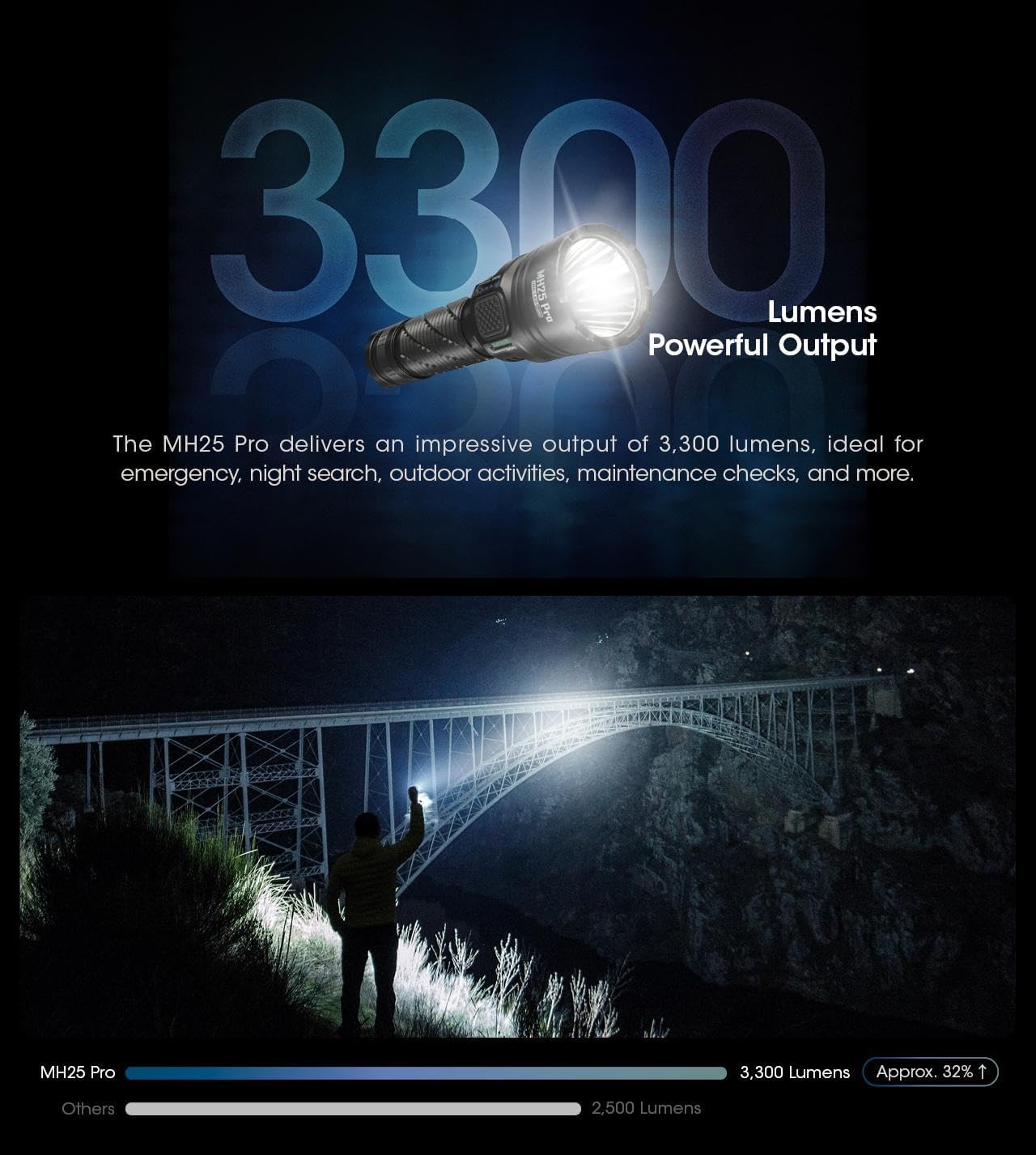
Image: The Nitecore MH25 PRO and MH10 V2 flashlights shown together, highlighting their compact design.
2. Багцын агуулга
Таны багцад бүх зүйл байгаа эсэхийг шалгана уу:
- Nitecore MH25 PRO Flashlight
- Nitecore MH10 V2 Flashlight
- NITECORE NL2153HP Li-ion Battery (for MH25 PRO)
- Li-ion Battery (for MH10 V2)
- USB-C цэнэглэгч кабель
- оосор
- Сэлбэг O-цагираг
- Клип
- Бүрээс
3. Тохиргоо
3.1 Батерей суурилуулах
Before first use, ensure the batteries are correctly installed. Unscrew the tail cap of each flashlight and insert the included Li-ion battery with the positive (+) terminal facing towards the head of the flashlight. Screw the tail cap back on tightly to ensure proper contact and water resistance.
3.2 Анхны цэнэглэлт
Both flashlights are equipped with a USB-C charging port. Connect the provided USB-C cable to the flashlight's charging port and to a USB power source (e.g., wall adapter, computer, power bank). The charging indicator will provide feedback on the charging status. A full charge is recommended before initial use to maximize battery life.

Image: Close-up of the Nitecore MH10 V2's USB-C charging port, showing its location and design for direct charging.
4. Үйл ажиллагаа
4.1 Ерөнхий хяналтууд
Both MH25 PRO and MH10 V2 feature a tail switch for momentary and constant illumination, and a side mode button for brightness level and special mode selection.
4.2 MH25 PRO Operating Modes
The MH25 PRO offers two user modes: Өдөр тутмын горим болон Тактикийн горим. It has 5 brightness levels (Ultralow, Low, Mid, High, Turbo) and 3 special modes (Strobe, Beacon, SOS).
- Асаах/унтраах: Гар чийдэнг асаах эсвэл унтраахын тулд арын товчлуурыг бүрэн дарна уу.
- Гэрэлтүүлгийн тохируулга: With the light on, press the side mode button to cycle through brightness levels.
- Тусгай горимууд: Double-press the mode button to activate Strobe. Press again to cycle through Beacon and SOS.
- Горим солих: Refer to the detailed instructions in the included manual for switching between Daily and Tactical modes.
4.3 MH10 V2 Operating Modes
The MH10 V2 also features multiple brightness levels and special modes.
- Асаах/унтраах: Гар чийдэнг асаах эсвэл унтраахын тулд арын товчлуурыг бүрэн дарна уу.
- Гэрэлтүүлгийн тохируулга: With the light on, press the side mode button to cycle through brightness levels (Ultralow, Low, Mid, High).
- Тусгай горимууд: Double-press the mode button to activate Strobe. Press again to cycle through Beacon and SOS.

Image: Diagram illustrating the Daily Mode and Tactical Mode interfaces with their respective brightness and special modes.
4.4 Power and Level Indicators
Both flashlights feature power indicators near the mode button to display remaining battery power and current brightness level. Consult the specific product manual for detailed indicator patterns.
4.5 Sensor Protection Function (MH25 PRO)
The MH25 PRO includes a built-in optical sensor. If an obstruction is detected at close range, the flashlight's brightness will automatically decrease to prevent overheating and potential damage.

Image: The Nitecore MH25 PRO flashlight held in hand, showcasing its anti-slip knurling and overall design for a secure grip.

Image: The Nitecore MH25 PRO flashlight emitting a powerful beam, illustrating its 3300 lumens output and long throw capability.
Image: The Nitecore MH10 V2 flashlight held in a gloved hand, demonstrating its compact size and lightweight design.
5. Техникийн үзүүлэлтүүд
5.1 Nitecore MH25 PRO Specifications
| Онцлог | Дэлгэрэнгүй |
|---|---|
| Хамгийн их гаралт | 3,300 люмен |
| Хамгийн их цацрагийн зай | 705 метр |
| Хамгийн их цацрагийн эрчим | 124,300 CD |
| Хамгийн их ажиллах хугацаа | 650 цаг (Хэт хурдан) |
| LED | NiteLab UHi 40 LED гэрэл |
| Батерей | 1 x NL2153HP (5,300mAh) Li-ion |
| Тусгай горимууд | STROBE, BEACON, SOS |
| Нөлөөллийн эсэргүүцэл | 1 метр |
| Усны хамгаалалттай үнэлгээ | IP68 (2 метр гүний) |
Image: Technical data table for the Nitecore MH25 PRO, detailing lumens, runtime, beam distance, and intensity for various modes.
5.2 Nitecore MH10 V2 Specifications
| Онцлог | Дэлгэрэнгүй |
|---|---|
| Хамгийн их гаралт | 1,200 люмен |
| Хамгийн их цацрагийн зай | 202 метр |
| Хамгийн их цацрагийн эрчим | 10,200 CD |
| Хамгийн их ажиллах хугацаа | 1500 цаг (Хэт хурдан) |
| LED | CREE XP-L2 V6 LED |
| Тохиромжтой батерей | 1 x 21700, 1 x 18650, 2 x CR123/RCR123 |
| Тусгай горимууд | STROBE, BEACON, SOS |
| Нөлөөллийн эсэргүүцэл | 1 метр |
| Усны хамгаалалттай үнэлгээ | IP68 (2 метр гүний) |
Image: Technical data table for the Nitecore MH10 V2, detailing lumens, runtime, beam distance, and intensity for various modes.
5.3 Ерөнхий техникийн үзүүлэлтүүд
- Материал: Аэро зэрэглэлийн хөнгөн цагаан хайлш
- Дуусгах: HA III military grade hard-anodized
- Цэнэглэж байна: USB-C цэнэглэдэг
- Оптик линз: Double-sided scratch resistant coating
6. Засвар үйлчилгээ
6.1 Цэвэрлэгээ
Гар чийдэнгийн их биеийг зөөлөн, d-ээр тогтмол цэвэрлэж байгаарай.amp cloth. For the lens, use a lens cleaning cloth to avoid scratches. Do not use abrasive cleaners or solvents.
6.2 Батерейны арчилгаа
To maintain optimal battery performance, charge the batteries regularly. If the flashlight will not be used for an extended period, remove the batteries to prevent leakage and store them in a cool, dry place. Avoid over-discharging or over-charging the batteries.
6.3 Усны эсэргүүцэл
Both flashlights are rated IP68, meaning they are dustproof and submersible to 2 meters. Ensure all caps and covers (especially the USB-C port cover) are securely closed before exposing the flashlight to water or dusty environments.
7. Алдаа засах
- Гар чийдэн асахгүй байна:
- Батерейг эерэг (+) терминалыг толгой руу нь харуулж зөв оруулсан эсэхийг шалгана уу.
- Сүүлний тагийг сайтар шурган байгаа эсэхийг шалгаарай.
- Charge the battery to ensure it has sufficient power.
- Бүдэг эсвэл анивчих гэрэл:
- Батерей бага байж магадгүй; үүнийг дахин цэнэглэ.
- Батерейны контактууд болон гар чийдэнгийн утаснуудыг цэвэрлэ.
- Flashlight gets hot quickly:
- The MH25 PRO has an Advanced Temperature Regulation (ATR) module and sensor protection to prevent overheating. If it becomes excessively hot, it may be operating in a high mode for an extended period or in a high ambient temperature. Reduce the brightness level.
- Цэнэглэх асуудал:
- Ensure the USB-C cable is properly connected to both the flashlight and the power source.
- Өөр USB-C кабель эсвэл тэжээлийн адаптер ашиглаж үзнэ үү.
8. Баталгаат хугацаа ба дэмжлэг
For warranty information, please refer to the warranty card included with your product or visit the official Nitecore website. For technical support or service inquiries, please contact Nitecore customer service directly through their official channels.


