1. Танилцуулга
This manual provides detailed instructions for the installation, operation, and maintenance of your Ulecoce Keyless Entry Door Lock Deadbolt with Handle Set. This smart lock offers multiple access methods and enhanced security features for your home or office.

Image 1.1: The Ulecoce Keyless Entry Door Lock Deadbolt with Handle Set in satin nickel finish, installed on a dark door.
2. Бүтээгдэхүүний онцлог
- Түлхүүргүй нэвтрэх: Supports 100 user codes (97 user, 3 admin), one-time codes, and 2 backup physical keys.
- Smart Access Management: Generate and share temporary or permanent codes for family, house sitters, or guests.
- Сайжруулсан аюулгүй байдал: Features auto-lock, one-touch locking, anti-peeping code input, and low battery alerts.
- Бат бөх чанар: Designed to withstand extreme temperatures (-4℉ to 140℉) and is IP54 waterproof.
- Эрчим хүч: Operates on 4 AA batteries (not included) with an approximate 180-day lifespan.

Зураг 2.1: Дууслааview of the Ulecoce Keyless Entry Door Lock Set highlighting its main features.
3. Техникийн үзүүлэлтүүд
| Атрибут | Дэлгэрэнгүй |
|---|---|
| Брэнд | Ulecoce |
| Загварын нэр | WZ-U18L-S-0513-TP |
| Түгжээний төрөл | Хаалттай боолт |
| Материал | Металл |
| Өнгө | Сатин никель |
| Хэмжээ (L x W x H) | 1 x 1 x 1 инч |
| Зүйлийн жин | 3.36 фунт |
| Онцлог шинж чанарууд | Anti-Peeping Password, Auto-Lock, Keyless Entry, One-Touch Lock |
| Зөвлөмж болгож буй хэрэглээ | Урд хаалга |
| Эрчим хүчний эх үүсвэр | 4 АА батерей (оруулаагүй) |
| Ашиглалтын температур | -4℉-аас 140℉ (-20℃-аас 60℃) |
| Ашиглалтын чийгшил | 0% - 95% |
| Усны хамгаалалттай үнэлгээ | IP54 |
| Баталгаажуулалт | ANSI 3-р зэргийн гэрчилгээтэй |
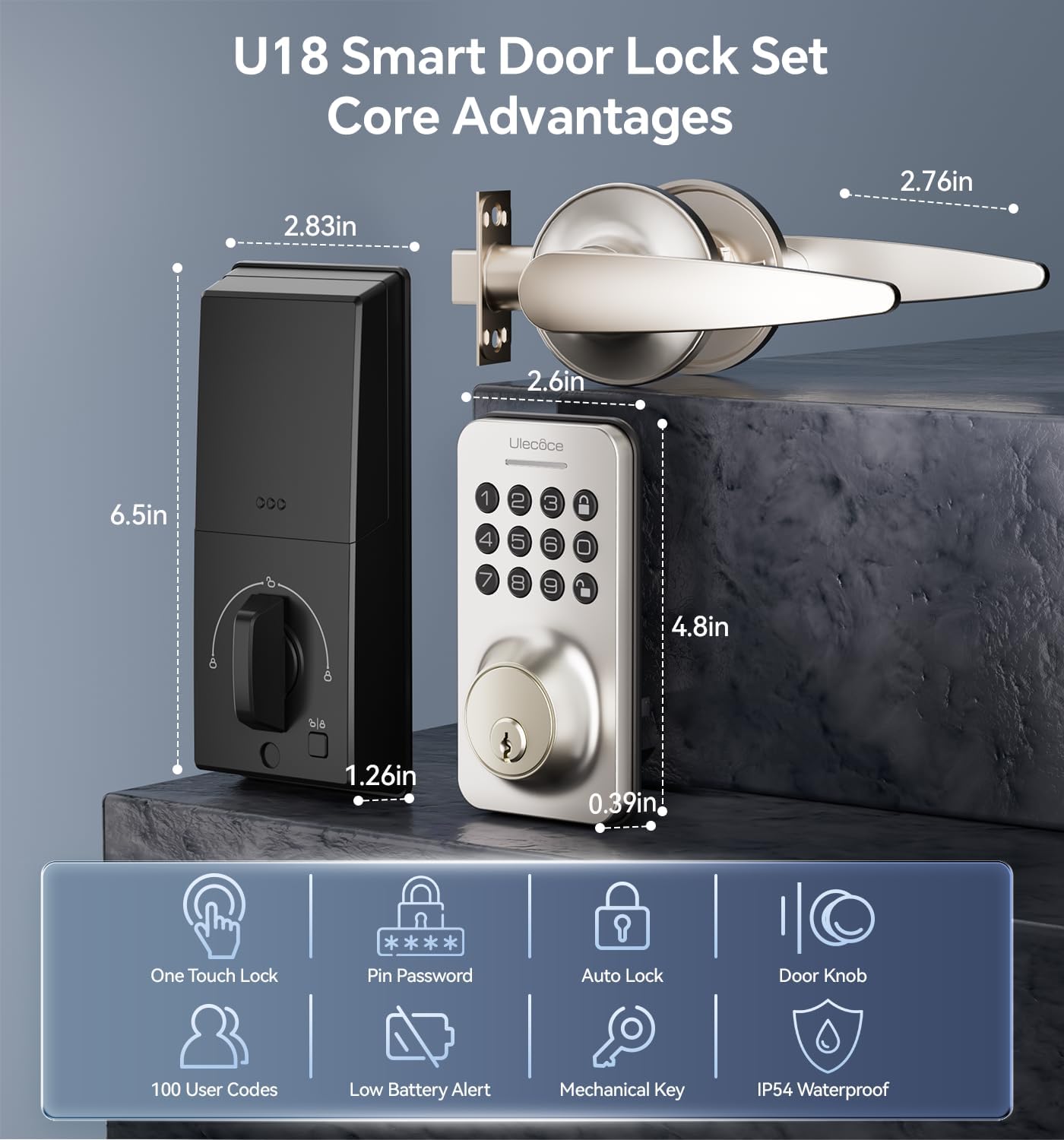
Image 3.1: Dimensions and key features of the Ulecoce U18 Smart Door Lock Set.

Image 3.2: ANSI Grade 3 certification and durability test results for the Ulecoce smart lock.
4. Тохиргоо ба суурилуулалт
The Ulecoce Keyless Entry Door Lock is designed for easy installation, requiring only a screwdriver. No additional drilling or professional locksmith services are typically needed. It is compatible with both left and right-hand doors.
4.1 Суурилуулалтын өмнөх шалгалт
Before beginning installation, ensure your door meets the compatibility requirements for latch hole and backset dimensions.
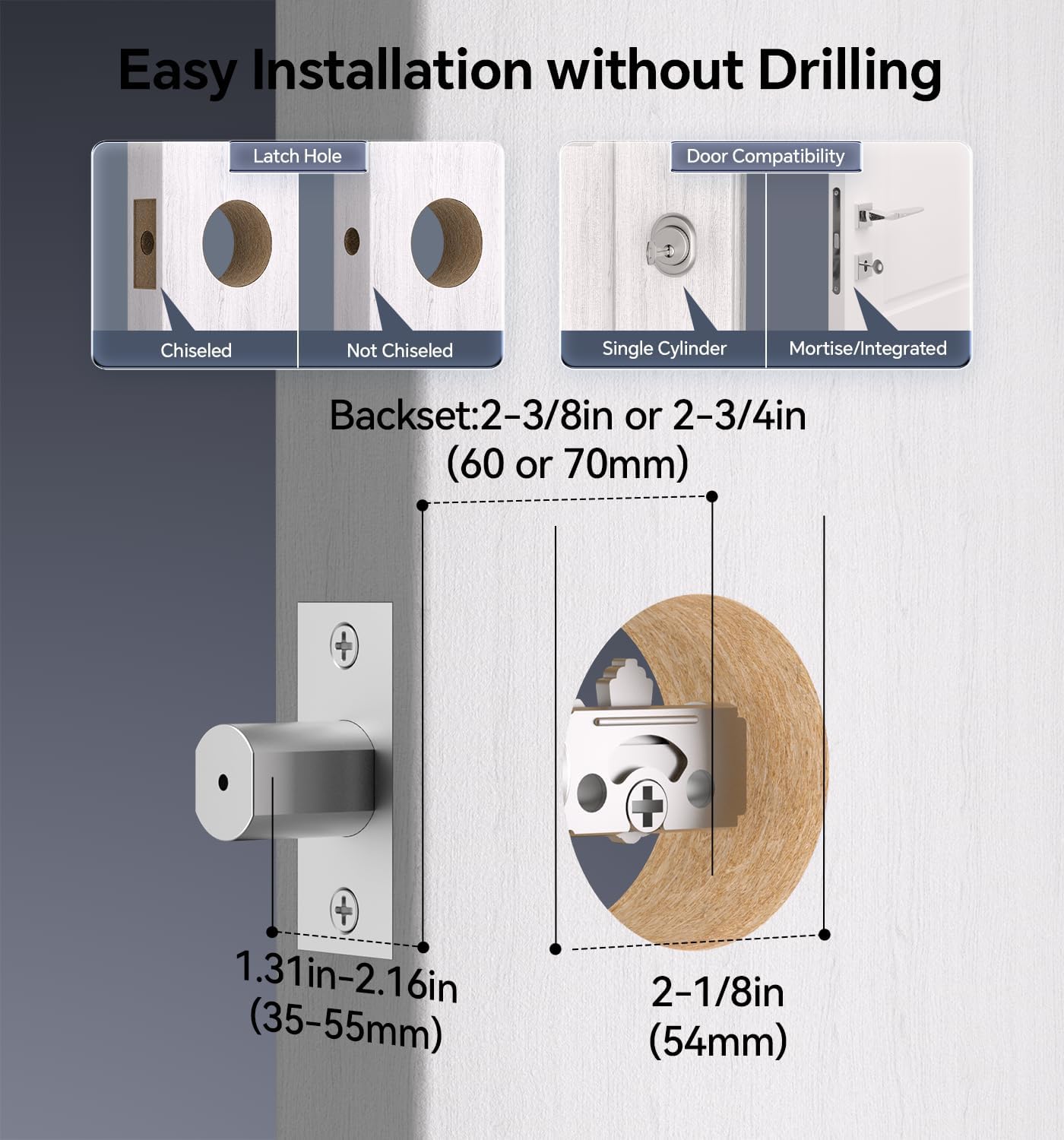
Image 4.1: Door compatibility and latch hole requirements for installation.

Image 4.2: Check door dimensions and lock measurements before purchase.
4.2 Суурилуулалтын үе шатууд
- Prepare the door: Ensure the door is properly prepped with the correct bore hole and backset.
- Түгжээ болон цохиурын хавтанг суурилуулна уу.
- Гадна талын товчлуурын угсралтыг суулгана уу.
- Install the interior assembly, connecting the cable.
- Түгжээг боолтоор бэхлээрэй.
- Insert 4 AA batteries (not included) into the battery compartment.
- Түгжээний ажиллагааг шалгана уу.

Image 4.3: Installation process using a screwdriver.

Image 4.4: The lock is compatible with both left and right-hand door orientations.
5. Ашиглалтын заавар
The Ulecoce smart lock offers various convenient ways to unlock and manage access.
5.1 Түгжээг тайлах аргууд
- Товчлуурын код: Enter your programmed user code on the keypad.
- One-Time Codes: Generate temporary codes for single use.
- Физик түлхүүр: Use the provided backup keys for manual unlocking.
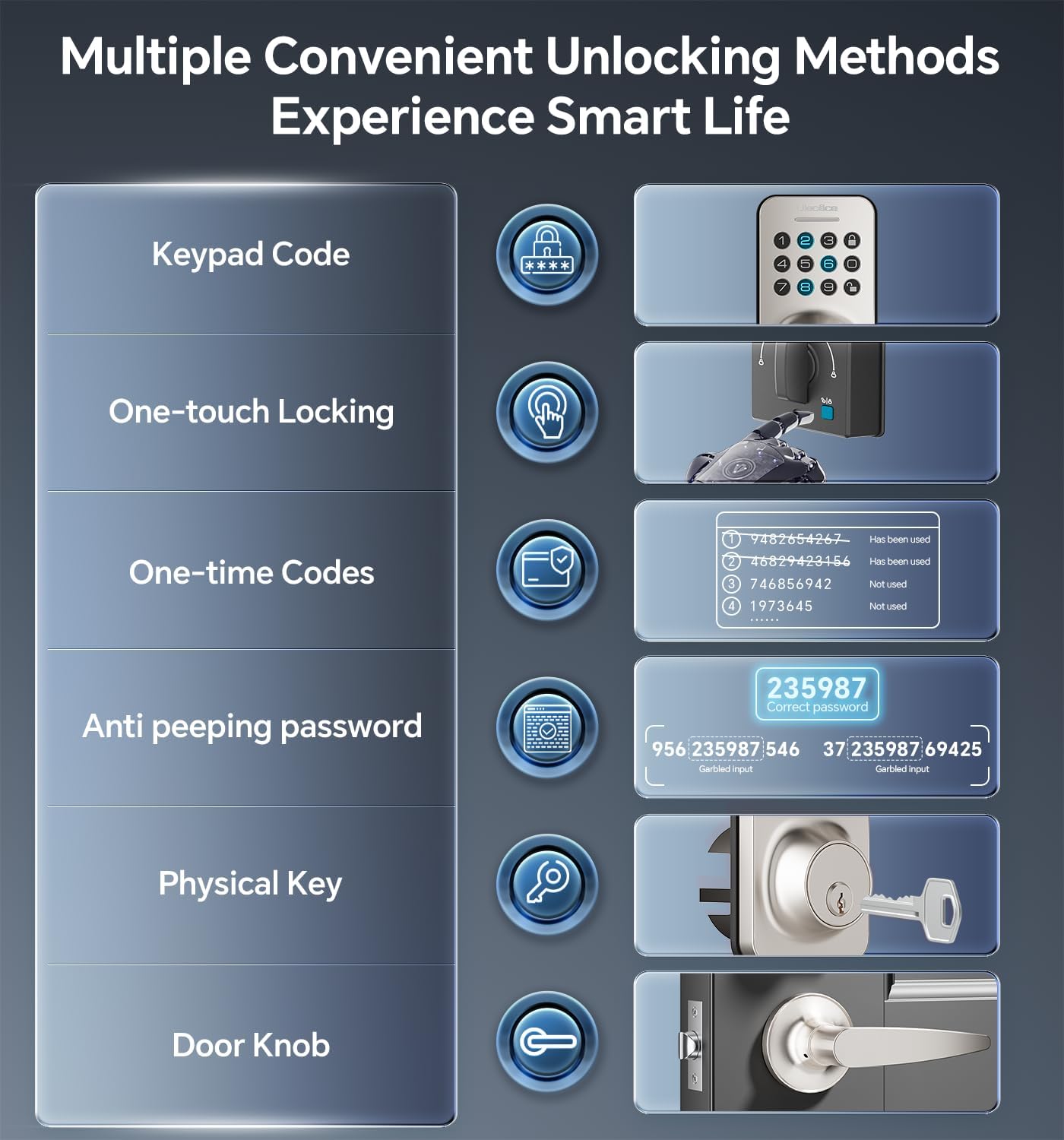
Image 5.1: Multiple methods available for unlocking the door.
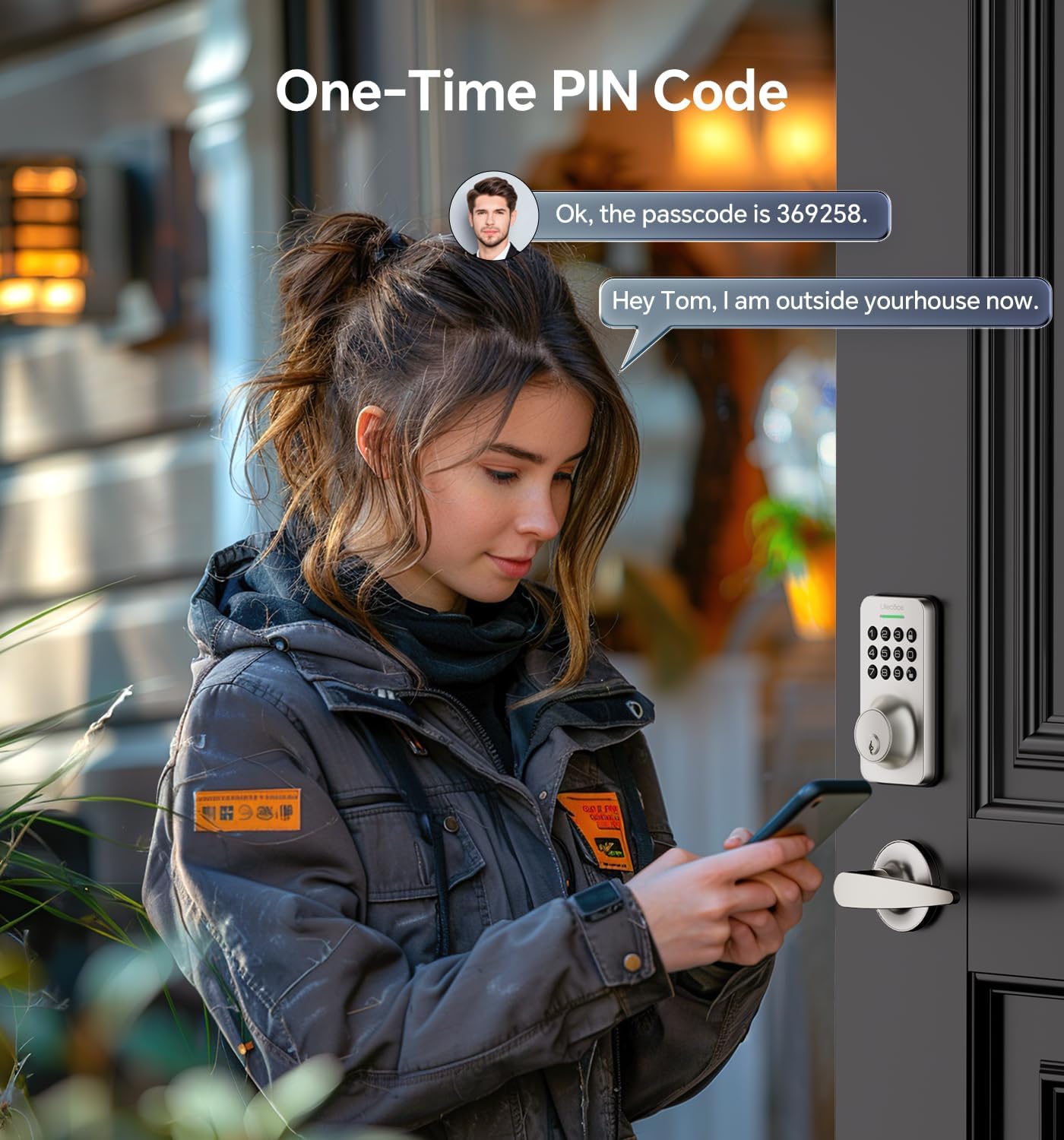
Image 5.2: Using a one-time PIN code for temporary access.
5.2 Сэтгэгдэл бичихээс хамгаалах нууц үг
To prevent others from guessing your code, you can enter random digits before or after your actual passcode. The lock will recognize the correct consecutive sequence within the input.
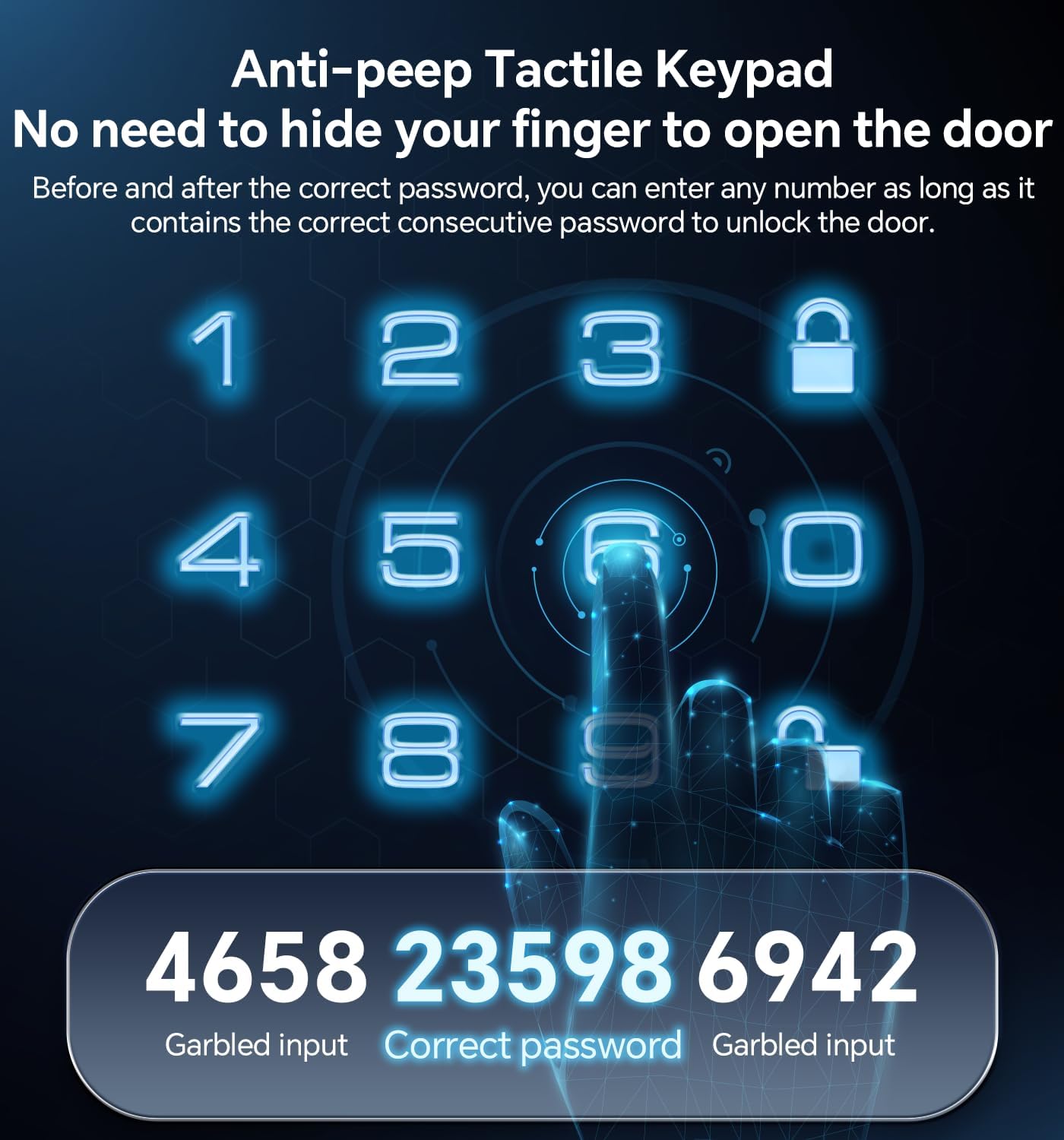
Зураг 5.3: Жишээ ньampнууц үгийн эсрэг функцийг ашиглах талаар.
5.3 Автомат түгжээ болон нэг мэдрэгчтэй түгжээ
- Автоматаар түгжих: The lock can be programmed to automatically lock after a set period (10-30 seconds) once the door is closed.
- Нэг товшилтоор түгжих: A dedicated button on the interior assembly allows for quick manual locking.

Image 5.4: The auto-lock feature provides convenience and security.
6. Засвар үйлчилгээ
6.1 Батерейг солих
The lock is powered by 4 AA batteries (not included). When the battery level is low, the lock will provide an alert. Replace all four batteries promptly to ensure continuous operation.

Image 6.1: Low battery indicator and backlit keypad for visibility.
6.2 Цэвэрлэгээ
Clean the lock's exterior with a soft, dry cloth. Avoid using abrasive cleaners or solvents, as these can damage the finish or electronic components.
7. Алдаа засах
- Түгжээ хариу өгөхгүй байна: Check battery levels and replace if necessary. Ensure the keypad is clean and free of debris.
- Код ажиллахгүй байна: Verify the code is entered correctly. Ensure the anti-peeping feature is used as intended. If issues persist, reset the code or use a physical key.
- Автомат түгжээ ажиллахгүй байна: Check the auto-lock settings to ensure it is enabled and the timer is set appropriately.
- Physical key not working: Түлхүүрийг бүрэн оруулж, зөв эргүүлсэн эсэхийг шалгана уу. Түлхүүрийн нүхэнд ямар нэгэн саад байгаа эсэхийг шалгана уу.
Нэмэлт тусламж авахыг хүсвэл Баталгаат ба дэмжлэг хэсгээс үзнэ үү.
8. Баталгаат хугацаа ба дэмжлэг
Ulecoce provides a Бүтээгдэхүүний 3 жилийн баталгаат хугацаа and lifetime after-sales service for this product. Our customer support team is available 24/7 via email to assist with any questions or concerns you may have.
Please feel free to contact us for support.


