Танилцуулга
The FeiyuTech SCORP Mini 3 Pro Kit is a versatile 3-axis camera stabilizer designed for a wide range of devices, including mirrorless cameras, compact cameras, action cameras, and smartphones. It features advanced AI tracking, a detachable handle for flexible shooting, a 1.3-inch HD touchscreen for real-time monitoring, and a robust 2KG (4.4lb) payload capacity. This manual provides detailed instructions for setting up, operating, and maintaining your SCORP Mini 3 Pro Kit to ensure optimal performance.
Хайрцагт юу байна
The FeiyuTech SCORP Mini 3 Pro Kit includes the following components:
- Main body (Gimbal)
- USB-C to charging cable
- USB-C-ээс Type-C камерын хяналтын кабель
- USB-C - Lightning цэнэглэгч кабель
- Эрхий хурууны урт шураг
- GoPro адаптер
- Камерын бэхэлгээний шураг
- Линз эзэмшигчийн шураг
- Tripod
- Слайдер
- Тогтмол хавтан
- Тоос бүрхэвч
- Түргэн гаргах хавтан
- Hex түлхүүр
- Линз эзэмшигч
- Smartphone holder with cooling fan
- Storage bag/Case
- Үе мөчний гар
- Гэрэл дүүргэх
- Extension rod (Reach Pole C275)
Тохиргоо
1. Gimbal Overview and Initial Assembly
Familiarize yourself with the main body of the gimbal. The detachable handle can be removed for remote control or different grip configurations. The gimbal features a 1.3-inch HD touchscreen for settings and monitoring, a joystick for control, and a focus/zoom wheel.

2. Attaching the Camera/Device
The SCORP Mini 3 Pro supports mirrorless cameras, compact cameras, action cameras, and smartphones. Use the appropriate quick-release plate and adapter for your device. For smartphones, utilize the provided holder with the built-in cooling fan to prevent overheating during extended use.

3. Balancing the Camera
Proper balancing is crucial for optimal gimbal performance and to prevent motor strain. Follow these steps for each axis:
- Tilt Axis Balancing:
- Unlock the tilt axis motor lock.
- Point the camera lens straight up. Release your hands and observe the direction it tilts.
- If the lens drops forward, the lens front is too heavy. Unlock the tilt axis arm lock and shift the camera backward until it stays pointing straight up when released.
- If the lens drops backward, the camera body is too heavy. Unlock the tilt axis arm lock and shift the camera forward until it stays pointing straight up when released.
- Once balanced, lock the tilt axis motor lock.
- Roll Axis Balancing:
- Unlock the roll axis motor lock.
- Face the camera forward. Release and observe which way it leans.
- If the camera drops to the left, the left side is too heavy. Unlock the quick release plate lock and move the camera to the right until it stays balanced when you let go.
- If the camera drops to the right, the right side is too heavy. Unlock the quick release plate lock and move the camera to the left until it stays balanced when you let go.
- Once balanced, lock the quick release plate in place.
- Pan Axis Balancing:
- Unlock the pan axis motor lock.
- Rotate the pan axis to one side and tilt the stabilizer forward. Check how the camera rotates.
- If the camera rotates to the left, the left side is too heavy. Unlock the pan axis arm lock and move the arm to the right until it stays balanced when you let go.
- If the camera rotates to the right, the right side is too heavy. Unlock the pan axis arm lock and move the arm to the left until it stays balanced when you let go.
- Once balanced, lock the pan axis motor lock.
Ашиглалтын заавар
1. Асаах/унтраах
To power on the gimbal, press and hold the power button until the screen illuminates. To power off, press and hold the power button again until the screen shuts down.
2. Modes and Controls
The 1.3-inch HD touchscreen allows you to monitor shooting status and adjust parameters in real-time. Use the joystick for precise control over gimbal movement and the Magic Wheel for ultimate precision control over gimbal axis rotation and camera electronic zoom.

3. AI Tracking 4.0 and Gesture Control
The built-in AI Tracking 4.0 offers ultra-fast response and 360° unlimited follow. Use gesture control for hands-free operation:
- "OK" gesture: Хяналтыг эхлүүлэх/ зогсоох.
- Double "L" gesture: Open/lock custom composition.
- Open Palm: Shoot/Record.
- Эрхий хуруу эсрэг чиглэлд: Stop Tracking.
- Double Thumbs-up Gesture: Turn off gesture control.

4. Холболт
Wirelessly control your cameras via Bluetooth or use the included USB cables for instant compatibility with DSLR, mirrorless, and action cameras. The detachable handle can also function as a fully wireless remote for shutter, zoom, and tracking.
5. Vertical/Horizontal Switching
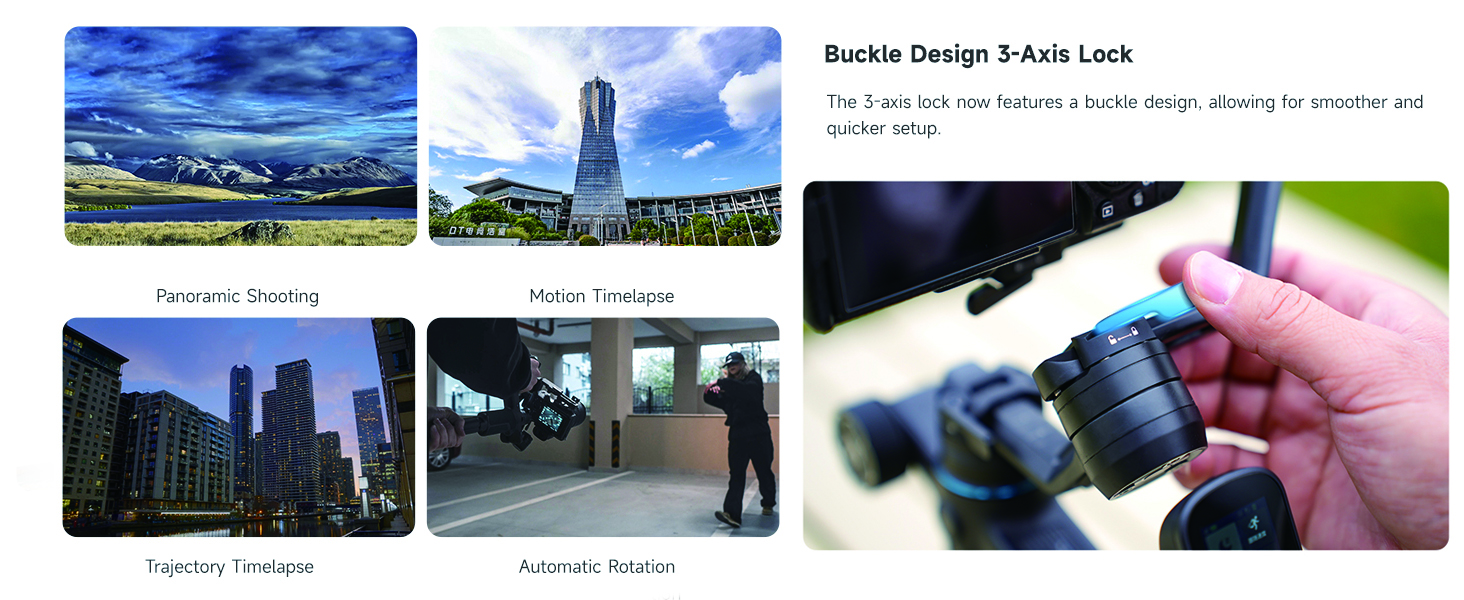
The 3-Axis Lever Lock system allows for rapid switching between portrait and landscape orientations without the need for rebalancing.

Засвар үйлчилгээ
- Цэвэрлэгээ: Гимбалыг цэвэрлэхдээ зөөлөн, хуурай даавуу ашиглаарай. Хүчтэй химийн бодис эсвэл зүлгүүрийн материал хэрэглэхээс зайлсхий.
- Хадгалах: Store the gimbal in its dedicated carrying case in a cool, dry place when not in use. Ensure all axes are locked to prevent damage.
- Зай цэнэглэх: The gimbal features a 14-hour battery life and supports 3-hour fast charging via USB-C. Use the provided charging cable.
- Програм хангамжийн шинэчлэлтүүд: FeiyuTech-ийн албан тушаалтныг тогтмол шалгаж байгаарай website or app for firmware updates to ensure optimal performance and access to new features.
Алдааг олж засварлах
- Gimbal Vibration Detected: If the gimbal displays a "Gimbal vibration detected" message, ensure the camera is properly balanced on all three axes. Re-balance the camera if necessary.
- Моторын хэт ачаалал: If motors appear strained or the gimbal is not responding smoothly, check the camera's weight to ensure it is within the 2KG (4.4lb) payload limit. Re-balance the camera and perform motor auto-tuning via the touchscreen or app.
- Холболтын асуудал: Ensure Bluetooth is enabled on your camera/smartphone and the gimbal. For wired connections, verify the correct USB cable is used and securely connected.
- AI Tracking Malfunction: Ensure the AI vision sensor is clear and unobstructed. Check lighting conditions and ensure the subject has sufficient contrast for effective tracking.
Үзүүлэлтүүд
| Онцлог | Дэлгэрэнгүй |
|---|---|
| Бүтээгдэхүүний хэмжээс | 7.87 x 6.69 x 11.81 inches (Folded: 20x17x30cm) |
| Зүйлийн жин | 4.4 фунт (2 килограмм) |
| Ачаалах хүчин чадал | Up to 2KG (4.4lb) |
| Зайны ашиглалт | 14 hours (3-hour fast charging) |
| Дэлгэц | 1.3 инчийн HD мэдрэгчтэй дэлгэц |
| Хяналт | Built-in AI Tracking 4.0 with Gesture Control |
| Тохиромжтой байдал | Mirrorless, Compact, Action Cameras, Smartphones |
| Өнгө | Хар |

Баталгаат болон дэмжлэг
Баталгаат хугацаа, техникийн дэмжлэг эсвэл үйлчилгээний талаарх лавлагааны талаар албан ёсны FeiyuTech-ээс лавлана уу. webсайт эсвэл харилцагчийн үйлчилгээтэй шууд холбогдоно уу. Баталгаат зарга авахын тулд худалдан авалтын баримтаа хадгална уу.
Албан ёсны FeiyuTech Webсайт: www.feiyu-tech.com


