1. Танилцуулга
The Machenike G3V2 Bluetooth Controller is a versatile gaming peripheral designed for multi-platform compatibility, including Switch, iOS, Android, and Windows PC. It features Hall Effect joysticks and triggers, customizable buttons, RGB lighting, and a dedicated charging station for an enhanced gaming experience.
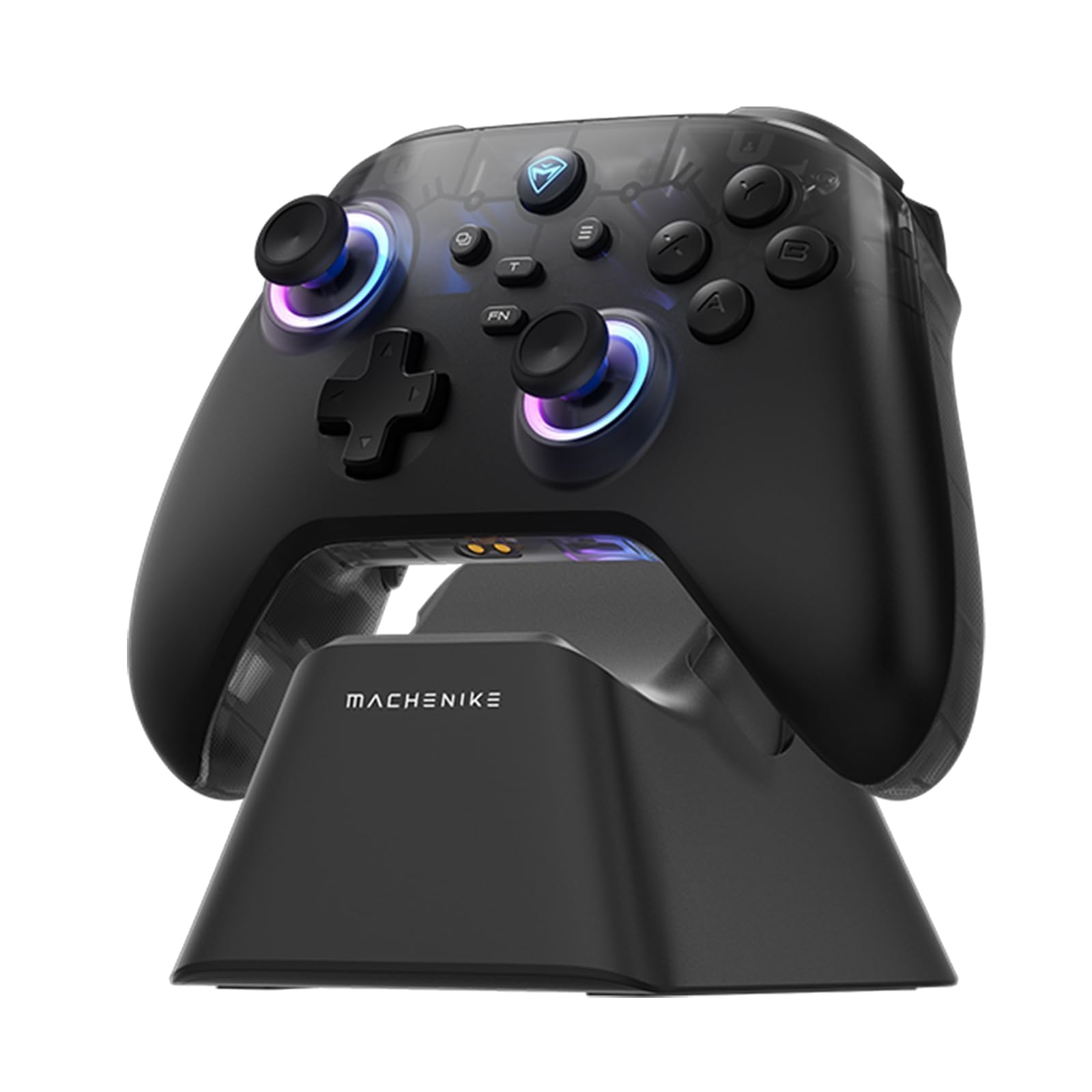
Image: The Machenike G3V2 Bluetooth Controller, showcasing its ergonomic design and vibrant RGB lighting around the joysticks.
2. Үндсэн шинж чанарууд
- Lightning-Fast 1000Hz Responsiveness: Equipped with ultra-high gaming responsiveness for instant command capture and millisecond-level feedback.
- Тохиромжтой цэнэглэх цэг: Includes a dedicated charging dock for efficient and fast recharging via USB-C, protecting the controller and ensuring optimal performance.
- Dual Hall-Effect Joysticks and Triggers: Features newly upgraded Hall-Effect sensing joysticks and high-precision trigger buttons for superior control and durability, eliminating drift.
- Customizable Force Adjustable Stick Tension: Unique force adjustment feature allows customization of joystick feedback from lightweight to precise, adapting to various game needs.
- Fast Charging & Extended Playtime: Built-in 1000mAh high-capacity battery provides extended playtime with fast-charging technology.
- Олон платформын дэмжлэг: Compatible with Switch/Switch 2, iOS, Android, and Windows PC.
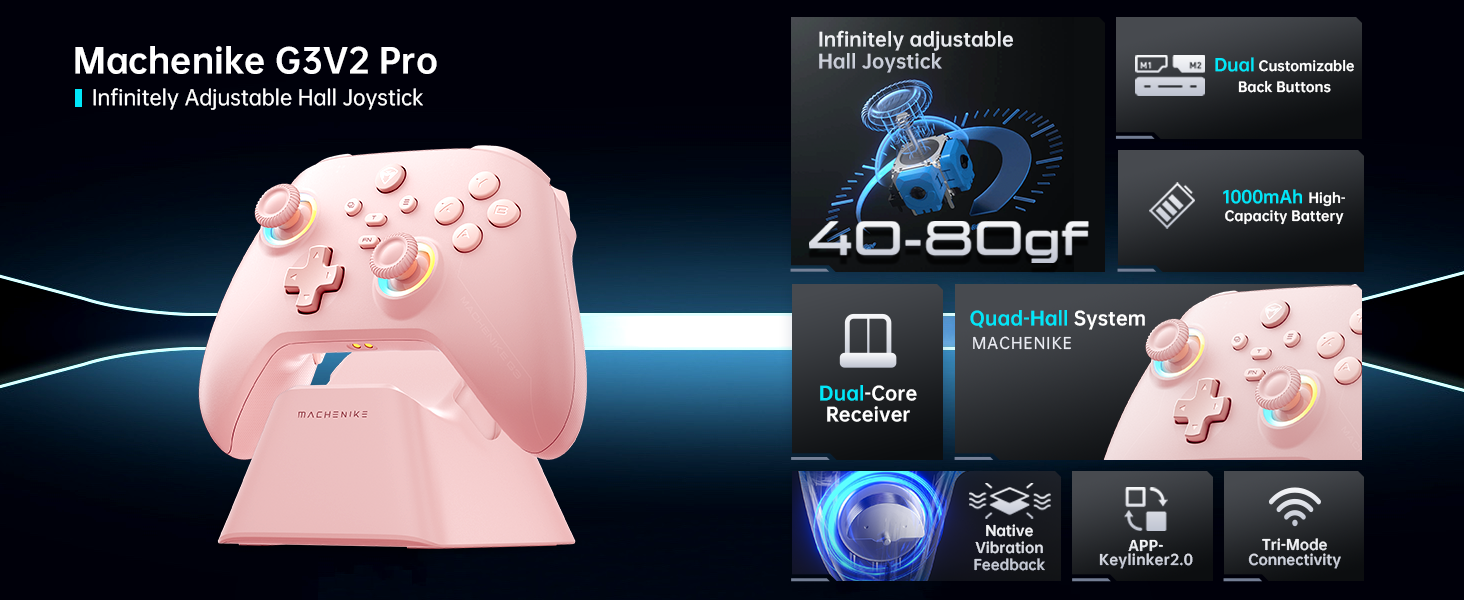
Зураг: Бүтэнview of the Machenike G3V2 controller's key features, including its Hall Effect joysticks, customizable back buttons, and connectivity options.
3. Тохиргоо ба холболт
3.1 Connecting to Nintendo Switch (Bluetooth Mode)
- Ensure your controller is charged.
- Удирдлага дээрх товчлуурыг удаан дар Y + Гэр buttons simultaneously until the indicator light flashes rapidly, changing from slow to fast flashing. This puts the controller into Switch pairing mode.
- Nintendo Switch дээрээ НҮҮР ХУУДАС цэс рүү очно уу.
- Select the 'Controllers' icon, then choose 'Change Grip/Order'.
- Wait for the controller to connect automatically. Once connected, the controller will vibrate, and its icon will appear on the Switch screen.
- дээр дарна уу A баталгаажуулахын тулд хянагч дээрх товчийг дарна уу.
- To toggle between Switch and Xbox button layouts (A/B, X/Y swap), press FN + A.
Video: A tutorial demonstrating how to connect the Machenike G3V2 controller to a Nintendo Switch console via Bluetooth mode, including button presses and on-screen confirmation.
3.2 Connecting to PC/iOS/Android (Bluetooth/Wired/2.4G)
The Machenike G3V2 controller supports multiple connection modes for various platforms:
- Bluetooth: For iOS, Android, and some PC setups. Activate Bluetooth on your device and search for 'Machenike G3V2' to pair.
- 2.4G утасгүй: Use the included USB dongle for PC and other compatible devices. Plug the dongle into your device, then power on the controller.
- Утастай: Connect the controller directly to your PC or compatible device using a USB-C cable.
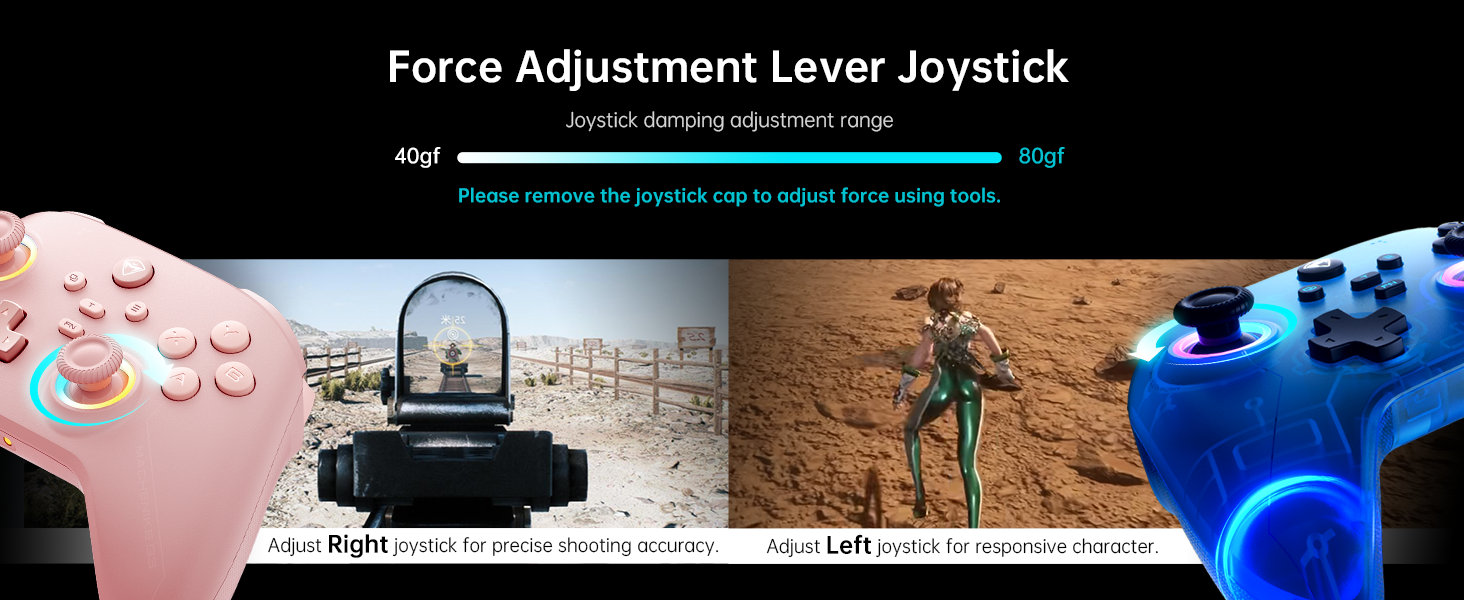
Image: The Machenike G3V2 controller highlighting its ergonomic design, anti-slip grip, and responsive triggers for comfortable and precise control.
4. Operation and Customization
4.1 Програмчлагдах буцах товчлуурууд (M1/M2)
The controller features two customizable back buttons (M1 and M2) that can be assigned to single keys or complex macros. This is particularly useful for games requiring quick actions or combos.
- To Assign a Single Key:
a. товчийг удаан дар FN + M1 (or M2) simultaneously until the joystick light ring glows with a soft blue breathing effect, indicating recording mode.
b. Press the desired button you wish to assign (e.g., 'A' button).
в. Хэвлэл M1 (or M2) once to save the assignment. The light ring will flash three times, confirming successful saving. - To Clear an Assignment:
a. товчийг удаан дар FN + M1 (or M2) simultaneously to enter recording mode.
b. Without pressing any other button, press M1 (or M2) again to save a blank input. The light ring will flash three times, clearing the previous assignment. - To Record a Macro (Multiple Keys):
a. товчийг удаан дар FN + M1 (or M2) simultaneously to enter recording mode.
b. Press the sequence of keys you want to record (e.g., A, B, X, Y, RB, LB). The timing between key presses will be recorded.
в. Хэвлэл M1 (or M2) once to save the macro. The light ring will flash three times.
Video: A detailed guide on how to set up and record keystroke macros using the programmable back buttons (M1/M2) on the Machenike G3V2 controller.
4.2 Жойстик болон триггерийн тохируулга
Calibration helps maintain accuracy and prevent drift in joysticks and triggers. This can be done whether the controller is off or connected.
- Жойстик тохируулга:
а. Дарна уу B + Back + Home buttons simultaneously until the blue LED starts flashing.
b. Move both joysticks in full circles (about three rotations) slowly and steadily.
в. дээр дарна уу Эхлэх button to save. The controller will power off, indicating successful calibration. - Trigger Calibration:
а. Дарна уу Y + Back + Home buttons simultaneously until the red LED starts flashing.
b. Press both triggers normally all the way down three times. Ensure gentle but full pressure.
в. дээр дарна уу Эхлэх button to save. The controller will power off, indicating successful calibration.
After calibration, reconnect the controller to your device to test the new settings. Always use normal, gentle pressure during calibration for accurate results.
Video: A guide on how to calibrate the joysticks and triggers of the Machenike G3V2 controller to ensure optimal performance and accuracy.
4.3 RGB гэрэлтүүлэг
The controller features dynamic RGB lighting around the joysticks. Specific controls for changing lighting modes or colors can often be found in the Keylinker 2.0 mobile application or through dedicated button combinations (refer to the app for advanced customization).
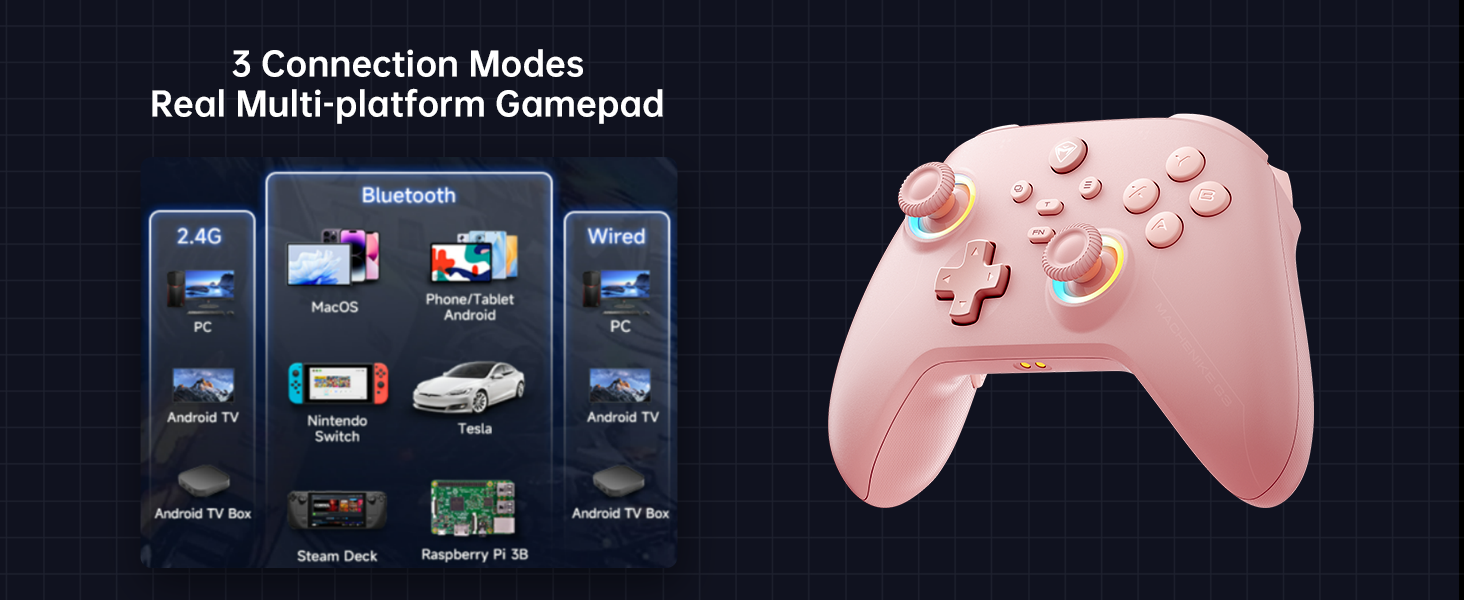
Image: The Machenike G3V2 controller illustrating its 4-level native vibration feedback, providing immersive experiences for various game genres.
5. Цэнэглэх
The Machenike G3V2 controller comes with a 1000mAh high-capacity battery and a dedicated charging dock.
- Цэнэглэх цэгийг ашиглах нь: Simply place the controller onto the dedicated charging dock. The built-in USB-C port on the dock facilitates quick recharging.
- Шууд USB-C цэнэглэх: You can also charge the controller directly using a USB-C cable connected to a power source.
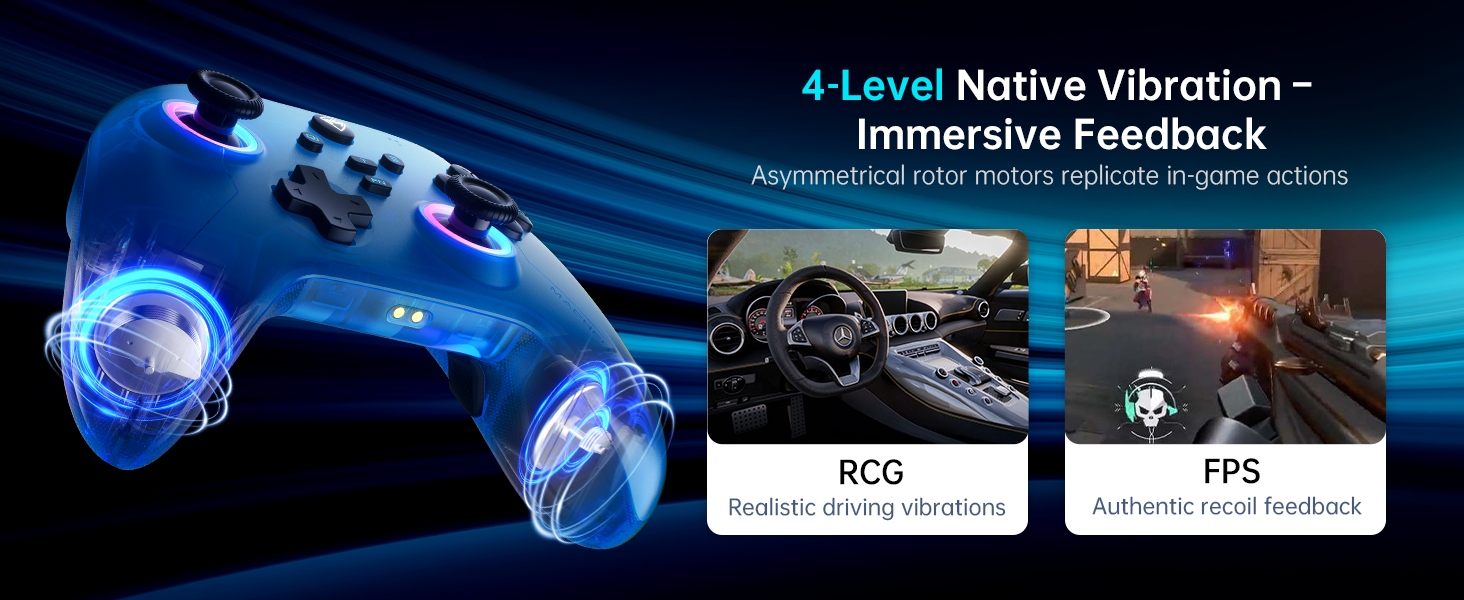
Image: The Machenike G3V2 controller resting on its dedicated charging dock, ready for an instant power boost.
6. Тохиромжтой байдал
- Дэмжигдсэн платформууд: Nintendo Switch, Switch 2, iOS, Android, Windows PC.
- Тохирохгүй: Xbox, PlayStation, or GeForce Now.
- For other game platforms not explicitly mentioned, please consult customer service before purchase.
7. Засвар үйлчилгээ
- Цэвэрлэгээ: Удирдагчийг цэвэрлэхийн тулд зөөлөн, хуурай даавуу ашиглана уу. Химийн хатуу бодис, зүлгүүрийн материал ашиглахаас зайлсхий.
- Хадгалах: Удирдагчийг нарны шууд тусгал, хэт температураас хол, сэрүүн, хуурай газар хадгална.
- Батерейны арчилгаа: Зайны ашиглалтын хугацааг уртасгахын тулд хянагчийг ойр ойрхон бүрэн цэнэглэхээс зайлсхий. Удаан хугацаагаар ашиглаагүй байсан ч тогтмол цэнэглээрэй.
8. Алдаа засах
- Хянагч холбогдоогүй байна:
- Ensure the controller is fully charged.
- Verify the correct pairing mode is activated for your device (e.g., Y+Home for Switch).
- On your device, try forgetting the controller from Bluetooth settings and re-pairing.
- For PC, try connecting via the 2.4G dongle or wired connection. - Joystick Drift or Inaccuracy:
- Perform joystick calibration as described in Section 4.2. - Trigger Issues:
- Perform trigger calibration as described in Section 4.2. - Хариу өгөхгүй товчлуурууд:
- Ensure the controller is properly connected.
- Check if any programmable back buttons (M1/M2) have unintended assignments (clear them if necessary).
- Reconnect the controller. - Цэнэглэх асуудал:
- Ensure the charging dock or USB-C cable is properly connected.
- Өөр USB-C кабель эсвэл тэжээлийн адаптер ашиглаж үзнэ үү.
9. Техникийн үзүүлэлтүүд
| Онцлог | Дэлгэрэнгүй |
|---|---|
| Загварын дугаар | PE-Upgrade |
| ASIN | B0F93RPT5H |
| Үйлдвэрлэгч | Machenike |
| Зүйлийн жин | 0.529 унц |
| Багцын хэмжээ | 6.93 x 6.46 x 3.23 инч |
| Батерей | 1 Лити Полимер батерей (дагсан) |
| Холболт | Bluetooth, 2.4G утасгүй, утастай (USB-C) |
| Санал хураалтын хувь | 1000 Гц |
| Жойстик | Hall Effect, Adjustable Tension (40-80gf) |
| Өдөөгч | Hall Effect, 255 Levels, Millimeter Precision |
| Програмчлагдах товчлуурууд | 2 Back Buttons (M1, M2) |
| Чичиргээ | 4-Level Native Vibration Feedback |
10. Баталгаат хугацаа ба дэмжлэг
Machenike products are designed for durability and performance. For warranty information, technical support, or service inquiries, please refer to the official Machenike webсайт эсвэл харилцагчийн үйлчилгээтэй шууд холбогдоно уу. Баталгаат зарга авахын тулд худалдан авалтын баримтаа хадгална уу.
Онлайн эх сурвалжууд болон Түгээмэл асуултуудыг мөн эндээс авах боломжтой. Амазон дээрх Machenike дэлгүүр.


