1. Танилцуулга
This manual provides essential information for the safe and efficient operation of your Y&H 6.2kW All-in-One Solar Inverter with Battery Storage. This integrated household energy storage system combines a solar inverter, Li-ion battery, and MPPT controller, supporting grid-connected, off-grid, and hybrid operation modes. Please read this manual thoroughly before installation and use, and retain it for future reference.
2. Аюулгүй байдлын мэдээлэл
Цахилгаан цочрол, гал түймэр, гэмтлийн эрсдлийг бууруулахын тулд дараах аюулгүй байдлын урьдчилан сэргийлэх арга хэмжээг үргэлж дагаж мөрдөөрэй.
- Суурилуулалт, засвар үйлчилгээг мэргэшсэн боловсон хүчин хийх ёстой.
- Төхөөрөмжийг өөрөө задлах эсвэл засах гэж бүү оролдоорой. Мэргэшсэн үйлчилгээний ажилтантай холбогдоно уу.
- Ensure all wiring connections are secure and correctly polarized before operation.
- Төхөөрөмжийг шатамхай материал, чийг, нарны шууд тусгалаас хол байлга.
- Хэт халалтаас урьдчилан сэргийлэхийн тулд төхөөрөмжийн эргэн тойронд хангалттай агааржуулалтыг хангана.
- Суурилуулалт, засвар үйлчилгээний явцад зохих хувийн хамгаалалтын хэрэгсэл (PPE) өмс.
- Disconnect all power sources (PV, battery, AC grid) before performing any service or maintenance.
3. Бүтээгдэхүүн дууссанview
The Y&H 6.2kW All-in-One Solar Inverter with Battery Storage is designed for comprehensive home energy management. It integrates a 6.2kW inverter, a 120A MPPT solar charger, and a configurable lithium battery system (5.12-20.48kWh). The system supports various operational modes and features a robust design for durability.
3.1 Системийн диаграмм
The diagram below illustrates the typical connections and components of the Y&H All-in-One Solar Inverter system within a household energy setup.

Зураг 3.1: System Diagram. This image displays the Y&H All-in-One Solar Inverter connected to solar modules, a utility grid, a generator, and various home appliances, illustrating the energy flow and system integration.
3.2 Back Panel and Connections
The back panel provides all necessary connection points for PV input, AC input/output, battery input, and communication ports. Understanding these connections is crucial for proper installation and operation.
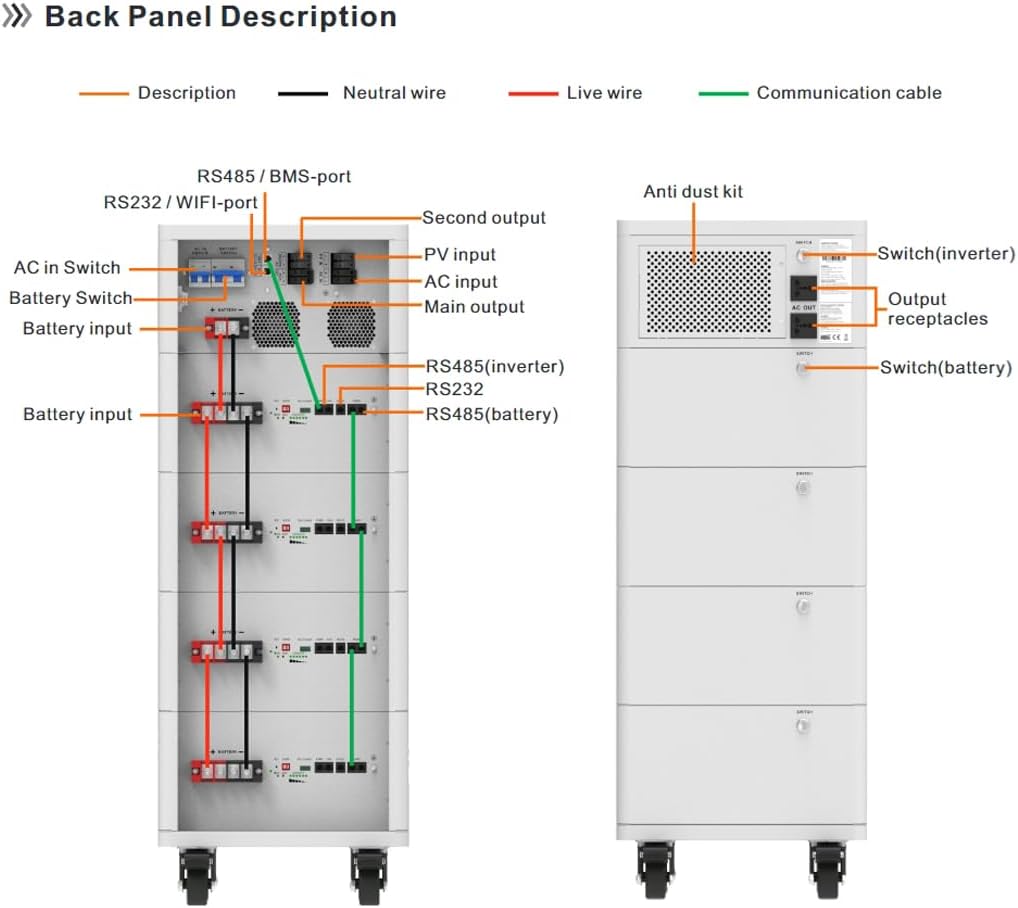
Зураг 3.2: Back Panel Description. This image details the various ports and switches on the back of the Y&H Solar Inverter, including AC in/out, PV input, battery input, RS232/RS485 communication ports, and the anti-dust kit.
- PV оролт: Connects to solar panels (60-500VDC).
- Хувьсах гүйдлийн оролт: Connects to the utility grid.
- Үндсэн гаралт: Primary AC output for general loads.
- Second Output: Secondary AC output for prioritized loads.
- Зайны оролт: Connects to the integrated lithium battery modules.
- Communication Ports (RS232/RS485/BMS/WIFI): For monitoring and system management.
- Шилжүүлэгч: Separate switches for inverter and battery power control.
- Anti-dust kit: Integrated for environmental protection.
3.3 Expandable and Stackable Design
The system is designed to be expandable, allowing for increased battery capacity from 5.12kWh to 20.48kWh. Its stackable design and universal wheels facilitate multi-unit clustering for larger energy requirements.

Зураг 3.3: Expandable Capacity Options. This image shows the Y&H All-in-One Solar Inverter system in different configurations, demonstrating its expandable battery capacity from 5.12kWh to 20.48kWh.
4. Тохиргоо ба суурилуулалт
Proper installation is critical for the safe and efficient operation of your solar inverter system. It is recommended that installation be performed by a certified electrician or solar professional.
4.1 Савлах, шалгах
- Carefully unpack the unit and inspect for any shipping damage. Report any damage to your supplier immediately.
- Баглаа боодлын жагсаалтад орсон бүх бүрэлдэхүүн хэсгүүд байгаа эсэхийг шалгаарай.
4.2 Холбох байршил
- Choose a location that is dry, well-ventilated, and protected from direct sunlight and extreme temperatures.
- Ensure sufficient clearance around the unit for proper airflow and maintenance access.
- The unit is IP65-rated with an anti-dust kit, but indoor installation or protected outdoor areas are recommended.
- Utilize the universal wheels for easy positioning, especially for multi-unit setups.
4.3 Цахилгааны холболтууд
Refer to Image 3.2 (Back Panel Description) for port identification.
- Фотоэлектрик оролтын холболт: Connect the solar panel strings to the PV input terminals. Ensure correct polarity and voltage заасан хязгаарт (60-500VDC).
- Зайны холболт: Connect the integrated battery modules to the battery input terminals. The BMS-protected lithium battery ensures safety.
- Хувьсах гүйдлийн оролтын холболт: Connect the utility grid AC supply to the AC input terminals.
- AC гаралтын холболт: Connect your household loads to the Main Output and Second Output terminals. The Second Output can be used for critical loads requiring prioritized power.
- Харилцааны холболтууд: Connect RS232/RS485/BMS/WIFI cables for monitoring and communication with external devices or the mobile app.
- Газардуулга: Орон нутгийн цахилгааны дүрмийн дагуу төхөөрөмжийг зөв газардуулсан эсэхийг шалгаарай.
Чухал: All electrical connections must be made with the system completely powered off and isolated from all power sources.
4.4 Анхдагч асаалт
- Double-check all wiring connections for correctness and security.
- Turn on the battery switch first.
- Инвертер шилжүүлэгчийг асаана уу.
- Observe the display panel for system status and any error indicators.
- If connected, verify communication with the remote monitoring app.
5. Ашиглалтын заавар
The Y&H All-in-One Solar Inverter offers flexible operation modes to suit various energy needs.
5.1 Үйлдлийн горимууд
- Grid-Tied Mode: The system can feed excess solar energy back into the utility grid, potentially reducing electricity bills.
- Сүлжээнээс гадуурх горим: The system operates independently of the utility grid, providing power from solar panels and battery storage.
- Гибрид горим: Combines grid-tied and off-grid functionalities, allowing for energy selling, backup power during outages, and optimized self-consumption.
Specific mode selection and configuration are typically done via the unit's display panel or the remote monitoring application.
5.2 Load Prioritization
The dual AC output ports allow for prioritizing power distribution. Critical loads can be connected to the designated output to ensure continuous power supply even during limited energy availability.
5.3 Алсын хяналт
The system supports remote monitoring via a dedicated mobile application (iOS/Android). This allows users to:
- Monitor real-time power generation and consumption.
- View battery status and charge levels.
- Access historical energy data and analytics.
- Анхааруулга болон мэдэгдэл хүлээн авах.
- Adjust certain system settings remotely.
Refer to the separate app manual for detailed instructions on setup and usage.
6. Засвар үйлчилгээ
Regular maintenance ensures the longevity and optimal performance of your Y&H solar inverter system.
6.1 Ерөнхий цэвэрлэгээ
- Keep the exterior of the unit clean and free from dust. Use a soft, dry cloth.
- Шингэн цэвэрлэгч эсвэл уусгагч хэрэглэж болохгүй.
- The integrated anti-dust kit helps protect internal components, but periodic inspection of air vents for blockages is recommended.
6.2 Холболтын шалгалт
- Periodically inspect all electrical connections (PV, AC, battery) for tightness and signs of corrosion.
- Ensure communication cables are securely connected.
6.3 Батерейны арчилгаа
- The integrated lithium battery features a Battery Management System (BMS) for protection against overcharge, over-discharge, and over-temperature.
- Avoid operating the system in extreme temperatures outside the specified range (-10°C to 50°C).
- Ensure humidity levels remain within 5-95% (non-condensing).
For any complex maintenance or repairs, contact qualified service personnel.
7. Алдаа засах
This section provides guidance for common issues. For problems not listed here or if issues persist, contact customer support.
7.1 Нийтлэг асуудал ба шийдвэрлэх арга замууд
| Асуудал | Боломжит шалтгаан | Шийдэл |
|---|---|---|
| Цахилгаан гаралт байхгүй | Inverter switch off, battery low, PV input insufficient, AC input disconnected. | Check inverter and battery switches. Verify PV and AC connections. Check battery charge level. |
| System not charging battery | PV input issue, MPPT controller fault, battery fault. | Inspect PV panel connections and output. Check MPPT status on display. Consult support if battery fault is indicated. |
| Remote monitoring not working | WiFi connection issue, app configuration error, communication cable fault. | Verify WiFi signal strength. Reconfigure app settings. Check communication cable connections. |
| Алдааны кодыг харуулав | System fault, specific component issue. | Note the error code and refer to the full product manual or contact customer support for specific guidance. |
7.2 Үйлдвэрийн тохиргоонд дахин оруулах
The unit features a one-key factory reset function. Use this with caution as it will revert all settings to their default values. Consult the full product manual for instructions on performing a factory reset.
8. Техникийн үзүүлэлтүүд
The following table outlines the key technical specifications for the Y&H 6.2kW All-in-One Solar Inverter with Battery Storage (Model: ESS PLUS-6.2KW-20.48 kWh).
| Онцлог | Үнэ цэнэ |
|---|---|
| Загварын дугаар | ESS PLUS-6.2KW-20.48 kWh |
| Гаралтын хүч | 6.2 кВт (6200 ватт) |
| Battery Capacity (Configurable) | 5.12 kWh - 20.48 kWh (100 Amp Hours for 20.48 kWh model) |
| MPPT Solar Charger Current | 120 А |
| Хамгийн их PV оролтын хэмжээtage | 500VDC |
| AC гаралтын ботьtage | 220V (Pure Sine Wave) |
| Үйлдлийн горимууд | Off-Grid, On-Grid, Hybrid |
| Зөвлөмж болгож буй хэрэглээ | Гэрийн эрчим хүчний хадгалалт |
| Эрчим хүчний эх үүсвэр | Нарны болон батерейгаар ажилладаг |
| Ашиглалтын температур | -10 хэмээс 50 хэм хүртэл |
| Чийгийн эсэргүүцэл | 5-95% (конденсацгүй) |
| Зүйлийн жин | 37.2 фунт |
| Багцын хэмжээ | 20.8 x 15.7 x 8.07 инч |
| Эхний боломжтой огноо | 20 оны тавдугаар сарын 2025 |
9. Баталгаат хугацаа ба дэмжлэг
Y&H is committed to providing reliable products and customer satisfaction.
9.1 Бүтээгдэхүүний баталгаа
Please refer to the warranty card included with your product or visit the official Y&H website for detailed warranty terms and conditions. Optional protection plans, such as a 3-Year Protection Plan, may be available for extended coverage.
9.2 Хэрэглэгчийн дэмжлэг
For technical assistance, troubleshooting, or service inquiries, please contact Y&H customer support. When contacting support, please have your product model number (ESS PLUS-6.2KW-20.48 kWh) and purchase date readily available.
You can typically find contact information on the Y&H official webсайт эсвэл худалдан авалтын цэгээр дамжуулан.