Аюулгүй байдлын чухал заавар
Энэ бүтээгдэхүүнийг ашиглахаасаа өмнө бүх аюулгүй байдлын зааврыг уншиж, ойлгоно уу. Цаашид лавлах зорилгоор энэхүү гарын авлагыг хадгална уу.
- Агааржуулалт: Тохиромжтой агааржуулалтыг хангах. Агааржуулалтын нүхийг хааж болохгүй.
- Ус ба чийг: Энэ төхөөрөмжийг бороо, чийгэнд бүү тавь. Ваар зэрэг шингэнээр дүүрсэн зүйлийг төхөөрөмж дээр тавьж болохгүй.
- Дулааны эх үүсвэрүүд: Радиатор, халаалтын төхөөрөмж, зуух болон бусад төхөөрөмж (үүнд ampөргөгч) дулаан үүсгэдэг.
- Эрчим хүчний эх үүсвэрүүд: Use only power supplies specified by the manufacturer. Ensure the power cord is protected from being walked on or pinched.
- Цэвэрлэгээ: Зөвхөн хуурай даавуугаар цэвэрлэ.
- Үйлчилгээ: Энэ бүтээгдэхүүнд өөрөө үйлчлэх гэж бүү оролдоорой. Бүх засвар үйлчилгээг мэргэшсэн үйлчилгээний ажилтнуудад хандаарай.
Багцын агуулга
Доор жагсаасан бүх зүйл таны багцад байгаа эсэхийг шалгаарай.
- Kuephom CD-X2A Boombox
- Хувьсах гүйдлийн цахилгааны утас
- Хэрэглэгчийн гарын авлага (энэ баримт бичиг)
- Алсын удирдлага
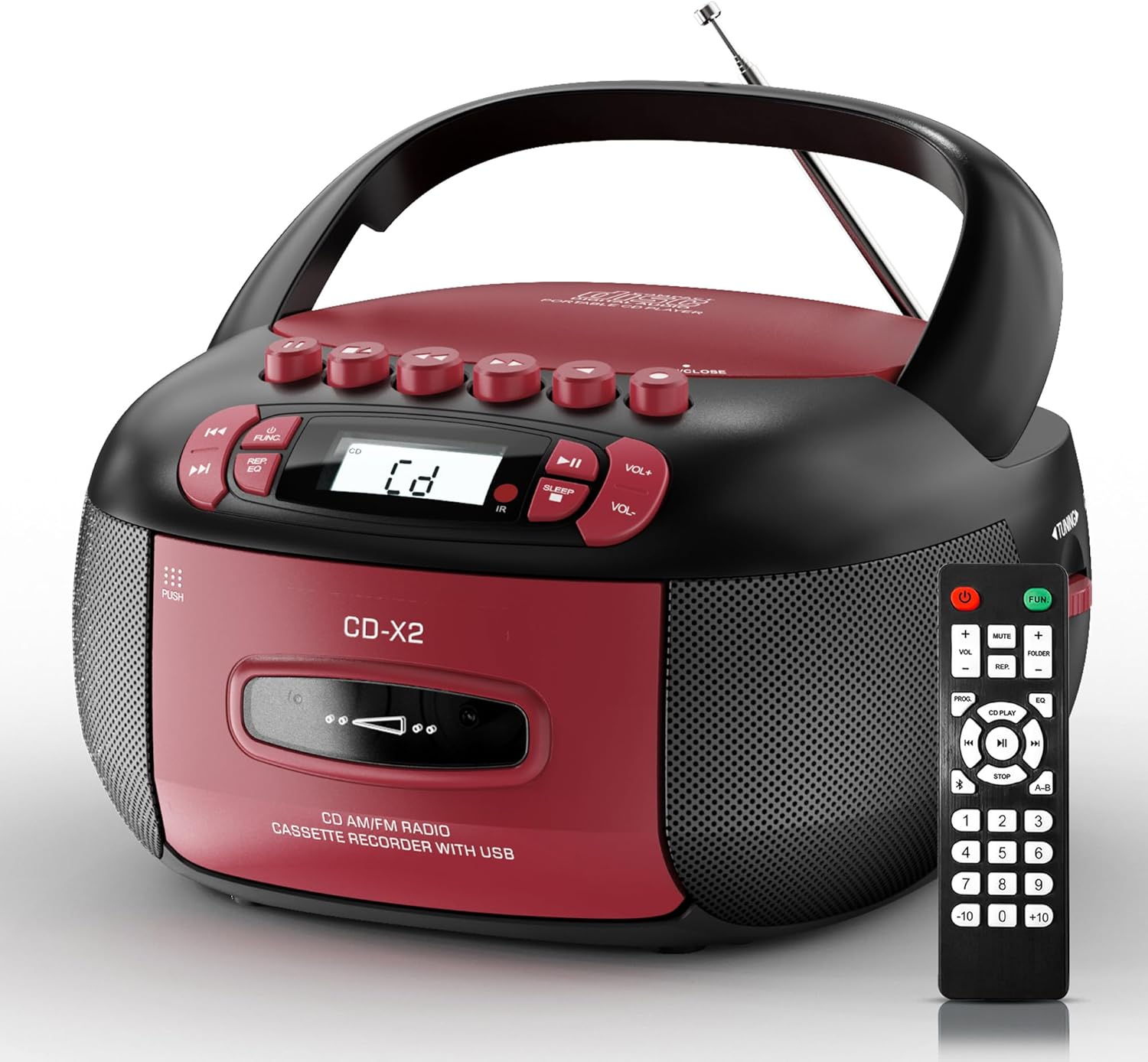
Image: The Kuephom CD-X2A Boombox with its included remote control, showcasing its compact design and red/black color scheme.
Бүтээгдэхүүн дууссанview
Familiarize yourself with the various components and controls of your Kuephom CD-X2A Boombox.
Урд самбарын удирдлага
- Цахилгаан/Функцийн товчлуур: Press and hold to power on/off. Press to cycle through modes (CD, USB, Bluetooth, Radio, AUX, Tape).
- Дууны түвшин +/- Товчлуурууд: Тоглуулах дууны хэмжээг тохируулна уу.
- Тоглуулах/түр зогсоох товчлуур: Start or pause playback for CD, USB, Bluetooth, or Tape.
- Зогсоох товч: Дахин тоглуулахаа зогсоох.
- Алгасах/Хайх товчлуурууд: Navigate between tracks on CD/USB or fast forward/rewind on tape.
- EQ товч: Эквалайзерын урьдчилсан тохиргоог сонгоно уу.
- Унтлагын цаг хэмжигч товчлуур: Унтах цаг хэмжигчийг тохируулна уу.
Хажуугийн самбарын хяналт
- Тохируулах товчлуур: Manually tune AM/FM radio stations.
- Чихэвчний Жак: Хувийн сонсохын тулд чихэвчээ холбоно уу.
- AUX оролтын порт: Гадаад аудио төхөөрөмжийг холбоно уу.
- USB порт: Insert USB drives for MP3/WMA playback.
Шилдэг самбарын онцлог шинж чанарууд
- CD тасалгаа: Top-loading compartment for CDs.
- Кассет тасалгаа: Front-loading compartment for cassette tapes.
- Телескоп антен: Extend for improved radio reception.

Image: The boombox highlighting its multiple functions including CD/MP3, Bluetooth, Type I/II tape, USB, FM/AM Radios, Sleep timer, Remote, Phone jack, AUX, and Tape recording.

Зураг: Ойролцоогоор views of the boombox's phone jack, top-loading CD player, telescopic antenna, and tape play/record buttons.
Тохиргоо
Boombox-ийг асаах
Хувьсах гүйдлийн хүч
- Connect the supplied AC power cord to the AC IN jack on the back of the boombox.
- Plug the other end of the power cord into a standard AC wall outlet (120V~60Hz).
Зайны хүч
- Open the battery compartment cover located on the bottom of the boombox.
- Insert 6 x 'C' size batteries (not included), ensuring correct polarity (+/-).
- Зайны тасалгааны тагийг сайтар хаа.
- When operating on battery power, disconnect the AC power cord.

Image: The boombox demonstrating both AC power connection and the use of 6 C-size batteries for portable operation.
Алсын удирдлага
- Insert 2 x 'AAA' batteries (not included) into the remote control, observing polarity.
- Point the remote control towards the boombox's IR sensor for optimal operation.

Image: An individual comfortably operating the boombox using the remote control from a distance.
Ашиглалтын заавар
Ерөнхий үйл ажиллагаа
- Асаах/унтраах: Press and hold the Power/Function button to turn the unit on or off.
- Функцийн сонголт: Press the Power/Function button repeatedly to switch between CD, USB, Bluetooth, Radio (AM/FM), AUX, and Tape modes.
CD тоглуулах
- CD тасалгааны тагийг нээ.
- Place a CD (CD, CD-R, MP3, WMA compatible) onto the spindle with the label side facing up.
- CD тасалгааны тагийг хаа.
- Press the Power/Function button to select 'CD' mode.
- Тоглуулах/Түр зогсоох товчийг дарж тоглуулж эхэлнэ.
- Use the Skip/Search buttons to navigate tracks.
- Press the Repeat button to repeat a single track, folder, or all tracks.
- Press the Program button to program a custom playback sequence.

Image: The boombox's display showing 'CD' mode, with icons indicating compatibility with CD, CD-R, CD-RW, WMA, and MP3 formats, along with single cycle, repeat folder, repeat all, random play, and play in order options.
Кассет тоглуулах ба бичлэг хийх
- Press the 'OPEN/CLOSE' button on the cassette compartment to open it.
- Кассет соронзон хальсыг оруул.
- Кассетны тасалгааг хаа.
- Press the Power/Function button to select 'TAPE' mode.
- Тоглуулах товчийг дарж тоглуулж эхэлнэ.
- Use the Fast Forward/Rewind buttons to navigate the tape.
- Бичлэг: In TAPE mode, select the desired source (CD, Bluetooth, USB, or AM/FM radio). Press the Record button to begin recording onto the cassette. The unit features an auto-stop function when the tape reaches its end.

Image: A hand inserting a cassette tape into the boombox's front-loading compartment, with controls for tape operation visible.
AM/FM радио
- Press the Power/Function button to select 'RADIO' mode. Press again to switch between AM and FM bands.
- Extend the telescopic antenna for better FM reception. For AM, rotate the unit for best reception.
- Use the Tuning knob on the side to manually tune to your desired station. The frequency will be displayed on the screen.

Image: A man relaxing on a couch with the boombox, which displays various FM/AM radio frequencies, indicating good reception.
Bluetooth холболт
- Press the Power/Function button to select 'BT' (Bluetooth) mode. The display will show 'BT' and flash, indicating it's in pairing mode.
- On your mobile device, enable Bluetooth and search for 'CD-X2A'.
- Select 'CD-X2A' to pair. Once paired, the 'BT' indicator will stop flashing.
- Та одоо төхөөрөмжөөсөө boombox руу утасгүй аудио дамжуулах боломжтой.

Image: A woman in a living room wirelessly streaming audio from her smartphone to the boombox via Bluetooth 5.1, indicating a stable connection.
USB тоглуулах
- Insert a USB flash drive into the USB port on the side of the boombox.
- Press the Power/Function button to select 'USB' mode.
- The boombox will automatically detect and play compatible MP3/WMA files.
- Use the Play/Pause, Stop, and Skip/Search buttons to control playback.
AUX оролт
- Connect an external audio device (e.g., smartphone, MP3 player) to the AUX-in port using a 3.5mm audio cable (not included).
- Press the Power/Function button to select 'AUX' mode.
- Холбогдсон гадаад төхөөрөмжөөсөө шууд тоглуулахыг удирдана уу.
Унтах таймер
- While the unit is playing, press the Sleep Timer button.
- Repeatedly press the button to cycle through available sleep timer durations (e.g., 15, 30, 60, 90 minutes).
- Сонгосон хугацааны дараа төхөөрөмж автоматаар унтрах болно.

Image: A man sleeping in bed with the boombox on his nightstand, illustrating the sleep timer feature which allows the device to turn off automatically.
Засвар үйлчилгээ
- Цэвэрлэгээ: Бумбоксын гадна талыг зөөлөн, хуурай даавуугаар цэвэрлэ. Зүлгүүрийн цэвэрлэгч эсвэл уусгагч хэрэглэж болохгүй.
- CD арчилгаа: CD-г ирмэгээс нь барь. Бохир CD-г төвөөс нь гадагш чиглүүлэн зөөлөн, хөвөнгүй даавуугаар арчина.
- Кассет арчилгаа: Keep cassette tapes away from direct sunlight and heat. Periodically clean the tape heads with a specialized cassette head cleaner.
- Хадгалах: When not in use for extended periods, disconnect the power cord and remove batteries. Store the unit in a cool, dry place.
Алдааг олж засварлах
Хэрэв танд асуудал тулгарвал нийтлэг асуудал, шийдлийг доорх хүснэгтээс харна уу.
| Асуудал | Боломжит шалтгаан | Шийдэл |
|---|---|---|
| Хүч чадалгүй | AC утас холбогдоогүй; Батерей дууссан эсвэл буруу оруулсан. | Check AC connection; Replace or correctly insert batteries. |
| Дуу алга | Дууны түвшин хэт бага байна; Буруу функцийн горим сонгогдсон; Чихэвч холбогдсон байна. | Increase volume; Select correct mode; Disconnect headphones. |
| CD алгасах эсвэл тоглохгүй байна | CD dirty or scratched; CD inserted incorrectly; Incompatible CD format. | Clean or replace CD; Insert CD correctly; Ensure CD is compatible (CD, CD-R, MP3, WMA). |
| Radio static/poor reception | Антенн сунгаагүй/байрлуулагдаагүй; Дохио сул байна. | Extend and adjust telescopic antenna; Try repositioning the unit. |
| Bluetooth-г холбохгүй байна | Boombox not in pairing mode; Device Bluetooth off; Device too far. | Ensure boombox is in 'BT' mode and flashing; Enable Bluetooth on device; Move device closer. |
| Кассет тоглуулахгүй/бичихгүй байна | Tape inserted incorrectly; Tape heads dirty; Auto-stop engaged. | Insert tape correctly; Clean tape heads; Check tape end. |
Үзүүлэлтүүд
| Онцлог | Дэлгэрэнгүй |
|---|---|
| Загварын дугаар | CD-X2A |
| Бүтээгдэхүүний хэмжээ (L x W x H) | 8.39 x 4.8 x 8.54 инч |
| Зүйлийн жин | 3.45 фунт |
| Эрчим хүчний эх үүсвэр | AC 120V~60Hz or 6 x 'C' size batteries |
| Холболтын технологи | Туслах, Bluetooth, USB |
| Чанга яригчийн төрөл | Stereo (2W+2W output) |
| Дэмжигдсэн дискний форматууд | CD, CD-R, MP3, WMA |
| Supported Tape Types | Type I/II Cassette |
| Радио хамтлагууд | AM/FM |
| Онцлог шинж чанарууд | Tape Recording, Sleep Timer, Earphone Jack, Remote Control |
Баталгаат болон дэмжлэг
Kuephom products are designed for reliability and performance. This product comes with a standard manufacturer's warranty against defects in materials and workmanship under normal use.
For warranty claims, technical assistance, or any questions regarding your Kuephom CD-X2A Boombox, please contact Kuephom customer support. Refer to the contact information provided with your purchase documentation or visit the official Kuephom webТусламжийн дэлгэрэнгүй мэдээллийг сайтаас авна уу.
We are committed to providing lifetime service support and 7/24 customer assistance for our products.


