1. Танилцуулга
Thank you for choosing the Marstek Venus E 5120Wh AC-Coupled Solar Energy Storage System. This manual provides essential information for the safe and efficient installation, operation, and maintenance of your new energy storage solution. The Venus E is designed to integrate seamlessly with existing PV systems or balcony power plants, offering reliable energy storage, emergency power capabilities, and smart app control.

Figure 1.1: Marstek Venus E 5120Wh Solar Energy Storage System. This image shows the sleek, black rectangular unit with "5120Wh" prominently displayed on its side, indicating its capacity. The unit features handles on top and small wheels at the bottom for portability.
2. Аюулгүй байдлын мэдээлэл
Please read all safety instructions carefully before installation and operation. Failure to follow these instructions may result in electric shock, fire, serious injury, or property damage.
- Цахилгааны аюулгүй байдал: Ensure all connections are secure and comply with local electrical codes. Do not attempt to open or repair the unit yourself. Refer all servicing to qualified personnel.
- Батерейны аюулгүй байдал: The unit contains a LiFePO4 battery. Do not expose the battery to extreme temperatures, direct sunlight, or fire. Avoid puncturing, dropping, or disassembling the battery.
- Байршил: Although the unit is IP65 certified for protected outdoor use, ensure it is placed on a stable, level surface away from flammable materials and direct water exposure.
- Агааржуулалт: Хэт халалтаас урьдчилан сэргийлэхийн тулд төхөөрөмжийн эргэн тойронд хангалттай агааржуулалтыг хангана. Агааржуулалтын нүхийг хааж болохгүй.
- Хүүхэд ба тэжээвэр амьтад: Төхөөрөмжийг хүүхэд, тэжээвэр амьтдын гар хүрэхгүй газар хадгална уу.
3. Бүтээгдэхүүний онцлог
The Marstek Venus E 5120Wh offers a range of advanced features for efficient and reliable energy management:
- Durable 5.12kWh LiFePO4 Battery: Utilizes one of the safest cell technologies with over 6000 charge cycles, ensuring maximum safety and longevity. Ideal for daily household use to efficiently store solar power and reduce electricity costs.
- AC-Coupled Solution: Seamlessly connects to existing PV systems or balcony power plants, regardless of the manufacturer. No additional inverters are required, and no grid feed-in is necessary.
- True Plug & Play Installation: Simply connect to a standard household outlet for immediate operation. Includes wall mount and caster set for stationary or mobile use.
- Emergency Power Supply (up to 2500W): Automatically detects grid failures and seamlessly switches critical loads to battery operation. Ideal for securing refrigerators, internet, lighting, or medical devices during outages.
- Ухаалаг програмын удирдлага: Monitor charge status, energy consumption, grid consumption, and PV utilization in real-time, even remotely. Supports dynamic electricity tariffs for maximum savings.
- Modularly Expandable (up to 20.48kWh): The storage capacity can be expanded with additional modules to meet growing energy demands, such as with more PV modules, electric vehicles, or heat pumps.
- IP65 Certified Enclosure: Resistant to dust, splashes, and moisture, making it suitable for indoor and protected outdoor use (e.g., basement, utility room, carport, garden shed) without additional protective measures.
- Intelligent BMS (Battery Management System): Provides comprehensive protection for the battery, ensuring optimal performance and safety.

Figure 3.1: Key features of the Marstek Venus E, highlighting its ESS Class battery, 10-year warranty, 15-year lifespan, 6-level protection, and intelligent Battery Management System (BMS).
4. Тохиргоо
4.1 Савлах
Carefully remove the Marstek Venus E from its packaging. Inspect the unit for any signs of damage during transit. Retain the packaging for future transport or storage.
4.2 Байршил
Choose a suitable location for your Venus E. The IP65 rating allows for protected outdoor installation, but ensure the area is stable, well-ventilated, and not exposed to direct, heavy rain or extreme temperatures. For indoor use, a basement, utility room, or garage is suitable.
4.3 Суурилуулах сонголтууд
The Venus E offers flexible mounting options:
- Stationary Wall Mount: Use the included wall bracket to securely mount the unit. Ensure the wall material can support the unit's weight (approx. 64.8 kg).
- Mobile Use with Casters: Attach the included caster set to the bottom of the unit for easy mobility. This is ideal for temporary setups or moving the unit within a property.

Figure 4.1: The Marstek Venus E unit shown with its rotatable casters attached, demonstrating its mobility. The unit is connected to a standard wall outlet.
4.4 Electrical Connection (Plug & Play)
The Venus E is designed for true plug-and-play installation:
- Locate the AC input port on the unit.
- Connect the provided power cable to the unit.
- Plug the other end of the power cable into a standard, grounded household electrical outlet.
- The unit will automatically begin charging or enter standby mode.

Figure 4.2: The Marstek Venus E connected to a standard wall outlet with a single cable, illustrating its simple plug-and-play setup for charging and discharging.

Figure 4.3: Diagram showing the Marstek Venus E integrated into a home microgrid system, demonstrating its compatibility with existing PV systems and solar panels.
4.5 Апп хослуулах
For full control and monitoring, download the official Marstek app from your smartphone's app store. Follow the in-app instructions to pair your Venus E unit. This typically involves enabling Bluetooth or Wi-Fi on the unit and your phone, then selecting the device in the app.
5. Ашиглалтын заавар
5.1 Үндсэн үйл ажиллагаа
The Marstek Venus E is largely automated. Once connected, it will manage charging and discharging based on its internal logic and your app settings. There is typically an ON/OFF button on the unit for manual control.
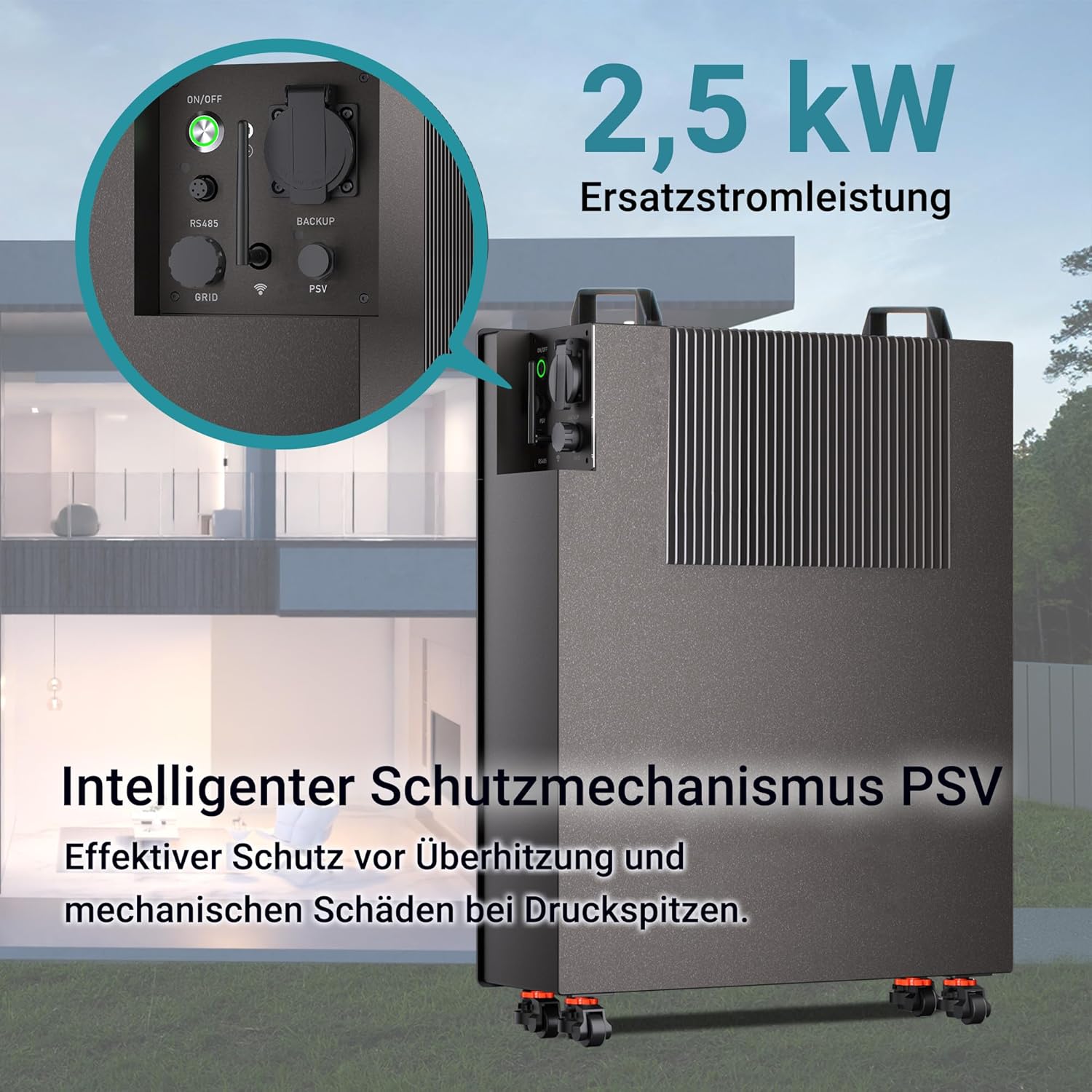
Зураг 5.1: Ойрын зураг view of the Marstek Venus E's control panel, showing the ON/OFF switch, RS485, GRID, and BACKUP ports, and highlighting its 2.5 kW backup power capability with an intelligent PSV protection mechanism.
5.2 App Control and Monitoring
The Marstek app provides comprehensive control and real-time data:
- Бодит цагийн хяналт: View current charge status, energy consumption, grid import/export, and PV utilization.
- Үйлдлийн горимууд: Select different operating modes (e.g., self-consumption, time-of-use, emergency backup priority).
- Dynamic Tariff Support: Optimize charging and discharging based on dynamic electricity tariffs to maximize savings.
- Алсын удирдлага: Turn the unit on/off or adjust settings remotely.
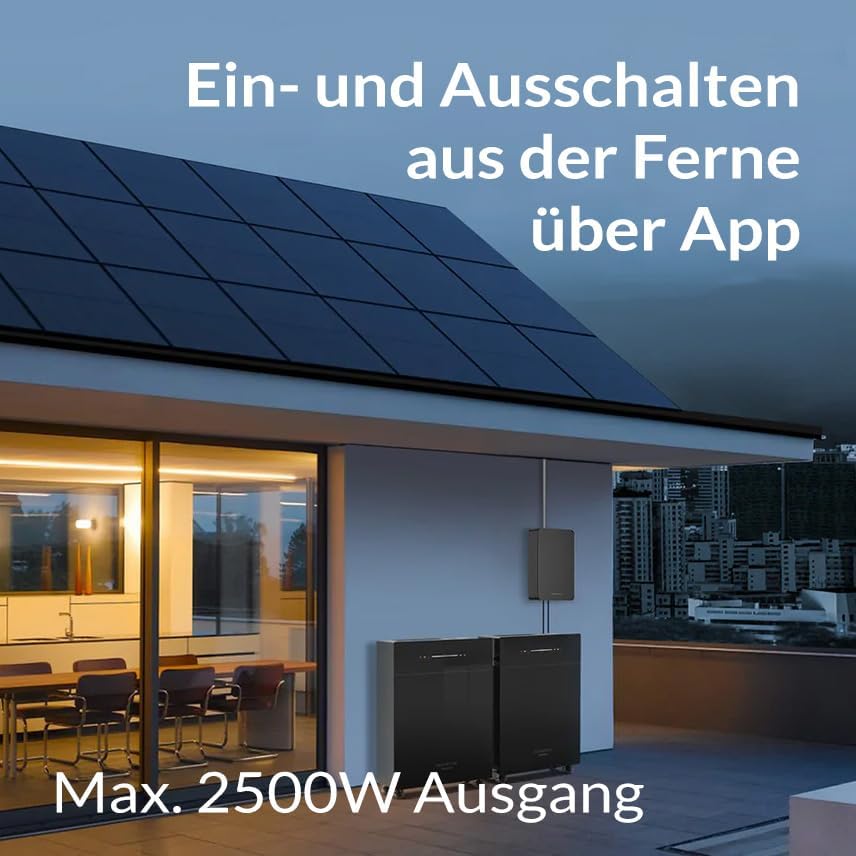
Figure 5.2: An illustration showing the Marstek Venus E unit installed outdoors with solar panels on the roof, emphasizing the ability to remotely turn the unit on and off via a smartphone app and its maximum 2500W output.
5.3 Emergency Power Function
Сүлжээнд цахилгааны сүлжээ үүссэн тохиолдолд utage, the Venus E automatically switches to emergency power mode, providing up to 2500W of output to connected critical loads. Ensure essential appliances are connected to the designated backup output if applicable, or that the unit is configured to power your home's critical loads circuit.

Figure 5.3: The Marstek Venus E unit connected to a refrigerator, demonstrating its reliable 24/7 power supply capability during a power outage.
5.4 Системийн өргөтгөл
The Marstek Venus E is designed for modular expansion. If your energy needs grow, additional Venus E units can be added to increase your total storage capacity up to 20.48kWh. Refer to the expansion kit manual for detailed instructions on adding modules.
6. Засвар үйлчилгээ
The Marstek Venus E is designed for minimal maintenance due to its robust construction and IP65 rating. However, regular checks can ensure optimal performance and longevity.
- Цэвэрлэгээ: Төхөөрөмжийн гадна талыг зөөлөн, үе үе арчиж байх damp cloth. Do not use abrasive cleaners or solvents. Ensure ventilation openings are free from dust and debris.
- Холболтын шалгалт: Occasionally inspect all electrical connections for tightness and signs of wear or corrosion.
- Програм хангамжийн шинэчлэлтүүд: Keep the Marstek app and the unit's firmware updated to the latest version to ensure optimal performance, security, and access to new features. Updates are typically managed through the app.
- Батерейны эрүүл мэнд: The intelligent BMS monitors battery health. No user intervention is typically required for battery maintenance. Avoid fully discharging the battery frequently to prolong its lifespan, although the LiFePO4 chemistry is highly resilient.
7. Алдаа засах
If you encounter issues with your Marstek Venus E, refer to the following common troubleshooting steps:
| Асуудал | Боломжит шалтгаан | Шийдэл |
|---|---|---|
| Төхөөрөмж асахгүй байна | No power from outlet; Unit is off; Internal fault. | Check wall outlet with another device. Ensure the unit's power switch is ON. If problem persists, contact support. |
| Цэнэглэхгүй байна | Input cable loose; Grid power unavailable; Charging limits set in app. | Check cable connections. Verify grid power. Review app settings for charging schedules or limits. |
| Цахилгаан гаралт байхгүй | Unit is off; Battery is depleted; Overload protection activated. | Ensure unit is ON. Check battery level in app. Reduce connected load. Allow unit to cool if overloaded. |
| Апп холболтын асуудал | Bluetooth/Wi-Fi off; Unit too far from router/phone; App outdated. | Ensure Bluetooth/Wi-Fi is enabled on both devices. Move closer to the unit. Update the app to the latest version. Restart unit and phone. |
| Ер бусын дуу чимээ эсвэл үнэр | Дотоод алдаа; Хэт халалт. | Immediately disconnect power. Do not attempt to operate. Contact customer support. |
If the problem persists after attempting these solutions, please contact Marstek customer support for further assistance.
8. Техникийн үзүүлэлтүүд
Detailed technical specifications for the Marstek Venus E 5120Wh:
| Онцлог | Тодорхойлолт |
|---|---|
| Загвар | Venus E 5120Wh |
| Зайны төрөл | LiFePO4 (литийн төмрийн фосфат) |
| Нэрлэсэн хүчин чадал | 5.12 кВт цаг |
| Өргөтгөх хүчин чадал | Up to 20.48 kWh (with additional modules) |
| Charge/Discharge Power | 2500W (Max. Input/Output) |
| Emergency Power Output | 2500 Вт |
| Амьдралын мөчлөг | > 6000 цикл |
| Нэвтрэх хамгаалалтын (IP) үнэлгээ | IP65 (Тоос нэвтэрдэггүй, усны тийрэлтэтээс хамгаалагдсан) |
| Холболт | App-controlled (Wi-Fi/Bluetooth) |
| Хэмжээ (сав баглаа боодол) | 76 x 60 x 38 см |
| Жин (Сав баглаа боодол) | 64.8 кг |
| Санал болгож буй програм | Solar devices, Home energy storage |

Зураг 8.1: Дотоод view of the Marstek Venus E, showcasing its components and highlighting its maximum 2500W input and 800W/2500W output capabilities.

Figure 8.2: A detailed internal view of the Marstek Venus E, showing the arrangement of its LiFePO4 battery cells, which contribute to its high capacity and long cycle life.
9. Баталгаат хугацаа ба дэмжлэг
9.1 Баталгаат хугацааны мэдээлэл
The Marstek Venus E 5120Wh comes with a 10 жилийн баталгаат хугацаа, ensuring peace of mind regarding its performance and durability. This warranty covers defects in materials and workmanship under normal use. Please retain your proof of purchase for warranty claims.
For detailed warranty terms and conditions, please refer to the official Marstek webсайт эсвэл хэрэглэгчийн дэмжлэгтэй холбоо барина уу.
9.2 Хэрэглэгчийн дэмжлэг
If you have any questions, require technical assistance, or need to make a warranty claim, please contact Marstek customer support. Contact information can typically be found on the official Marstek website or through the Marstek app.
When contacting support, please have your product model (Venus E 5120Wh) and purchase details ready to expedite the process.


