Танилцуулга
This manual provides comprehensive instructions for the setup, operation, and maintenance of your TMC 8-Inch Digital Clock. Designed with a clear, large display and user-friendly features, this clock is ideal for displaying time, date, and reminders. Please read this manual thoroughly before using the device to ensure proper functionality and longevity.
Аюулгүй байдлын мэдээлэл
- Цахилгаан адаптер нь таны орон нутгийн цахилгаан хангамжтай нийцэж байгаа эсэхийг шалгаарай.
- Төхөөрөмжийг хэт өндөр температур, нарны шууд тусгал, өндөр чийгшилд бүү тавь.
- Avoid dropping or subjecting the clock to strong impacts.
- Төхөөрөмжийг өөрөө задлах, засах гэж бүү оролдоорой. Тусламж авахын тулд хэрэглэгчийн дэмжлэгтэй холбоо барина уу.
- Хүүхэд, тэжээвэр амьтдын гар хүрэхгүй газар хадгална уу.
Багцын агуулга
Бүх зүйл багцад байгаа эсэхийг шалгана уу:
- TMC 8-Inch Digital Clock
- Эрчим хүчний адаптер
- Хэрэглэгчийн гарын авлага (энэ баримт бичиг)
- Ширээний тавцан
- Алсын удирдлага (хэрэв таны загварт багтсан бол)
Бүтээгдэхүүн дууссанview
The TMC 8-Inch Digital Clock features a clear, high-contrast display designed for easy readability. It includes multiple display styles, automatic brightness adjustment, and up to 12 customizable alarm reminders.
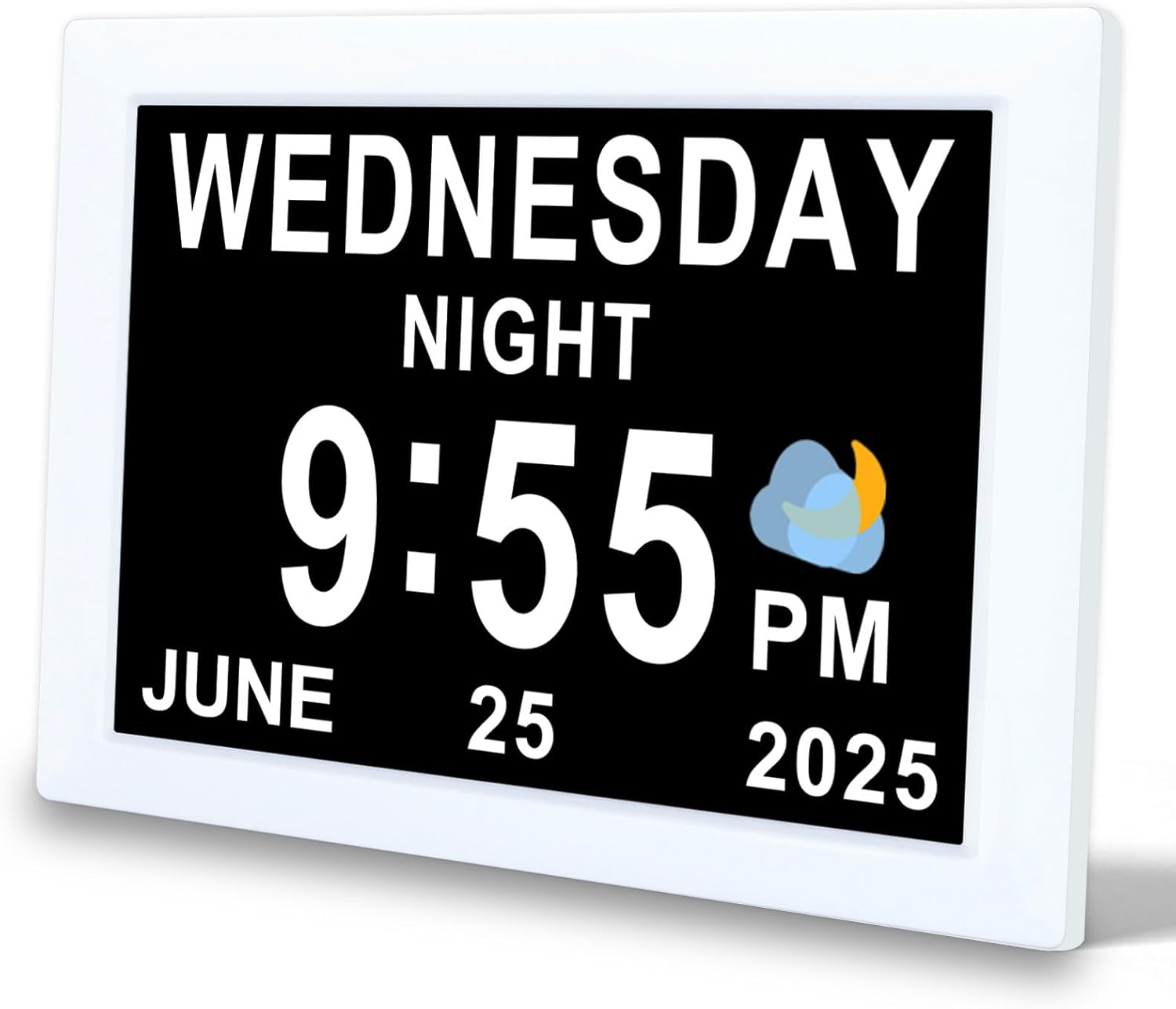
Зураг 1: Урд view of the TMC 8-Inch Digital Clock, showing a clear display of the day, time, and date.

Зураг 2: The clock features an ultra-narrow bezel design, enhancing the display area and providing a modern aesthetic for both wall-mounted and desktop use.

Зураг 3: The clock's design provides a 20% larger visible screen area compared to typical models, along with an anti-glare finish for improved readability.

Зураг 4: Арын view and dimensions of the clock, highlighting the DC power input, SD card slot, and wall-mounted hole. The remote control is also shown with its buttons: Power, Up, Down, Left, Right, Play/Pause, Menu.
Гол онцлогууд:
- 8-inch high-resolution display with narrow bezel.
- 10 хэлийг дэмждэг.
- 12 customizable alarm reminders with 9 icon options.
- Automatic brightness adjustment (5 levels) or manual control.
- Multiple display interfaces (digital, analog, icon modes).
- 12/24-hour time format.
- Wall-mountable or desktop stand options.
- Built-in backup battery for power loss protection.
- Adjustable volume (levels 1-10).
- SD card support for photo and video playback (optional).
Тохиргоо
- Төхөөрөмжийг задлах: Цаг болон бүх дагалдах хэрэгслийг савлагаанаас болгоомжтой авч хая.
- Байршил:
- For desktop use, attach the provided stand to the back of the clock.
- For wall mounting, use the wall-mounted hole on the back of the clock (mounting hardware not included).
- Эрчим хүчийг холбох: Plug the power adapter into the DC Power port on the back of the clock, then plug the adapter into a standard electrical outlet. The clock will power on automatically.
- Анхны тохиргоо: Upon first power-on, you may be prompted to set the language, time, and date. Use the remote control or buttons on the back of the clock to navigate and confirm selections.
Ашиглалтын заавар
1. Basic Navigation and Settings
Use the remote control or the buttons on the back of the clock to access and adjust settings. The 'MENU' button typically opens the main settings menu, and arrow buttons navigate options. 'OK' or 'Play/Pause' confirms selections.
2. Цаг, огноог тохируулах
- Press the 'MENU' button to enter the main settings.
- Navigate to 'Time Settings' or 'Date Settings'.
- Use the arrow buttons to adjust hours, minutes, year, month, and day.
- Select 12-hour or 24-hour format as desired.
- Confirm your selections to save.
3. Сэрүүлэг тохируулах
The clock supports up to 12 customizable alarms. Each alarm can be set with a specific time and an associated icon.

Зураг 5: The clock displaying a 'Medication Time' alarm, with a visual representation of various daily reminder icons available for customization.
- Press 'MENU' and navigate to 'Alarm Settings'.
- Select an alarm slot (e.g., Alarm 1, Alarm 2).
- Сэрүүлгийн хүссэн цагийг тохируулна уу.
- Choose an alarm icon from the available options (e.g., Medication Time, Meal Time, Wake Up).
- Сэрүүлгийг идэвхжүүлэх эсвэл идэвхгүй болгох.
- Adjust the alarm volume (see section 5).
- Confirm to save the alarm.

Зураг 6: Нарийвчилсан view of the alarm setting interface, illustrating the selection of various alarm types and their corresponding icons.
4. Гэрэлт байдлыг тохируулах
The clock features automatic brightness adjustment based on the time of day. You can also manually set the brightness.

Зураг 7: Illustration of the automatic brightness feature, showing the display adjusting for daytime and nighttime conditions.
- From the 'MENU', navigate to 'Display Settings' or 'Brightness'.
- Select 'Auto' for automatic adjustment (5 levels) or 'Manual' to set a fixed brightness level.
- If 'Manual' is selected, use arrow buttons to choose your preferred brightness level.
- Confirm to save.
5. Дууны хэмжээг тохируулах
The alarm and notification volume can be adjusted from level 1 to 10.

Зураг 8: The clock's volume adjustment feature, suitable for various preferences, including deep sleepers.
- From the 'MENU', navigate to 'Sound Settings' or 'Volume'.
- Use the arrow buttons to select a volume level from 1 to 10.
- Confirm to save.
6. Display Modes and UI Styles
The clock offers multiple display styles and user interface (UI) layouts to suit your preference.

Зураг 9: Various selectable UI styles, including digital, calendar, and analog formats.
- From the 'MENU', navigate to 'Display Settings' or 'UI Style'.
- Use the arrow buttons to cycle through available UI layouts (e.g., digital, analog, icon modes).
- Some styles may offer font color options.
- Сонголтоо баталгаажуулна уу.

Зураг 10: Examples of the unique time-based display, showing how the clock indicates different parts of the day (e.g., Morning, Afternoon, Night).
7. SD Card Photo and Video Playback (Optional)
If your model supports it, you can insert an SD card to display photos or play videos.
- Insert a compatible SD card into the SD card slot on the back of the clock.
- Navigate to 'Media Playback' or 'Photo/Video' in the main menu.
- Select the desired media type (photos or videos) and browse your files.
- Use the 'Play/Pause' button to start or stop playback.
Засвар үйлчилгээ
- Цэвэрлэгээ: Use a soft, dry cloth to gently wipe the screen and body of the clock. Do not use liquid cleaners or abrasive materials.
- Хадгалах: Хэрэв цагийг удаан хугацаагаар хадгалах бол цахилгаан тэжээлээс салгаад сэрүүн, хуурай газар хадгална уу.
- Нөөц батерей: The built-in backup battery maintains time and date settings during power outages. It is not user-replaceable.
Алдааг олж засварлах
| Асуудал | Боломжит шалтгаан | Шийдэл |
|---|---|---|
| Цаг асахгүй байна. | Цахилгаан адаптер холбогдоогүй эсвэл алдаатай байна. | Цахилгаан адаптер цаг болон ажиллаж байгаа цахилгаан залгуурт найдвартай залгагдсан эсэхийг шалгаарай. Өөр залгуурыг туршаад үзээрэй. |
| Дэлгэц хэт бүдэг эсвэл хэт тод байна. | Гэрэлтүүлгийн тохиргоо буруу байна. | Adjust brightness settings in the 'Display Settings' menu (see Operating Instructions, section 4). Ensure 'Auto' brightness is enabled if desired. |
| Сэрүүлэг дуугарахгүй эсвэл хэт чимээгүй байна. | Сэрүүлэг идэвхгүй эсвэл дууны түвшин хэт бага байна. | Check 'Alarm Settings' to ensure the alarm is enabled. Adjust the volume in 'Sound Settings' (see Operating Instructions, section 5). |
| Буруу цаг эсвэл огноо харуулагдсан. | Time/date settings are incorrect. | Access 'Time Settings' and 'Date Settings' in the menu to correct the values (see Operating Instructions, section 2). |
| SD card media not playing. | SD card not inserted correctly or incompatible file формат. | Ensure the SD card is fully inserted. Check the manual for supported file formats. Try a different SD card. |
Үзүүлэлтүүд
| Брэнд | TMC |
| Загвар | 8-Inch Digital Clock |
| Дэлгэцийн төрөл | Дижитал |
| Дэлгэцийн хэмжээ | 8 инч |
| Бүтээгдэхүүний хэмжээс | 15.5 x 3.81 x 19.5 см |
| Зүйлийн жин | 470 гр |
| Материал | Хуванцар |
| Онцлог шинж чанарууд | Adjustable Brightness, Adjustable Volume, 12 Alarms, Calendar Display, Multi-Style Interfaces, SD Card Playback (optional) |
| Дэмжигдсэн хэлүүд | 10 Хэл |

Зураг 11: A summary of the clock's features and capabilities.
Баталгаат болон дэмжлэг
For warranty information or technical support, please refer to the contact details provided with your purchase documentation or visit the official TMC webсайт. Худалдан авалтын баримтаа худалдан авалтын баталгаа болгон хадгалаарай.


