Танилцуулга
Thank you for choosing the ProtoArc KM310 Dual Mode Mechanical Keyboard and Mouse Kit. This kit provides a versatile and efficient solution for your computing needs, offering both 2.4G wireless and Bluetooth connectivity. The mechanical keyboard features a UK QWERTY layout with responsive red switches, while the ergonomic mouse offers adjustable DPI and quiet clicks. This manual will guide you through the setup, operation, and maintenance of your new device.
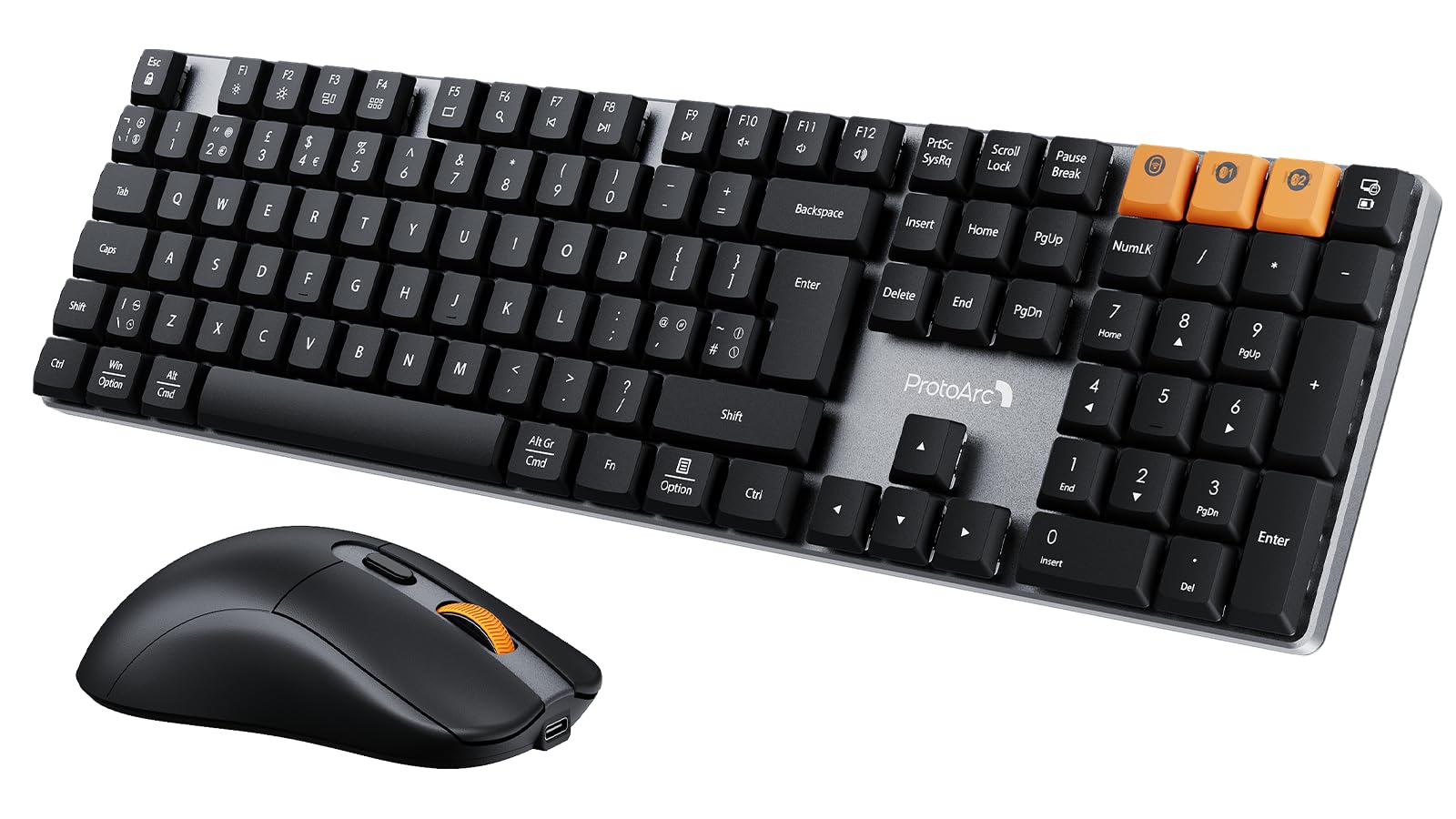
Image: The ProtoArc KM310 keyboard and mouse kit, showcasing its sleek design on a modern desk setup.
Багцын агуулга
- ProtoArc KM310 Mechanical Keyboard
- ProtoArc Wireless Mouse
- USB 2.4G Receiver (stored in the mouse battery compartment)
- USB-C цэнэглэгч кабель
- Хэрэглэгчийн гарын авлага
Тохируулах заавар
Гарны тохиргоо
The keyboard supports both 2.4G wireless and Bluetooth connectivity. You can connect up to three devices simultaneously (one via 2.4G, two via Bluetooth).
2.4G утасгүй холболт:
- Хулганы батерейны хэсэгт ихэвчлэн хадгалагддаг USB 2.4G хүлээн авагчийг олоорой.
- USB хүлээн авагчийг компьютер дээрээ байгаа USB порт руу холбоно уу.
- Turn on the keyboard using the power switch located on the side or back.
- дарна уу fn+4 to switch the keyboard to 2.4G mode. The indicator light will flash briefly, then remain solid when connected.
Блютүүт холболт (BT1 / BT2):
- Цахилгаан унтраалга ашиглан гарыг асаана уу.
- дарна уу Fn + Q (for BT1) or Fn + W (for BT2) to select a Bluetooth channel. The indicator light will flash slowly.
- Хослуулах горимд орохын тулд удаан дарна уу Fn + Q or Fn + W for 3-5 seconds until the indicator light flashes rapidly.
- On your device (computer, laptop, tablet), enable Bluetooth and search for "ProtoArc KM310".
- Select "ProtoArc KM310" to pair. The indicator light will stop flashing and remain solid when connected.
- Repeat for a second Bluetooth device using Fn + W.
Хулганы тохиргоо
The mouse also supports both 2.4G wireless and Bluetooth connectivity.
2.4G утасгүй холболт:
- USB 2.4G хүлээн авагчийг компьютертээ залгасан эсэхээ шалгаарай.
- Хулганы доод талд байрлах цахилгаан товчийг ашиглан хулганыг асаана уу.
- Press the mode switch button on the underside of the mouse until the indicator light shows 2.4G mode (usually green). The mouse should connect automatically.
Bluetooth холболт:
- Цахилгаан унтраалга ашиглан хулганаа асаана уу.
- Press the mode switch button on the underside of the mouse to cycle through Bluetooth modes (BT1 or BT2, usually blue).
- Press and hold the mode switch button for 3-5 seconds until the indicator light flashes rapidly.
- On your device, enable Bluetooth and search for "ProtoArc Mouse".
- Select "ProtoArc Mouse" to pair. The indicator light will stop flashing and remain solid when connected.

Image: The ProtoArc KM310 keyboard and mouse connected to multiple devices (desktop, laptop, tablet) via 2.4G and Bluetooth.
Ашиглалтын заавар
Гарны функцууд
- Механик түлхүүрүүд: Гар нь бага түвшний үзүүлэлттэйfile mechanical red switches for a smooth and responsive typing experience with low sound.
- UK QWERTY Layout: Standard UK QWERTY layout with a full numeric keypad.
- Мультимедиа түлхүүрүүд: -г ашиглана уу Fn key in combination with the F-keys (F1-F12) for various multimedia and shortcut functions (e.g., volume control, media playback, brightness adjustment). Refer to the keycap legends for specific functions.
- Тохируулах боломжтой хазайлттай хөл: The keyboard includes adjustable tilt legs on the underside, allowing you to set it at a 6° or 9° angle for improved ergonomic comfort during long typing sessions.

Зураг: Ойрын зураг view of the ProtoArc KM310 mechanical keyboard, highlighting the low-profile red switches and keycap design.

Image: The ProtoArc KM310 keyboard from a side angle, demonstrating the adjustable tilt legs set at a 9-degree angle.
Хулганы функцууд
- Тохируулах DPI: The mouse offers three adjustable DPI levels: 1000, 1600, and 2400. Press the DPI button (usually located behind the scroll wheel) to cycle through these settings and adjust cursor sensitivity.
- Чимээгүй товшилт: Чимээгүй ажиллах зориулалттай бөгөөд товшилтын чимээг 90% хүртэл бууруулдаг.
- Эргономик дизайн: The mouse features an ergonomic grip for comfortable use, reducing hand fatigue during extended periods.
- Хэт хөнгөн: Weighing approximately 63g, the mouse is designed to be ultra-light, contributing to efficient work and reduced fatigue.

Image: The ProtoArc wireless mouse illustrating its adjustable DPI settings (1000, 1600, 2400) and quiet click feature.

Image: A hand demonstrating the natural and ergonomic grip of the ProtoArc wireless mouse.

Image: A comparison showing the ProtoArc wireless mouse's ultra-lightweight design (63g) compared to a traditional mouse (100g), emphasizing reduced fatigue.
Цэнэглэх заавар
Both the keyboard and mouse are equipped with built-in rechargeable batteries and use a USB-C charging port.
- Цэнэглэж байна: Connect the provided USB-C cable to the charging port on the keyboard/mouse and the other end to a USB power source (e.g., computer USB port, wall adapter).
- Цэнэглэх үзүүлэлт: An indicator light will typically show red during charging and turn off or change color when fully charged.
- Цэнэглэх хугацаа: A full charge usually takes 2-3 hours.
- Хүлээлгийн хугацаа: The devices offer a standby time of 150-200 days on a full charge.
- Usage During Charging: Цэнэглэх үед хоёр төхөөрөмжийг хоёуланг нь ашиглаж болно.
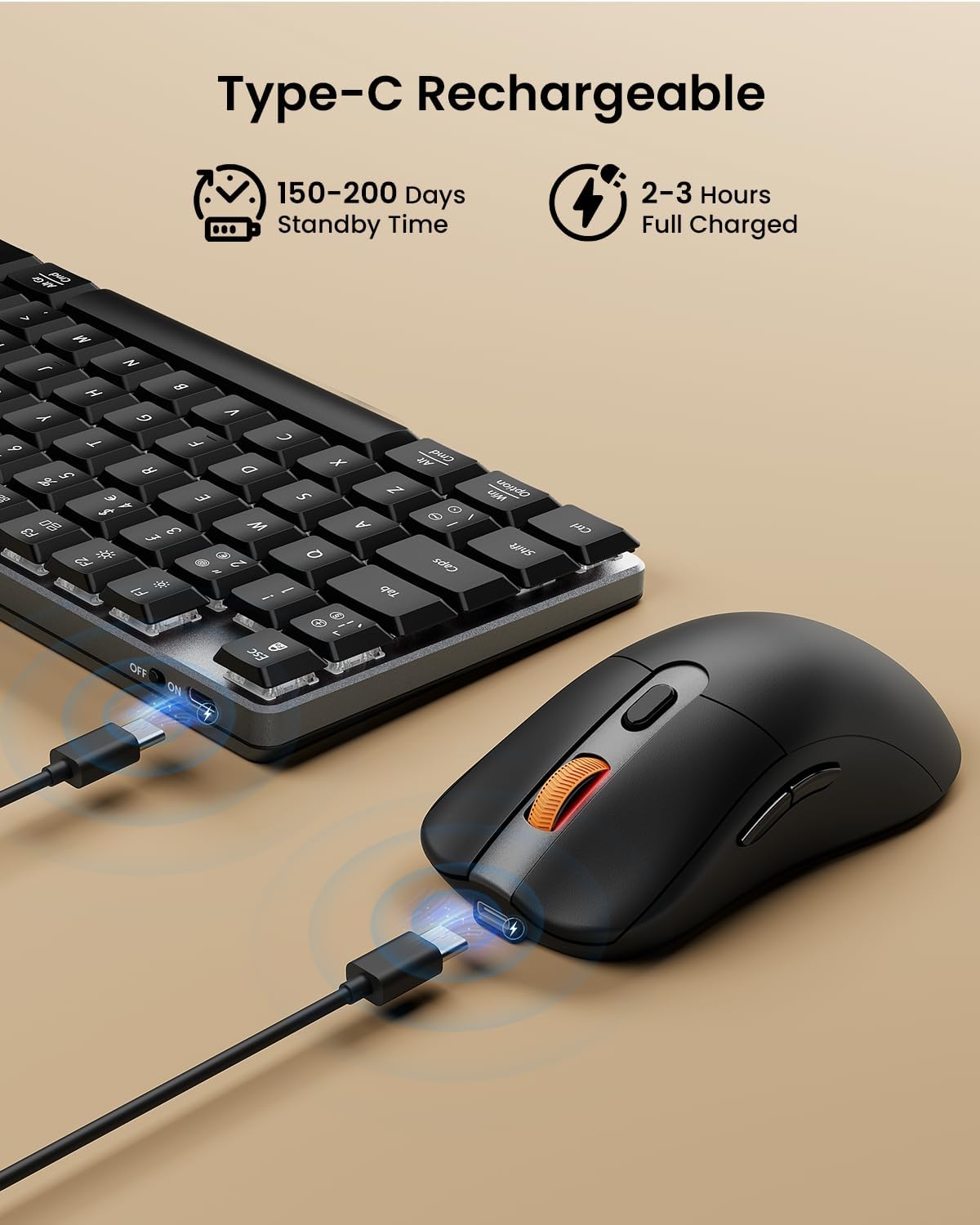
Image: The ProtoArc keyboard and mouse being charged simultaneously via USB-C cables, illustrating the charging ports and cables.
Засвар үйлчилгээ
- Цэвэрлэгээ: Use a soft, dry cloth to clean the surfaces of the keyboard and mouse. For deeper cleaning, especially between keys, use compressed air. Avoid using harsh chemicals or abrasive materials.
- Хадгалах: Удаан хугацаагаар ашиглаагүй тохиолдолд батерейны ашиглалтыг хэмнэхийн тулд төхөөрөмжийг унтраа. Тэднийг сэрүүн, хуурай газар хадгална.
- Батерейны арчилгаа: Avoid fully discharging the battery frequently. Charge the devices regularly to maintain optimal battery health.
Алдааг олж засварлах
Гар/хулгана хариу өгөхгүй байна:
- Төхөөрөмжүүд асаалттай байгаа эсэхийг шалгаарай.
- Зайны түвшинг шалгаж, шаардлагатай бол цэнэглэ.
- 2.4G холболтын хувьд USB хүлээн авагч нь ажиллаж байгаа USB порт руу найдвартай залгагдсан эсэхийг шалгаарай. Өөр USB порт ашиглаж үзнэ үү.
- For Bluetooth connection, ensure Bluetooth is enabled on your device and the correct channel (BT1/BT2) is selected on the keyboard/mouse. Try re-pairing the device.
- Move the devices closer to the receiver/device to rule out interference.
Хоцрогдол эсвэл холболт тасалдалт:
- Ensure there are no strong sources of interference (e.g., Wi-Fi routers, other wireless devices) nearby.
- Try connecting via the other mode (e.g., if using 2.4G, try Bluetooth, or vice-versa).
- Update your computer's Bluetooth drivers if connecting via Bluetooth.
Түлхүүрүүд зөв ажиллахгүй байна:
- Check for any debris under the keycaps.
- Ensure the keyboard is not in a special mode that might alter key functions.
Үзүүлэлтүүд
| Брэнд | ProtoArc |
| Загварын дугаар | KM310 |
| Өнгө | Хар |
| Холболтын технологи | Bluetooth, 2.4G USB утасгүй |
| Үйлдлийн системийн нийцтэй байдал | Windows, macOS, Linux |
| Онцлог шинж чанарууд (Гар) | Rechargeable mechanical keyboard, UK QWERTY layout, Red switches, Numeric keypad, Shortcut and multimedia keys, Adjustable tilt legs |
| Special Features (Mouse) | Adjustable DPI (1000/1600/2400), Silent click, Ergonomic grip, Ultra-lightweight (approx. 63g) |
| Тохиромжтой төхөөрөмжүүд | Хувийн компьютер, зөөврийн компьютер, таблет |
| Гарын тайлбар | Механик |
| Хөдөлгөөн илрүүлэх технологи | Оптик |
| Эрчим хүчний эх үүсвэр | Батерейгаар ажилладаг (USB-C-ээр цэнэглэдэг) |
| Зайны зогсолтын хугацаа | 150-200 хоног |
| Бүрэн цэнэглэх хугацаа | 2-3 цаг |
Баталгаат болон дэмжлэг
ProtoArc products are designed for reliability and performance. For any questions, technical support, or warranty claims, please contact ProtoArc customer service. Details can typically be found on the official ProtoArc webсайт эсвэл таны худалдан авах платформоор дамжуулан.
Баталгаат хугацаанд худалдаж авсан баримтаа хадгална уу.