1. Оршил ба түүнээс дээшview
Welcome to the Vibox V-525 Gaming PC. This manual provides essential information for setting up, operating, maintaining, and troubleshooting your new computer. The Vibox V-525 is a high-performance gaming system featuring an AMD Ryzen 5 5500 processor, an Nvidia RTX 4060 8GB graphics card, 16GB of DDR4 RAM, and a 1TB SSD, pre-installed with Windows 11.
Please read this manual carefully before using your PC to ensure optimal performance and longevity.
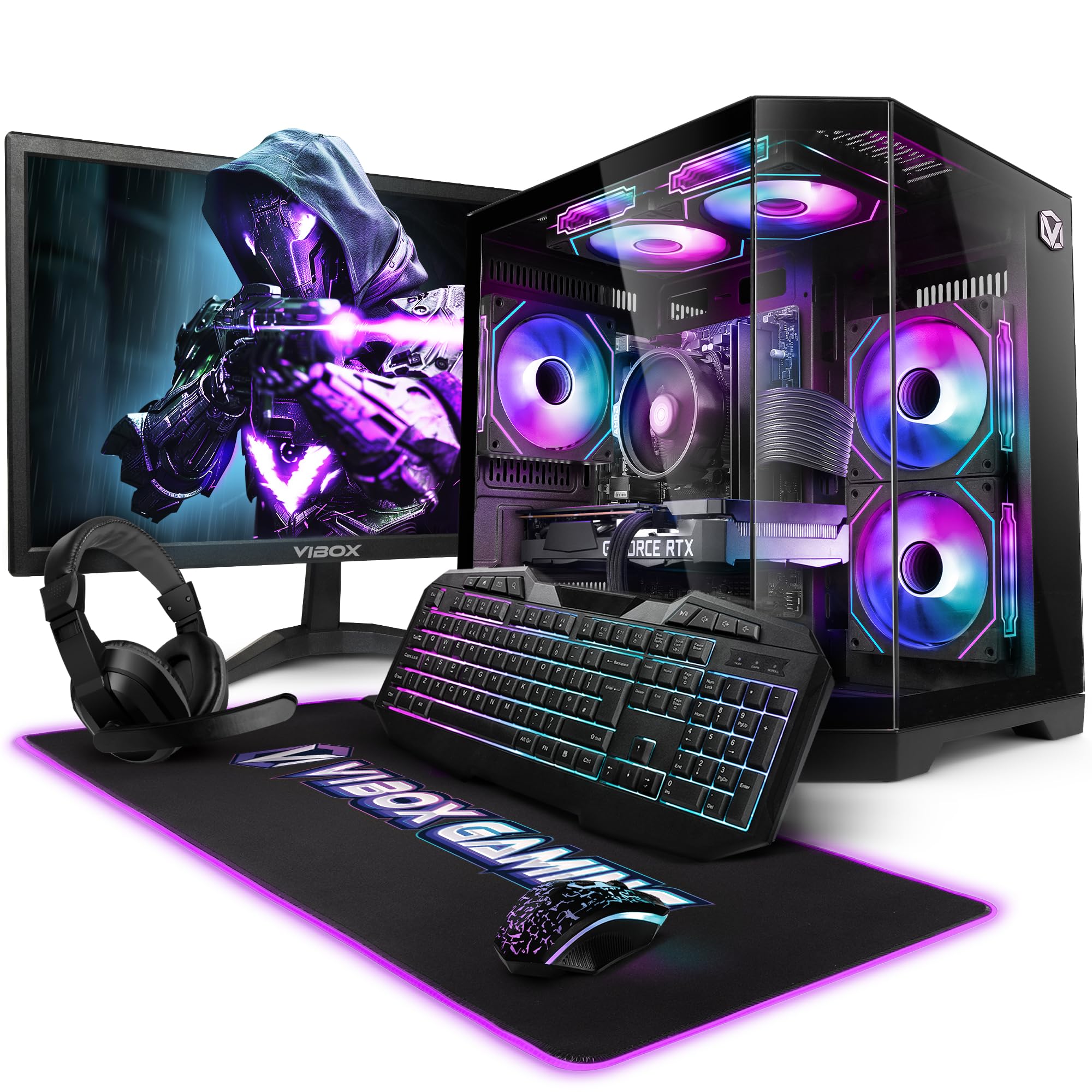
Figure 1.1: Vibox V-525 Gaming PC
2. Тохируулах гарын авлага
2.1 Савлах
Carefully remove all components from the packaging. Ensure you have the PC tower, 23-inch monitor, gaming keyboard, gaming mouse, headset, mouse pad, Wi-Fi adapter, and power cables.
2.2 Захын төхөөрөмжүүдийг холбох
- Монитор: Connect the 23-inch monitor to the graphics card (Nvidia RTX 4060) using an HDMI or DisplayPort cable. Ensure the cable is securely fastened.
- Гар ба хулгана: Connect the gaming keyboard and mouse to the available USB ports on the rear or front of the PC.
- Чихэвч: Plug your headset into the dedicated audio jacks on the front panel or rear I/O.
- Wi-Fi Adapter: Insert the 300 Mbps Wi-Fi adapter into an available USB port.
- Эрчим хүч: Connect the power cable to the PC's power supply unit (PSU) and then to a wall outlet. Connect the monitor's power cable as well.
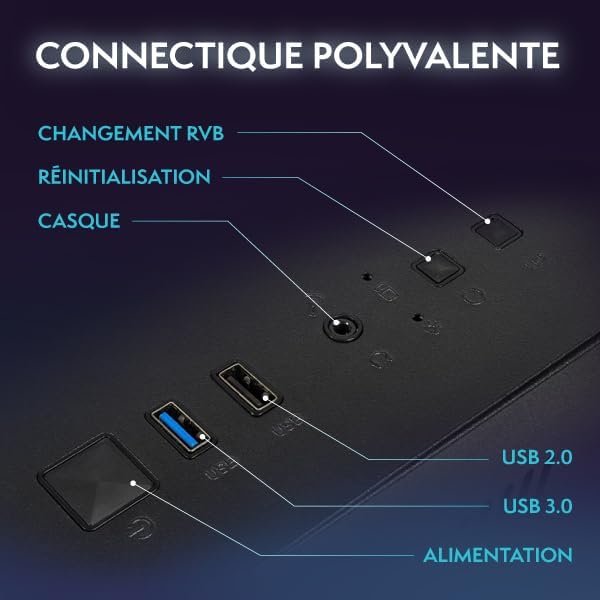
Figure 2.1: Front Panel Connectivity (Power, USB 2.0, USB 3.0, Headset, Reset, RGB Change)
2.3 Анхны ачаалалт ба Windows 11 тохиргоо
- Компьютерийн урд талд байрлах цахилгаан товчийг дарна уу.
- Follow the on-screen instructions to complete the Windows 11 setup process. This typically involves selecting your region, language, creating a user account, and connecting to a network.
- Once Windows 11 is set up, ensure all drivers are installed. You can check this in Device Manager.

Figure 2.2: Windows 11 Home Features
3. Ашиглалтын заавар
3.1 Асаах/унтраах
- Асаахын тулд: Урд самбар дээрх цахилгаан товчийг дарна уу.
- Унтраахын тулд: Click the Start button in Windows, then select Power > Shut down. Avoid simply holding the power button to turn off, as this can lead to data loss.
- Дахин эхлүүлэхийн тулд: Эхлүүлэх товчийг дараад, дараа нь Асаах > Дахин эхлүүлэх гэснийг сонгоно уу.
3.2 Basic Windows 11 Navigation
Windows 11 features a redesigned user interface. The Start menu is centrally located, and widgets provide quick access to information. Explore the settings menu to personalize your experience.
3.3 Wi-Fi-д холбогдож байна
- Ensure your USB Wi-Fi adapter is plugged in.
- Click the network icon (Wi-Fi symbol) in the taskbar.
- Select your desired Wi-Fi network from the list and click 'Connect'.
- Хэрэв асуувал сүлжээний аюулгүй байдлын түлхүүрийг (нууц үг) оруулна уу.
3.4 RGB гэрэлтүүлгийн удирдлага
Your Vibox V-525 features Hex RGB Infinity 120mm fans. Use the 'RGB Change' button on the front panel to cycle through various lighting modes and colors. Refer to the software provided by Vibox (if applicable) for more advanced customization.

Figure 3.1: Hex RGB Infinity 120mm Fans
4. Засвар үйлчилгээ
4.1 Компьютерээ цэвэрлэх
Тогтмол цэвэрлэгээ нь оновчтой гүйцэтгэлийг хадгалахад тусалдаг ба эд ангиудын ашиглалтын хугацааг уртасгадаг.
- Гадна: Зөөлөн ашиглах, damp cloth to wipe down the exterior of the case. Avoid harsh chemicals.
- Interior (Dust): Periodically, and with the PC powered off and unplugged, use compressed air to remove dust from inside the case, especially from fans, heatsinks, and vents. Pay attention to the Hex RGB Infinity fans and the GPU heatsink.
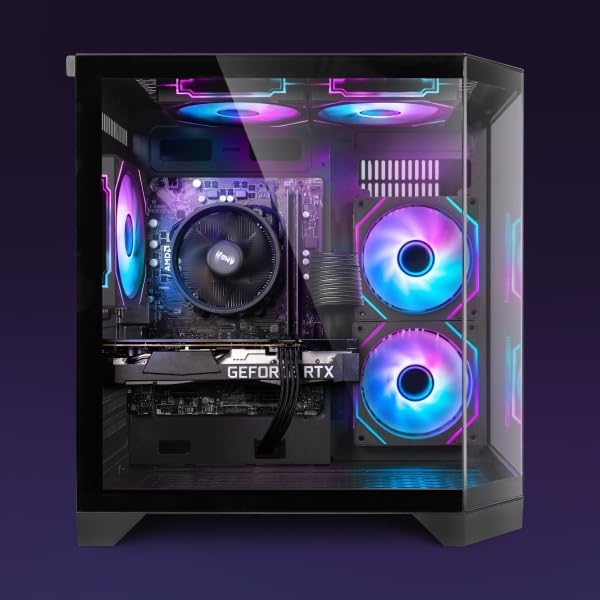
Зураг 4.1: Дотоод View of PC Components
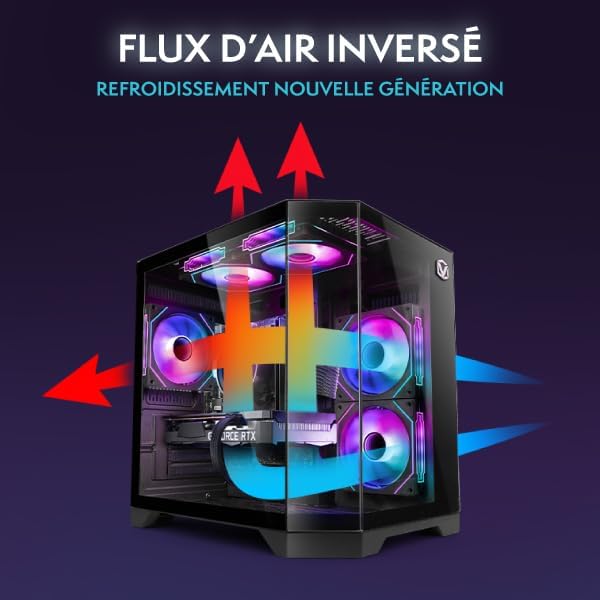
Figure 4.2: Reverse Airflow Next Generation Cooling Diagram
4.2 Програм хангамжийн шинэчлэлтүүд
- Windows шинэчлэлтүүд: Тохиргоо > Windows Update хэсгээс Windows шинэчлэлтүүдийг тогтмол шалгаж, суулгаарай.
- Драйверын шинэчлэлтүүд: Keep your graphics card drivers (Nvidia GeForce Experience) and other component drivers up to date for optimal performance and stability.
4.3 Өгөгдлийн нөөцлөлт
Чухал зүйлээ байнга нөөцөлж аваарай fileМэдээллийн алдагдлаас урьдчилан сэргийлэхийн тулд гадаад диск эсвэл үүл хадгалах сан руу шилжүүлээрэй.
5. Алдаа засах
Энэ хэсэгт танд тулгарч болох нийтлэг асуудлуудыг авч үзэх болно.
5.1 Эрчим хүчгүй
- Цахилгааны кабелийг компьютер болон ханын залгуурт найдвартай холбосон эсэхийг шалгаарай.
- Check if the power switch on the PSU (at the back of the PC) is in the 'On' position.
- Өөр цахилгаан залгуураар оролдоно уу.
5.2 Дэлгэц дээр дэлгэц байхгүй
- Verify that the monitor's power cable is connected and the monitor is turned on.
- Ensure the video cable (HDMI/DisplayPort) is securely connected to both the graphics card (Nvidia RTX 4060) and the monitor.
- Хэрэв боломжтой бол өөр видео кабель эсвэл монитор ашиглаж үзээрэй.
5.3 Удаан гүйцэтгэл
- CPU, RAM эсвэл дискний нөөцийг хэт их хэрэглэдэг программууд байгаа эсэхийг Task Manager (Ctrl+Shift+Esc) шалгана уу.
- Windows болон драйверууд шинэчлэгдсэн эсэхийг шалгаарай.
- Вирусын хайлтыг ажиллуул.
- Ensure adequate airflow and clean any dust buildup (refer to Section 4.1).
5.4 Сүлжээний холболтын асуудлууд
- Verify the Wi-Fi adapter is properly installed and recognized by Windows.
- Чиглүүлэгч/модемоо дахин эхлүүлнэ үү.
- Windows сүлжээний алдааг олж засварлагчийг ажиллуулна уу.
6. Техникийн үзүүлэлтүүд
The following table details the key specifications of your Vibox V-525 Gaming PC:
| Бүрэлдэхүүн хэсэг | Тодорхойлолт |
|---|---|
| Процессор | AMD Ryzen 5 5500 (6 Cores, Max 4.2 GHz) |
| График карт | Nvidia GeForce RTX 4060 (8 GB GDDR6 RAM, HDMI 2.1, DisplayPort 1.4a) |
| RAM | 16 GB DDR4 Dual Channel (3200 MHz) |
| Хадгалах | 1 TB SSD |
| Үйлдлийн систем | Windows 11 Нүүр хуудас |
| Хяналт | 23-inch (Max Resolution: 1920 x 1080) |
| Холболт | Wi-Fi (300 Mbps adapter included), 4 Total USB Ports |
| Кэш санах ой | 16 MB |
| Кейсийн зураг төсөл | 3-Panel Tempered Glass |
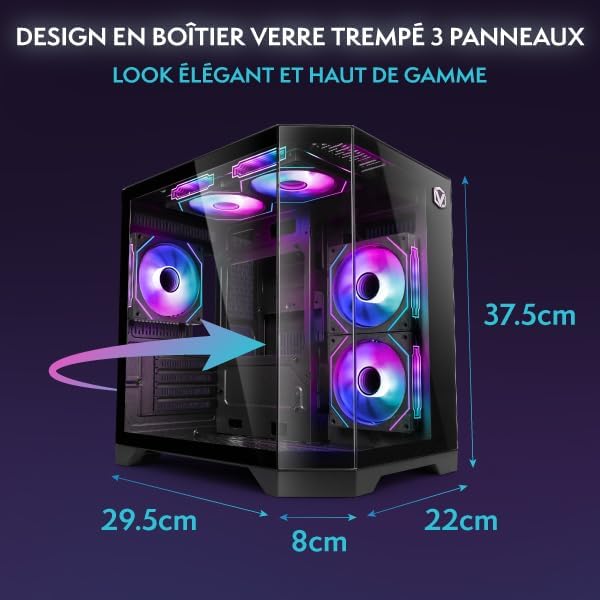
Зураг 6.1: Компьютерийн корпусын хэмжээ
7. Баталгаат хугацаа ба дэмжлэг
Your Vibox V-525 Gaming PC comes with a manufacturer's warranty. Please refer to the warranty card included in your product packaging for specific terms and conditions, including the warranty period and coverage details.
For technical support, troubleshooting assistance beyond this manual, or warranty claims, please contact Vibox customer service through their official webсайт эсвэл таны худалдан авалтын баримт бичигт өгөгдсөн холбоо барих мэдээлэл.
Always provide your product model (V-525) and purchase date when contacting support.


