Танилцуулга
The JBL Horizon 3 is a versatile radio alarm clock designed to enhance your daily routine. It features clear digital audio via DAB/DAB+/FM radio and Bluetooth connectivity for streaming from smart devices. Key functions include a sunrise simulation alarm, customizable sleep mode with natural sounds, and internal memory for favorite stations. Its portable design makes it suitable for various environments, from bedside tables to outdoor settings, delivering powerful and clear JBL sound.
This manual provides essential information for setting up, operating, and maintaining your JBL Horizon 3 to ensure optimal performance and longevity.
Тохиргоо
1. Савлах ба байрлуулах
- Сав баглаа боодолоос бүх бүрэлдэхүүн хэсгүүдийг болгоомжтой арилгана.
- Place the JBL Horizon 3 on a stable, flat surface. Ensure adequate ventilation around the unit.
- For optimal radio reception, extend the spiral antenna fully.

Зураг 1: Урд view of the JBL Horizon 3, displaying the time and alarm status on its digital screen.
2. Эрчим хүчний холболт
- Connect the provided power cable to the power input port on the back of the unit.
- Цахилгааны кабелийн нөгөө үзүүрийг ханын залгуурт холбоно уу.
- The device will power on automatically or can be turned on using the power button.
Зураг 2: Доод талд view of the JBL Horizon 3, illustrating the power connection point and the battery compartment.
3. Анхны тохиргоо (Цаг ба огноо)
- Upon first power-on, the device may prompt you to set the time and date. Follow the on-screen instructions.
- Alternatively, use the JBL ONE application for easier configuration.
Ашиглалтын заавар
1. Хяналтуудview

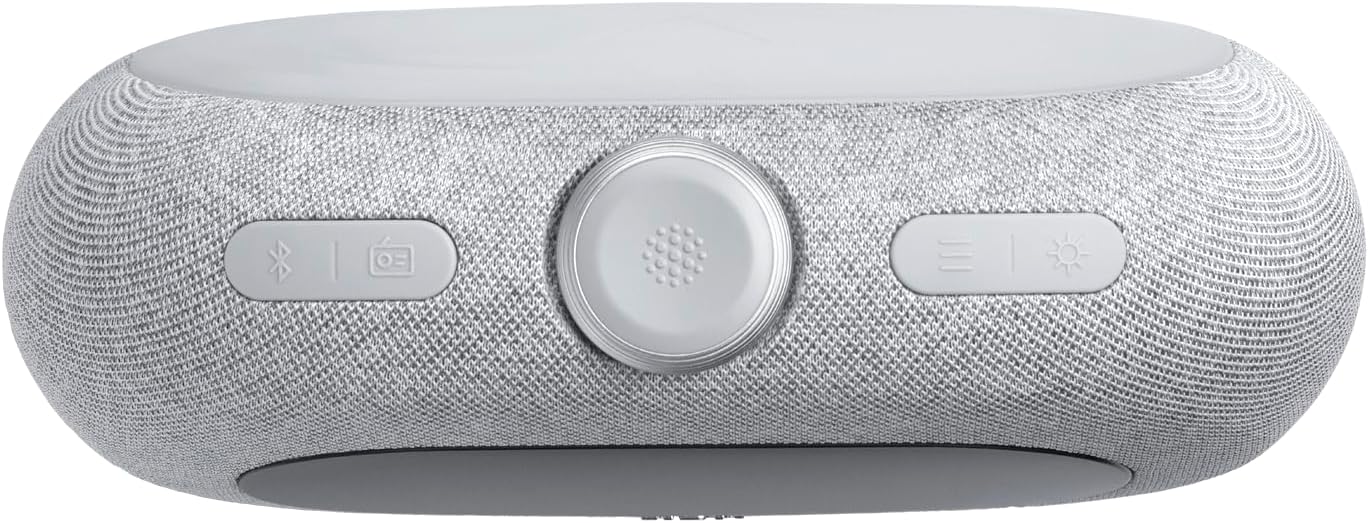
Зураг 3: Дээд тал view of the JBL Horizon 3, highlighting the main controls including the rotary dial, function buttons, and alarm presets.
- Эргэдэг залгах: Used for adjusting volume, navigating menus, and setting time/alarms.
- Цахилгаан товч: Төхөөрөмжийг асаах/унтраах.
- Bluetooth товчлуур: Bluetooth хослуулах горимыг идэвхжүүлнэ.
- Radio Button (DAB/FM): Toggles between DAB and FM radio modes.
- Орчны гэрлийн товчлуур: Controls the ambient light settings.
- Alarm Presets (1, 2, 3): Quick access to saved alarm settings.
2. Radio Operation (DAB/DAB+/FM)
- дээр дарна уу Радио button to switch between DAB/DAB+ and FM modes.
- In DAB mode, the device will automatically scan for available stations. Use the rotary dial to browse.
- In FM mode, use the rotary dial to tune to a specific frequency or press the scan buttons to find the next available station.
- To save a favorite station, long-press one of the numbered preset buttons (1-3).
3. Bluetooth дамжуулалт
- дээр дарна уу Bluetooth button to enter pairing mode. The display will show "Pairing".
- On your smart device, enable Bluetooth and select "JBL Horizon 3" from the list of available devices.
- Once connected, you can stream audio from your device to the JBL Horizon 3.
4. Сэрүүлгийн тохиргоо
- Аль нэгийг нь дар Сэрүүлгийн урьдчилсан тохируулга buttons (1-3) to configure an alarm.
- Use the rotary dial to set the alarm time, alarm source (radio, natural sound, Bluetooth), and volume.
- Enable the sunrise simulation feature for a gradual wake-up experience.
- To snooze, press the rotary dial when the alarm sounds.
5. Sleep Mode and Ambient Light
- Activate sleep mode to fall asleep to soothing natural sounds or a chosen radio station.
- -г ашиглана уу Орчны гэрэл button to adjust the color and brightness of the integrated LED light.
- Further customization of sleep sounds and ambient light is available through the JBL ONE application.
Засвар үйлчилгээ
- Цэвэрлэгээ: Төхөөрөмжийн гадаргууг цэвэрлэхийн тулд зөөлөн, хуурай даавуу ашиглаарай. Зүлгүүрийн цэвэрлэгч эсвэл уусгагч хэрэглэж болохгүй.
- Хадгалах: Удаан хугацаагаар ашиглаагүй тохиолдолд төхөөрөмжийг сэрүүн, хуурай газар хадгална.
- Батерейны арчилгаа: If the device uses an optional battery, ensure it is charged regularly to maintain its lifespan.
Алдааг олж засварлах
- Эрчим хүчгүй: Ensure the power cable is securely connected to both the device and the wall outlet. Check if the outlet is functional.
- Радио хүлээн авалт муу: Fully extend the spiral antenna. Try repositioning the unit to improve signal strength. Perform a new station scan.
- Bluetooth холболтын асуудал: Ensure Bluetooth is enabled on your smart device and the JBL Horizon 3 is in pairing mode. Move your device closer to the Horizon 3.
- Сэрүүлэг дуугарахгүй байна: Verify that the alarm is enabled and the volume is set to an audible level. Check the alarm time.
- Дэлгэц хэт тод/бүдэг байна: Adjust the display brightness settings via the device controls or the JBL ONE application.
Үзүүлэлтүүд
| Онцлог | Дэлгэрэнгүй |
|---|---|
| Бүтээгдэхүүний хэмжээ (L x W x H) | 22.5 x 3.81 x 14.2 см |
| Жин | 780 грамм |
| Брэнд | JBL |
| Загварын дугаар | Horizon 3 |
| Өнгө | Саарал |
| Дэлгэцийн төрөл | Дижитал |
| Онцлог шинж чанарууд | Display, USB Port, LED Light |
| Эрчим хүчний эх үүсвэр | Corded Electric (with optional battery) |
| Дотор/гадаа ашиглах | Дотор |
| Материал | Plastic, Metal (frame) |
| Батерей шаардлагатай | Тиймээ |
| Оруулсан бүрэлдэхүүн хэсгүүд | 1 JBL Horizon 3 unit, 1 spiral antenna, 1 warranty card and safety instructions, 1 quick start guide, Power cables (up to 4 cables depending on regional SKUs) |
Баталгаат болон дэмжлэг
Баталгаат хугацааны мэдээлэл
The JBL Horizon 3 comes with a 2 жилийн баталгаат хугацаа. Please refer to the included warranty card and safety instructions for detailed terms and conditions.
Хэрэглэгчийн дэмжлэг
Нэмэлт тусламж, техникийн дэмжлэг эсвэл баталгаат хугацааны талаар дэлгэрэнгүй мэдээлэл авахыг хүсвэл JBL-ийн албан ёсны дэмжлэгтэй холбогдоно уу website or contact their customer service. Contact information can typically be found in the included documentation or on the JBL brand webсайт.


