Танилцуулга
Thank you for choosing the GNCC 1080P Indoor Security Camera. This manual provides detailed instructions for setting up, operating, and maintaining your camera to ensure optimal performance and security for your home. This camera offers high-definition video, advanced detection features, and two-way audio communication.
Хайрцагт юу байна
Багцынхаа агуулгыг шалгана уу. Хэрэв ямар нэгэн зүйл алга болсон эсвэл гэмтсэн бол хэрэглэгчийн дэмжлэгтэй холбогдоно уу.
- Дотор камер
- Эрчим хүчний адаптер
- Зааварчилгааны гарын авлага
- Суурилуулах шураг
- 2м цахилгаан утас
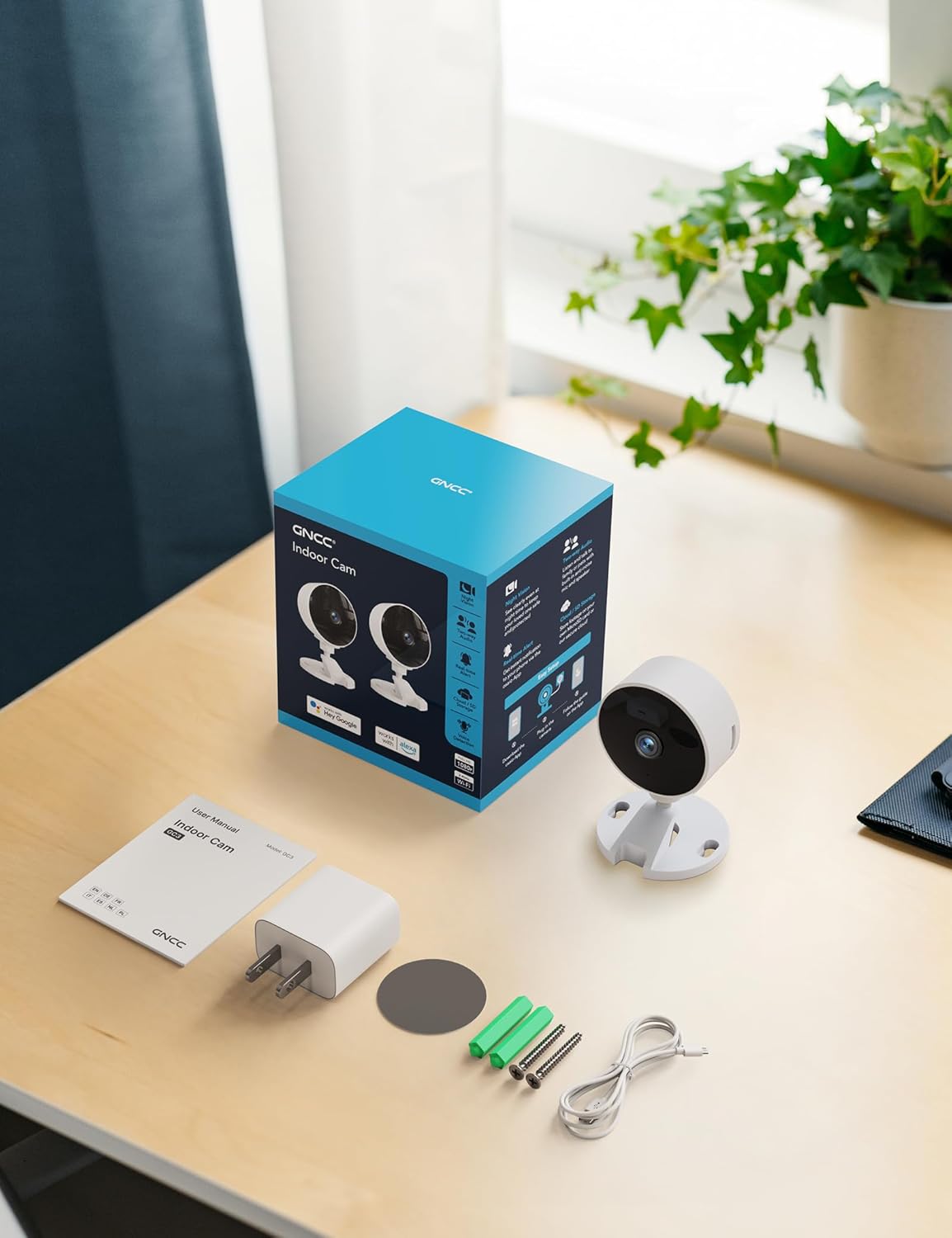
Image: All components included in the GNCC Indoor Camera package, neatly laid out on a wooden surface.
Бүтээгдэхүүний онцлог
The GNCC Indoor Security Camera is equipped with several features designed to enhance your home security and monitoring experience:
- 1080P Full HD нягтрал: Provides clear and detailed video monitoring.
- 15м шөнийн хараа: Built-in infrared LEDs enable clear vision up to 15 meters in low-light conditions.
- Smarter AI Detection: Advanced AI (subscription required) for identifying people, pets, vehicles, and packages, reducing false alerts.
- Уян хатан хадгалах сонголтууд: Supports local recording with a 128GB Micro SD card (not included) and offers a 14-day free cloud storage trial.
- Хялбар тохиргоо: Can be installed quickly using 3M tape or included screws for wall mounting.
- Нууцлалын горим: One-tap privacy mode to disable the lens and LED for enhanced privacy.
- Хоёр талын аудио: Бодит цагийн харилцаа холбооны зориулалттай суурилуулсан микрофон болон чанга яригч.
- Ухаалаг интеграци: Compatible with Alexa and Google Home for voice control.
- Гэр бүлийн хуваалцах: Allows sharing access with up to 3 users.

Image: Visual representation of the camera's core functionalities, including HD resolution, night vision, and two-way audio.
Тохиргоо
1. Асаах
- Connect the provided power adapter to the camera's power input port.
- Цахилгаан адаптерийг ердийн цахилгаан залгуурт холбоно уу.
- Камер асах бөгөөд заагч гэрэл түүний статусыг харуулна.
2. Апп суулгах, бүртгэл үүсгэх
- Download the official GNCC app from your smartphone's app store (iOS App Store or Google Play Store).
- Аппликешныг нээж, дэлгэцэн дээрх зааврыг дагаж шинэ бүртгэл үүсгэх эсвэл хэрэв танд бүртгэл байгаа бол нэвтэрнэ үү.
3. Adding the Camera to the App
- In the GNCC app, tap the "+" icon to add a new device.
- Хэрэв асуувал "Аюулгүй байдлын камер" эсвэл тухайн загварыг сонгоно уу.
- Камерыг 2.4GHz Wi-Fi сүлжээнд холбохын тулд аппликейшны зааврыг дагана уу. Note: This camera is not compatible with 5GHz Wi-Fi networks.
- You may be required to scan a QR code displayed on your phone with the camera lens or enter a code manually.
- Once connected, name your camera and assign it to a specific room or location.

Image: The GNCC camera alongside a smartphone showing the camera's live feed and app interface, demonstrating connectivity.
4. Суурилуулах сонголтууд
Камер нь уян хатан суурилуулах сонголтуудыг санал болгодог:
- Ширээний тавцангийн байршил: Simply place the camera on a flat surface like a shelf, table, or desk.
- Хананд суурилуулах: Use the included 3M adhesive tape for a drill-free installation, or use the provided screws for a more permanent fixture. Ensure the mounting surface is clean and dry before applying adhesive.
Ашиглалтын заавар
Амьд View болон алсаас хянах
Once connected, you can access the live video feed from your camera anytime, anywhere, through the GNCC app.

Image: A smartphone screen showing the live feed from the GNCC camera, illustrating remote monitoring capabilities.
Хоёр талын аудио
The camera features a built-in microphone and speaker, allowing for two-way communication. Tap the microphone icon in the app to speak, and release to listen. This is ideal for communicating with family members or pets.

Image: A visual representation of the two-way audio feature, showing a child and a pet, with text bubbles indicating conversation.
Шөнийн хараа
The camera automatically switches to night vision mode in low-light conditions, providing clear black and white images up to 15 meters. This ensures continuous monitoring even in complete darkness.

Image: A baby sleeping in a crib, demonstrating the camera's clear night vision capabilities in a dark environment.
Хөдөлгөөн ба дуу чимээ илрүүлэх
The camera can detect motion and sound, sending instant alerts to your smartphone. With an optional AI subscription, the camera can differentiate between people, pets, vehicles, and packages, reducing false alarms. You can customize motion detection zones within the app.

Image: Children and a dog triggering motion and sound detection, with example alert notifications shown.
Хадгалах сонголтууд
Your GNCC camera supports two primary storage methods for recorded footage:
- Микро SD карт: Insert a Micro SD card (up to 128GB, not included) into the camera's slot for continuous local recording.
- Үүл хадгалах сан: A 14-day free trial of cloud storage is included. Cloud storage provides secure, off-site backup of your recordings, accessible from anywhere.

Image: The camera with visual cues for both SD card and cloud storage, highlighting flexible recording options.
Нууцлалын горим
To ensure privacy, the GNCC camera features a one-tap privacy mode within the app. Activating this mode will fully disable the camera lens and LED indicator, preventing any recording or live viewing.
Засвар үйлчилгээ
- Цэвэрлэгээ: Камерын линз болон их биеийг цэвэрлэхдээ зөөлөн, хуурай даавуу ашиглаарай. Шингэн цэвэрлэгч эсвэл зүлгүүрийн материал хэрэглэхээс зайлсхий.
- Програм хангамжийн шинэчлэлтүүд: Regularly check the GNCC app for firmware updates. Keeping your camera's firmware up-to-date ensures optimal performance, security, and access to new features.
- Байршил: Камерыг нарны шууд тусгал, дулааны эх үүсвэр, хэт их чийгнээс хол, тогтвортой байршилд байрлуулсан эсэхийг шалгаарай.
Алдааг олж засварлах
| Асуудал | Боломжит шалтгаан / шийдэл |
|---|---|
| Камер Wi-Fi-д холбогдоогүй байна |
|
| Видео тэжээл байхгүй / Офлайн төлөв |
|
| Видео чанар муу |
|
| Motion/Sound alerts not received |
|
| Хоёр талын аудио ажиллахгүй байна |
|
Үзүүлэлтүүд
| Онцлог | Дэлгэрэнгүй |
|---|---|
| Загварын нэр | GC3B-1P |
| Дотор/гадаа ашиглах | Дотор |
| Видео бичлэгийн нягтрал | 1080p бүрэн HD |
| Шөнийн харааны хүрээ | 15 метр |
| Холболтын технологи | Утасгүй (Wi-Fi) |
| Wi-Fi давтамж | 2.4GHz (5GHz-д тохирохгүй) |
| Эрчим хүчний эх үүсвэр | Утастай цахилгаан |
| Хянагчийн төрөл | Amazon Alexa, Google Home |
| Суурилуулах төрөл | Ширээний тавиур, хананд бэхэлгээ |
| Хадгалах сонголтууд | Микро SD карт (128 ГБ хүртэл, багтаагүй), Үүлэн санах ой |
| Хоёр талын аудио | Тиймээ |
| AI илрүүлэх | Motion, Sound (AI features require subscription) |
| Бүтээгдэхүүний хэмжээс | 2.56 x 2.76 x 3.54 инч |
| Зүйлийн жин | 2.24 унц |
| Өнгө | Цагаан |
| Оруулсан бүрэлдэхүүн хэсгүүд | Indoor camera, Power Adapter, Instruction Manual, Mounting Screw, 2m power cord |
Баталгаат болон дэмжлэг
GNCC products are designed for reliability and performance. For specific warranty details, please refer to the warranty card included with your product or visit the official GNCC webсайт.
If you encounter any issues or have questions regarding your GNCC 1080P Indoor Security Camera, please contact GNCC Customer Support through the following channels:
- Official GNCC Webсайт: Look for the "Support" or "Contact Us" section.
- Имэйл тусламж: Refer to the contact information provided in the GNCC app or on the product packaging.
- Апп доторх дэмжлэг: Some issues can be resolved directly through the help section within the GNCC application.
Please have your product model (GC3B-1P) and purchase information ready when contacting support.