Sanyo DRW-500

Sanyo DRW-500 DVD Recorder/Player Instruction Manual

Model: DRW-500

Танилцуулга

This manual provides comprehensive instructions for the safe and efficient operation of your Sanyo DRW-500 DVD Recorder/Player. Please read this manual thoroughly before using the device and retain it for future reference. The Sanyo DRW-500 allows you to record television programs and home videos onto DVD-R/RW discs, as well as play back DVD-Video and Audio CD discs.

Аюулгүй байдлын чухал мэдээлэл

АНХААРУУЛГА: ГАЛ, ЦАХИЛГААНЫ ЦОХИЛТЫН ЭРСДЛИЙГ БУУРУУЛАХЫН тулд ЭНЭ ТӨХӨӨРӨМЖИЙГ БОРООНД, ЧИЙНД БОЛОХГҮЙ.

Гал түймэр, цахилгаанд цохиулах, хүний ​​биед гэмтэл учруулах эрсдлийг бууруулахын тулд энэ бүтээгдэхүүнийг ашиглахдаа аюулгүй байдлын үндсэн арга хэмжээг үргэлж дагаж мөрдөөрэй.

Багцын агуулга

Хайрцагт бүх зүйл байгаа эсэхийг шалгана уу:

Бүтээгдэхүүн дууссанview

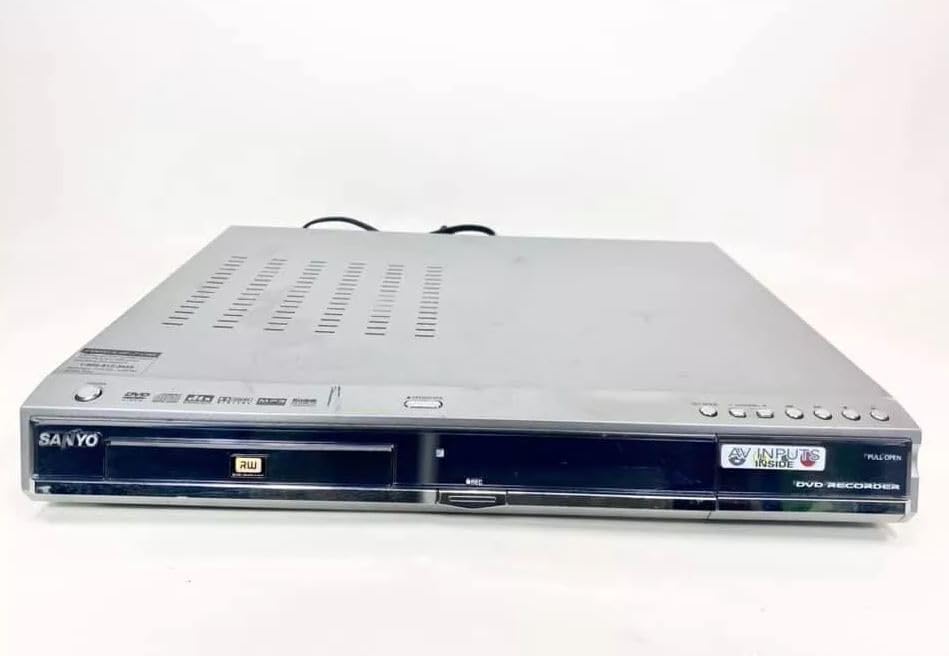
Familiarize yourself with the front and rear panels of your Sanyo DRW-500.

Урд view of the Sanyo DRW-500 DVD Recorder/Player with disc tray, display, and control buttons.

Зураг 1: Front Panel of Sanyo DRW-500. Shows the disc tray, power button, play/pause, stop, record buttons, and the display screen.

Урд самбарын удирдлага:

Арын самбарын холболтууд:

Тохиргоо

1. Телевизтэй холбогдох

There are two primary ways to connect your Sanyo DRW-500 to a television:

Option A: RCA (Composite Video) Connection

  1. Connect one end of the RCA audio/video cable (red, white, yellow) to the AUDIO/VIDEO OUT jacks on the rear of the DRW-500.
  2. Connect the other end of the RCA cable to the corresponding AUDIO/VIDEO IN jacks on your television. Ensure colors match (yellow to yellow for video, red to red for right audio, white to white for left audio).
  3. Select the correct input channel on your TV (e.g., Video 1, AV1, Input 1).

Option B: S-Video Connection (for improved picture quality)

  1. Connect an S-Video cable (not included) from the S-VIDEO OUT jack on the DRW-500 to the S-Video input on your television.
  2. Connect a separate RCA audio cable (red, white) from the Аудио гарав jacks on the DRW-500 to the corresponding audio input jacks on your television. S-Video only carries video, not audio.
  3. Select the correct input channel on your TV (e.g., S-Video, Input 2).

2. Эрчим хүчний холболт

  1. Нийлүүлсэн цахилгааны утсыг сүлжээнд холбоно уу Эрчим хүч port on the rear of the DRW-500.
  2. Plug the other end of the power cord into a standard AC wall outlet.

3. Анхны тохиргоо болон цагны тохиргоо

Upon first power-on, the unit may prompt you to set the clock and other basic settings. Follow the on-screen instructions using the remote control.

Ашиглалтын заавар

DVD эсвэл CD тоглуулж байна

  1. дээр дарна уу ХҮЧ төхөөрөмжийг асаах товчлуур.
  2. дээр дарна уу НЭЭХ/ХААХ товчлуурыг дарж дискний тавиурыг нээнэ үү.
  3. DVD эсвэл CD дискийг шошготой талыг нь дээш харуулан тавиур дээр байрлуул.
  4. дээр дарна уу НЭЭХ/ХААХ тавиурыг хаахын тулд дахин дарна уу.
  5. Тоглуулах нь автоматаар эхлэх ёстой. Хэрэв үгүй ​​бол товчийг дарна уу ТОГЛОХ товч.
  6. Use the remote control for functions like Pause, Stop, Fast Forward, Rewind, and Chapter Skip.

Recording to DVD-R/RW

The Sanyo DRW-500 can record from various external sources connected to its AUDIO/VIDEO IN үүр.

Recording from a TV/Cable Box:

  1. Connect the audio/video output of your TV or cable box to the AUDIO/VIDEO IN jacks on the rear of the DRW-500.
  2. Insert a blank recordable DVD (DVD-R or DVD-RW) into the disc tray.
  3. Select the correct input source on the DRW-500 using the Оролт сонгоно уу button on the remote control (e.g., L1, L2).
  4. Tune your TV/cable box to the desired program.
  5. дээр дарна уу БИЧЛЭГ button on the DRW-500 or its remote control to start recording.
  6. дээр дарна уу ЗОГС бичлэгийг дуусгахын тулд товчлуурыг дарна уу.

Recording from a VCR or Camcorder:

  1. Connect the audio/video output of your VCR or camcorder to the AUDIO/VIDEO IN jacks on the rear of the DRW-500.
  2. Хоосон бичигдэх боломжтой DVD-г дискний тавиур дээр хийнэ үү.
  3. Select the correct input source on the DRW-500 using the Оролт сонгоно уу алсын удирдлага дээрх товчлуур.
  4. Start playback on your VCR or camcorder.
  5. дээр дарна уу БИЧЛЭГ button on the DRW-500 or its remote control to start recording.
  6. дээр дарна уу ЗОГС бичлэгийг дуусгахын тулд товчлуурыг дарна уу.

Дискийг дуусгаж байна

For recorded DVD-R/RW discs to be playable on other DVD players, they must be "finalized."

  1. Insert the recorded DVD-R/RW disc into the DRW-500.
  2. хандах Цэс алсын удирдлага дээр.
  3. Navigate to the "Disc Settings" or "Setup" menu.
  4. Select the "Finalize Disc" option.
  5. Confirm the action. The finalization process may take several minutes. Do not interrupt power during this process.

Note: DVD-RW discs can be unfinalized and re-recorded multiple times. DVD-R discs, once finalized, cannot be recorded on again.

Засвар үйлчилгээ

Нэгжийг цэвэрлэх

Дискний арчилгаа

Алдааг олж засварлах

АсуудалБоломжит шалтгаанШийдэл
Хүч чадалгүйЦахилгааны утас найдвартай холбогдоогүй байна.Төхөөрөмж болон ханын залгуурт холбогдсон цахилгааны утсыг шалгана уу.
Зураг, дуу байхгүйIncorrect TV input selected. A/V cables not connected properly.Select the correct input on your TV. Ensure A/V cables are securely connected to the correct input/output jacks.
Диск тоглохгүй байнаDisc is dirty or scratched. Disc is inserted incorrectly. Incompatible disc format.Clean the disc. Insert the disc with the label side up. Ensure the disc is a compatible format (DVD-Video, Audio CD, recorded DVD-R/RW).
Бичлэг хийх боломжгүйNo blank recordable disc inserted. Disc is full or protected. Incorrect input source selected.Insert a blank DVD-R or DVD-RW. Use a new disc or erase a DVD-RW. Select the correct input source (e.g., L1, L2).
Recorded disc won't play on other playersДиск эцэслэн гараагүй байна.Finalize the disc using the "Finalize Disc" option in the unit's menu.

Үзүүлэлтүүд

ОнцлогДэлгэрэнгүй
ЗагварDRW-500
ҮйлдвэрлэгчСанёо
Compatible Disc Formats (Playback)DVD-Video, CD-Audio, DVD-R, DVD-RW (finalized)
Recordable Disc FormatsDVD-R, DVD-RW
Видео гаралтComposite Video (RCA), S-Video
Аудио гаралтСтерео RCA
Видео оролтын нийцтэй байдалNTSC
Холболтын технологиAUX (RCA)
Онцлог шинж чанарКомпакт дизайн
Эрчим хүчний хангамжAC 120V, 60Hz (typical for US models)

Баталгаат болон дэмжлэг

This product is covered by a limited manufacturer's warranty. Please refer to the warranty card included with your purchase for specific terms and conditions. For technical support or service inquiries, please contact Sanyo customer service through their official webсайт эсвэл баталгаат баримт бичигт заасан холбоо барих мэдээлэл.

Please note that warranty terms may vary by region and retailer. Keep your proof of purchase for warranty claims.

Холбогдох баримт бичиг - DRW-500

Урьдчилсанview SANYO FWBP507FF / FWBP505F Q Blu-ray Disc™ / DVD Player Owner's Manual
Comprehensive owner's manual for the SANYO FWBP507FF and FWBP505F Q Blu-ray Disc™ and DVD Player, detailing setup, playback features, connections, troubleshooting, and specifications.
Урьдчилсанview SANYO FWBP505F Blu-ray Disc™ / DVD Player Owner's Manual
This owner's manual provides comprehensive instructions for the SANYO FWBP505F Blu-ray Disc™ and DVD Player, covering setup, features, playback, connections, troubleshooting, and maintenance. Visit www.sanyo-av.com for more support.
Урьдчилсанview SANYO MCD-Z120/MCD-Z120F зөөврийн CD радио кассет бичигчийн үйлчилгээний гарын авлага
Энэхүү иж бүрэн үйлчилгээний гарын авлага нь техникийн нарийвчилсан үзүүлэлтүүд, тохируулах журам, тэсрүүлсэн views, мөн SANYO MCD-Z120 болон MCD-Z120F зөөврийн CD радио хуурцаг бичигч системийн эд ангиудын жагсаалт. Техникч, засварын мэргэжилтнүүдэд зайлшгүй шаардлагатай.
Урьдчилсанview SANYO DC-PT70 DVD Micro Component System Service Manual
Comprehensive service manual for the SANYO DC-PT70 DVD Micro Component System. Covers laser safety, service mode operations, component replacement, tuner adjustments, parts lists, wiring diagrams, and detailed IC block diagrams and descriptions.
Урьдчилсанview SANYO DC-F210 Мини Бүрэлдэхүүн хэсгийн системийн зааварчилгааны гарын авлага
SANYO DC-F210 Мини Бүрэлдэхүүн Системийн зааварчилгааны гарын авлагад CD тоглуулагч, тюнерын тохиргоо, ажиллагаа, ampөргөгч болон хуурцагны тавцан, бичлэг, дубляж, таймерын функц, засвар үйлчилгээ болон техникийн үзүүлэлтүүд. Аюулгүй байдлын чухал арга хэмжээ болон баталгаат хугацааны мэдээллийг багтаасан болно.
Урьдчилсанview SANYO MCD-Z281F CD зөөврийн радио кассет бичигчийн үйлчилгээний гарын авлагын нэмэлт
SANYO MCD-Z281F CD зөөврийн радио кассет бичигчийн үйлчилгээний гарын авлагын нэмэлт, бүтээгдэхүүний аюулгүй байдлын талаарх дэлгэрэнгүй мэдэгдлийг агуулсан, дэлбэрсэн views, мөн янз бүрийн угсралтын дэлгэрэнгүй эд ангийн жагсаалт.