1. Танилцуулга
Thank you for choosing the MOCREO LS1 Waterproof Thermometer. This device is designed for accurate and reliable temperature monitoring in various environments, including refrigerators, freezers, greenhouses, and warehouses. It provides real-time data and alerts when paired with the MOCREO H5Pro LoRa Hub and the MOCREO Smart App. This manual provides detailed instructions for setup, operation, and maintenance to ensure optimal performance.
2. Бүтээгдэхүүн дууссанview
2.1 Гол онцлогууд
- Upgraded Waterproofing: IP66 rated for use in humid environments like refrigerators, measuring from -0.4°F to 131°F with ±0.9°F accuracy.
- Урт хугацааны холболт: Requires MOCREO H5Pro LoRa Hub (sold separately, ASIN B0DRHQT24P) for an open-air range of up to 1,640 ft (500m). Not compatible with H5Lite, H1B, H2 hubs.
- Шуурхай анхааруулга: Provides app notifications, email alerts, and an 80dB hub beep for critical temperature changes. Includes smart settings for low battery and anti-false alarms.
- Өргөтгөсөн зай: Powered by three replaceable AAA batteries, offering up to 2 years of operation.
- 2 Years Data Logging: No subscription required. View clear charts online and export up to 2 years of data in CSV format for analysis.
2.2 Багцын агуулга
- 1 MOCREO LS1 Wireless Thermometer (three AAA batteries included)
2.3 Бүтээгдэхүүний бүрэлдэхүүн хэсгүүд

Зураг 1: The MOCREO LS1 Waterproof Thermometer sensor, a compact white device with a silver button and yellow accent.

Зураг 2: Comparison of MOCREO LS1 and ST4 models, highlighting LS1's long range (1640ft/500m), whole IP66 waterproofing, and 2-year replaceable battery life.

Зураг 3: Visual representation of the LS1 sensor's IP66 waterproof rating, showing it resistant to water splashes, ideal for humid environments.

Зураг 4: Дотоод view of the MOCREO LS1, illustrating the three AAA replaceable batteries that provide up to 2 years of operation.
3. Тохируулах заавар
3.1 Эхлэхээсээ өмнө
- Ensure you have the MOCREO H5Pro LoRa Hub (ASIN B0DRHQT24P) as it is required for the LS1 sensor to function.
- Download the MOCREO Smart App from your device's app store.
- Ensure your H5Pro Hub is powered on and connected to your network.
3.2 Батерей суурилуулах
- Gently open the LS1 sensor casing батерейны тасалгаанд хандах.
- Insert the three included AAA batteries, ensuring correct polarity (+/-).
- c-г хаахasing нь IP66 усны хамгаалалтын зэрэглэлийг найдвартай хадгалахын тулд.
3.3 Pairing with H5Pro Hub
- Open the MOCREO Smart App on your smartphone.
- Шинэ төхөөрөмж нэмэхийн тулд програмын зааврыг дагана уу.
- Select the LS1 sensor from the list of available devices. The app will guide you through the pairing process with your H5Pro Hub.
- Once paired, you can name the sensor and assign it to a specific location (e.g., 'Kitchen Fridge', 'Greenhouse').

Зураг 5: Diagram illustrating the long-range monitoring capability of the MOCREO LS1 sensors connecting wirelessly to the LoRa H5-Pro Hub over a wide area.

Зураг 6: An apartment building with multiple MOCREO sensors connected to a single H5Pro Hub, demonstrating the ability to add up to 100 sensors for comprehensive monitoring.
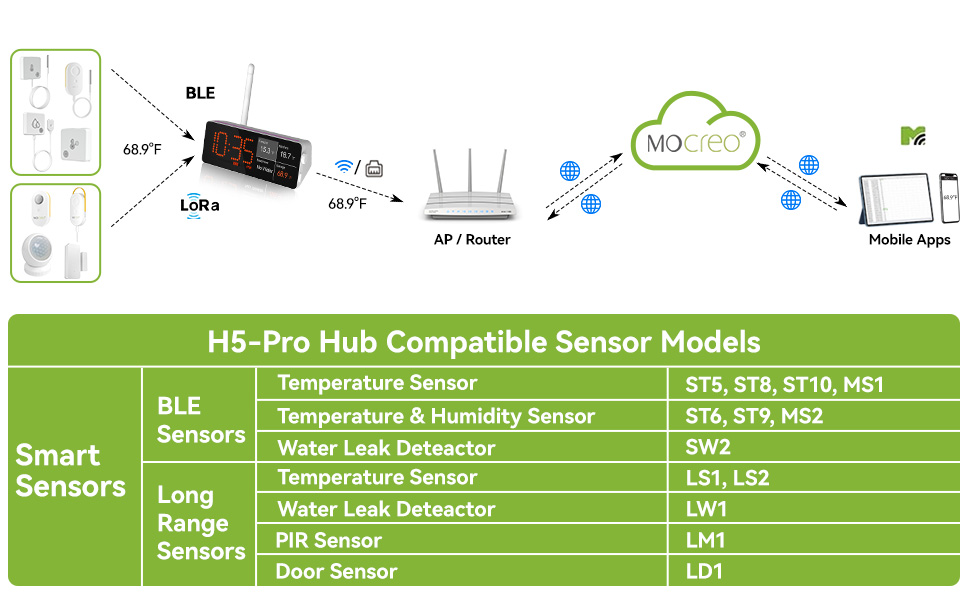
Зураг 7: A table listing various MOCREO smart sensors compatible with the H5-Pro Hub, categorized by BLE and Long Range sensors, including the LS1 and LS2 temperature sensors.
4. Ашиглалтын заавар
4.1 Бодит цагийн хяналт
- Once paired, the LS1 sensor will begin transmitting temperature data to your H5Pro Hub, which then sends it to the MOCREO Smart App.
- Програмыг нээнэ үү view real-time temperature readings for all your connected sensors.
- The app displays current temperatures and historical data in clear charts.

Зураг 8: A smartphone screen displaying the MOCREO Smart App interface, showing real-time temperature monitoring for multiple locations and alert notifications.
4.2 Дохиоллын систем
- Configure temperature thresholds within the MOCREO Smart App for each sensor.
- When the temperature exceeds or falls below your set limits, you will receive instant alerts via:
- Аппын мэдэгдэл: Push notifications directly to your smartphone.
- Имэйл анхааруулга: Таны бүртгэлтэй имэйл хаяг руу мэдэгдэл илгээсэн.
- Төвийн дохио: An 80dB audible alarm from the H5Pro Hub.
- Utilize smart settings like "low battery alert" and "anti-false alarm" to enhance monitoring reliability.

Зураг 9: Хэрэглэгч viewing urgent temperature alerts on their smartphone via the MOCREO Smart App, indicating a temperature deviation in a monitored area.
4.3 Өгөгдөл бүртгэх болон экспортлох
- The LS1 sensor automatically logs temperature data for up to 2 years.
- Access historical data and charts directly within the MOCREO Smart App.
- Export data in CSV format for in-depth analysis by selecting the desired date range within the app.

Зураг 10: A smartphone screen showing the MOCREO Smart App's data export function, allowing users to select a date range and export temperature data in CSV format.
5. Засвар үйлчилгээ
5.1 Батерейг солих
- When the low battery alert is triggered, replace the three AAA batteries.
- Follow the steps in Section 3.2 for battery installation, ensuring the casing is sealed properly after replacement to maintain waterproofing.
5.2 Цэвэрлэгээ
- Мэдрэгчийг зөөлөн, d-ээр арчинаamp даавуу. Зүлгүүрийн цэвэрлэгч, уусгагчийг бүү ашигла.
- Ensure the sensor is dry before placing it back in its monitoring environment.
6. Алдаа засах
6.1 Нийтлэг асуудлууд
- No Data in App:
- Ensure the LS1 sensor has fresh batteries and is powered on.
- Verify the H5Pro Hub is online and connected to your network.
- Check the distance between the sensor and the hub; reduce obstacles if possible.
- Re-pair the sensor with the hub via the MOCREO Smart App.
- Alerts Not Triggering:
- Confirm that temperature thresholds are correctly set in the app.
- Ухаалаг гар утсан дээрээ аппликейшны мэдэгдлийн тохиргоог шалгана уу.
- Verify email address for alerts is correct and check spam folders.
- Буруу уншилтууд:
- Ensure the sensor is placed in a location that accurately reflects the environment you wish to monitor.
- Avoid placing the sensor near heat sources or direct sunlight unless intended.
7. Техникийн үзүүлэлтүүд
7.1 Техникийн үзүүлэлтүүд
| Онцлог | Тодорхойлолт |
|---|---|
| Загварын дугаар | LS1 |
| Температурын хүрээ | -0.4°F - 131°F (-18°C - 55°C) |
| Температурын нарийвчлал | ± 0.9 ° F (± 0.5 ° C) |
| Усны хамгаалалттай үнэлгээ | IP66 |
| Эрчим хүчний эх үүсвэр | 3 x AAA батерей (дагсан) |
| Зайны ашиглалт | 2 жил хүртэл |
| Холболт | LoRa (requires MOCREO H5Pro Hub) |
| Утасгүй сүлжээ | Ил задгай агаарт 1,640 фут (500 м) хүртэл |
| Өгөгдлийн бүртгэл | 2 years, exportable in CSV format |
| Сэрэмжлүүлгийн төрлүүд | App Notification, Email Alert, 80dB Hub Beep |
| Хэмжээ | 5.2 x 2.44 x 1.54 инч |
| Жин | 4.66 унц |
| Өнгө | Цагаан |
8. Баталгаат хугацаа ба дэмжлэг
8.1 Баталгаат хугацааны мэдээлэл
- 90 хоногийн сэтгэл ханамжийн баталгаа: MOCREO offers a 90-day 100% satisfaction guarantee, including money-back and free returns.
- 1 жилийн баталгаа: The MOCREO LS1 Waterproof Thermometer is covered by a 1-year warranty from the date of purchase.
8.2 Хэрэглэгчийн дэмжлэг
- For technical assistance, troubleshooting, or warranty claims, please contact MOCREO customer support.
- Онлайн дэмжлэг: 24/7 online support is available. Refer to the MOCREO Smart App or the official MOCREO webхолбоо барих мэдээллийг авах сайт.


