1. Танилцуулга
This manual provides comprehensive instructions for the safe and effective use of your OnePlus Watch 3. Please read this manual thoroughly before operating the device and retain it for future reference. The OnePlus Watch 3 is a sophisticated smartwatch designed to integrate seamlessly into your daily life, offering advanced health monitoring, fitness tracking, and smart connectivity features.

Figure 1: The OnePlus Watch 3 in Black Steel, showcasing its round display and textured fluoroelastomer band.
2. Тохиргоо
2.1 Хайрцагнаас задлах ба анхны төлбөр
Upon unboxing your OnePlus Watch 3, ensure all components are present: the smartwatch, charging cable, and quick start guide. Before first use, fully charge the device using the provided charging cable. Connect the magnetic end of the cable to the charging pins on the back of the watch and the USB end to a compatible power adapter.

Зураг 2: Ар талд view of the OnePlus Watch 3, highlighting the charging pins and health sensors.
2.2 Ухаалаг утастайгаа хослуулах
- Download the OHealth app from your smartphone's app store (Google Play Store).
- Ухаалаг утсан дээрээ Bluetooth идэвхжсэн эсэхийг шалгаарай.
- Open the OHealth app and follow the on-screen instructions to add a new device.
- Select 'OnePlus Watch 3' from the list of available devices.
- Таны цаг болон ухаалаг гар утсан дээр харагдах хослох кодыг баталгаажуулна уу.
3. Төхөөрөмжийг ажиллуулах
3.1 Үндсэн навигаци
- Мэдрэгчтэй дэлгэц: Цэс болон дэлгэцүүдийг үзэхийн тулд зүүн/баруун, дээш/доош шударна уу. Зүйлсийг сонгохын тулд товшино уу.
- Титэм: Rotate the crown to scroll through lists or adjust settings. Press the crown to return to the watch face or open the app drawer.
- Доод товчлуур: Customizable shortcut button, typically used for quick access to fitness tracking or health checks.

Figure 3: The front of the OnePlus Watch 3, illustrating the interactive display and physical crown for navigation.
3.2 Цагны нүүрийг өөрчлөх
The OnePlus Watch 3 offers a variety of pre-installed watch faces and allows for further customization through the OHealth app. You can also set personal photos as watch faces for a personalized touch.

Figure 4: A personalized watch face on the OnePlus Watch 3, demonstrating customization options.
4. Эрүүл мэндийн хяналт
The OnePlus Watch 3 is equipped with advanced sensors for comprehensive health monitoring. Data is synchronized with the OHealth app for detailed analysis and insights.
- Зүрхний цохилтын хяналт: Өдрийн турш зүрхний цохилтыг тасралтгүй хянах.
- Цусан дахь хүчилтөрөгчийн (SpO2) хяналт: Цусан дахь хүчилтөрөгчийн ханалтын түвшинг хэмждэг.
- Унтлагын хяналт: Унталтыг хянадагtages (Deep, Light, REM) and provides a sleep score, including sleep breathing risk detection.
- Стресс хяналт: Assesses stress levels based on heart rate variability.
- Arterial Stiffness: Provides insights into vascular health.
- Циклийн хяналт: Helps track menstrual cycles for women.

Figure 5: The OnePlus Watch 3 showing various health metrics on its display.
5. Дасгал хөдөлгөөнийг хянах
The watch supports over 100 professional-level tracking modes, providing detailed metrics for various activities. GPS is integrated for accurate outdoor activity tracking.
- GPS навигаци: Supports Beidou, GPS, Galileo, GLONASS, and QZSS for precise location tracking during outdoor workouts.
- Үйл ажиллагааг хянах: Алхам, зай, шатаасан калори болон идэвхтэй минутуудыг тэмдэглэнэ.
- Fat Burning Evaluation: Provides insights into your workout effectiveness for fat burning.

Figure 6: The OnePlus Watch 3 being used during a cycling activity, demonstrating its fitness tracking capabilities.
6. Design & Build Quality
The OnePlus Watch 3 features a premium design with durable materials for everyday wear.
- Тохиолдол: 43mm polished stainless steel case.
- Дэлгэцийн хамгаалалт: Sapphire Crystal for enhanced scratch resistance.
- Хамтлаг: Comfortable fluoroelastomer band.
- Усны эсэргүүцэл: IP68 and 5 ATM rating, suitable for swimming and daily water exposure.
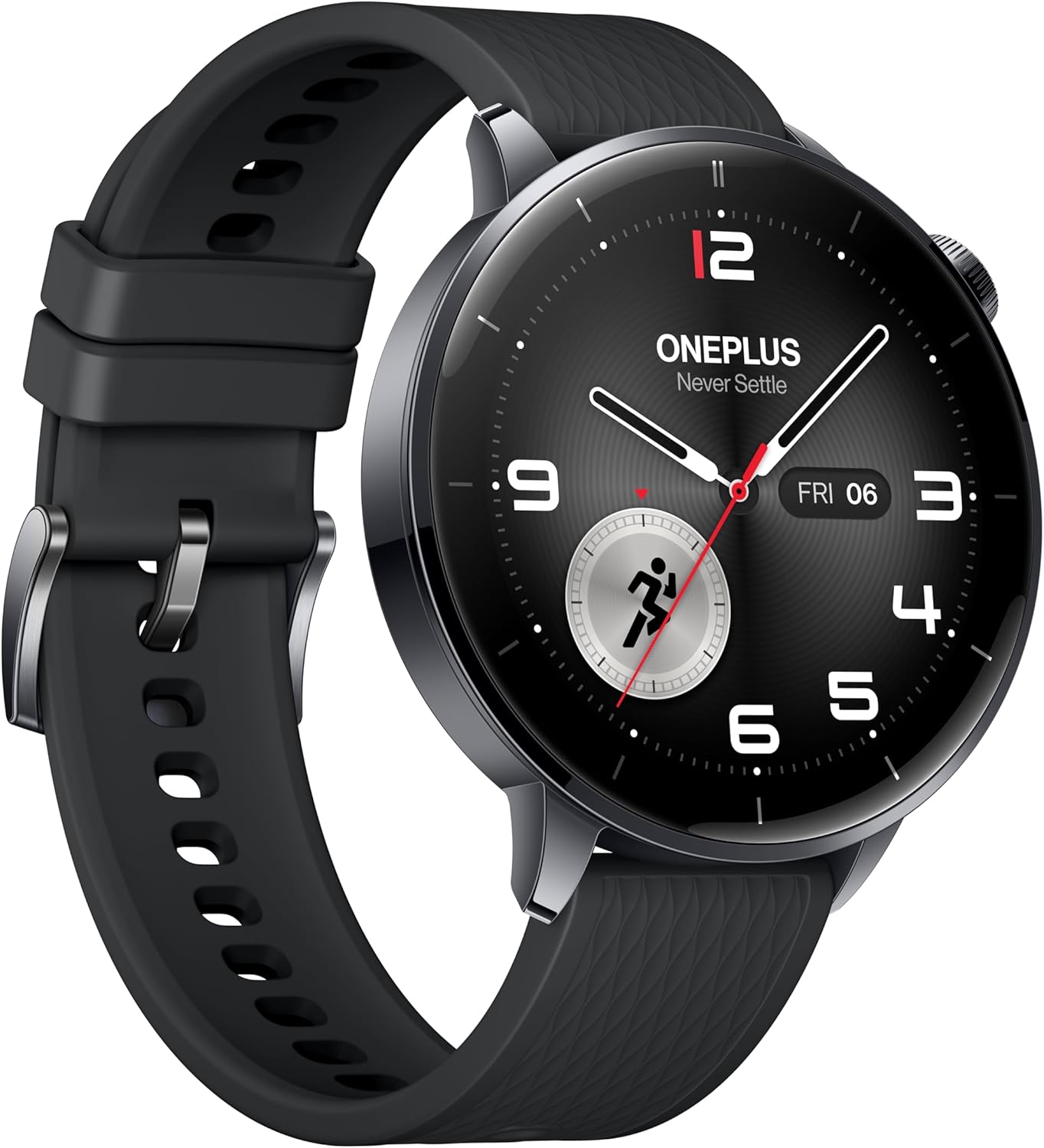
Зураг 7: Side profile of the OnePlus Watch 3, showcasing its polished stainless steel case and integrated crown.
7. Техникийн үзүүлэлтүүд
| Онцлог | Тодорхойлолт |
|---|---|
| Загвар | OnePlus Watch 3 (43mm Black Steel) |
| Дэлгэц | 1.32-inch AMOLED, Round Face |
| Үйлдлийн систем | WearOS 5 (at launch) |
| Процессор | Snapdragon W5 Gen 1 |
| RAM | 2 ГБ |
| Хадгалах | 32 ГБ |
| Зайны багтаамж | 345mAh (up to 60 hours in Smart Mode) |
| Цэнэглэж байна | VOOC Quick Charging |
| Холболт | Bluetooth, Wi-Fi (5G/2.4G, 802.11 a/b/g/n), NFC |
| GPS | Beidou, GPS, Galileo, GLONASS, QZSS |
| Усны эсэргүүцэл | IP68, 5 ATM |
| Жин (оосоргүй) | 49.7 гр |
| Материал | Polished Stainless Steel Case, Sapphire Crystal, Fluoroelastomer Band |
8. Battery Performance
The OnePlus Watch 3 offers exceptional battery life for a WearOS smartwatch, providing up to 60 hours of use in Smart Mode. Power-saving features can extend this significantly.

Figure 8: The OnePlus Watch 3 highlighting its impressive 60-hour battery life in Smart Mode.
9. Дэлгэц
The 1.32-inch AMOLED display provides vibrant colors and excellent readability, even in bright sunlight. The display is protected by Sapphire Crystal for durability.
Figure 9: A close-up of the OnePlus Watch 3's vibrant AMOLED display.
10. Холболт
The watch offers robust connectivity options for seamless integration with your digital ecosystem.
- Bluetooth: For connecting to your smartphone and compatible accessories like earbuds.
- Wi-Fi: Enables faster app downloads and updates from the Play Store.
- NFC: Supports Google Wallet for contactless payments.

Figure 10: The OnePlus Watch 3's app drawer, illustrating the range of applications available.
11. Software (Wear OS 5.0)
Running on Wear OS 5.0, the OnePlus Watch 3 provides a smooth and feature-rich user experience with access to a wide range of Google apps and services.
- Google Play Apps: Download and install your favorite apps directly from the watch.
- Google Түрийвч: Convenient contactless payments.
- Google Туслах: Voice-activated assistant for quick tasks and information.
- Dual OS: Combines Wear OS for smart features with an RTOS-based system for power efficiency in core functions.
12. Smartphone App (OHealth)
The OHealth app serves as the central hub for managing your OnePlus Watch 3, providing detailed health and fitness data, watch face customization, and device settings.
- Эрүүл мэндийн талаарх ойлголтууд: Comprehensive summaries and tips based on your prolonged usage data.
- Дасгалын бичлэгүүд: Detailed logs of your fitness activities, including maps, heart rate zones, and elevation data.
- Төхөөрөмжийн удирдлага: Control watch settings, notifications, and app installations.
13. Засвар үйлчилгээ
To ensure the longevity and optimal performance of your OnePlus Watch 3, follow these maintenance guidelines:
- Цэвэрлэгээ: Regularly wipe the watch and band with a soft, damp даавуу. Химийн хүчтэй бодисоос зайлсхий.
- Усанд өртөх: While water-resistant, avoid prolonged submersion in saltwater or exposure to high-pressure water. Rinse with fresh water after swimming.
- Цэнэглэж байна: Use only the original charging cable. Keep charging contacts clean and dry.
- Хадгалах: Цагийг ашиглаагүй үед сэрүүн, хуурай газар хадгална.
14. Алдаа засах
If you encounter any issues with your OnePlus Watch 3, try the following common solutions:
- Цаг асахгүй байна: Цаг бүрэн цэнэглэгдсэн эсэхийг шалгаарай.
- Хослуулах асуудал: Ensure Bluetooth is on, the watch is in pairing mode, and the OHealth app is updated. Try restarting both devices.
- Эрүүл мэндийн буруу мэдээлэл: Ensure the watch is worn snugly on your wrist. Clean the sensors regularly.
- GPS-ийн нарийвчлал муу: Цэлмэг тэнгэртэй задгай газар байгаа эсэхээ шалгаарай view.
- App crashes/slowness: Restart the watch. Ensure all apps and Wear OS are updated.
For persistent issues, refer to the online support resources or contact OnePlus customer service.
15. Баталгаат хугацаа ба дэмжлэг
Your OnePlus Watch 3 comes with a limited manufacturer's warranty. Please refer to the warranty card included in your product packaging for specific terms and conditions. For technical support, FAQs, and additional resources, visit the official OnePlus support webсайт эсвэл харилцагчийн үйлчилгээтэй холбогдоно уу.


