1. Танилцуулга
The Audiolab 9000A is a high-performance integrated amplifier designed to be the central component of any advanced audio system. It combines a powerful amplifier, a high-resolution Digital-to-Analog Converter (DAC), and a dedicated phono preamplifier, offering extensive connectivity and advanced features for audiophiles.
This manual provides essential information for setting up, operating, and maintaining your Audiolab 9000A to ensure optimal performance and longevity.
2. Аюулгүй байдлын мэдээлэл
Төхөөрөмжийг ажиллуулахын өмнө аюулгүй байдлын бүх зааврыг анхааралтай уншина уу. Энэ гарын авлагыг цаашид лавлах зорилгоор хадгална уу.
- Эрчим хүчний хангамж: Connect the unit only to a power supply of the type marked on the rear panel.
- Агааржуулалт: Тохиромжтой агааржуулалтыг хангах. Агааржуулалтын нүхийг хааж болохгүй.
- Ус ба чийг: Төхөөрөмжийг бороо, чийгэнд бүү тавь. Төхөөрөмж дээр шингэнээр дүүрсэн зүйлийг бүү байрлуул.
- Дулаан: Төхөөрөмжийг радиатор, дулааны төхөөрөмж, зуух болон дулаан үүсгэдэг бусад төхөөрөмжийн ойролцоо байрлуулж болохгүй.
- Цэвэрлэгээ: Зөвхөн хуурай даавуугаар цэвэрлэ. Шингэн цэвэрлэгч, аэрозол цэвэрлэгч хэрэглэж болохгүй.
- Үйлчилгээ: Энэ төхөөрөмжийг өөрөө засварлах гэж бүү оролдоорой. Бүх үйлчилгээг мэргэшсэн үйлчилгээний ажилтнуудад шилжүүлээрэй.
3. Хайрцагт юу байна
Carefully unpack the contents of the box. You should find the following items:
- Аудиолаб 9000A нэгдсэн Ampнастан
- Цахилгааны утас
- Алсын удирдлага
- Хэрэглэгчийн гарын авлага (энэ баримт бичиг)
- Antennas (for Bluetooth connectivity)
4. Бүтээгдэхүүн дууссанview
Урд самбар
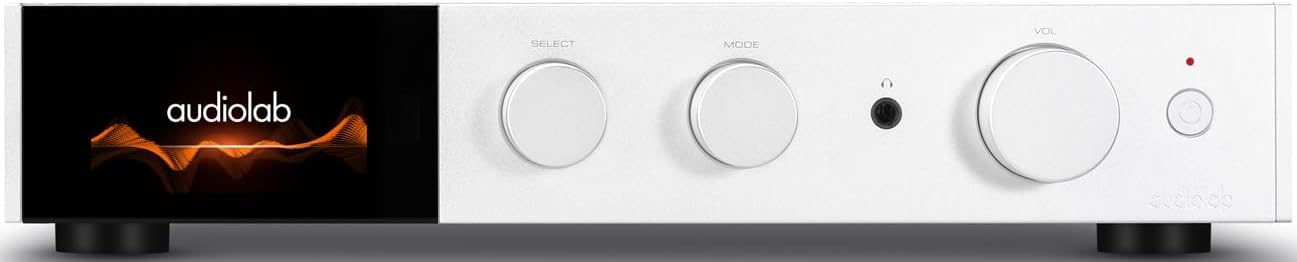
Зураг 4.1: Урд view of the Audiolab 9000A, displaying the Audiolab logo on its full-color IPS LCD screen. The front panel features three rotary controls for Select, Mode, and Volume, along with a headphone jack and power button.

Зураг 4.2: Урд view of the Audiolab 9000A, showcasing the full-color IPS LCD screen displaying VU meters. This visual option provides real-time audio level feedback.
The 9000A features a 4.3-inch (800 x 480mm) full-color IPS LCD screen, providing clear and informative playback, source, and file information. It also offers various display options, including two VU meter styles, allowing for visual feedback or a discreet appearance.
Арын самбарын холболтууд

Figure 4.3: Rear panel of the Audiolab 9000A, showing a comprehensive array of input and output connections. These include analog, XLR, phono (MM), power amplifier input, SPDIF (coaxial and optical), PC USB, Bluetooth antenna, pre-amplifier output, stereo speaker terminals, and 12V trigger connections.
The rear panel provides a wide range of connectivity options, including multiple analog and digital inputs, a dedicated phono input, balanced XLR input, and various outputs for speakers and external components. Bluetooth antennas are also located here for wireless streaming.
Гол онцлогууд
- Ampамь нас: Discrete Class AB power amplifier delivering 100W per channel into 8 ohms (160W into 4 ohms). Features Audiolab's CFB (Complementary Feedback) topology for superior linearity.
- Digital-to-Analog Converter (DAC): Equipped with the ESS 9038PRO flagship 32-bit DAC chip, supporting PCM up to 32-bit/768kHz and DSD up to DSD512.
- MQA код тайлах: Full MQA decoding capability for high-resolution streaming.
- Фоно С.tage: Dedicated high-performance, low-noise Moving Magnet (MM) phono stage with JFET-based circuitry and precise RIAA equalization.
- Чихэвч Ampамь нас: Зориулалтын одоогийн санал хүсэлтийн чихэвч amplifier with wide bandwidth and high slew rate.
- Холболт: Multiple analog inputs (3 x AUX, 1 x XLR), digital inputs (2 x Coaxial, 2 x Optical, 1 x PC USB), Bluetooth 5.1 with aptX HD/AAC/LDAC support.
- Үйлдлийн горимууд: Integrated, Pre-Power, and Pre Only modes for versatile system integration.
5. Тохиргоо
5.1 Байршил
Place the Audiolab 9000A on a stable, level surface away from direct sunlight, heat sources, and excessive moisture. Ensure there is adequate space around the unit for ventilation.
5.2 Чанга яригчийг холбох
- Ensure the 9000A is powered off and unplugged from the mains.
- Connect your loudspeakers to the speaker terminals on the rear panel (refer to Figure 4.3). Ensure correct polarity: red (+) to red (+) and black (-) to black (-).
- Tighten the binding posts securely, but do not overtighten.
5.3 Аудио эх сурвалжийг холбох
The 9000A offers a variety of input options:
- Analog Inputs (AUX1, AUX2, AUX3): Use RCA cables to connect analog sources like CD players, tuners, or tape decks.
- Тэнцвэртэй XLR оролт: For high-quality analog sources with XLR outputs.
- Фоно (ММ) оролт: Connect your turntable directly to this input. Ensure your turntable has a Moving Magnet (MM) cartridge.
- Digital Inputs (COAX1, COAX2, OPT1, OPT2): Connect digital sources such as CD transports, media streamers, or TVs using coaxial or optical cables.
- PC USB (USB B): Connect your computer for high-resolution audio playback.
- Bluetooth: Attach the supplied antennas to the rear panel for optimal Bluetooth signal reception.
5.4 Эрчим хүчний холболт
Once all audio connections are made, connect the supplied power cord to the IEC inlet on the rear panel and then to a suitable mains power outlet.
6. Ашиглалтын заавар
6.1 Асаах/унтраах
Press the power button on the front panel or the remote control to switch the unit on or off. The display will illuminate upon power-on.
6.2 Эх сурвалж сонгох
Use the "SELECT" rotary control on the front panel or the source buttons on the remote control to cycle through the available input sources (AUX1, AUX2, AUX3, XLR, Phono, COAX1, COAX2, OPT1, OPT2, PC USB, Bluetooth).
6.3 Дууны хяналт
Adjust the listening volume using the "VOL" rotary control on the front panel or the Volume Up/Down buttons on the remote control.
6.4 Үйлдлийн горимууд
The 9000A offers three distinct operating modes, selectable via the menu:
- Integrated Mode: This is the default mode, where the pre-ampөргөгч ба хүч ampамь аврах stages are combined. Use this for connecting digital and analog sources directly to the 9000A and driving a pair of speakers.
- Pre-Power Mode: This mode disconnects the pre-ampөргөгч ба хүч ampамь аврах stages. The 9000A can then be used solely as a power amplifier (e.g., connected to an AV processor) or to insert external signal processing between the pre-out and power-in connections.
- Pre Only Mode: In this mode, the 9000A functions solely as a pre-amplifier, outputting the processed signal via its pre-amplifier outputs to an external power ampнастан.
6.5 Дижитал шүүлтүүрүүд
For digital inputs, the 9000A provides user-selectable digital filters to optimize the response to suit the source file and partnering equipment. Access these options through the unit's menu system.
6.6 Bluetooth холболт
- Ensure the Bluetooth antennas are connected to the rear panel.
- Select "Bluetooth" as the input source on the 9000A.
- Мобайл төхөөрөмж дээрээ (ухаалаг утас, таблет, зөөврийн компьютер) Bluetooth-г идэвхжүүлж, боломжтой төхөөрөмжүүдийг хайж олоорой.
- Select "Audiolab 9000A" from the list to pair. Once paired, audio from your device will stream wirelessly to the ampнастан.
- The 9000A supports aptX HD, AAC, and LDAC protocols for high-quality wireless audio.
6.7 Чихэвчний гаралт
Connect your headphones to the 6.35mm (1/4 inch) headphone jack on the front panel. Connecting headphones will automatically mute the main speaker outputs.
7. Засвар үйлчилгээ
- Цэвэрлэгээ: Use a soft, dry, lint-free cloth to clean the unit. Do not use abrasive cleaners, waxes, or solvents.
- Агааржуулалт: Агааржуулалтын нүхнүүд тоос шороо, хог хаягдлаас цэвэрлэгдсэн эсэхийг үе үе шалгаж байгаарай.
- Холболтууд: Ensure all cables are securely connected. Loose connections can affect sound quality.
- Хадгалах: Хэрэв төхөөрөмжийг удаан хугацаагаар хадгалах бол цахилгаан тэжээлээс салгаж, сэрүүн, хуурай газар хадгална уу.
8. Алдаа засах
| Асуудал | Боломжит шалтгаан | Шийдэл |
|---|---|---|
| Хүч чадалгүй | Цахилгааны утас холбогдоогүй; цахилгаан залгуур буруу; Төхөөрөмж зогсолтын горимд байна. | Check power cord connection; Try a different outlet; Press power button on unit or remote. |
| Чанга яригчаас дуу гарахгүй | Incorrect input selected; Speaker cables loose or incorrectly connected; Volume too low; Mute function active; Headphone connected. | Select correct input; Check speaker connections and polarity; Increase volume; Deactivate mute; Disconnect headphones. |
| Нэг сувгаас дуу гарахгүй | Speaker cable loose or faulty; Source cable faulty; Speaker faulty. | Check speaker and source cable connections; Test with another speaker or source. |
| Хувцаслах эсвэл дуугарах чимээ | Газрын гогцоо; Ойролцоох цахилгааны хөндлөнгийн оролцоо; Алдаатай кабель. | Ensure all components are properly grounded; Move unit away from other electronics; Try different cables. |
| Bluetooth холболттой холбоотой асуудлууд | Antennas not connected; Device too far; Device already paired with another unit. | Connect Bluetooth antennas; Move device closer; Disconnect from other devices and try pairing again. |
9. Техникийн үзүүлэлтүүд
| Ангилал | Дэлгэрэнгүй |
|---|---|
| Ерөнхий тодорхойлолт | Нэгдсэн Ampнастан |
| Эрчим хүчний гаралт | 2 x 100W (8 ohms, THD<1%); 2 x 160W (4 ohms, THD<1%) Class AB |
| DAC чип | ES9038Pro 32-bit DAC |
| Дэлгэц | 4.3" (800 x 480mm) Full View IPS LCD |
| MQA код тайлах | Built-in Certified MQA Full Decoder (PC USB, Coax/Optical) |
| Bluetooth | Bluetooth 5.1 (aptX/aptX HD/AAC/LDAC) Support |
| Фоно С.tage | Dedicated High-performance, Low-noise MM Phono Stage |
| Чихэвч AMP | Зориулалтын гүйдэл-санал хүсэлтийн чихэвч AMP |
| Үйлдлийн горимууд | Integrated / PRE-POWER / PRE Only Modes |
| USB Upgrade Support | Тиймээ |
| Оролтууд | 3 x Analogue, 1 x XLR, 1 x Phono (MM), 1 x Power Amplifier, 2 x SPDIF (Coax), 2 x SPDIF (Optical), 1 x PC USB (USB B), 1 x Bluetooth, 1 x 12V Trigger |
| Гаралт | 1 x ӨМНӨ Ampөргөгч, 1 x стерео чанга яригч, 1 x чихэвч, 1 x 12V триггер |
| Sampling Frequency (Optical/Coaxial) | 44.1кГц-192кГц |
| Sampling Frequency (PC USB) | 44.1kHz-768kHz (PCM) / DSD64, DSD128, DSD256, DSD512 |
| Урьдчилсанamplifier Gain (max.) | +6dB (Line), +53dB (Phono MM) |
| Урьдчилсанamplifier THD | <0.0004% (1kHz @ 2V, Volume = 0dB) |
| DAC THD | <0.001% (1kHz @ 0dBFS) |
| Хүч Amplifier THD | <0.002% (1кГц @ 50Вт / 8 Ом) |
| Чихэвч Amplifier THD | <0.01% (1kHz, 50mW) |
| Цэвэр жин | 9.4 кг |
| Хэмжээ (Ө x Ө x D) | 444 x 342 x 89 мм |
| Дуусгах сонголтууд | Хар / Мөнгө |
| Эрчим хүчний шаардлага | 100-120V ~ 50/60Hz |
10. Баталгаат хугацаа ба дэмжлэг
Audiolab products are manufactured to the highest standards and undergo rigorous quality control. This product is covered by a manufacturer's warranty, the terms of which may vary by region. Please refer to the warranty card included with your product or visit the official Audiolab webбаталгааны дэлгэрэнгүй мэдээллийг авах сайт.
For technical support, service, or inquiries regarding your Audiolab 9000A, please contact your authorized Audiolab dealer or distributor. You can also find support resources, FAQs, and contact information on the official Audiolab webсайт: www.audiolab.co.uk