1. Бүтээгдэхүүн дууссанview
The WESECUU Light Bulb Security Camera offers comprehensive home surveillance with easy installation. Designed for both indoor and outdoor use, this camera provides a 360° panoramic view, motion tracking, and AI detection for enhanced security.
- Хялбар суулгах: Screws into a standard light bulb socket, requiring no drilling or complex wiring.
- 360 ° Панорама View & Auto Motion Tracking: Provides full-area coverage and automatically follows detected movement.
- Ухаалаг AI илрүүлэх: Distinguishes between people and other movements to reduce false alerts.
- Хоёр талын аудио: Features a built-in speaker and microphone for real-time communication.
- 24/7 Day & Night Monitoring: Ensures continuous surveillance in various lighting conditions.

2. Багцын агуулга
Таны багцад бүх зүйл байгаа эсэхийг шалгана уу:
- WESECUU Light Bulb Security Camera
- Хэрэглэх заавар (энэ баримт бичиг)
3. Тохируулах заавар
3.1 Физик суурилуулалт
The camera is designed for simple installation into a standard E27/E26 light bulb socket.
- Суурилуулалтын өмнө гэрлийн залгуурын хүчийг таслуур дээр унтраасан эсэхийг шалгаарай.
- Carefully screw the WESECUU Light Bulb Security Camera into the light bulb socket until it is secure. Do not overtighten.
- Turn the power back on at the circuit breaker. The camera will power on and initiate its startup sequence.
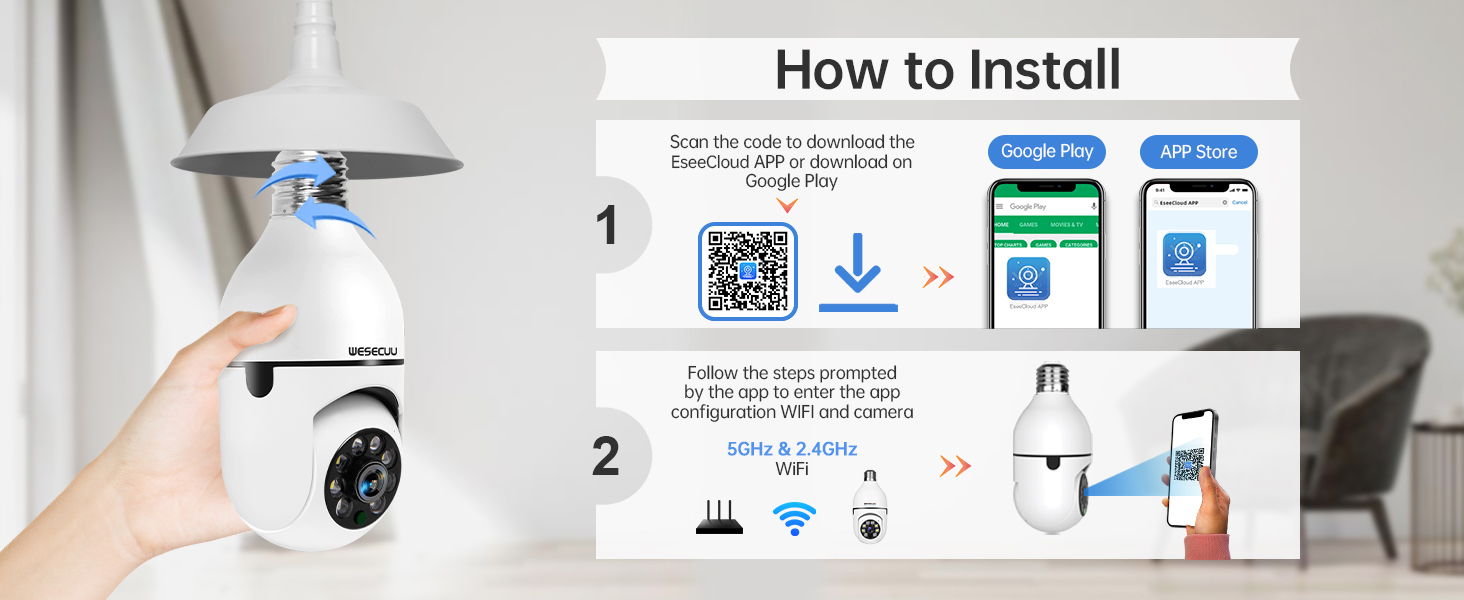
3.2 App Download and Camera Pairing
To operate your camera, you need to download the EseeCloud APP and pair the device.
- Download the EseeCloud APP from the Google Play Store or Apple App Store. You can also scan the QR code provided in the installation image below or visit http://www.e-seenet.com/download/indexm.php?p=tjesee.
- Open the EseeCloud APP and create an account or log in.
- Follow the in-app instructions to add your new camera. Ensure your smartphone is connected to a 2.4GHz or 5GHz Wi-Fi network during the pairing process. The camera supports both 2.4GHz and 5GHz Wi-Fi.
- Once successfully paired, you can access the live feed and camera settings through the app.
4. Ашиглалтын заавар
4.1 Амьд View болон тоглуулах
Access the EseeCloud APP to view the live feed from your camera. You can also review foo бүртгэгдсэнtage from the SD card (if installed) or cloud storage (if subscribed).

4.2 Хөдөлгөөн илрүүлэх ба хянах
The camera features advanced motion detection and automatic tracking. When motion is detected, the camera will pan and tilt to follow the subject, ensuring continuous coverage. Alerts will be sent to your smartphone.

4.3 AI Detection Alerts
The integrated AI technology helps differentiate between human movement and other sources of motion, such as pets or passing vehicles, reducing irrelevant notifications.

4.4 Хоёр талын аудио
Utilize the two-way audio feature to communicate through the camera. This allows you to speak to visitors, deter intruders, or comfort pets remotely.

4.5 Шөнийн хараа
The camera provides both full-color night vision and infrared night vision modes for clear monitoring in low-light conditions.

4.6 Хадгалах сонголтууд
The camera supports local storage via an SD card (16-128GB, not included) and offers optional cloud storage plans for continuous recording and advanced features.

5. Засвар үйлчилгээ
To ensure optimal performance and longevity of your WESECUU Light Bulb Security Camera, follow these maintenance guidelines:
- Линз цэвэрлэх: Gently wipe the camera lens with a soft, dry microfiber cloth to remove dust or smudges. Avoid abrasive cleaners.
- Эрчим хүчний хангамж: Ensure the camera receives a stable power supply. Avoid frequent power interruptions.
- Програм хангамжийн шинэчлэлтүүд: Regularly check the EseeCloud APP for available firmware updates to ensure your camera has the latest features and security enhancements.
- Байгаль орчны нөхцөл: While designed for outdoor use, avoid direct exposure to extreme weather conditions if possible, and ensure the light socket is weather-protected.
6. Алдаа засах
If you encounter issues with your WESECUU Light Bulb Security Camera, refer to the following common solutions:
- Камер Wi-Fi-д холбогдоогүй байна:
- Ensure your Wi-Fi network is 2.4GHz or 5GHz and stable.
- Аппликейшнд Wi-Fi нууц үгийг зөв оруулсан эсэхээ шалгана уу.
- Move the camera closer to your Wi-Fi router during setup.
- Чиглүүлэгч болон камераа дахин эхлүүлнэ үү.
- Зураг байхгүй эсвэл хар дэлгэц байхгүй:
- Check if the camera is properly powered on and the light socket has power.
- Камерын линз бөглөрөөгүй эсэхийг шалгаарай.
- Restart the camera by turning off and on the power to the socket.
- Хөдөлгөөн мэдрэгч ажиллахгүй байна:
- Check motion detection settings in the EseeCloud APP.
- Ensure the detection sensitivity is set appropriately.
- Verify that notification permissions are enabled for the app on your smartphone.
- Зургийн чанар муу:
- Камерын линзийг цэвэрлэ.
- Зургийн оновчтой тод байдлыг хангахын тулд, ялангуяа өнгөт шөнийн харааны хувьд хангалттай гэрэлтүүлэгтэй байх.
- Check your internet connection speed, as a slow connection can affect streaming quality.

Figure 10: Visual comparison demonstrating the superior clarity of WESECUU's 3MP resolution compared to other standard resolutions.
7. Техникийн үзүүлэлтүүд
| Онцлог | Тодорхойлолт |
|---|---|
| Загварын дугаар | TP-8052BW3 |
| Брэнд | WESECUU |
| Дотор/гадаа ашиглах | Гадаа |
| Холболтын технологи | Утасгүй (Wi-Fi) |
| Холболтын протокол | Wi-Fi (2.4GHz & 5GHz) |
| Эрчим хүчний эх үүсвэр | Утастай цахилгаан |
| Видео бичлэгийн нягтрал | 4K |
| Суурилуулах төрөл | Таазны бэхэлгээ |
| Онцлог шинж чанар | Тохируулах боломжтой |
| Тохиромжтой төхөөрөмжүүд | Amazon Alexa |
| Хянагчийн төрөл | Amazon Alexa |
| Бүтээгдэхүүний хэмжээ (L x W x H) | 1 x 1 x 1 инч |
| Зүйлийн жин | 7.2 унц (0.21 килограмм) |
8. Баталгаат хугацааны мэдээлэл
For detailed warranty information, please refer to the warranty card included with your product packaging or visit the official WESECUU webсайт. Баталгаат нөхцөл нь бүс нутаг болон худалдан авсан огнооноос хамаарч өөр өөр байж болно.
9. Хэрэглэгчийн дэмжлэг
If you require further assistance or have questions not covered in this manual, please contact WESECUU customer support:
- Хэрэглэгчийн шууд утас: +1-888-9716718
- Ажлын цаг: Pacific Standard Time 6:00 PM - 3:00 AM, Monday to Friday
- Онлайн дэмжлэг: Visit the official WESECUU webТүгээмэл асуултууд, тусламжийн эх сурвалжууд болон холбоо барих маягтуудын сайт.


