1. Танилцуулга
This manual provides detailed instructions for the Loutoc SRC4526 Universal Remote Control, designed for seamless compatibility with Philips Ambilight Smart TVs. Please read this guide thoroughly to ensure optimal use and longevity of your remote control.
1.1 Бүтээгдэхүүн дууссанview
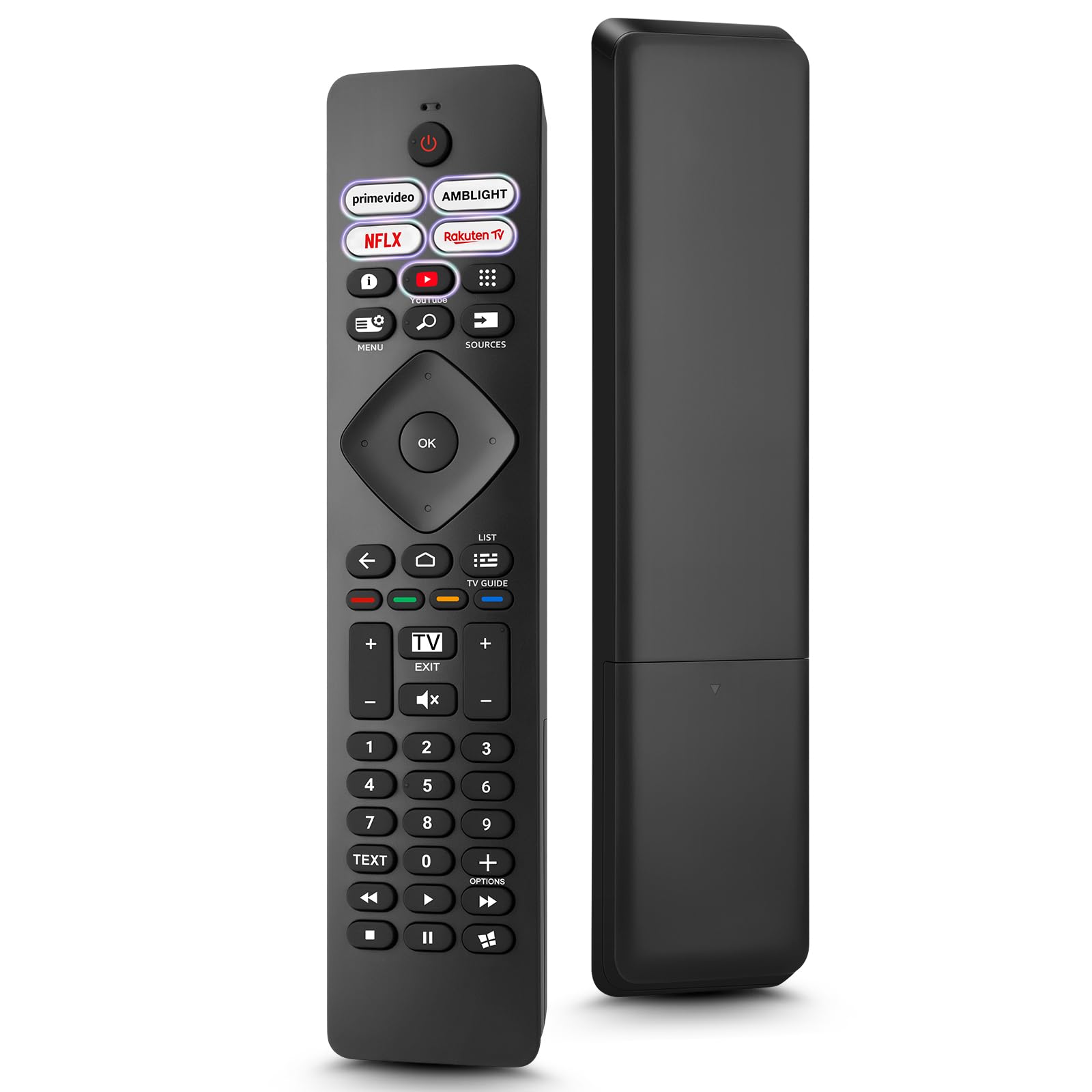
Image: The Loutoc SRC4526 Universal Remote Control, showcasing түүний эргономик дизайн, товчлуурын зохион байгуулалт.
1.2 Гол онцлогууд
- Convenient Plug-and-Play: No complex setup or programming required. Simply insert batteries and the remote is ready for use.
- Wide TV Compatibility: Fully compatible with Philips Ambilight TVs, including 4K Ambilight LED, OLED, FHD, and Full Ultra HD models.
- Dedicated Shortcut Buttons: Features 5 direct access buttons for popular streaming platforms: Ambilight, Video, NFLX (Netflix), Rakuten TV, and YouTube.
- Найдвартай гүйцэтгэл: Offers an effective operating range of 8 meters (26 feet) and an ultra-fast response time of 0.2 seconds.
2. Тохиргоо
2.1 Батерей суурилуулах
The Loutoc SRC4526 remote control requires two AAA batteries (not included) for operation.
- Алсын удирдлагын ар талд байгаа зайны тасалгааг ол.
- Зайны тасалгааны тагийг гулсуулж нээнэ үү.
- Эерэг (+) ба сөрөг (-) терминалууд нь тасалгааны доторх үзүүлэлтүүдтэй зөв таарч байгаа эсэхийг шалгаарай хоёр AAA батерейг оруулаарай.
- Зайны тасалгааны тагийг сайтар хаа.
2.2 Анхны хэрэглээ
This remote control is designed for immediate use with compatible Philips Ambilight TVs. No programming or pairing is required. Once batteries are installed, point the remote at your TV and begin operation.
3. Ашиглалтын заавар
3.1 Товчлуурын ажиллагаа дууссанview
Refer to the image below for a visual guide to the remote control's buttons and their corresponding functions.

Image: Detailed diagram of the Loutoc SRC4526 remote control, illustrating each button and its primary function.
| Товчлуур | Чиг үүрэг |
|---|---|
| Хүч | Switches the TV on or off (Standby mode). |
| Prime Video, Ambilight, Netflix, Rakuten TV | Quickly launches the corresponding application. |
| Цэс | Opens the Quick Menu with typical TV functions. Hold to show Gaming control bar. |
| хайх | Opens the Search tab on the Home screen. |
| Эх сурвалжууд | Opens or closes the TV's input sources menu. |
| OK | Confirms a selection or setting. |
| Arrow/Navigation Keys | Navigates up, down, left, or right through menus and options. |
| Буцах | Өмнөх дэлгэц эсвэл суваг руу буцна. |
| Гэр | ТВ-ийн Нүүр цэсийг нээнэ. |
| ТВ хөтөч | Opens or closes the TV Guide. Long press to open the channel list. |
| Color Keys (Red, Green, Yellow, Blue) | Provides direct selection of on-screen options. The blue key typically opens Help. |
| Дууны хэмжээ (+/-) | ТВ-ийн дууны түвшинг тохируулна. |
| Channel (+/-) | Switches to the next or previous channel. |
| Гарах | Exits current menu/application or returns to live TV. From standby, goes to last viewed source. |
| Дууг хаах | ТВ-ийн дууг хаадаг эсвэл нээдэг. |
| Тооны товчлуурууд (0-9) | Телевизийн сувгуудыг шууд сонгоно. |
| TEXT | Opens or closes Text/Teletext. |
| Тоглуулах удирдлага | Controls media playback: Play, Pause, Stop, Rewind, Fast Forward. |
| Програмууд | Opens the Apps tab on the Home screen. |
3.2 Ambilight функц
For Philips TVs equipped with Ambilight functionality, the dedicated Ambilight button on your remote allows you to control the lighting effects.
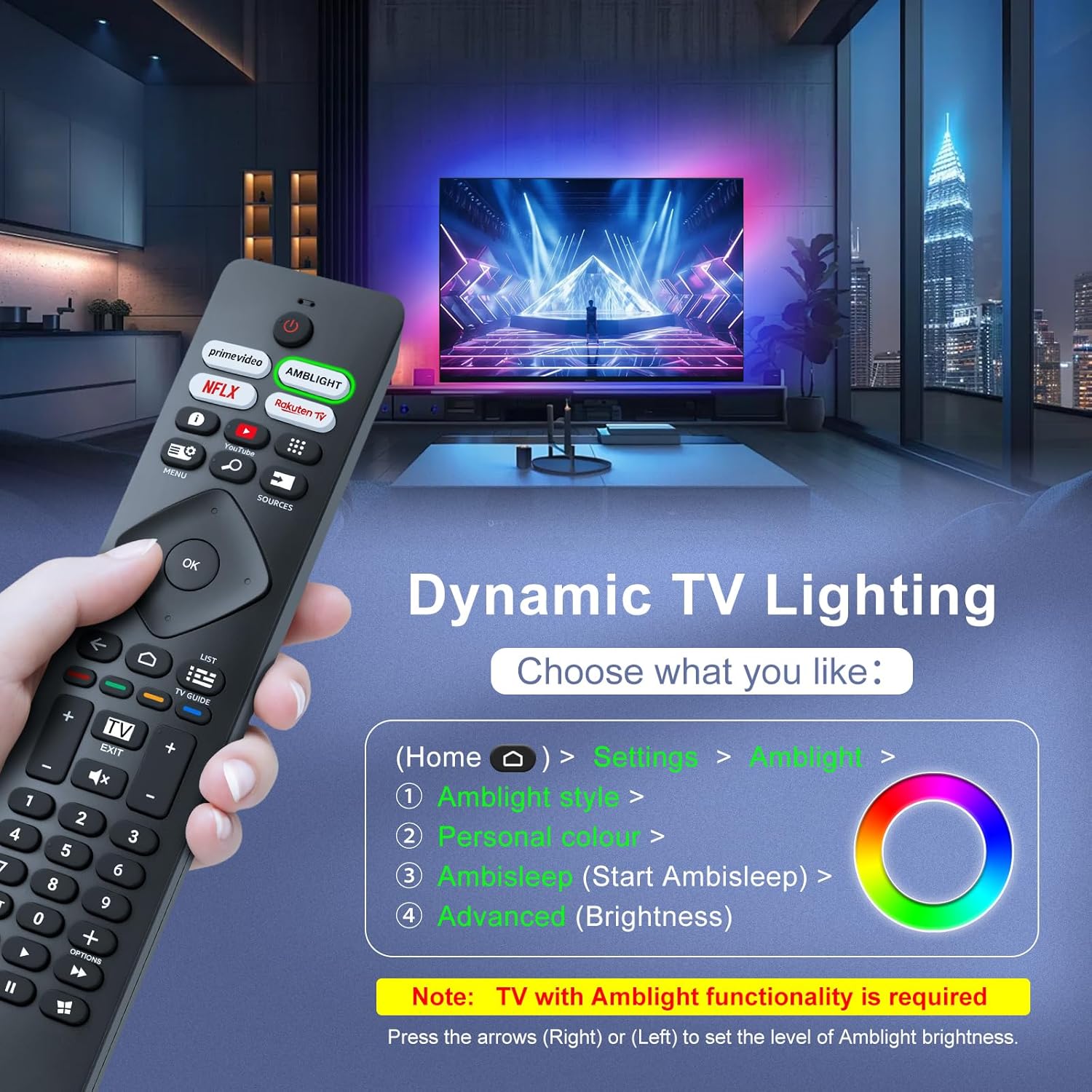
Image: A hand holding the remote control, with an overlay showing Ambilight settings on a TV screen.
After pressing the Ambilight button, you can navigate through the TV's menu to:
- Select different Ambilight display styles.
- Adjust personal color preferences.
- Initiate AmbiSleep mode.
- Adjust Ambilight brightness levels (using the right or left arrow keys).
Note: This feature requires a Philips TV with built-in Ambilight functionality.
4. Засвар үйлчилгээ
4.1 Цэвэрлэгээ
To clean your remote control, gently wipe it with a soft, dry cloth. Avoid using liquid cleaners, aerosols, or harsh chemicals, as these can damage the remote's surface or internal components.
4.2 Хадгалалт
Алсын удирдлагыг нарны шууд тусгал, хэт температураас хол, сэрүүн, хуурай газар хадгална. Хэрэв алсын удирдлагыг удаан хугацаагаар ашиглахгүй бол гоожихоос урьдчилан сэргийлэхийн тулд батерейг арилгахыг зөвлөж байна.
4.3 Батерейны арчилгаа
- Бүх батерейг нэгэн зэрэг солих; хуучин ба шинэ батерейг бүү холь.
- Өөр өөр төрлийн батерейг (жишээлбэл, шүлтлэг ба цэнэглэдэг) хольж болохгүй.
- Ашигласан батерейг орон нутгийн дүрэм журмын дагуу хариуцлагатайгаар устгана уу.
5. Алдаа засах
5.1 Нийтлэг асуудал ба шийдвэрлэх арга замууд
- Алсын удирдлага хариу өгөхгүй байна:
- Батерейг зөв туйлшралтайгаар зөв оруулсан эсэхийг шалгана уу.
- Батерейг шинэ AAA батерейгаар солино уу.
- Алсын удирдлага болон ТВ-ийн хэт улаан туяаны хүлээн авагчийн хооронд ямар ч саад бэрхшээл байхгүй эсэхийг шалгаарай.
- Үр дүнтэй ажиллах хүрээнд (8 метр хүртэл) байгаа эсэхээ шалгаарай.
- Тодорхой товчлуурууд ажиллахгүй байна:
- Clean the remote control, especially around the non-functioning buttons, to remove any dirt or debris.
- If only Ambilight functions are not working, ensure your Philips TV model supports Ambilight.
5.2 Дэмжлэгтэй холбоо барина уу
If you encounter persistent issues that cannot be resolved with the troubleshooting steps above, please contact Loutoc customer support directly. We aim to respond to all inquiries within 12 working hours.
6. Техникийн үзүүлэлтүүд
| Онцлог | Дэлгэрэнгүй |
|---|---|
| Брэнд | Loutoc |
| Загварын нэр | SRC4526-FBA |
| Загварын дугаар | SRC4526 |
| Өнгө | Хар |
| Холболтын технологи | Хэт улаан туяа |
| Онцлог шинж чанарууд | No programming required, Ergonomic, Lightweight |
| Тохиромжтой төхөөрөмжүүд | Television (Philips Ambilight TVs) |
| Maximum Number of Supported Devices | 1 |
| Хянагчийн төрөл | Товчлуурын удирдлага |
| Хамгийн их хүрээ | 8 метр (26 фут) |
| Батерейны тодорхойлолт | AAA (2 required, not included) |
| Үйлдвэрлэгч | Loutoc |
| Гарал үүслийн улс | Хятад |
| Анхны огноог Amazon.com.be дээрээс авах боломжтой | 31 оны наймдугаар сарын 2025 |
7. Баталгаат хугацаа ба дэмжлэг
7.1 Баталгаат хугацааны мэдээлэл
This Loutoc remote control comes with a manufacturer's warranty of 30 days from the date of purchase. Please retain your proof of purchase for any warranty claims.
7.2 Хэрэглэгчийн дэмжлэг
For any questions, technical assistance, or warranty inquiries, please contact Loutoc customer support. We are committed to providing timely assistance and will respond to your queries within 12 working hours.