1. Танилцуулга
Thank you for choosing the HARDELL Mini Cordless Rotary Tool. This versatile and compact tool is designed for various light-duty tasks such as sanding, polishing, drilling, carving, and engraving. Its cordless design and multiple speed settings provide flexibility and precision for your DIY projects and crafts. Please read this manual thoroughly before use to ensure safe and optimal operation.
2. Аюулгүй байдлын мэдээлэл
- Always wear appropriate personal protective equipment, including safety glasses, during operation.
- Ажлын талбайг цэвэр, гэрэлтүүлэгтэй байлгах. Эмх замбараагүй эсвэл харанхуй газар осол аваар гарахыг өдөөдөг.
- Шатамхай шингэн, хий, тоос зэрэг тэсрэх аюултай орчинд цахилгаан хэрэгслийг бүү ажиллуул.
- Цахилгаан хэрэгсэл ажиллуулж байх үед хүүхдүүд болон хажууд байгаа хүмүүсийг хол байлга. Анхаарал сарниулах нь хяналтаа алдахад хүргэдэг.
- Санамсаргүй асаахаас зайлсхий. Батерейтай холбох, багажийг авах эсвэл авч явахаасаа өмнө унтраалга унтарсан байрлалд байгаа эсэхийг шалгаарай.
- Цахилгаан хэрэгслийг хүчээр бүү хий. Хэрэглээнд тохирох цахилгаан хэрэгслийг ашигла.
- Аливаа тохируулга хийх, дагалдах хэрэгслийг солих, цахилгаан хэрэгслийг хадгалахын өмнө батерейг цахилгаан хэрэгслээс салга.
- Хөдөлгөөнгүй байгаа цахилгаан хэрэгслийг хүүхдэд хүрэхгүй газар хадгална уу, цахилгаан хэрэгсэл болон эдгээр зааврыг мэдэхгүй хүмүүст цахилгаан хэрэгслийг ажиллуулахыг бүү зөвшөөр.
- Цахилгаан хэрэгсэл, дагалдах хэрэгслийг засварлах. Хөдөлгөөнт хэсгүүдийн тэгш бус байдал, бэхэлгээ, эд анги эвдэрсэн, цахилгаан хэрэгслийн ажиллагаанд нөлөөлж болзошгүй бусад нөхцөл байдлыг шалгана уу.
- Ажлын нөхцөл, гүйцэтгэх ажлыг харгалзан цахилгаан хэрэгсэл, дагалдах хэрэгсэл, багаж хэрэгслийг эдгээр зааврын дагуу ашигла.
- This rotary tool is not designed for heavy-duty tasks.
3. Багцын агуулга
The HARDELL Mini Cordless Rotary Tool kit includes the following items:
- HARDELL Mini Cordless Rotary Tool (Orange)
- USB-C цэнэглэгч кабель
- Assorted Accessories (35 pieces), including:
- Зүлгүүрийн тууз
- Өнгөлгөөний дэвсгэр
- Grinding heads
- Өрөмдлөгийн битүүд
- Engraving tips
- Таслах дугуй
- Collets (various sizes)
- Дагалдах хэрэгслийг солих түлхүүр

Image: The HARDELL Mini Cordless Rotary Tool shown with its included USB-C charging cable and various accessories, such as sanding bands, cutting discs, drill bits, and grinding heads.
4. Бүтээгдэхүүн дууссанview
Familiarize yourself with the components of your HARDELL Mini Cordless Rotary Tool:

Image: Diagram showing the key parts of the rotary tool, including the Locking Collar, Spindle Lock Button, On/Off Button, Speed Control Button, Unique Cooling Device, and Type-C Charging Port.
- Түгжих хүзүүвч: Firmly fixes accessories in place.
- Спиндлийн түгжээний товчлуур: Quick collet lock for fast accessory changes. Caution: Do not press this button when the device is running.
- Асаах/унтраах товч: Хэрэгслийг асаах эсвэл унтраах.
- Speed Control Buttons (+/-): Adjusts the rotational speed. The "+" button increases speed, and the "-" button decreases speed.
- LED гэрэл: Illuminates the work area for enhanced precision and visibility.
- Type-C цэнэглэх порт: For convenient charging using a USB-C cable.
- Unique Cooling Device: Designed to dissipate heat during operation.
Хурдны тохиргоо
The tool features 5-speed settings for various applications:
- Хурд 1: 5000 RPM (Recommended for polishing)
- Хурд 2: 8000 RPM (Recommended for sanding)
- Хурд 3: 11000 RPM (Recommended for carving)
- Хурд 4: 14000 RPM (Recommended for grinding)
- Хурд 5: 18000 RPM (Recommended for drilling)
5. Setup and Accessory Installation
Proper installation of accessories is crucial for safe and effective operation.
General Accessory Installation
- Спиндлийн түгжих товчийг дарж, самарыг тайл.
- Choose the suitable collet and insert it into the tool. Then, place the black nut over the collet. Install the accessory you need to use.
- Press the spindle lock button again, then tighten the nut to secure the accessory.

Image: Visual guide demonstrating the four steps to install various accessories into the rotary tool's collet.
Installing a Sanding Band
- Insert the sanding drum into the collet and tighten the nut.
- Loosen the screw of the sanding drum.
- Зүлгүүрийн туузыг хүрдэн дээр суурилуулна.
- Press down the spindle lock button and tighten the screw of the sanding drum with the provided wrench.

Image: Visual instructions for attaching a sanding band to the rotary tool, showing the drum, band, and tightening process.
Installing an HSS Cutting Disc or Sanding Paper
- Дугуйны холхивчийг цохиурт хийж, самарыг чангална.
- Dismantle the screw of the wheel mandrel.
- Дугуйны холхивчийг суурилуулж, HSS зүсэх диск эсвэл зүлгүүрийн цаасыг угсарна.
- Press down the spindle lock button and tighten the screw of the wheel mandrel with the provided wrench.
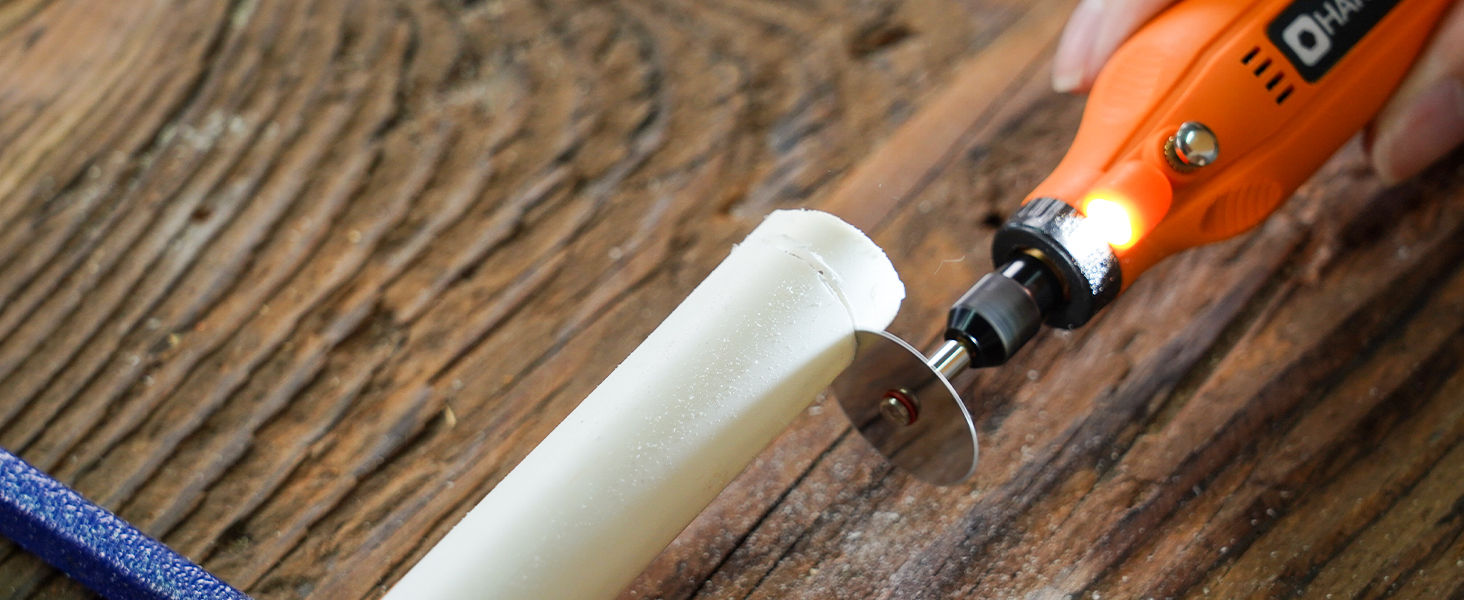
Image: Visual instructions for attaching an HSS cutting disc or sanding paper to the rotary tool, detailing the mandrel and securing steps.
6. Ашиглалтын заавар
- Асаах/унтраах: Press the On/Off button to turn the tool on or off.
- Хурд тохируулах: Use the '+' and '-' buttons to cycle through the 5 available speed settings (5000 RPM to 18000 RPM). The LED indicators will show the current speed level.
- LED гэрэл: The integrated LED light automatically illuminates when the tool is powered on, providing visibility for detailed work.
- Үйл ажиллагаа: Hold the tool firmly and apply gentle pressure to the workpiece. Allow the tool to do the work; excessive force can lead to poor results or damage to the tool/workpiece.

Image: A person using the HARDELL Mini Cordless Rotary Tool for carving a wooden piece, demonstrating its ergonomic design and precision.

Зураг: Ойрын зураг view of the rotary tool in action, with its LED light brightly illuminating the precise point of contact on a workpiece, highlighting its utility in detailed tasks.
7. Хэрэглээ
The HARDELL Mini Cordless Rotary Tool is ideal for a variety of light-duty projects, including but not limited to:
- Engraving on various materials
- Sanding small surfaces or edges
- Carving intricate designs
- Drilling small holes
- Grinding for shaping or smoothing
- Polishing for a smooth finish
- Trimming excess material

Зураг: эвлүүлэг шоуasing the multi-purpose capabilities of the rotary tool, including sanding wood, carving glass, polishing beads, grinding metal, drilling shells, and cutting plastic.
8. Засвар үйлчилгээ
Хэрэгслийг цэнэглэж байна
- Connect the provided USB-C charging cable to the charging port at the base of the tool.
- Plug the other end of the USB-C cable into a compatible power source (e.g., computer, car charger, power bank).
- The LED indicators will show the charging status. A full charge provides up to 100 minutes of continuous use under no-load conditions.
Цэвэрлэгээ ба хадгалах
- After each use, disconnect any accessories and gently wipe the tool body with a clean, dry cloth.
- Remove any dust or debris from the collet and spindle area.
- Store the tool and its accessories in a dry, clean place, preferably in its original carrying case, away from direct sunlight and extreme temperatures.
9. Алдаа засах
- Хэрэгсэл асахгүй байна: Ensure the tool is fully charged. If the battery is low, connect it to a power source using the USB-C cable.
- Гүйцэтгэл буурсан: Check if the accessory is securely installed. Ensure the battery is adequately charged. The tool is designed for light-duty tasks; avoid using it for heavy-duty applications that may exceed its capacity.
- Хэт их чичиргээ эсвэл дуу чимээ: Ensure the accessory is correctly inserted and tightened. A loose or damaged accessory can cause vibration. Replace any worn or damaged accessories.
- Хэт халалт: If the tool feels excessively hot, discontinue use and allow it to cool down. Ensure the cooling vents are not obstructed.
10. Техникийн үзүүлэлтүүд
| Онцлог | Тодорхойлолт |
|---|---|
| Брэнд | ХАРДЕЛЛ |
| Загварын дугаар | DM12405ORANGEH-2 |
| Эрчим хүчний эх үүсвэр | Батерейгаар ажилладаг (3.7V Литий Ион) |
| Хурдны тохиргоо | 5-Speed (5000-18000 RPM) |
| Цэнэглэх төрөл | USB-C |
| Зүйлийн жин | 0.3 lbs (7.4 ounces / 0.21 Kilograms) |
| Онцлог шинж чанарууд | Compact, LED Light |
| Оруулсан бүрэлдэхүүн хэсгүүд | 35 Accessories, USB-C Cable |
11. Баталгаат хугацаа ба дэмжлэг
For warranty information, technical support, or any questions regarding your HARDELL Mini Cordless Rotary Tool, please refer to the documentation included in your product packaging or contact HARDELL customer service directly. Contact details can typically be found on the manufacturer's webсайт эсвэл бүтээгдэхүүний сав баглаа боодол дээр.


