1. Танилцуулга
This manual provides comprehensive instructions for the safe and effective use of your HAYLOU S40 Noise Cancelling Headphones. Please read this manual thoroughly before using the product and retain it for future reference.
2. Аюулгүй байдлын мэдээлэл
- Чихэвчийг хэт өндөр температур, чийгшил эсвэл идэмхий орчинд бүү байлга.
- Чихэвчийг унагах эсвэл хүчтэй цохилтонд оруулахаас зайлсхий.
- Do not disassemble or modify the headphones. This may void the warranty and cause damage.
- Чихэвчийг хүүхэд болон гэрийн тэжээвэр амьтдаас хол байлга.
- Use only the provided charging cable. Do not use the headphones while charging.
- Дууны өндөр түвшинд удаан хугацаагаар сонсох нь сонсголд гэмтэл учруулж болзошгүй. Дууны түвшинг аюулгүй түвшинд тохируулна уу.
3. Багцын агуулга
Таны багцад бүх зүйл байгаа эсэхийг шалгана уу:
- HAYLOU S40 Noise Cancelling Bluetooth Headphones
- Type-C 2-in-1 Cable (Charging & Audio)
- Салдаг микрофон
- Хэрэглэгчийн гарын авлага (энэ баримт бичиг)
4. Бүтээгдэхүүн дууссанview
Familiarize yourself with the components of your HAYLOU S40 headphones.
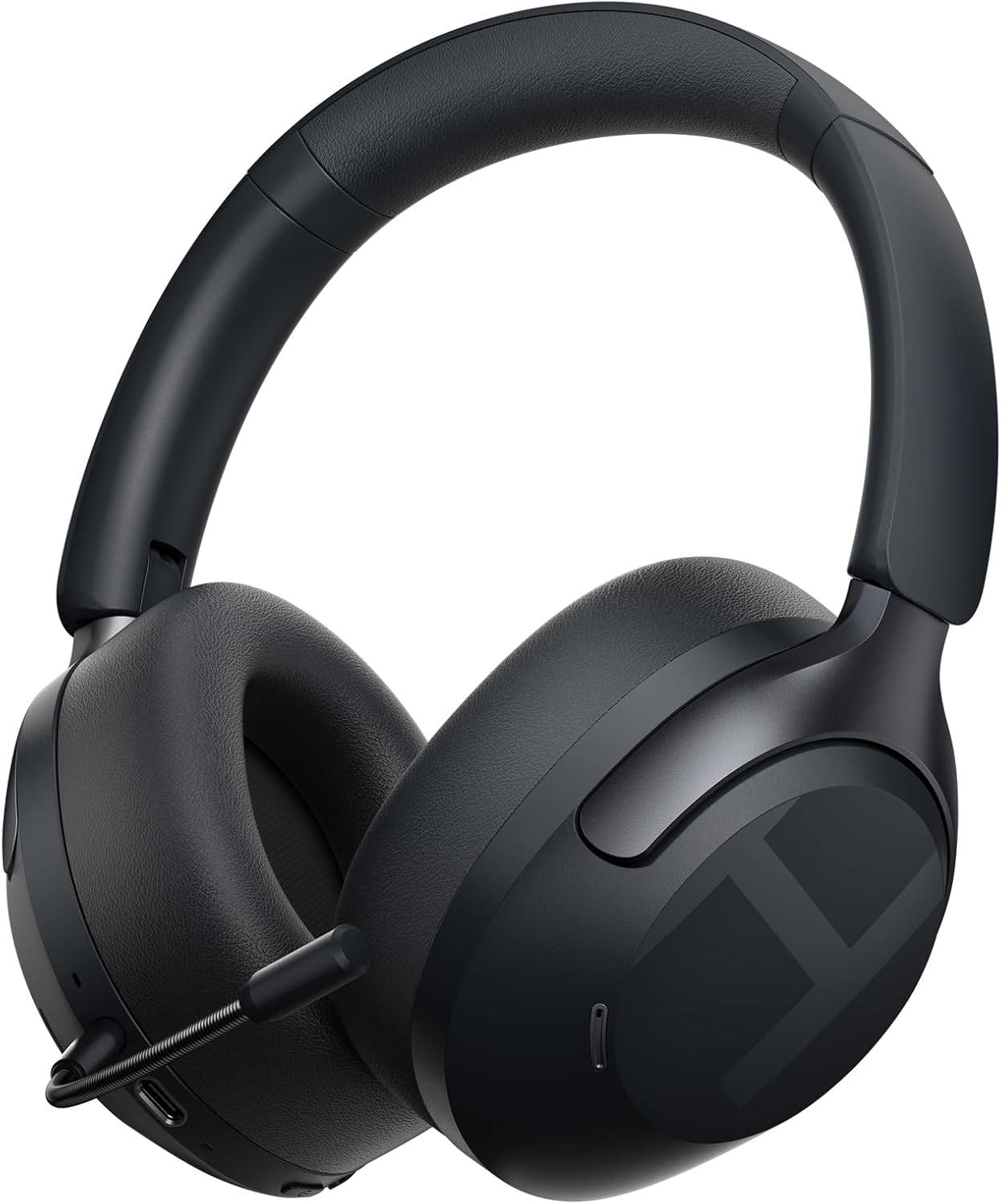
Зураг 4.1: HAYLOU S40 Noise Cancelling Headphones with the detachable microphone attached.
The headphones feature soft protein leather earcups for comfort, an adjustable headband, and foldable design for portability.

Зураг 4.2: The HAYLOU S40 headphones demonstrating their foldable design, soft earcups, and adjustable headband for comfortable wear and easy storage.
Хяналт ба портууд:

Зураг 4.3: Detailed diagram illustrating the location and function of buttons and touch controls on the HAYLOU S40 headphones.
- Цахилгаан товч: For power on/off and pairing mode.
- Дууны товчлуурууд (+/-): Adjust volume, next/previous track.
- ANC товчлуур: Идэвхтэй дуу чимээг цуцлах горимуудаар ээлжлэн солино уу.
- Мэдрэгчтэй хяналтын хэсэг: For quick conversation mode, answer/reject calls, play/pause music.
- USB-C порт: Цэнэглэх болон утастай аудио холболтын зориулалттай.
- Микрофон порт: Салдаг микрофоныг холбоход зориулагдсан.
5. Тохиргоо
5.1 Чихэвчийг цэнэглэх
Before first use, fully charge the headphones. Connect the provided Type-C cable to the headphone's USB-C port and a power source (e.g., computer USB port or wall adapter).
- Цэнэглэх хугацаа: Бүрэн цэнэглэхэд ойролцоогоор 2.5 цаг зарцуулна.
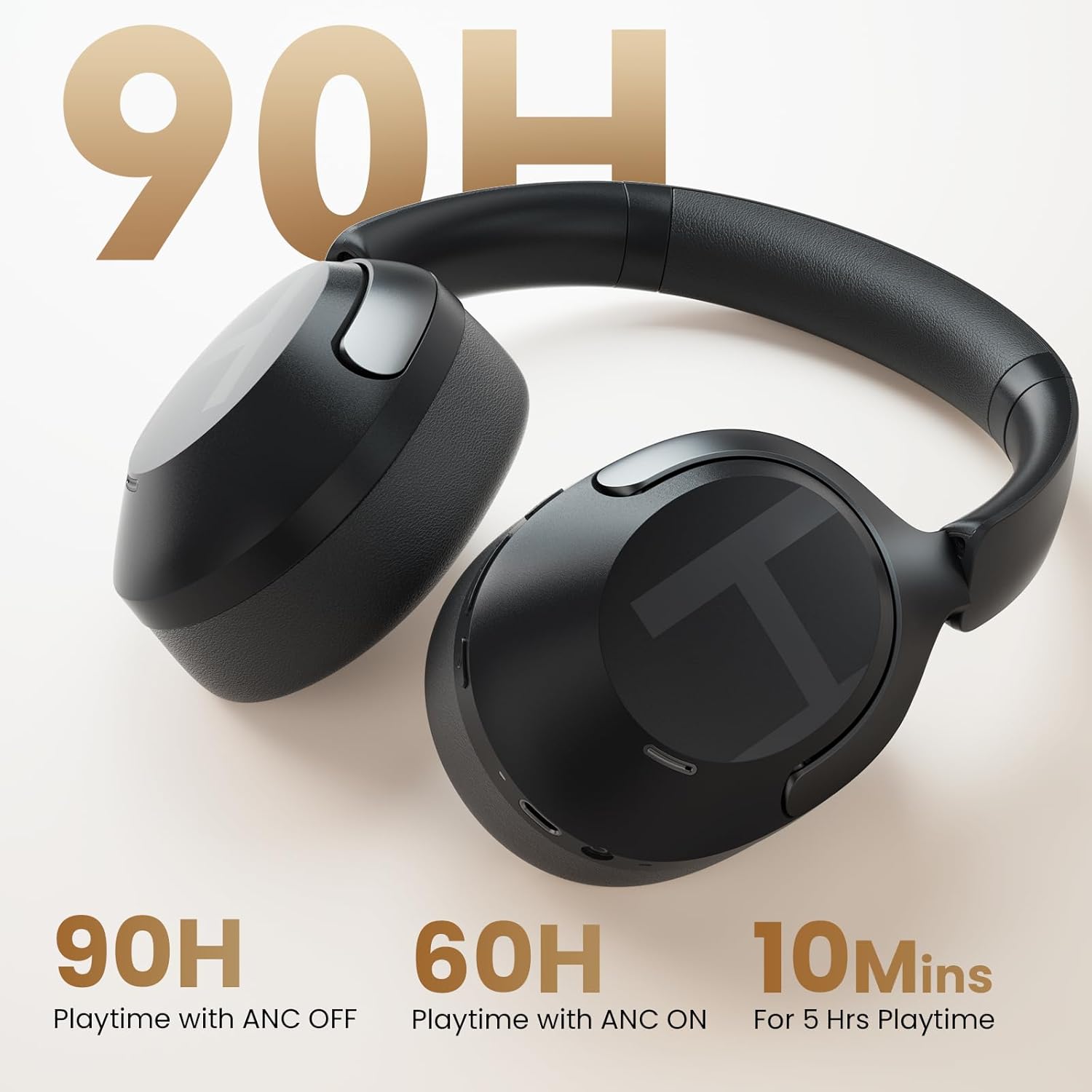
- Түргэн цэнэглэх: 10 minutes of charging provides approximately 5 hours of playback.
- Үзүүлэлт: The LED indicator will show charging status. Refer to the LED indicator section for details.
Note: Do not use the headphones while charging.

Зураг 5.1: Visual representation of the HAYLOU S40's battery life, indicating 90 hours with ANC off, 60 hours with ANC on, and 10 minutes of quick charging for 5 hours of playback.
5.2 Асаах/унтраах
- Асаах: Power товчийг 2 секундын турш удаан дарна уу.
- Унтраах: Power товчийг 2 секундын турш удаан дарна уу.
5.3 Bluetooth холболт
- Чихэвч унтарсан эсэхийг шалгаарай.
- Hold down the Power button for 5 seconds until the LED indicator flashes blue and red, indicating pairing mode.
- Төхөөрөмж дээрээ (ухаалаг утас, таблет, компьютер) Bluetooth-г идэвхжүүлж, боломжтой төхөөрөмжүүдийг хайж олоорой.
- Select "HAYLOU S40" from the list of devices.
- Холбогдсоны дараа LED индикатор нь цэнхэр өнгөтэй болно.
5.4 Connecting to the Haylou Sound App
For advanced features and customization, download the "Haylou Sound" app from your device's app store.
- Download and install the "Haylou Sound" app.
- Ensure your HAYLOU S40 headphones are powered on and connected via Bluetooth to your device.
- Open the Haylou Sound app. The app should automatically detect and prompt you to connect to your S40 headphones.
- Холболтыг дуусгахын тулд дэлгэцэн дээрх зааврыг дагана уу.

Зураг 5.2: A smartphone screen displaying the Haylou Sound app interface, showing a prompt to connect to the Haylou S40 headphones.
The app allows for noise canceling depth controls, preset sound profiles, device renaming, and game mode activation.
5.5 Олон цэгийн холболт
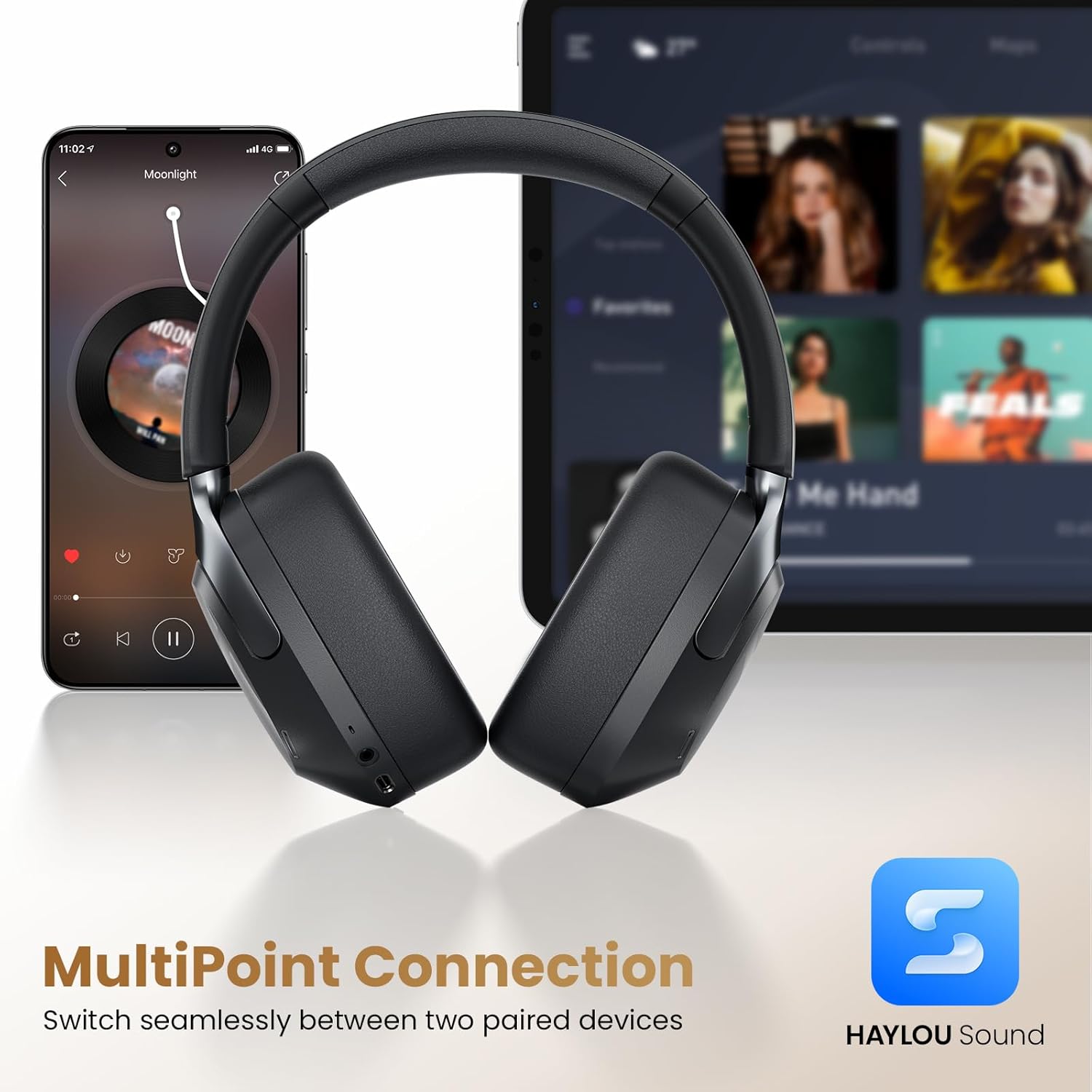
The HAYLOU S40 supports connecting to two devices simultaneously, allowing seamless switching between them.
- Чихэвчийг 5.3-р хэсэгт тайлбарласны дагуу Bluetooth-ээр эхний төхөөрөмжид холбоно уу.
- Чихэвчийг эхний төхөөрөмжөөс салга (хос бүү сал).
- Чихэвчийг дахин хослуулах горимд оруулаад хоёр дахь төхөөрөмжтэй холбоно уу.
- Чихэвчийг анхны төхөөрөмждөө Bluetooth тохиргооноос нь дахин холбоно уу. Чихэвчийг одоо хоёр төхөөрөмжид холбох ёстой.

Зураг 5.3: The HAYLOU S40 headphones demonstrating multipoint connection, simultaneously linked to a smartphone and a tablet, enabling seamless audio switching.
6. Ашиглалтын заавар
6.1 Үндсэн удирдлага
| Чиг үүрэг | Үйлдэл |
|---|---|
| Асаах/унтраах | Long press Power button for 2s |
| Хослуулах горим | Hold Power button for 5s (when device is off) |
| Дууны хэмжээг нэмэгдүүлэх | Click "+" button |
| Дууг багасгах | Click "-" button |
| Дараагийн дуу | Press and hold "+" button |
| Өмнөх зам | Press and hold "-" button |
| ANC On/Off/Mode Cycle | ANC товчийг дарна уу |
| Quick Conversation Mode | Press and hold touch control area (release to turn off) |
| Дуудлагад хариулах/таслах | Double click touch control area |
| Дуудлагаас татгалзах | Press and hold touch control area for 1s |
| Хөгжим тоглуулах/түр зогсоох | Double click touch control area |
6.2 Идэвхтэй дуу чимээг арилгах (ANC) горимууд
The HAYLOU S40 features 50dB Hybrid ANC with multiple modes. Press the ANC button to cycle through the available modes:
- Гүн ANC: Effectively blocks over 95% of noise, ideal for very noisy environments like airplanes or subways.
- Moderate ANC: Preserves some ambient sounds while reducing noise, suitable for offices or cafes.
- Дасан зохицох ANC: Intelligently adjusts noise reduction based on your surroundings.
- Ил тод байдлын горим: Allows you to hear your surroundings clearly without removing the headphones, useful for conversations or announcements.
- ANC унтраалттай: Disables active noise cancellation.
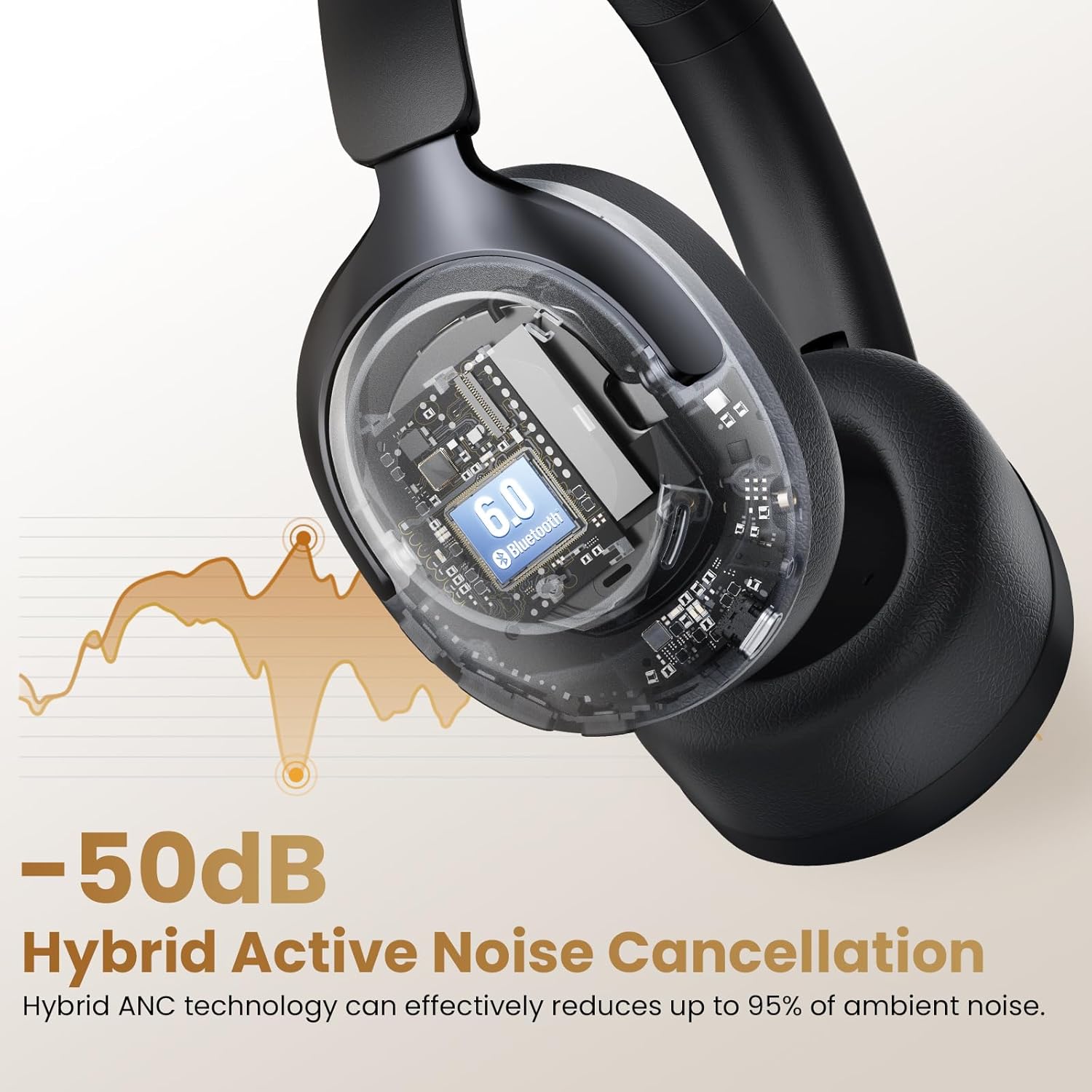
Зураг 6.1: An illustration depicting the 50dB Hybrid Active Noise Cancellation feature of the HAYLOU S40 headphones, showing how it reduces up to 95% of ambient noise.

Зураг 6.2: A collage illustrating the four distinct Active Noise Cancellation modes: Deep ANC for maximum noise blocking, Moderate ANC for balanced noise reduction, Adaptive ANC for intelligent adjustment, and Transparency Mode for hearing surroundings.
6.3 LDAC Hi-Res Audio Activation
The HAYLOU S40 supports LDAC for Hi-Res Wireless Audio. To enable LDAC, you must activate it within the Haylou Sound App.
- Ensure your headphones are connected to the Haylou Sound App (refer to section 5.4).
- Navigate to the audio settings within the app.
- Locate and enable the LDAC option.
Note: Disabling LDAC is recommended during Game Mode to avoid latency issues.
Зураг 6.3: Дэлбэрэв view of the HAYLOU S40's 40mm+20mm dual driver system, highlighting its Hi-Res Audio and LDAC compatibility for lossless sound reproduction.
6.4 Detachable Microphone Usage
The HAYLOU S40 includes a detachable microphone for enhanced call clarity. Simply plug the microphone into the designated port on the headphones.
The headphones utilize five built-in microphones and the detachable microphone, combined with AI algorithms, to isolate your voice and suppress background noise during calls.

Зураг 6.4: The HAYLOU S40 headphones with the detachable microphone attached, illustrating its use for clear communication, particularly during gaming or calls.
6.5 Орон зайн аудио
Experience immersive audio with 360° Surround Spatial Audio and Head Tracking. This feature can be configured via the Haylou Sound App.
Зураг 6.5: A woman wearing the HAYLOU S40 headphones, depicted experiencing 360° surround spatial audio with head tracking for an immersive listening experience.
7. Засвар үйлчилгээ
- Цэвэрлэгээ: Чихэвчийг цэвэрлэхийн тулд зөөлөн, хуурай даавуу ашиглана уу. Химийн хатуу бодис, зүлгүүрийн материалыг бүү ашигла.
- Хадгалах: Ашиглаагүй үед чихэвчийг нарны шууд тусгал, хэт температураас хол, сэрүүн, хуурай газар хадгална. Эвхэгддэг загвар нь авсаархан хадгалах боломжийг олгодог.
- Батерейны арчилгаа: Зайны ашиглалтын хугацааг уртасгахын тулд чихэвчийг байнга цэнэглэж болохгүй. Байнгын хэрэглээгүй байсан ч тогтмол цэнэглэ.
8. Алдаа засах
| Асуудал | Боломжит шалтгаан | Шийдэл |
|---|---|---|
| Чихэвч асахгүй байна. | Батерей бага. | Чихэвчийг бүрэн цэнэглэ. |
| Bluetooth-ээр холбох боломжгүй. | Чихэвчийг холбох горимд оруулаагүй; Төхөөрөмж дээрх Bluetooth унтраалттай; хөндлөнгийн оролцоо. | Ensure headphones are in pairing mode (flashing blue/red LED). Turn Bluetooth on your device. Move closer to the device. Restart both devices. |
| Дуу байхгүй эсвэл дуу багатай. | Дууны түвшин хэт бага; чихэвч холбогдоогүй; аудио гаралт буруу байна. | Adjust volume on headphones and device. Reconnect Bluetooth. Check device's audio output settings. |
| АН үр дүнтэй ажиллахгүй байна. | Incorrect ANC mode; poor seal. | Cycle through ANC modes. Ensure earcups form a good seal around your ears. |
| Микрофон ажиллахгүй байна. | Detachable microphone not properly connected; device microphone settings. | Ensure the detachable microphone is securely plugged in. Check your device's microphone input settings. |
| LDAC audio quality issues or latency. | LDAC enabled during Game Mode; environmental interference. | Disable LDAC in the Haylou Sound App if using Game Mode. Reduce distance to device or move away from interference sources. |
9. Техникийн үзүүлэлтүүд
| Онцлог | Дэлгэрэнгүй |
|---|---|
| Загварын нэр | HAYLOU S40 |
| Дуу чимээний хяналт | Adaptive Noise Cancellation (50dB Hybrid ANC) |
| Аудио драйверын төрөл | Dynamic Driver (40mm + 20mm) |
| Өндөр нягтаршилтай аудио дэмжлэг | Yes (LDAC compatible) |
| Bluetooth хувилбар | 6.0 |
| Холболтын технологи | Wired (USB-C), Wireless (Bluetooth) |
| Батерейны хугацаа (ANC унтраалттай) | 90 цаг хүртэл |
| Батерейны хугацаа (ANC асаалттай) | 60 цаг хүртэл |
| Цэнэглэх хугацаа | Ойролцоогоор 2.5 цаг |
| Микрофонууд | 5 built-in + 1 detachable (AI algorithms for calls) |
| Олон цэгийн холболт | Yes (connects to two devices simultaneously) |
| Материал | ABS, Faux Leather, PC |
| Жин | 0.35 килограмм (12.3 унц) |
| Хэмжээ | 6.81 x 3.26 x 7.68 инч |
10. Баталгаат хугацаа ба дэмжлэг
HAYLOU products are covered by a limited warranty. For detailed warranty information, please refer to the warranty card included in your package or visit the official HAYLOU webсайт.
For technical support, troubleshooting assistance, or to inquire about replacement parts, please contact HAYLOU customer service through their official channels. You can often find support contact information on the HAYLOU website or within the Haylou Sound App.
Онлайн нөөцүүд:
- Албан ёсны ХАЙЛОУ Webсайт: www.haylou.com
- Haylou Sound App: Available on iOS App Store and Google Play Store.


