1. Бүтээгдэхүүн дууссанview
The Masajoy CM7003 is a wired USB headset designed for clear communication and comfortable use with various computing devices. It features a noise-canceling microphone and a stable USB-A connection, making it suitable for home office, online classes, and teleconferencing environments.

Image 1: Masajoy USB Headset CM7003, showcasing the headset with its USB-A connector.
2. Багцын агуулга
- 1 x Masajoy USB Headset (Model CM7003)
3. Тохируулах заавар
3.1 Чихэвчийг холбох
- Компьютер, зөөврийн компьютер эсвэл нийцтэй төхөөрөмж дээрээ боломжтой USB-A портыг олоорой.
- Insert the USB-A connector of the headset into the USB-A port.
- The headset is plug-and-play. Your operating system should automatically detect and install the necessary drivers. The device name will typically appear as "USB Audio Device".

Image 2: Illustration of the headset's plug-and-play functionality, showing a user connecting the USB plug to a laptop.
3.2 Системийн нийцтэй байдал
The Masajoy CM7003 headset is compatible with a wide range of operating systems and communication platforms:
- Үйлдлийн системүүд: macOS, Android, Windows 7/8, Windows 10, Windows 11.
- Төхөөрөмжүүд: PCs, Laptops, Tablets, Macs.
- Харилцаа холбооны платформууд: Teams, Skype, Zoom, Webex, Facetime, Google Meet.

Image 3: Visual representation of the headset's broad compatibility with various operating systems, devices (desktop PC, laptop, USB plug), and communication applications.
4. Ашиглалтын заавар
4.1 Дууны хэмжээг тохируулах
Volume can be adjusted directly on the headset:
- -г эргүүл баруун чихний аяга to increase or decrease the audio volume.
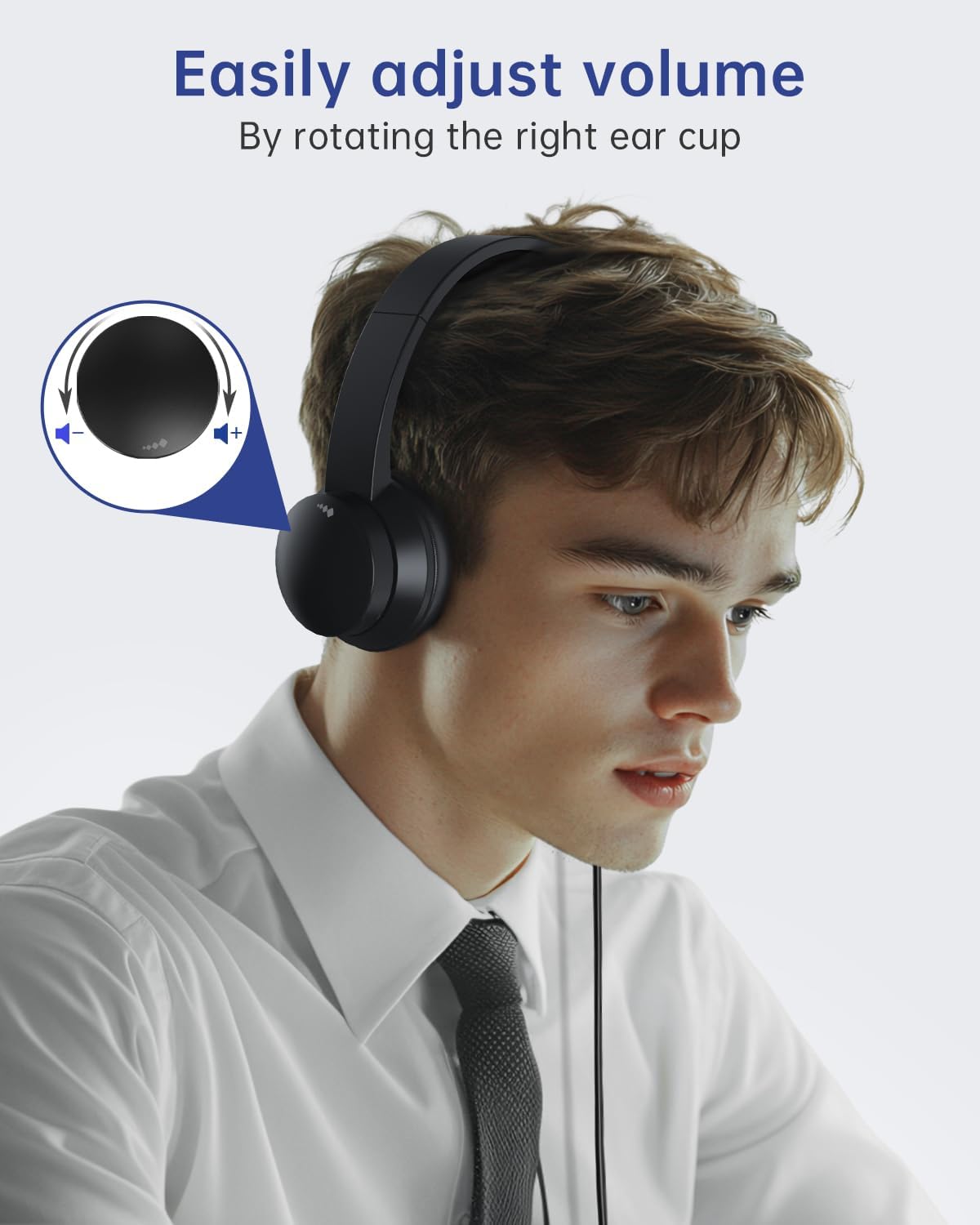
Image 4: A user adjusting the volume by rotating the right ear cup of the headset, with an inset diagram showing the rotation direction for volume control.
4.2 Микрофоныг хаах функц
Микрофоны дууг хаахын тулд:
- Lift the microphone boom arm to an upright position (approximately 90 degrees). This action will mute the microphone.
- Lower the microphone boom arm to unmute.
Жич: The microphone arm only supports 90-degree adjustment. The headset does ҮГҮЙ support right-ear wearing.

Image 5: A user demonstrating the microphone mute function by rotating the microphone boom arm upwards. An icon indicates the mute status.
4.3 Optimal Microphone Positioning
For the best noise reduction performance and clear voice capture, position the microphone 1 to 2 cm from your mouth.

Image 6: A person using the headset, highlighting the noise-canceling microphone feature for improved communication, with a visual representation of sound wave reduction.
5. Тав тухтай байдал ба дизайн
The Masajoy CM7003 headset is engineered for extended wear comfort:
- Чихний дэр: Made with premium soft, breathable protein memory foam to prevent heat and sweat buildup.
- Толгойн тууз: Adjustable and retractable to fit various head sizes.
- Жин: Lightweight design (approximately 5 ounces / 0.23 kg) reduces pressure during prolonged use.

Зураг 7: Ойролцоогоор view illustrating the comfort features of the headset, including soft earpads, a cushioned leather head beam, and an adjustable headband.
6. Засвар үйлчилгээ
Чихэвчнийхээ удаан эдэлгээ, оновчтой ажиллагааг хангахын тулд дараах засвар үйлчилгээний удирдамжийг дагаж мөрдөнө үү.
- Цэвэрлэгээ: Use a soft, dry cloth to wipe down the ear cups and headband. Avoid using harsh chemicals or abrasive materials.
- Хадгалах: Чихэвчийг цэвэр, хуурай газар, хэт өндөр температур болон нарны шууд тусгалаас хол хадгална уу.
- Кабель арчилгаа: USB кабелийг гэмтээхгүйн тулд хурц гулзайлгах эсвэл хэт их татахаас зайлсхий.
7. Алдаа засах
If you encounter issues with your Masajoy CM7003 headset, refer to the following common solutions:
- Дуугүй:
- Ensure the headset is securely plugged into a working USB-A port.
- Check your computer's audio settings to confirm "USB Audio Device" is selected as the output device.
- Verify the volume control on the headset (right ear cup) is not at its minimum setting.
- Test with a different USB port or another computer to rule out port or system issues.
- Микрофон ажиллахгүй байна:
- Ensure the microphone boom arm is lowered and not in the muted (upright) position.
- Check your computer's audio settings to confirm "USB Audio Device" is selected as the input device.
- Adjust the microphone input level in your system settings.
- Ensure the microphone is positioned 1-2 cm from your mouth.
- Sound Distortion or Static:
- Чихэвчийг өөр USB порт руу залгаж үзээрэй.
- Ensure there are no other devices causing electrical interference nearby.
- Update your computer's audio drivers if available.
8. Техникийн үзүүлэлтүүд
| Загварын нэр | CM7003 |
| Холболтын технологи | Утастай (USB-A) |
| Чихэвчний үүр | USB А |
| Дуу чимээний хяналт | Идэвхгүй дуу чимээг арилгах |
| Давтамжийн хүрээ | 20 Гц - 20,000 Гц |
| Эсэргүүцэл | 32 Ом |
| Аудио драйверын төрөл | Динамик драйвер |
| Чихний байрлал | Чихэн дээр |
| Form Factor | Чихэн дээр |
| Зүйлийн жин | 0.23 килограмм (8.1 унц) |
| Оруулсан бүрэлдэхүүн хэсгүүд | USB чихэвч |
| Хяналтын арга | Push Button (Volume rotation, Mic lift) |
9. Баталгаат хугацаа ба дэмжлэг
For warranty information or technical support, please refer to the documentation included with your purchase or contact Masajoy customer service directly. Contact details can typically be found on the manufacturer's official webсайт эсвэл жижиглэн худалдаалагчаар дамжуулан.
If you experience any product problems during use, please contact our support team for assistance. Our senior engineers are available to help resolve issues as soon as possible.

