1. Танилцуулга
Худалдан авалт хийсэнд баярлалааasing the Moukey MAMP3 2.0 Channel Stereo Amplifier. This manual provides essential information for the safe and efficient operation of your device. Please read it thoroughly before use and retain it for future reference.
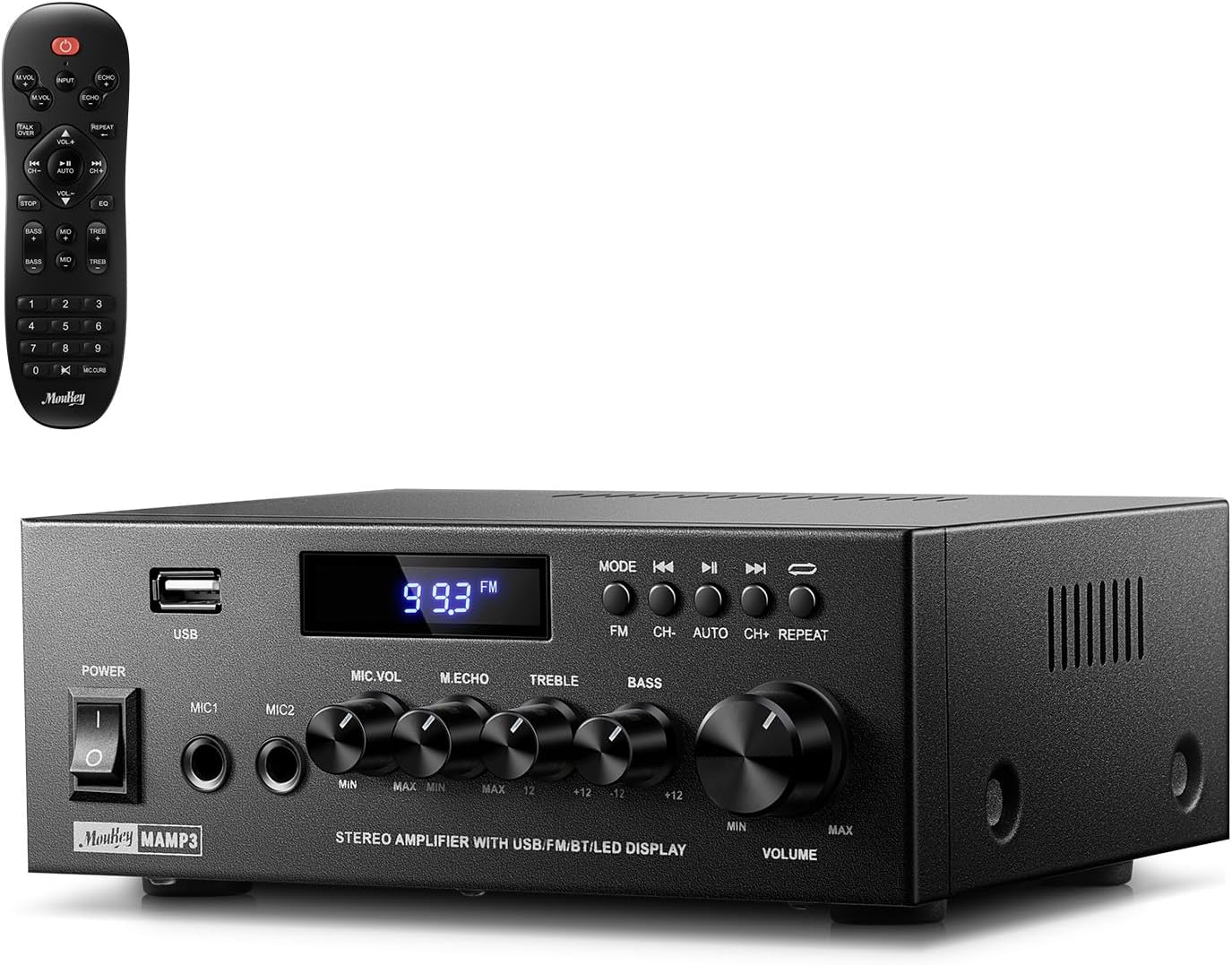
Image 1.1: The Moukey MAMP3 amplifier and its remote control.
2. Аюулгүй ажиллагааны заавар
- Төхөөрөмжийг ажиллуулахын өмнө бүх зааврыг уншина уу ampнастан.
- -г хадгал amplifier away from water, moisture, and extreme temperatures.
- Do not block ventilation openings. Ensure proper airflow around the unit.
- Зөвхөн төхөөрөмжид дагалддаг тэжээлийн адаптерийг ашиглана уу.
- Төхөөрөмжийг өөрөө засах, өөрчлөх гэж бүү оролдоорой. Бүх үйлчилгээг мэргэшсэн боловсон хүчинд шилжүүлээрэй.
- Disconnect the power cord from the outlet if the unit will be unused for extended periods.
3. Бүтээгдэхүүн дууссанview
3.1 Гол онцлогууд
- 2.0 Channel Stereo Audio Output
- Bluetooth 5.3 for stable wireless connection
- Multiple Audio Inputs: RCA, USB, FM Radio, 2 Microphone Inputs
- Full-function Remote Control with EQ adjustments
- Customizable Treble, Midrange, and Bass controls
- Memory function for mode, volume, and EQ settings
- 300 Watts Peak Power Output
3.2 Урд самбарын удирдлага ба үзүүлэлтүүд

Image 3.1: Front Panel Layout
- Эрчим хүч солих: Төхөөрөмжийг асаах эсвэл унтраана.
- MIC1/2: 6.35 мм микрофон оролттой.
- Микрофоны дууны бариул: Холбогдсон микрофоны дууны түвшинг тохируулна.
- Цуурай бариул: Микрофоны цуурай эффектийг тохируулна.
- Гурвалсан товчлуур: Өндөр давтамжийн аудио гаралтыг тохируулна.
- Басс бариул: Бага давтамжийн аудио гаралтыг тохируулна.
- Хөгжмийн дууны товчлуур: Main volume control for all audio sources.
- USB үүр: For connecting USB storage devices for audio playback.
- Лэд дэлгэц: Одоогийн горим, замын мэдээлэл эсвэл FM давтамжийг харуулна.
- MODE товчлуур: Switches between input sources (BT, Aux, CD, USB, FM).
- Өмнөх товчлуур: Skips to the previous track (USB/BT) or FM station.
- Тоглуулах/түр зогсоох товчлуур: Plays or pauses audio (USB/BT).
- Дараагийн товчлуур: Skips to the next track (USB/BT) or FM station.
- Давтах товч: Repeats current track or all tracks (USB).
3.3 Арын самбарын холболтууд

Image 3.2: Rear Panel Connections
- FM антенны оролт: Connect the included FM antenna for radio reception.
- AUDIO INPUT (RCA): Connect external audio sources like CD/DVD players using RCA cables.
- AUDIO OUTPUT (Speaker Terminals): Connect passive speakers. Ensure correct polarity (+ to + and - to -).
- POWER AC INPUT: Цахилгааны утсыг AC залгуурт холбоно уу.
4. Тохиргоо
4.1 Савлах
Болгоомжтой арилгана уу amplifier and all accessories from the packaging. Verify that all items listed in the 'What's in the Box' section are present.
4.2 Чанга яригчийг холбох
МAMP3 amplifier supports two passive speakers. Connect your speakers to the Аудио гаралт terminals on the rear panel. Ensure that the positive (+) terminal on the amplifier connects to the positive (+) terminal on your speaker, and the negative (-) terminal on the amplifier connects to the negative (-) terminal on your speaker. Incorrect polarity can affect sound quality.

Image 4.1: Speaker Connection Diagram
4.3 Аудио эх сурвалжийг холбох
The amplifier offers multiple input options:
- RCA оролт: Use RCA cables to connect devices such as CD players, DVD players, or other audio equipment to the Аудио оролт арын самбар дээрх залгуурууд.
- USB оруулах: USB флаш дискийг дотор нь оруулна уу USB оролт on the front panel for direct audio playback.
- Bluetooth: Bluetooth идэвхжүүлсэн төхөөрөмжөө (ухаалаг утас, таблет, зөөврийн компьютер) утасгүйгээр холбоно уу.
- FM радио: Дагалдах FM антенныг дараахтай холбоно уу FM антенны оролт on the rear panel for radio reception. Extend the antenna for optimal signal.
- Микрофоны оролтууд: Хоёр хүртэлх микрофоныг холбоно уу MIC1/2 jacks on the front panel for karaoke or public address.

Image 4.2: Available Signal Inputs
4.4 Эрчим хүчний холболт
Цахилгааны утасыг POWER AC INPUT on the rear panel and then plug it into a standard AC power outlet.
5. Ашиглалтын заавар
5.1 Асаах/унтраах
дээр дарна уу Цахилгаан унтраалга on the front panel to turn the amplifier on or off. The LED display will illuminate when the unit is powered on.
5.2 Оролтын сонголт
дээр дарна уу MODE button on the front panel or the remote control to cycle through the available input sources: Bluetooth (BT), Auxiliary (Aux), CD, USB, and FM radio. The selected mode will be shown on the LED display.
5.3 Дууны хяналт
Томыг эргүүлнэ үү Music Volume Knob on the front panel clockwise to increase volume and counter-clockwise to decrease it. Volume can also be adjusted using the remote control.
5.4 Тэнцвэржүүлэгч (EQ) тохируулга
Adjust the sound characteristics using the Гурвалсан товчлуур болон Басс товчлуур on the front panel. The remote control also provides dedicated buttons for Treble, Midrange, and Bass adjustments. The amplifier will automatically save your preferred EQ settings.
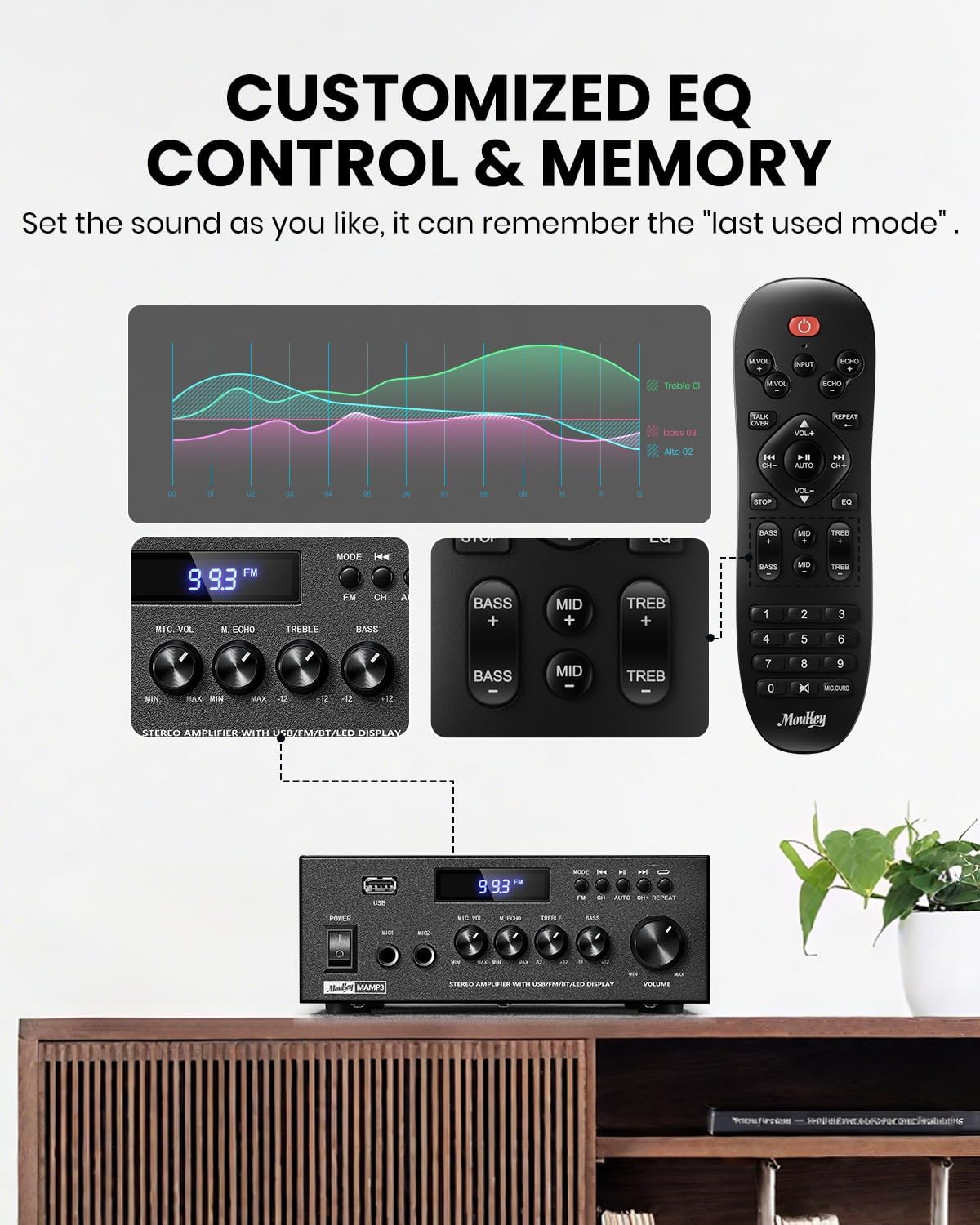
Image 5.1: Customizable EQ Control
5.5 Микрофоны удирдлага
If microphones are connected, use the Микрофоны дууны товчлуур to adjust their output level and the Цуурай товчлуур to add an echo effect. The remote control also features a 'Talkover' function.
5.6 Bluetooth-ийн ажиллагаа
- дээр дарна уу MODE button until "BT" appears on the LED display. The amplifier is now in Bluetooth pairing mode.
- On your mobile device, enable Bluetooth and search for "Moukey MAMP3".
- Select "Moukey MAMP3" to pair. Once connected, you will hear a confirmation tone.
- Та одоо төхөөрөмжөөсөө аудиог дараахаар тоглуулж болно ampнастан.

Image 5.2: Bluetooth Pairing
5.7 FM радиогийн ажиллагаа
- дээр дарна уу MODE button until "FM" appears on the LED display.
- Автомат скан хийх: Press the "AUTO" button on the remote to automatically scan and save available FM stations.
- Гараар тааруулах: Use the number pad on the remote control to directly enter the desired FM frequency (e.g., for 101.1 MHz, enter 1011).
- -г ашиглана уу Өмнөх болон Дараа нь buttons to navigate between saved stations or fine-tune frequencies.
5.8 USB тоглуулах
MP3 эсвэл WAV аудио агуулсан USB флаш дискийг оруулна уу files руу USB оролт. The amplifier will automatically switch to USB mode and begin playback. Use the Өмнөх, Тоглуулах/түр зогсоох, ба Дараа нь тоглуулахыг хянах товчлуурууд. Давт button allows you to repeat the current track or all tracks.
5.9 Алсын удирдлага
The included full-function remote control allows for convenient operation from a distance. It provides control over input selection, volume, EQ settings (treble, midrange, bass), microphone echo, and talkover functions across all input modes.

Image 5.3: Upgraded Remote Control Functionality
6. Засвар үйлчилгээ
- Цэвэрлэгээ: Гаднах хэсгийг цэвэрлэхийн тулд зөөлөн, хуурай даавуу ашиглана уу ampШингэн цэвэрлэгч эсвэл уусгагч хэрэглэж болохгүй.
- Агааржуулалт: Ensure that the ventilation openings are free from dust and debris to prevent overheating.
- Хадгалах: Удаан хугацаагаар ашиглаагүй тохиолдолд хадгална ampАчаалагчийг сэрүүн, хуурай газар, нарны шууд тусгал болон хэт өндөр температураас хол хадгална уу.
7. Алдаа засах
| Асуудал | Боломжит шалтгаан | Шийдэл |
|---|---|---|
| Хүч чадалгүй | Цахилгааны утас холбогдоогүй; цахилгаан залгуур буруу; Цахилгаан унтраалттай. | Ensure power cord is securely connected; Test outlet with another device; Turn power switch on. |
| Дууны гаралт байхгүй | Volume too low; Incorrect input selected; Speaker wires loose/incorrectly connected; Audio source issue. | Increase volume; Select correct input mode; Check speaker wire connections and polarity; Verify audio source is playing. |
| Bluetooth холбогдоогүй байна | Amplifier not in BT mode; Device too far; Device already connected to another unit; Interference. | Солих amplifier to BT mode; Move device closer; Disconnect from other devices; Reduce interference. |
| FM хүлээн авах чадвар муу байна | Antenna not connected or poorly positioned; Weak signal. | Connect and adjust FM antenna position; Try auto-scan or manual tuning for stronger stations. |
| USB тоглуулахтай холбоотой асуудлууд | Дэмжигдээгүй file форматлах; USB драйв зөв форматлагдаагүй; USB драйвын багтаамж хэт том байна. | Баталгаажуулах files are MP3/WAV; Format USB drive to FAT32; Use USB drives 32GB or less. |
8. Техникийн үзүүлэлтүүд
| Онцлог | Тодорхойлолт |
|---|---|
| Загварын дугаар | MAMP3 |
| Гаралтын хүч | 300 ватт (Оргил) |
| Сувгууд | 2.0 Стерео |
| Холболтын технологи | Auxiliary, Bluetooth 5.3, FM, USB |
| Тохиромжтой төхөөрөмжүүд | Smartphone, Tablet, Laptop, Computer, Speakers, CD/DVD Player |
| Холбогч төрөл | RCA, USB, 2 Mic input |
| Аудио гаралтын горим | Стерео |
| Бүтээгдэхүүний хэмжээс | 6.1"D x 7.1"W x 2.8"H (15.5 x 18.0 x 7.1 см) |
| Зүйлийн жин | 2.14 фунт (0.97 кг) |
| Өнгө | Хар |
8.1 Хайрцагт юу байгаа вэ
- Муки МAMP3 Ampнастан
- Алсын удирдлага
- FM антен
- Хэрэглэгчийн гарын авлага
- Эрчим хүчний адаптер
9. Баталгаат хугацаа ба дэмжлэг
9.1 Баталгаат хугацааны мэдээлэл
Moukey products are designed and manufactured to the highest quality standards. This product is covered by a limited warranty against defects in materials and workmanship. Please refer to the warranty card included with your purchase for specific terms and conditions, or visit the official Moukey webбаталгааны дэлгэрэнгүй мэдээллийг авах сайт.
9.2 Хэрэглэгчийн дэмжлэг
If you encounter any issues or have questions regarding your Moukey MAMP3 amplifier, please contact our customer support team. You can find contact information on the official Moukey webсайт эсвэл таны худалдан авах платформоор дамжуулан.
Webсайт: www.moukey.com (Жишээ ньample link, please refer to actual product documentation)
Имэйл: support@moukey.com (Жишээ ньample email, please refer to actual product documentation)


