1. Аюулгүй ажиллагааны чухал заавар
Энэ төхөөрөмжийг ашиглахаасаа өмнө бүх зааврыг анхааралтай уншина уу. Энэ гарын авлагыг цаашид лавлах зорилгоор хадгална уу.
- Боть байгаа эсэхийг баталгаажуулна ууtage specified on the rating label matches your mains voltage.
- Сэнс, залгуур, утсыг ус болон бусад шингэнд дүрж болохгүй.
- Ашиглаагүй үедээ, цэвэрлэхийн өмнө эсвэл зөөхөөс өмнө сэнсийг залгуураас салга.
- Do not operate the fan with a damaged cord or plug. Contact authorized service personnel for repair.
- Хуруу болон бусад зүйлсийг сэнсний ир болон нүхнээс хол байлга.
- Do not use the fan near windows, in bathrooms, or in wet environments.
- Энэ төхөөрөмжийг бие бялдар, мэдрэхүйн болон сэтгэцийн хомсдолтой, эсвэл туршлага, мэдлэг дутмаг хүмүүс (хүүхдүүдийг оролцуулан) ашиглахад зориулагдаагүй бөгөөд хэрэв тэдэнд аюулгүй байдлыг нь хариуцдаг хүнээс зааварчилгаа өгөөгүй бол төхөөрөмжийг ашиглах талаар зааварчилгаа аваагүй болно. .
- Хүүхдийг төхөөрөмжөөр тоглуулахгүйн тулд тэднийг хянах хэрэгтэй.
2. Бүтээгдэхүүн дууссанview
The Mistral MFD4389DRW is a 43-inch DC Turbo Tower Fan designed for efficient air circulation. It features a DC brushless motor, 12 speed settings, and multiple operating modes. Control options include a full touch screen, remote control, and Wi-Fi with online voice control capabilities. The fan also offers a unique height conversion feature and 60-degree left-right oscillation.

Зураг 2.1: Урд view of the Mistral MFD4389DRW DC Turbo Tower Fan, showcasing its sleek design and touch control panel.

Зураг 2.2: Хажуу тал view of the Mistral MFD4389DRW DC Turbo Tower Fan, highlighting its slim profile.

Зураг 2.3: Буцах view of the Mistral MFD4389DRW DC Turbo Tower Fan, showing the air intake grille.
3. Багцын агуулга
Савлагаанд бүх бүрэлдэхүүн хэсгүүд байгаа эсэхийг шалгана уу:
- Mistral MFD4389DRW DC Turbo Tower Fan Unit
- Алсын удирдлага
- Хэрэглэгчийн гарын авлага (энэ баримт бичиг)
- Base components (if not pre-assembled)
- Height extension component (for convertible height models)
4. Угсралт
The Mistral MFD4389DRW fan features simple assembly. Typically, this involves attaching the base to the main fan unit. For models with height conversion, an additional extension piece may need to be secured.
- Сав баглаа боодолоос бүх бүрэлдэхүүн хэсгүүдийг болгоомжтой арилгана.
- Place the main fan unit upside down on a soft, flat surface to avoid scratching.
- Суурийг сэнсний төхөөрөмжийн ёроолтой зэрэгцүүл. Цахилгааны утас нь суурийн зориулалтын нүхээр дамжин өнгөрч байгаа эсэхийг шалгаарай.
- Secure the base to the fan unit using the provided screws (if applicable).
- For height conversion, insert the extension component between the base and the main unit, ensuring it clicks securely into place or is fastened as per instructions.
- Сэнсийг тогтвортой, тэгш гадаргуу дээр босоо байрлуул.
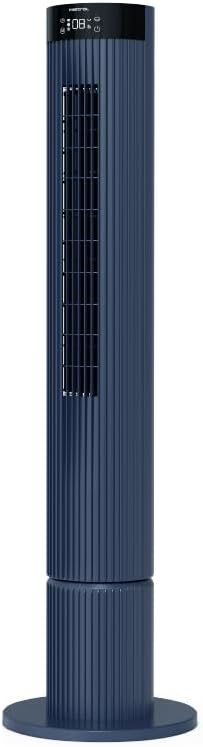
Figure 4.1: The fan demonstrating its convertible height feature, allowing adjustment between two different heights.
5. Тохиргоо ба анхны хэрэглээ
After assembly, position the fan in your desired location. Ensure it is on a stable, flat surface and away from curtains or objects that could obstruct airflow.
- Plug the power cord into a suitable electrical outlet (220-240V~, 50-60Hz).
- The fan will enter standby mode. The touch screen display may illuminate briefly.
- To power on, touch the power icon on the control panel or press the power button on the remote control.
6. Ашиглалтын заавар
The fan can be operated via the full touch screen control panel on the unit or the included remote control.
6.1 Хяналтын самбарын функцууд
The touch screen control panel provides access to all fan functions:
- Цахилгаан товч: Сэнсийг асаана эсвэл унтраана.
- Хурдны тохируулга: Cycles through 12 fan speeds.
- Горим сонгох: Switches between Turbo, One-key Cycle, and Baby modes.
- Мэдрэл: Activates or deactivates 60-degree left-right oscillation.
- Цаг хэмжигч: Sets the pre-set On/Off timer for up to 12 hours.
- Wi-Fi үзүүлэлт: Wi-Fi холболтын статусыг харуулна.
6.2 Алсын удирдлага
The remote control duplicates all functions available on the touch screen panel for convenient operation from a distance.
- Алсын удирдлага нь ажиллах батарей байгаа эсэхийг шалгаарай.
- Point the remote control towards the fan's control panel for optimal signal reception.
6.3 Үйлдлийн горимууд
- Турбо горим: Provides maximum airflow for rapid cooling.
- One-key Cycle Mode: Automatically cycles through different fan speeds to simulate natural breeze.
- Хүүхдийн горим: Operates at a gentle, quiet speed suitable for nurseries or light sleeping.
7. Wi-Fi and Online Voice Control
The Mistral MFD4389DRW fan can be connected to your home Wi-Fi network for smart control via a mobile application and online voice commands.
7.1 Wi-Fi холболт
- Download the official Mistral smart home application from your device's app store.
- Апп доторх бүртгэлдээ бүртгүүлэх эсвэл нэвтэрнэ үү.
- Таны хөдөлгөөнт төхөөрөмж 2.4GHz Wi-Fi сүлжээнд холбогдсон эсэхийг шалгаарай.
- Follow the in-app instructions to add a new device. This typically involves putting the fan into pairing mode (refer to the app or fan display for specific instructions, often by holding a Wi-Fi button).
- Once connected, the Wi-Fi indicator on the fan's control panel will illuminate steadily.
7.2 Online Voice Control
After successful Wi-Fi connection, you can link your fan to compatible smart home voice assistants (e.g., Google Assistant, Amazon Alexa) through the Mistral app settings.
- Open the Mistral app and navigate to the 'Integrations' or 'Voice Control' section.
- Select your preferred voice assistant and follow the prompts to link your Mistral account.
- Холбогдсоны дараа та дараах дуут тушаалуудыг ашиглаж болно.
- "Turn on the fan."
- "Set fan speed to 5."
- "Turn off oscillation."
- "Change fan mode to Baby."
8. Засвар үйлчилгээ
Тогтмол цэвэрлэгээ хийх нь сэнсний гүйцэтгэлийг хадгалж, ашиглалтын хугацааг уртасгахад тусалдаг.
8.1 Цэвэрлэгээ
- Цэвэрлэхийн өмнө сэнсээ үргэлж цахилгааны залгуураас салга.
- Зөөлөн ашиглах, damp сэнсний гаднах гадаргууг арчих даавуу. Зүлгүүрийн цэвэрлэгч, уусгагчийг бүү ашигла.
- Сойз бүхий тоос сорогч ашиглан агаарын оролт, гаралтын торны тоосыг зайлуулна.
- Сэнсийг буцааж залгаад ажиллуулахаасаа өмнө бүрэн хуурай байгаа эсэхийг шалгаарай.
8.2 Хадгалалт
If storing the fan for an extended period, unplug it, clean it thoroughly, and store it in its original packaging or a dust-free environment.
9. Алдаа засах
Хэрэв та фэнтэйгээ холбоотой асуудалтай тулгарвал дараах нийтлэг асуудал, шийдлүүдийг үзнэ үү.
| Асуудал | Боломжит шалтгаан | Шийдэл |
|---|---|---|
| Сэнс асахгүй байна. | Цахилгаан хангамж байхгүй. | Цахилгааны утсыг ажлын залгуурт найдвартай залгасан эсэхийг шалгана уу. |
| Агаарын урсгал сул. | Агаар оруулах/гаралтын нүх бөглөрсөн; Сэнсний хурд хэт бага байна. | Clean grilles to remove dust. Increase fan speed. |
| Сэнс ер бусын чимээ гаргадаг. | Obstruction; Loose parts. | Unplug and check for any foreign objects. Ensure base is securely attached. |
| Алсын удирдлага ажиллахгүй байна. | Батерей дуусчихсан; Бөглөрөл. | Replace remote control batteries. Ensure no objects are blocking the signal path. |
| Wi-Fi холболт амжилтгүй боллоо. | Incorrect Wi-Fi password; Router issues; Fan too far from router. | Verify Wi-Fi password. Ensure fan is within range of a 2.4GHz Wi-Fi network. Restart router and fan. |
Эдгээр шийдлүүдийг туршиж үзсэний дараа асуудал хэвээр байвал хэрэглэгчийн дэмжлэгтэй холбоо барина уу.
10. Техникийн үзүүлэлтүүд
| Онцлог | Тодорхойлолт |
|---|---|
| Загвар | MFD4389DRW |
| Ботьtage | 220-240V~, 50-60Hz 1.3A |
| Ватtage | 40 Вт |
| Агаарын хэмжээ | 29.54 м³ / мин |
| Хамгийн их агаарын урсгал | 4.26 м / с |
| Noise Level (Lowest Speed) | 33.2дБ |
| Noise Level (Highest Speed) | 68.3дБ |
| Бүтээгдэхүүний хэмжээс (L*W*H) | 168 * 300 * 900 OR 1104 mm |
| Цэвэр жин | 4.46 кг |
| Аюулгүй байдлын тэмдэг | 250467-11 |
| Онцлог шинж чанарууд | Remote Controlled, Timer, Wi-Fi Enabled |
| Хурдны тоо | 12 |
11. Баталгаат хугацаа ба дэмжлэг
This Mistral MFD4389DRW DC Turbo Tower Fan comes with a comprehensive warranty:
- Ерөнхий баталгаа: Худалдан авсан өдрөөс хойш 1 жил.
- Моторын баталгаа: An additional 3 Years for the motor only, totaling 4 years for the motor.
For warranty claims, technical support, or service inquiries, please contact your local Mistral authorized service center or refer to the contact information provided on the official Mistral webсайт.