Танилцуулга
Thank you for choosing the Ohniyou GLX100 42-inch Low Profile Ceiling Fan with Light. This manual provides essential information for the safe installation, operation, and maintenance of your new ceiling fan. Please read it thoroughly before installation and keep it for future reference.
Аюулгүй байдлын мэдээлэл
To reduce the risk of fire, electric shock, or personal injury, please follow these important safety instructions:
- Always disconnect power at the main fuse box or circuit breaker before installing or servicing the fan.
- Бүх утаснууд нь үндэсний болон орон нутгийн цахилгааны дүрэмд нийцсэн байх ёстой.
- Сэнс нь хамгийн багадаа 35 фунт (15.9 кг) жинг даах чадвартай таазны дам нуруу эсвэл тулгуур байгууламжид суурилуулсан байх ёстой.
- Do not use a full-range dimmer switch to control fan speed, as this may damage the fan motor.
- Бүх холболтууд найдвартай, зөв тусгаарлагдсан эсэхийг шалгаарай.
- Суурилуулах эсвэл цэвэрлэх явцад ирний бариулыг нугалж болохгүй.
- Keep children away from the fan while it is operating.
Багцын агуулга
Carefully unpack your ceiling fan and ensure all components are present and undamaged. If any parts are missing or damaged, please contact customer support.
- Гэрэл иж бүрдэл бүхий таазны сэнс
- Алсын удирдлага
- Суурилуулах тоног төхөөрөмж
- Хэрэглэгчийн гарын авлага
- Сэнс ир (5)
- Blade Holders (5)
- Халхавч
- Motor (with safety rope)
- Lamp Самбар
- Хүлээн авагчийн хяналт
- Lampсүүдэр
- Өөрөө эрэг шураг
- Шураг

Зураг: Дууслааview of Ohniyou ceiling fan components including fan body, blades, light kit, remote, and mounting hardware.
Video: This video demonstrates how to identify and request replacement parts if any are missing from your package.
Бүтээгдэхүүний онцлог
- Ухаалаг хяналт: Operable via included remote control and smartphone application for convenience.
- Хэт чимээгүй тогтмол гүйдлийн мотор: Features a reversible DC motor with noise levels as low as 20 dB, providing 6-speed settings and 4,400 CFM airflow.
- Жилийн турш тав тухтай байдал: Reversible motor function allows for cooling breezes in summer and warm air circulation in winter.
- Багасгах LED гэрэлтүүлэг: Integrated 18W LED light source (3000K warm/4500K natural/6000K cool white) with 5%-100% dimmability and flicker-free illumination.
- Орчин үеийн дизайн: 42-inch flush mount design with double-sided blades (black and wood-grey) to complement various decor styles.
- Хялбар суурилуулалт: Designed for quick installation on flat ceilings, typically within 30 minutes, with all necessary hardware included.

Image: Visual representation of key product features including 2H Timer, Remote/APP Control, Double Finish Fan Blade, Sleep Mode, 6 Wind Speeds, Memory Function, and 3CCT Dimmable Light.

Image: Illustration showing the reversible wind function for summer cooling (downward airflow) and winter warm air circulation (upward airflow), along with dual blade colors.
Тохиргоо & Суурилуулалт
The Ohniyou GLX100 ceiling fan is designed for easy installation. Please follow the detailed instructions provided in the included manual and refer to the video guide for visual assistance.
- Суулгахад бэлтгэх: Ensure power is disconnected at the circuit breaker. Gather all necessary tools and components.
- Хаалт суурилуулах: Таазны уулзвар хайрцагт бэхэлгээний бэхэлгээг бэхлэнэ.
- Сэнс угсрах: Attach the fan blades to the motor assembly. Connect the wiring for the motor and light kit.
- Сэнсийг суурилуулах: Lift the fan assembly and attach it to the mounting bracket. Secure all connections.
- Гэрлийн хэрэгсэл суурилуулах: Connect and secure the LED light panel and lampсүүдэр.
- Эрчим хүчийг сэргээх: Once installation is complete, restore power and test the fan and light functions.

Image: Visual guide illustrating the components and steps for easy installation of the flush mount ceiling fan.
Video: Detailed instructional video for the installation process of the Ohniyou ceiling fan.
Ашиглалтын заавар
Алсын удирдлага
The included remote control allows for convenient operation of your ceiling fan. Ensure 2 AAA batteries (not included) are installed.

Image: Diagram of the multifunctional remote control with labels for Light ON/OFF, CCT Change, Pairing, Reversible Motor, 6 Speed Buttons, ALL OFF, Night Light, Brightness +/-, Timer Setting (2H), Natural Wind, and Fan OFF.
- Асаах/унтраах: Use the 'ON/OFF' button for light and 'ALL OFF' for both fan and light.
- Сэнсний хурд: Select from 6 speed settings using buttons 1-6.
- Гэрлийн хяналт: Adjust light brightness (5%-100%) and color temperature (3000K/4500K/6000K) using the dedicated buttons.
- Урвуу хөдөлгүүр: Press 'F/R' to change fan direction for summer (downward airflow) or winter (upward airflow) modes.
- Цаг хэмжигч: Set the fan to turn off automatically after 2 hours using the '2H' button.
- Байгалийн салхи: Сэнсний хурдыг өөрчлөх замаар байгалийн салхийг дуурайдаг горимыг идэвхжүүлдэг.
- Шөнийн гэрэл: Бага гэрэлтэй гэрлийн тохиргоог идэвхжүүлнэ.
Ухаалаг гар утасны програмын хяналт
Control your fan conveniently from your smartphone. Download the "FanLamp Pro" app from your app store or by scanning the QR code below. Download FanLamp Pro програм

Image: Illustration showing a smartphone displaying the FanLamp Pro app interface for controlling the ceiling fan, including fan speed, light settings, and pairing instructions.
- Bluetooth-г асаана уу: Утасныхаа Bluetooth идэвхжсэн эсэхийг шалгаарай.
- Програмыг нээх: Navigate to the app interface.
- Reset the Fan (IMPORTANT): Turn on the wall switch in your room that controls the power of your fan, and then turn it off. Wait about 5 seconds, then turn it on again.
- Pair to the App: Hit the pair button on the app about 3 times until you hear a beep from the fan and the light flashes.
- Хяналт: Once paired, you can adjust fan speed, light brightness, and color temperature directly from the app.
Video: This video provides a step-by-step guide on how to download and connect the FanLamp Pro app to your Ohniyou ceiling fan.
Засвар үйлчилгээ
Тогтмол засвар үйлчилгээ нь таазны сэнсний оновчтой гүйцэтгэл, удаан эдэлгээтэй байдлыг баталгаажуулдаг.
- Цэвэрлэгээ: Зөөлөн ашиглах, damp сэнсний ир болон моторын гэрийг цэвэрлэх даавуу. Зүлгүүрийн цэвэрлэгч, уусгагчийг бүү ашигла.
- Хутганы тэнцвэр: Check for any wobbling. If wobbling occurs, ensure all blade screws are tight. A balancing kit may be used if necessary (not included).
- Гэрлийн эх үүсвэр: Нэгдсэн LED гэрлийн эх үүсвэр нь удаан хугацаанд ашиглах зориулалттай бөгөөд хэрэглэгчийн сольж болдоггүй.
- Мотор: DC мотор нь засвар үйлчилгээ шаарддаггүй бөгөөд тосолгоо шаарддаггүй.
Алдааг олж засварлах
Хэрэв та фэнтэйгээ холбоотой асуудал гарвал дараах нийтлэг асуудал, шийдлүүдийг үзнэ үү.
| Асуудал | Боломжит шалтгаан | Шийдэл |
|---|---|---|
| Сэнс эхлэхгүй байна | No power to the fan; Loose wiring; Remote control battery low. | Check circuit breaker/fuse; Ensure all wiring connections are secure; Replace remote control batteries. |
| Сэнс ганхаж байна | Сул иртэй эрэг; Тэнцвэргүй ир; Буруу суурилуулалт. | Tighten all blade screws; Use a balancing kit; Re-check mounting bracket installation. |
| Гэрэл ажиллахгүй байна | Loose wire connection; LED driver issue; Remote control battery low. | Check light kit wiring; Contact customer support if LED driver is suspected; Replace remote control batteries. |
| Алсын удирдлага хариу өгөхгүй байна | Battery low; Not paired correctly; Obstruction. | Replace batteries; Re-pair remote with fan (refer to app pairing instructions); Ensure no obstructions between remote and fan. |
Үзүүлэлтүүд
| Онцлог | Дэлгэрэнгүй |
|---|---|
| Брэнд | Ohniyou |
| Загварын нэр | GLX100 |
| Бүтээгдэхүүний хэмжээс | 42"D x 42"W x 10.63"H |
| Өнгө | Хар |
| Цахилгаан сэнсний дизайн | Таазны сэнс |
| Эрчим хүчний эх үүсвэр | 110-240V AC input, DC motor |
| Загвар | Шатах уул |
| Өрөөний төрөл | Bedroom, Covered patios, Dining Room, Kitchen, Living Room |
| Онцлог шинж чанар | App Operable, Dimmable Light, Quiet DC Motor, Remote Controlled |
| Дуу чимээний түвшин | 20 децибел |
| Ватtage | 32 ватт |
| Хутганы тоо | 5 |
| Агаарын урсгалын хүчин чадал | Минутанд 4400 куб метр |
| Хурд | 260 эргэлт |
| Зүйлийн жин | 8 фунт |
| Хяналтын арга | Апп, Алсын удирдлага |
| Суурилуулалтын төрөл | DIY |
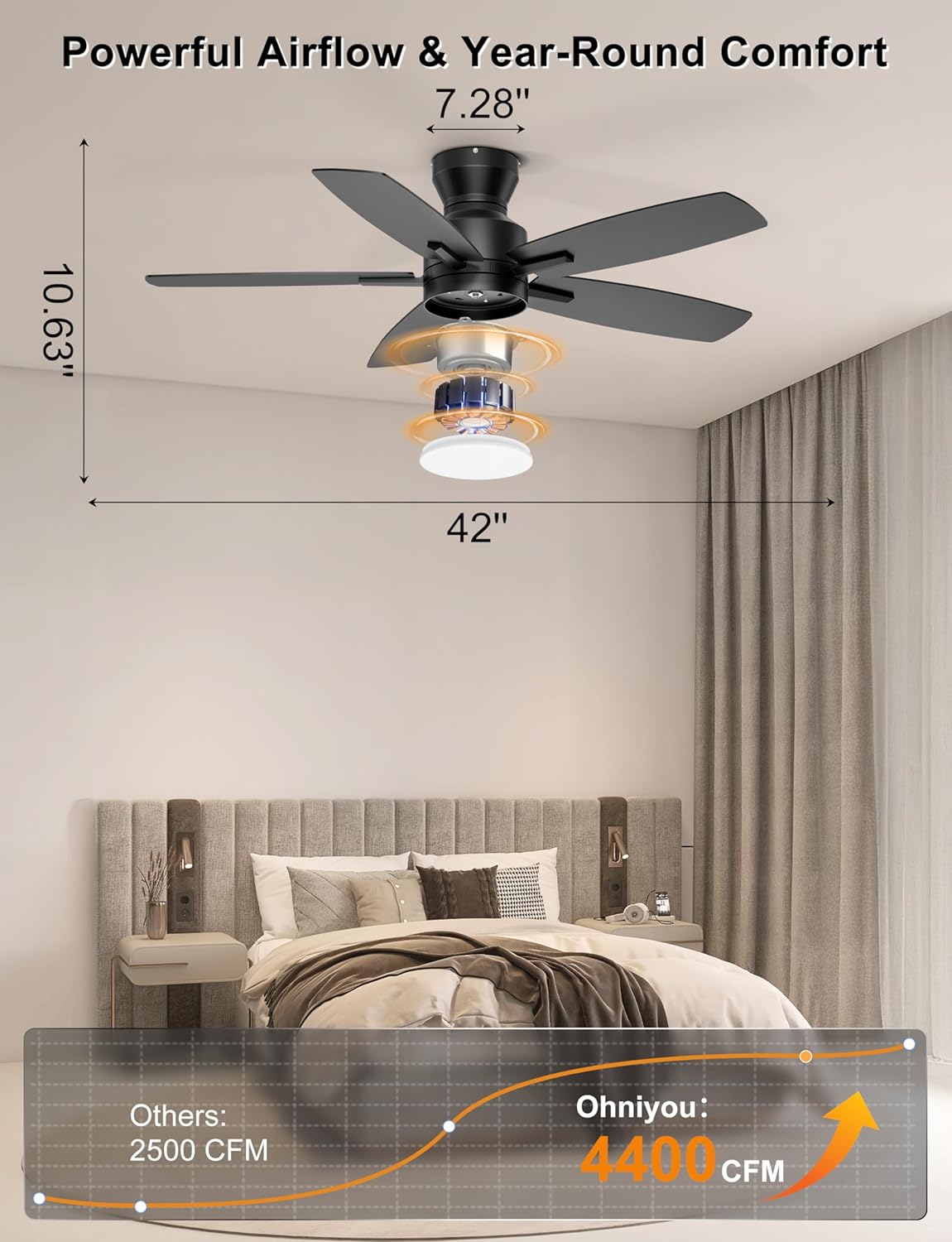
Image: Detailed dimensions of the 42-inch ceiling fan and its powerful 4400 CFM airflow capacity.

Зураг: Ойролцоогоор view of the copper brushless DC motor, highlighting its 6 adjustable speeds, 260 RPM max speed, and 85% energy saving efficiency.

Image: Graphic illustrating the quiet operation of the Ohniyou fan at 20dB, compared to other noise levels, and its 2-hour time mode.
Баталгаат болон дэмжлэг
For any questions, missing parts, or technical support, please contact Ohniyou customer service.
Имэйл: ohniyou@ledphy.com
We aim to reply within 12 hours.


