1. Бүтээгдэхүүн дууссанview
The Vormooi V15 is a compact and portable digital voice recorder designed for high-quality audio capture in various environments, including lectures, meetings, and classes. It features a large internal storage capacity and advanced noise reduction technology.
Гол онцлогууд:
- Massive 64GB built-in memory: Stores up to 750 hours of voice recordings in WAV and MP3 formats.
- Авсаархан, зөөврийн дизайн: Хэт нимгэн мэргэжлийнfile (0.25 x 1.3 x 2.2 inches) and lightweight (0.7 ounces) for maximum portability.
- Удаан эдэлгээтэй цэнэглэдэг батерей: Provides extended recording sessions.
- AI дуу чимээг бууруулах: Equipped with an intelligent 2155P AI chip for enhanced noise cancellation and pure recording.
- Voice-Activated Recording (VAR): Intelligently skips silent passages to save memory and time.
- Энгийн ажиллагаа: One-button recording and saving.
- Нийтэд нийцтэй байдал: Connects via USB Type-C to Windows and macOS computers.

Image: Key features of the Vormooi V15 recorder, including its recording capacity, memory, and battery life.
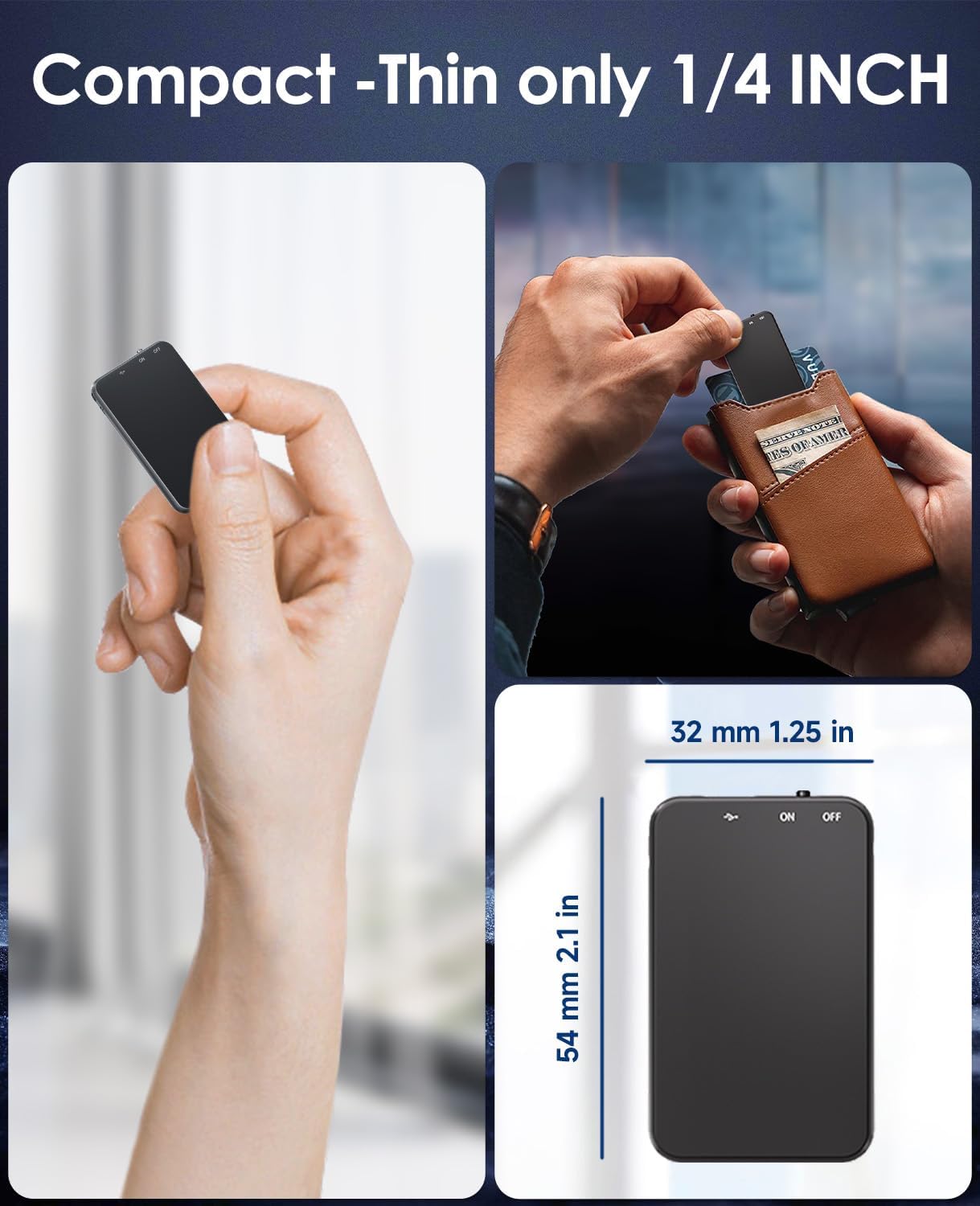
Image: Demonstrates the compact and thin design of the Vormooi V15, showing its small dimensions and portability.

Image: Illustrates the advanced AI noise cancellation technology and supported recording formats (MP3, WAV) of the V15 recorder.
2. Багцын агуулга
Багцыг нээхдээ бүх зүйл байгаа, сайн нөхцөлд байгаа эсэхийг шалгана уу.
- 1 x Vormooi V15 Digital Voice Recorder
- 1 x USB Type-C Cable (for charging and data transfer)
- 1 х хэрэглэгчийн гарын авлага (энэ баримт бичиг)
3. Тохиргоо
3.1 Төхөөрөмжийг цэнэглэх
Before first use, fully charge the Vormooi V15 recorder. Connect the included USB Type-C cable to the recorder's Type-C port and the other end to a USB power adapter (not included) or a computer's USB port. The indicator light will show charging status.
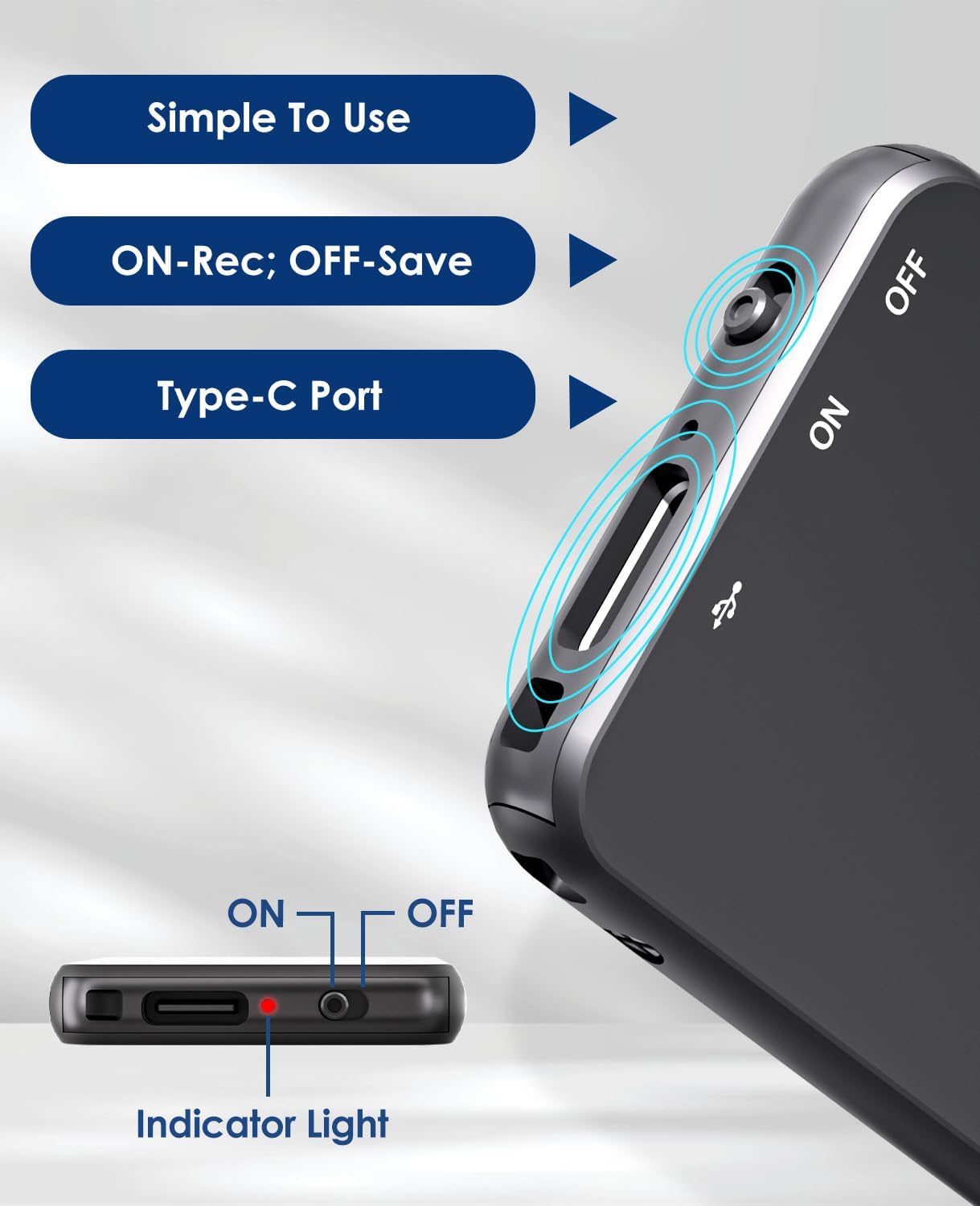
Image: Details of the recorder's side, highlighting the ON/OFF switch, Type-C port, and indicator light for simple operation.
3.2 Асаах/унтраах
To power on the device, slide the ON/OFF switch to the "ON" position. To power off, slide it to the "OFF" position. The indicator light will briefly illuminate.
4. Ашиглалтын заавар
4.1 Аудио бичлэг хийх
To start recording, simply slide the ON/OFF switch to the "ON" position. The device will automatically begin recording. The indicator light may flash or change color to indicate recording status. To stop recording and save the file, шилжүүлэгчийг "OFF" байрлалд гулсуулна уу.
4.2 Voice-Activated Recording (VAR)
The V15 features a voice-activated recording function. When enabled, the recorder will automatically pause recording during periods of silence and resume when sound is detected, optimizing memory usage. The sensitivity of the voice activation can be adjusted (though specific instructions for adjustment are not provided in the product images, it's a common feature).

Image: Depicts the Voice-Activated Recording (VAR) feature, illustrating how it saves memory by skipping silent blanks and showing different sensitivity levels.
4.3 Шилжүүлэх Files-г Компьютерт оруулна
Connect the Vormooi V15 to your computer using the provided USB Type-C cable. The device will appear as a removable storage device (like a USB drive). You can then drag and drop your recorded audio files (MP3 or WAV format) to your computer. The device is compatible with Windows and macOS operating systems.

Image: Shows the Type-C connection and compatibility with Windows, Mac, and Linux operating systems for easy file шилжүүлэх.
4.4 Тоглуулах
While the device supports playback, specific controls for direct playback (e.g., built-in speaker, headphone jack) are not detailed in the provided information. Typically, playback is done by connecting headphones to the device's headphone jack (if available) or by transferring files to a computer and playing them there.
Note: The product specifications mention "Headphones Jack: 1", confirming the presence of a jack for direct playback.
5. Засвар үйлчилгээ
- Цэвэрлэгээ: Төхөөрөмжийг цэвэрлэхийн тулд зөөлөн, хуурай даавуу ашиглана уу. Шингэн цэвэрлэгч, уусгагчийг бүү ашигла.
- Хадгалах: Дуу хураагуурыг нарны шууд тусгал, хэт температураас хол, сэрүүн, хуурай газар хадгална.
- Батерейны арчилгаа: Зайны ашиглалтын хугацааг уртасгахын тулд зайгаа ойр ойрхон бүрэн цэнэггүй болгохоос зайлсхий. Төхөөрөмжийг удаан хугацаагаар ашиглаагүй байсан ч тогтмол цэнэглэ.
- Өгөгдлийн нөөцлөлт: Өгөгдөл алдагдахаас сэргийлэхийн тулд чухал бичлэгүүдийг компьютер дээрээ тогтмол нөөцлөөрэй.
6. Алдаа засах
- Төхөөрөмж асахгүй байна: Батерейг цэнэглэсэн эсэхийг шалгаарай. Эрчим хүчний эх үүсвэрт холбогдоод дахин оролдоно уу.
- Бичлэг хийх боломжгүй: Check if the memory is full. Transfer files to your computer to free up space.
- Бичлэгийн чанар муу: Ensure the microphone is not obstructed. Reduce background noise. Check if AI Noise Reduction is functioning.
- Төхөөрөмжийг компьютер танихгүй байна: Try a different USB port or cable. Ensure the device is powered on. Restart your computer.
- Төхөөрөмжийг дахин тохируулах: If the device becomes unresponsive, locate the small "RESET" hole (often requiring a pin or paperclip) and gently press it to restart the device.

Зураг: Урд ба хойд views of the V15, indicating the location of the reset button and overall dimensions.
7. Техникийн үзүүлэлтүүд
| Онцлог | Дэлгэрэнгүй |
|---|---|
| Загварын дугаар | V15 |
| Хадгалах багтаамж | 64 ГБ |
| Бичлэг хийх чадвар | 750 цаг хүртэл |
| Бичлэгийн формат | WAV, MP3 |
| Бүтээгдэхүүний хэмжээс | 0.25 x 1.3 x 2.2 инч (0.25"D x 1.3"W x 2.2"H) |
| Зүйлийн жин | 0.705 унц (20 грамм) |
| Зайны төрөл | Lithium-ion (1 A battery included) |
| Зайны ашиглалт | 40-50 цаг (ойролцоогоор) |
| Цэнэглэх порт | USB Type-C |
| Микрофон | Баригдсан |
| Чихэвчний үүр | 1 |
| Тохиромжтой төхөөрөмжүүд | Windows/macOS Computer |
| Үйлдвэрлэгч | Вормоо |
8. Баталгаат хугацаа ба дэмжлэг
For warranty information and technical support, please refer to the documentation included with your purchase or visit the official Vormooi webсайт. Баталгаат нэхэмжлэл гаргахын тулд худалдан авалтаа нотлох баримтаа хадгалаарай.
For further assistance, you may contact Vormooi customer service through their official channels. Details are typically found on the product packaging or the brand's official online presence.
9. Зориулалт
The Vormooi V15 Digital Voice Recorder is intended for personal and professional audio recording purposes, including but not limited to:
- Recording lectures and academic presentations.
- Documenting business meetings and conferences.
- Conducting interviews.
- Capturing personal memos and ideas.

Зураг: Жишээ ньamples of typical usage scenarios for the V15 recorder, such as in classes, interviews, meetings, and for personal notes.


