1. Танилцуулга
Thank you for choosing the Oakcastle IR200 Internet Radio. This manual provides essential information for the safe and efficient operation of your device. Please read it thoroughly before use and retain it for future reference.
The Oakcastle IR200 is a versatile audio system offering multiple listening options, including Internet Radio, DAB+, FM, Bluetooth 5.3, and AUX input. It features a color display, remote control, and podcast support for a comprehensive audio experience.
2. Багцын агуулга
Carefully unpack the box and ensure all items listed below are present and in good condition:
- Oakcastle IR200 Internet Radio Unit
- Цахилгаан кабель
- Алсын удирдлага
- Хэрэглэгчийн гарын авлага (энэ баримт бичиг)
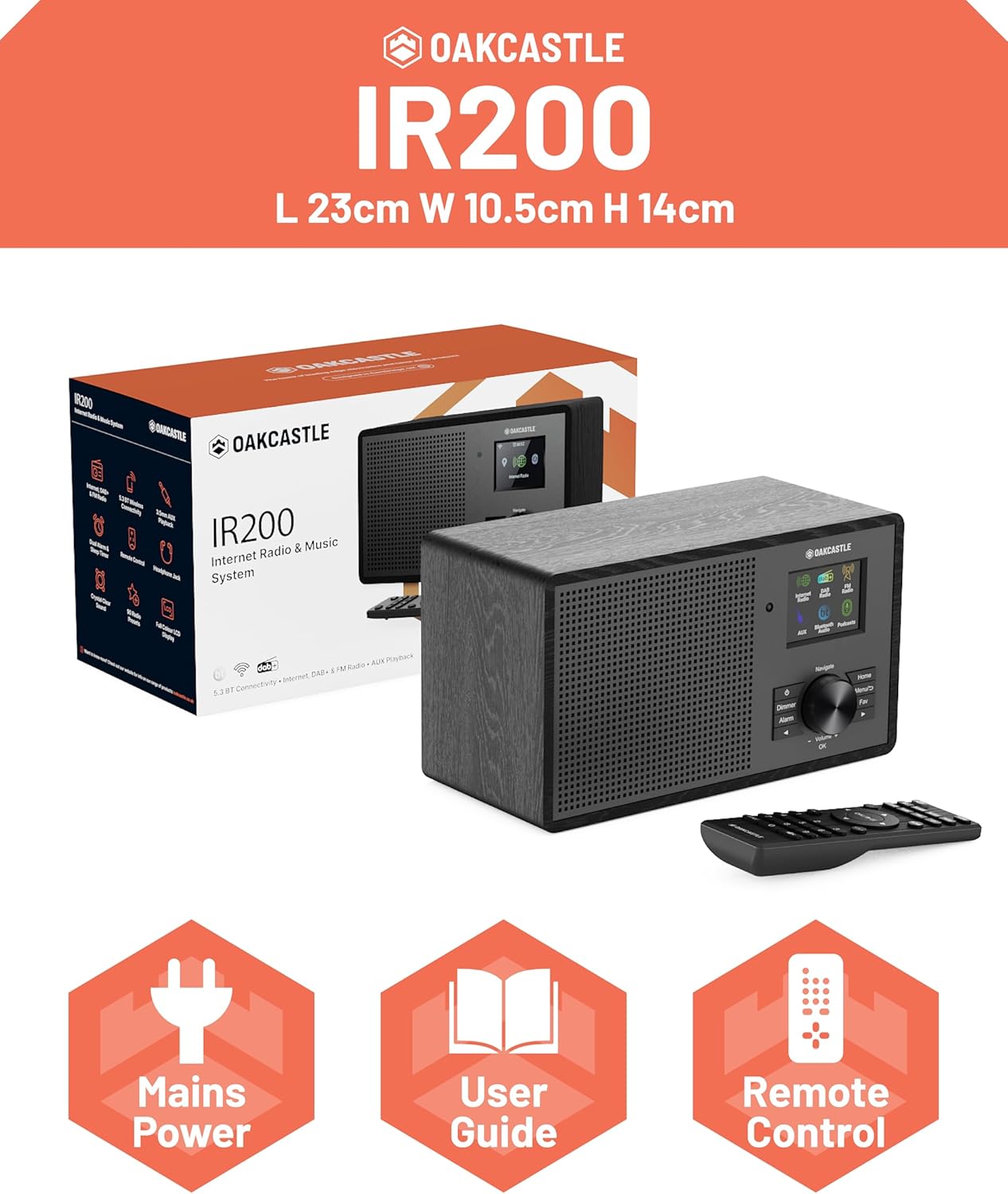
Image 2.1: Contents of the Oakcastle IR200 package, including the radio unit, its box, power cable, remote control, and user manual.
3. Бүтээгдэхүүн дууссанview
Familiarize yourself with the main components and controls of your Oakcastle IR200 radio.
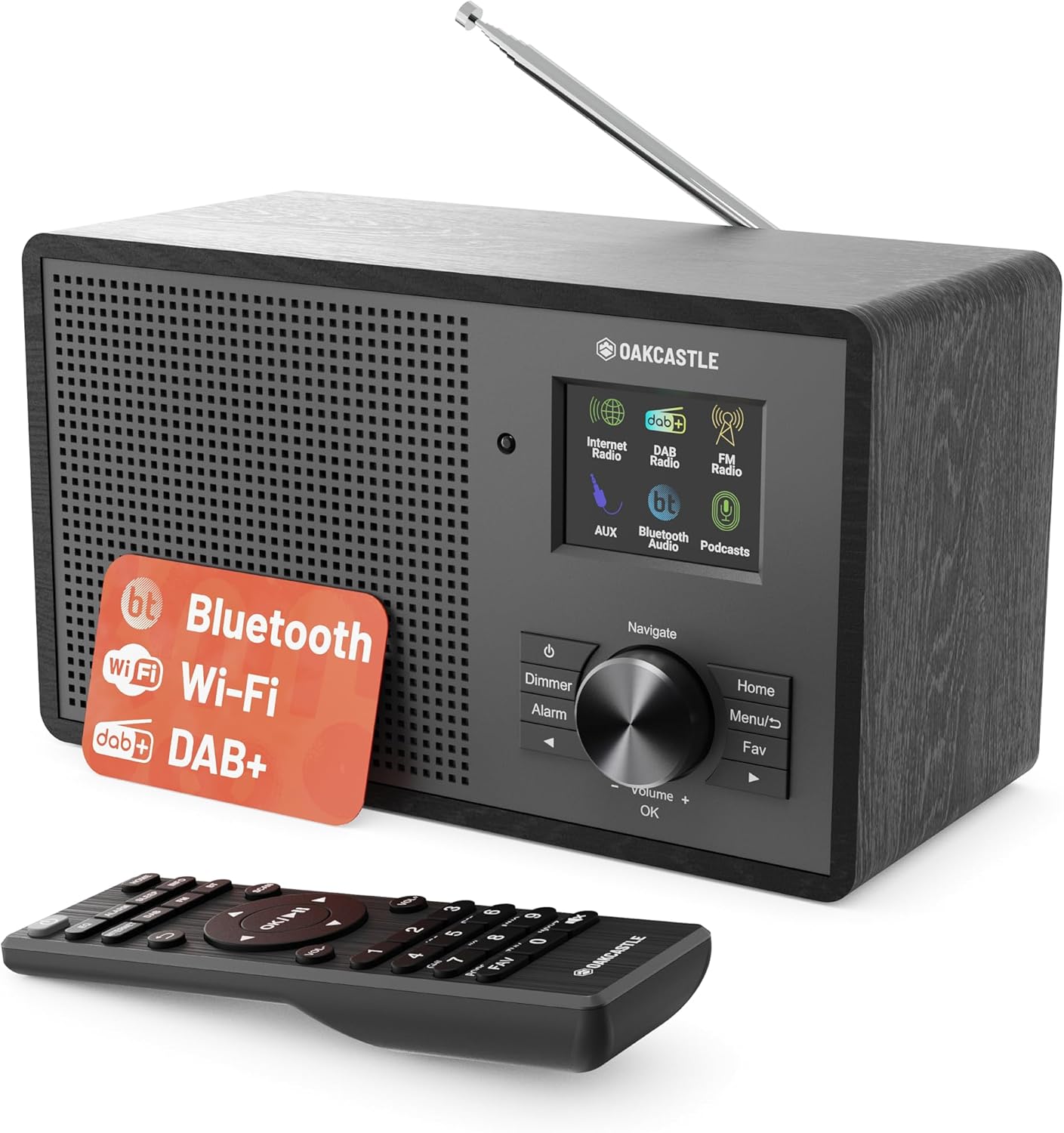
Зураг 3.1: Урд view of the Oakcastle IR200 radio, showcasing the display, control knob, buttons, and the included remote control.
3.1 Урд самбарын удирдлага
- Дэлгэц: Станцын мэдээлэл, цаг, цэсийн сонголтыг харуулна.
- Navigate/Volume/OK Knob: Rotate to navigate menus or adjust volume; press to confirm selections.
- Цахилгаан товч: Төхөөрөмжийг асаана/унтраана эсвэл хүлээлгийн горимд оруулна.
- Бүдгэрүүлэх товчлуур: Дэлгэцийн тод байдлыг тохируулна.
- Сэрүүлгийн товчлуур: Сэрүүлгийн тохиргоонд ханддаг.
- Нүүр хуудас товч: Үндсэн цэс рүү буцна.
- Цэсийн товчлуур: Accesses mode-specific menus.
- Дуртай товчлуур: Accesses favorite station presets.
3.2 Арын самбарын холболтууд

Зураг 3.2: Ар талд view of the Oakcastle IR200, highlighting the headphone output and AUX input ports.
- Телескоп антен: For DAB+ and FM reception.
- AUX оролт: Гадаад аудио төхөөрөмжийг холбоно уу.
- Чихэвчний гаралт: Хувийн сонсохын тулд чихэвчээ холбоно уу.
- DC IN: Цахилгаан адаптерийн холболт.
4. Анхны тохиргоо
4.1 Эрчим хүчний холболт
- Insert the power cable into the DC IN port on the rear of the radio.
- Plug the other end of the power cable into a wall socket.
- Радиог асаахын тулд урд самбар эсвэл алсын удирдлага дээрх асаах товчийг дарна уу.
4.2 Антенны тохируулга
For optimal DAB+ and FM reception, fully extend the telescopic antenna located at the rear of the unit.
4.3 Network Connection (for Internet Radio)
- Upon first power-on, the radio will guide you through the network setup.
- Select "Network Wizard" or "Wi-Fi Setup" from the menu.
- Радио нь боломжтой Wi-Fi сүлжээг хайх болно. Жагсаалтаас сүлжээгээ сонгоно уу.
- Enter your Wi-Fi password using the navigation knob and OK button.
- Холбогдсоны дараа радио нь баталгаажуулах мессежийг харуулах болно.
5. Үйлдлийн горимууд
The Oakcastle IR200 offers several listening modes. Press the "Home" button to access the main menu and select your desired mode.
5.1 Интернет радио
Access thousands of global radio stations via your Wi-Fi connection.

Image 5.1: The radio's display screen in Internet Radio mode, showing station information.
- Үндсэн цэснээс "Интернет радио" -г сонгоно уу.
- You can browse stations by location, genre, or search by name.
- Rotate the Navigate knob to scroll through options and press OK to select.
- To save a station as a favorite, press the "Fav" button during playback.
5.2 DAB+ радио
Өндөр чанартай дижитал радио нэвтрүүлгийг сайхан өнгөрүүлээрэй.

Image 5.2: The radio's display screen in DAB+ Radio mode, showing the current station.
- Үндсэн цэснээс "DAB+ Radio"-г сонгоно уу.
- Радио нь боломжтой DAB+ станцуудыг автоматаар сканнердах болно.
- Use the Navigate knob to select a station from the list.
- To save a station as a favorite, press the "Fav" button during playback.
5.3 FM радио
Уламжлалт аналог FM нэвтрүүлгүүдэд тааруулна уу.
- Үндсэн цэснээс "FM Radio"-г сонгоно уу.
- To auto-scan for stations, press and hold the OK button or use the scan function via the menu.
- To manually tune, rotate the Navigate knob.
- To save a station as a favorite, press the "Fav" button during playback.
5.4 Bluetooth холболт
Bluetooth-тэй төхөөрөмжөөсөө дууг утасгүй дамжуулаарай.

Image 5.3: The radio's display screen in Bluetooth mode, indicating readiness for pairing.
- From the main menu, select "Bluetooth". The radio will enter pairing mode.
- On your external device (e.g., smartphone), enable Bluetooth and search for "Oakcastle IR200".
- Select "Oakcastle IR200" to pair. Once connected, you can stream audio.
5.5 AUX оролт
3.5 мм аудио кабель ашиглан гадаад аудио эх үүсвэрийг холбоно уу.
- Connect one end of a 3.5mm audio cable to the AUX IN port on the rear of the radio.
- Нөгөө үзүүрийг гадаад төхөөрөмжийн чихэвчний залгуур эсвэл аудио гаралт руу холбоно уу.
- From the main menu, select "AUX".
- Өөрийн гадаад төхөөрөмжөөс тоглуулахыг удирдах.
5.6 подкаст
Browse and listen to a wide range of podcasts.
- From the main menu, select "Podcasts".
- Browse podcasts by category or search for specific titles.
- Select a podcast to start listening.
6. Тохиргоо ба онцлог
6.1 Системийн тохиргоо
Access general system settings via the main menu to configure time, language, display, and more.
- Цаг/Огноо: Set time format, synchronize time.
- Хэл: Select your preferred language for the menu.
- Дэлгэц: Adjust backlight, color scheme.
- Сүлжээ: Reconfigure Wi-Fi settings.
- Програм хангамжийн шинэчлэл: Програм хангамжийн шинэчлэлтүүдийг шалгаж, суулгана уу.
6.2 Эквалайзер (EQ)
Customize the audio output to your preference using the equalizer settings, accessible via the remote control or system menu.
6.3 Урьдчилан тохируулах
The radio supports over 90 presets for your favorite Internet, DAB+, and FM stations. To recall a preset, press the "Fav" button and select from the list.
6.4 Сэрүүлэг
Set alarms to wake up to your favorite radio station or a buzzer sound. Access alarm settings via the "Alarm" button on the front panel or remote.
7. Алсын удирдлага
The included remote control provides convenient access to all radio functions from a distance.
Ensure batteries are correctly inserted. Point the remote control towards the front of the radio for optimal response.
7.1 Алсын удирдлагын функцууд
- Эрчим хүч: On/Off/Standby.
- Эзлэхүүн +/-: Дууны түвшинг тохируулна уу.
- Навигацийн товчлуурууд (дээш/доошоо/зүүн/баруун): Цэс рүү шилжих.
- БОЛЖ БАЙНА УУ: Сонголтыг баталгаажуулна уу.
- Mode Buttons (Internet, DAB, FM, Bluetooth, AUX): Горимуудын хооронд шилжих.
- Урьдчилан тохируулсан товчлуурууд (1-90+): Directly select saved favorite stations.
- Тэгшитгэл: Эквалайзерын тохиргоонд хандах.
- Цэс: Access mode-specific menus.
- Дуртай: Access favorite station list.
8. Засвар үйлчилгээ
8.1 Цэвэрлэгээ
To clean the radio, use a soft, dry cloth. Do not use abrasive cleaners, waxes, or solvents as these may damage the finish.
8.2 Ерөнхий арчилгаа
- Төхөөрөмжийг нарны шууд тусгал, дулааны эх үүсвэр, чийгнээс хол байлга.
- Төхөөрөмжийг унагах эсвэл хүчтэй нөлөөнд оруулахаас зайлсхий.
- Төхөөрөмжийн эргэн тойронд зохих агааржуулалтыг хангах.
9. Алдаа засах
| Асуудал | Боломжит шалтгаан | Шийдэл |
|---|---|---|
| Хүч чадалгүй | Power cable not connected; wall socket not active. | Check power cable connection; try a different wall socket. |
| Дуу алга | Дууны хэмжээ хэт бага; Дууг хаахыг идэвхжүүлсэн; Буруу эх сурвалж сонгосон. | Дууг нэмэгдүүлэх; Дуугүй болгох төлөвийг шалгах; Зөв оролтын горимыг сонгох. |
| Интернет радио холбогдохгүй байна | Incorrect Wi-Fi password; Weak Wi-Fi signal; Router issue. | Re-enter Wi-Fi password; Move radio closer to router; Restart router. |
| DAB+/FM хүлээн авалт муу | Antenna not extended; Poor signal area. | Fully extend antenna; Reposition radio for better signal. |
| Bluetooth-г холбохгүй байна | Radio not in pairing mode; Device too far; Device already paired. | Ensure radio is in Bluetooth mode; Move device closer; Unpair from other devices. |
10. Техникийн үзүүлэлтүүд
| Онцлог | Дэлгэрэнгүй |
|---|---|
| Брэнд | Оккасл |
| Загвар | IR200 |
| Өнгө | Хар |
| Холболтын технологи | Wi-Fi, Bluetooth 5.3, AUX |
| Тааруулах технологи | Интернет радио, DAB+, FM |
| Онцлог шинж чанарууд | Bluetooth, EQ, Podcasts, Internet Radio, Remote Control |
| Эрчим хүчний эх үүсвэр | Electric Cable (Mains) |
| Бүтээгдэхүүний хэмжээ (H x W x D) | 14 см x 10.5 см x 23 см (ойролцоогоор) |
| Бүтээгдэхүүний жин | 0.94 кг |
| Тохиромжтой төхөөрөмжүүд | MP3 тоглуулагч, ухаалаг утас, таблет |
11. Баталгаат хугацаа ба дэмжлэг
11.1 Баталгаат хугацааны мэдээлэл
The Oakcastle IR200 comes with a standard warranty. An extended 3-year warranty is available upon product registration on the manufacturer's website. Please refer to the warranty card included in your package or visit the official Oakcastle webдэлгэрэнгүй мэдээллийг авах сайт.
11.2 Хэрэглэгчийн дэмжлэг
For technical assistance, troubleshooting, or further inquiries, please contact Oakcastle customer support. Contact details can typically be found on the official Oakcastle webсайт эсвэл баталгаат карт дээр.


