Танилцуулга
Thank you for choosing the WUBEN X4 EDC Flat Flashlight. This compact and versatile lighting tool is designed for various applications, offering powerful illumination and multiple functional modes. This manual provides essential information for proper setup, operation, and maintenance to ensure optimal performance and longevity of your device.

Image: The WUBEN X4 EDC Flat Flashlight, showcasinавсаархан загвар болон хос гэрлийн эх үүсвэртэй.
Гол онцлогууд
- Portable Multi-functional Design: Dual light source with a main light offering up to 1500 lumens and a side light providing warm white and RGB options.
- Зөн совингийн удирдлага: Features a toggle switch for mode selection (lock, side light, main light, moonlight) and a rotary switch for stepless brightness dimming and RGB color control.
- Тактикийн сүүл солих: Integrated switch for instant 1500-lumen main light activation.
- Magnetic Tail Cap: Allows for hands-free attachment to metal surfaces.
- Бат бөх, хөнгөн жинтэй: Constructed from aluminum, weighing only 137 grams (4.8 oz) with batteries, and measuring 1.5 x 1 x 3.8 inches.
- IP68 Усны хамгаалалттай үнэлгээ: Built to withstand immersion in water up to 2 meters for 1 hour, and resistant to drops, dust, and rain.
- Өргөтгөсөн зай: Up to 285 hours of operation with a 3350mAh high-capacity battery, fully rechargeable in 2.5 hours via USB-C.
- Зайны үзүүлэлт: Monitor battery level at any time.
Багцын агуулга
Хайрцагнаас задлахад бүх зүйл байгаа эсэхийг шалгаарай:
- WUBEN X4 Flashlight x 1
- USB-C цэнэглэх кабель x 1
- Оосор x 1
- Belt Clip x 1 (Pre-installed or included separately)
- Хэрэглэгчийн гарын авлага x 1
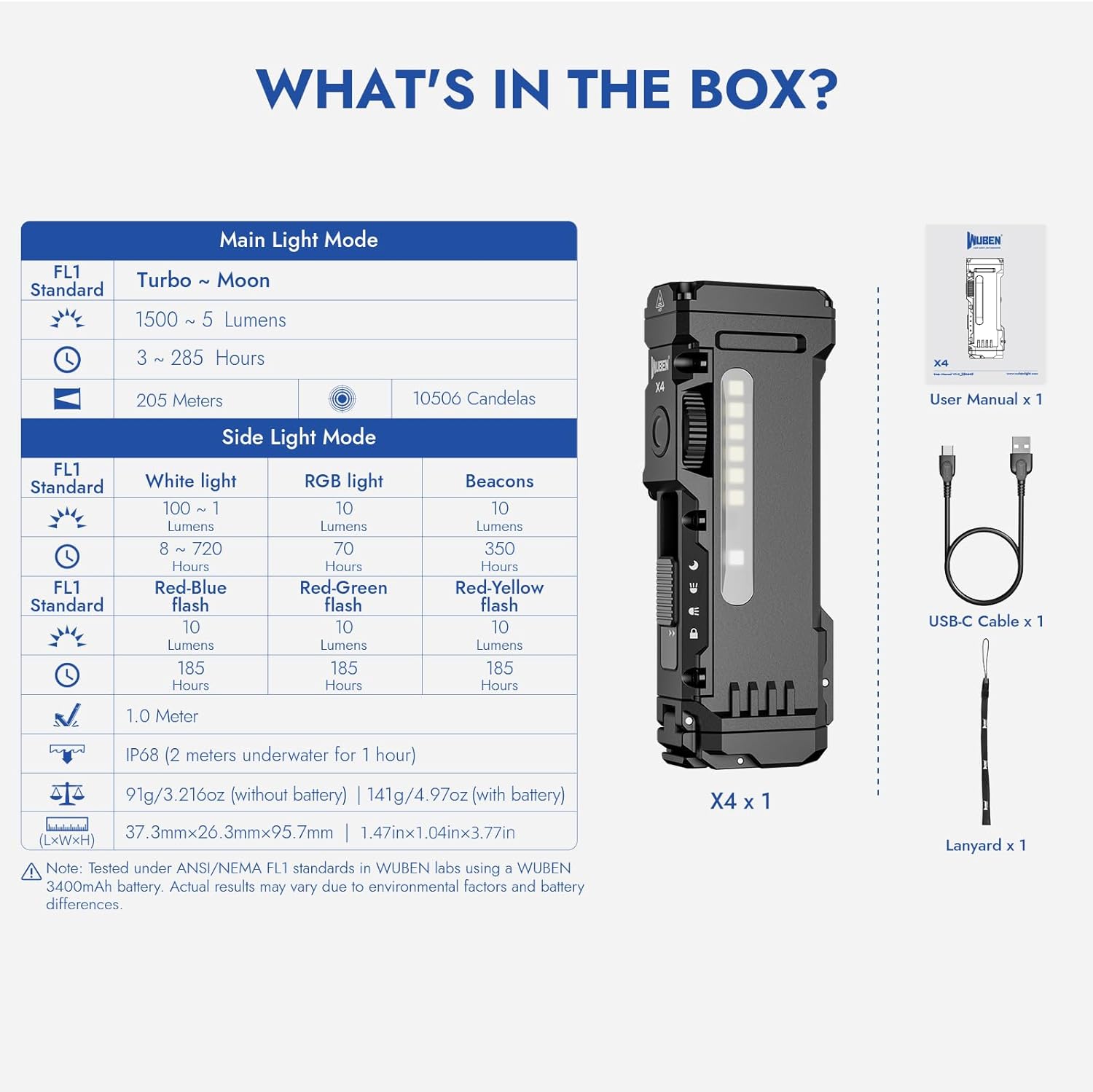
Image: Visual representation of the WUBEN X4 flashlight and its included accessories.
Тохиргоо
Зайг суурилуулах, солих
- Locate the battery compartment at the tail end of the flashlight.
- Slide the lock switch to the unlocked position (if applicable) and open the battery cap.
- Insert the 18650 Lithium-Ion battery, ensuring the positive (+) and negative (-) terminals align correctly with the markings inside the compartment.
- Close the battery cap securely and slide the lock switch back to the locked position.
Цэнэглэж байна
- Slide the mode selection switch to the 'Moonlight' position to expose the USB-C charging port.
- Connect the provided USB-C charging cable to the flashlight's port and a compatible USB power source.
- Батерейны индикаторын гэрэл цэнэглэлтийн төлөвийг харуулна. Бүрэн цэнэглэлтэд ихэвчлэн 2.5 цаг шаардагдана.
- Once charging is complete, return the mode selection switch to the desired position, ensuring the USB-C port is covered for water resistance.
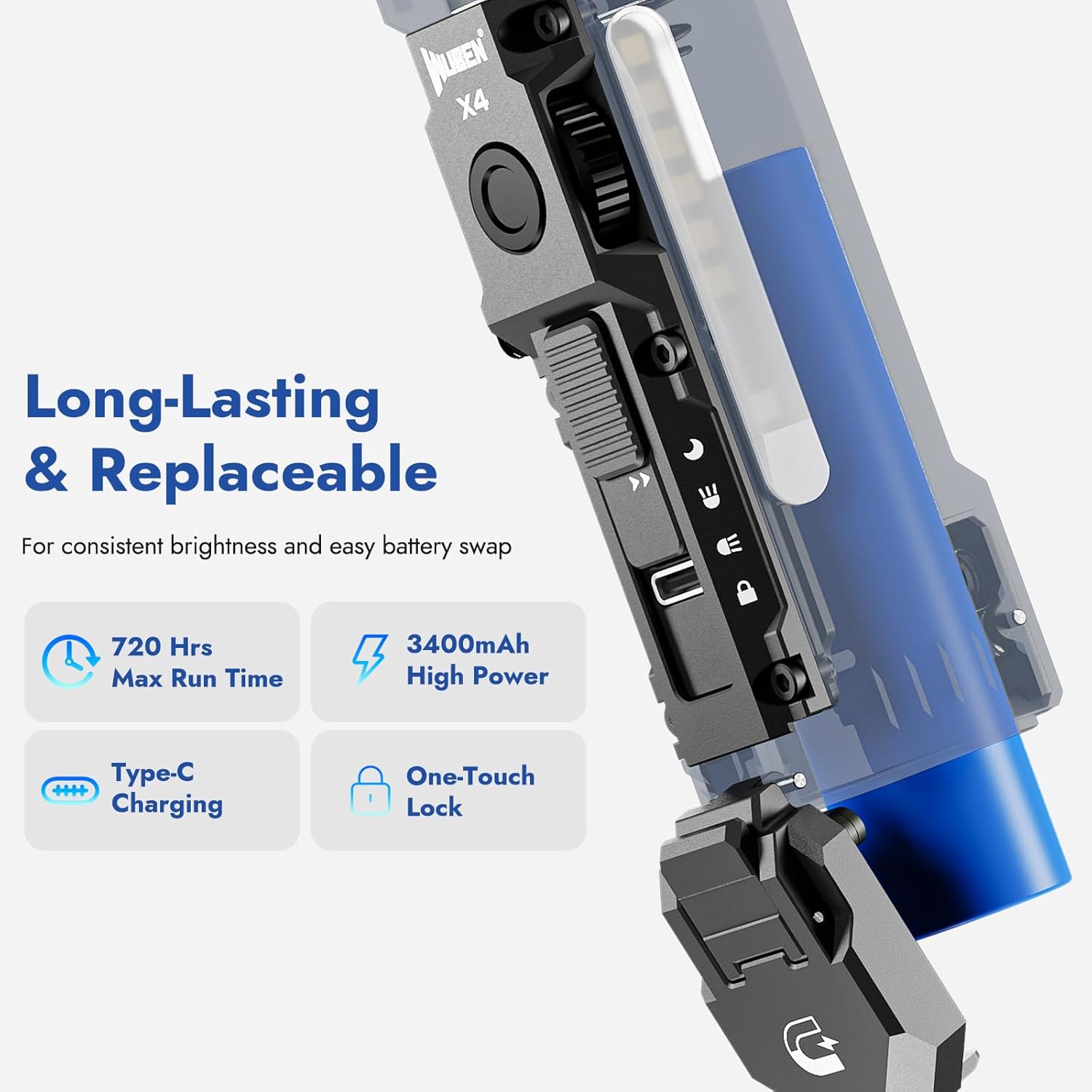
Image: The WUBEN X4 flashlight highlighting its replaceable battery and USB-C charging port.
Ашиглалтын заавар
Mode Selection (Toggle Switch)
The toggle switch on the side of the flashlight allows you to select between different lighting modes:
- Түгжих горим: Prevents accidental activation. Ensure the switch is in this position when not in use.
- Хажуугийн гэрлийн горим: Activates the side LED panel for area illumination.
- Үндсэн гэрлийн горим: Activates the primary front LED for focused beam illumination.
- Сарны гэрлийн горим: Provides a very low light output, ideal for preserving night vision or discreet use. This position also exposes the USB-C charging port.
Brightness Adjustment (Rotary Switch)
Once a light mode (Main or Side) is selected, use the rotary switch to adjust the brightness steplessly. Rotate clockwise to increase brightness and counter-clockwise to decrease it.
RGB Light Modes (Side Light)
In Side Light Mode, press and hold the rotary switch to cycle through different RGB colors. Rotate the switch to fine-tune the color or select specific flashing patterns (e.g., red-blue flash for emergencies).

Image: The WUBEN X4 showcasing its multi-use side light with warm white and RGB color options.
Тактикийн сүүлний унтраалга
The integrated tactical tail switch provides quick access to maximum brightness:
- Instant 1500 Lumens: Press the tactical tail switch to instantly activate the main light at 1500 lumens, regardless of the current mode (Main Light or Side Light).
- Түр асаалттай: Lightly press and hold the tactical switch for momentary high output. Release to turn off.
- Strobe горим: Double-press the tactical switch to activate strobe mode for signaling or self-defense.

Image: Diagram illustrating the functions of the innovative tactical tail switch on the WUBEN X4.
Magnetic Tail Cap and Clip
The magnetic tail cap allows the flashlight to be securely attached to metal surfaces, providing hands-free illumination. The extended clip offers versatile carrying options, allowing attachment to hats, waistbands, or backpacks.
Video: Demonstration of the WUBEN X4's back clip, lanyard, and magnetic tail features for hands-free use.
Засвар үйлчилгээ
- Цэвэрлэгээ: Гар чийдэнгийн их биеийг зөөлөн арчиж, damp даавуу. Зүлгүүрийн цэвэрлэгч, уусгагчийг бүү ашигла.
- Батерейны арчилгаа: Recharge the battery regularly to maintain its lifespan. If storing for an extended period, charge the battery to approximately 50% and store in a cool, dry place.
- Усны эсэргүүцэл: Ensure the USB-C port cover is properly sealed when not charging to maintain IP68 water resistance.
- Хадгалах: When not using the X4 flashlight, always adjust the slide switch to the locked position to prevent accidental activation and battery drain.
Үзүүлэлтүүд
| Брэнд | ВУБЕН |
| Загвар | X4 |
| Main Light Output | 1500 люмен хүртэл |
| Side Light Output | 1 to 100 Lumens (Warm Light), RGB |
| Цацрагийн зай | 205 метр хүртэл |
| Эрчим хүчний эх үүсвэр | Батерейгаар ажилладаг (3350mAh литийн ион) |
| Цэнэглэх порт | USB-C |
| Цэнэглэх хугацаа | Ойролцоогоор 2.5 цаг |
| Хамгийн их ажиллах хугацаа | 285 цаг хүртэл |
| Усны эсэргүүцэл | IP68 (Ус нэвтэрдэггүй) |
| Материал | Хөнгөн цагаан |
| Хэмжээ | 1.5"D x 3.8"W x 1"H |
| Зүйлийн жин | 9.9 унц (0.28 килограмм) |

Image: The WUBEN X4 flashlight demonstrating its IP68 waterproof capability.
Баталгаат болон дэмжлэг
For warranty information, technical support, or any inquiries regarding your WUBEN X4 flashlight, please refer to the official WUBEN webсайт эсвэл харилцагчийн үйлчилгээтэй шууд холбогдоно уу. Баталгаат зарга авахын тулд худалдан авалтын баримтаа хадгална уу.
-д зочилно уу WUBEN Store дэлгэрэнгүй мэдээллийг авна уу.