1. Танилцуулга
Thank you for choosing the WOLFANG WDV01 Portable DVD Player. This manual provides essential information for setting up, operating, and maintaining your device. Please read it carefully before use to ensure optimal performance and longevity of your product.
The WOLFANG WDV01 is designed for portable entertainment, featuring a 9.5-inch unit with a 7.5-inch HD swivel screen, stereo speakers, and a long-lasting battery. It supports various disc and file formats, making it versatile for different media content.
2. Багцын агуулга
Бүх зүйл багцад байгаа эсэхийг шалгана уу:
- WOLFANG WDV01 Portable DVD Player
- Алсын удирдлага
- Хэрэглэгчийн гарын авлага
- AC цэнэглэгч
- Машины цэнэглэгч
- 3-ын 1 AV кабель

Image: Contents of the WOLFANG WDV01 package, showing the DVD player, remote control, user manual, AC charger, car charger, and AV cable.
3. Бүтээгдэхүүн дууссанview
3.1 Гол онцлогууд
- Дэлгэц: 9.5-inch unit with 7.5-inch HD eye-protection screen.
- Дэлгэцийн эргэлт: 270° horizontal rotation and 180° vertical flip for flexible viewөнцөг.
- Аудио: Нэгдсэн стерео чанга яригч.
- Зайны хугацаа: Up to 6 hours of playback on a full charge.
- Эрчим хүчний сонголтууд: AC power adapter and car charger included.
- Санах ойн функц: Breakpoint memory resumes playback from the last stopped point.
- Хэвлэл мэдээллийн нийцтэй байдал: Supports DVD, SVCD, VCD, CD-R/RW discs.
- File Форматын дэмжлэг: JPEG, WMA, MPG, MP3, DIVX, VOB, AVI.
- Гадаад холболт: USB port, SD card slot (max 32GB), AV input, AV output, 3.5mm headphone jack.
3.2 Төхөөрөмжийн зохион байгуулалт
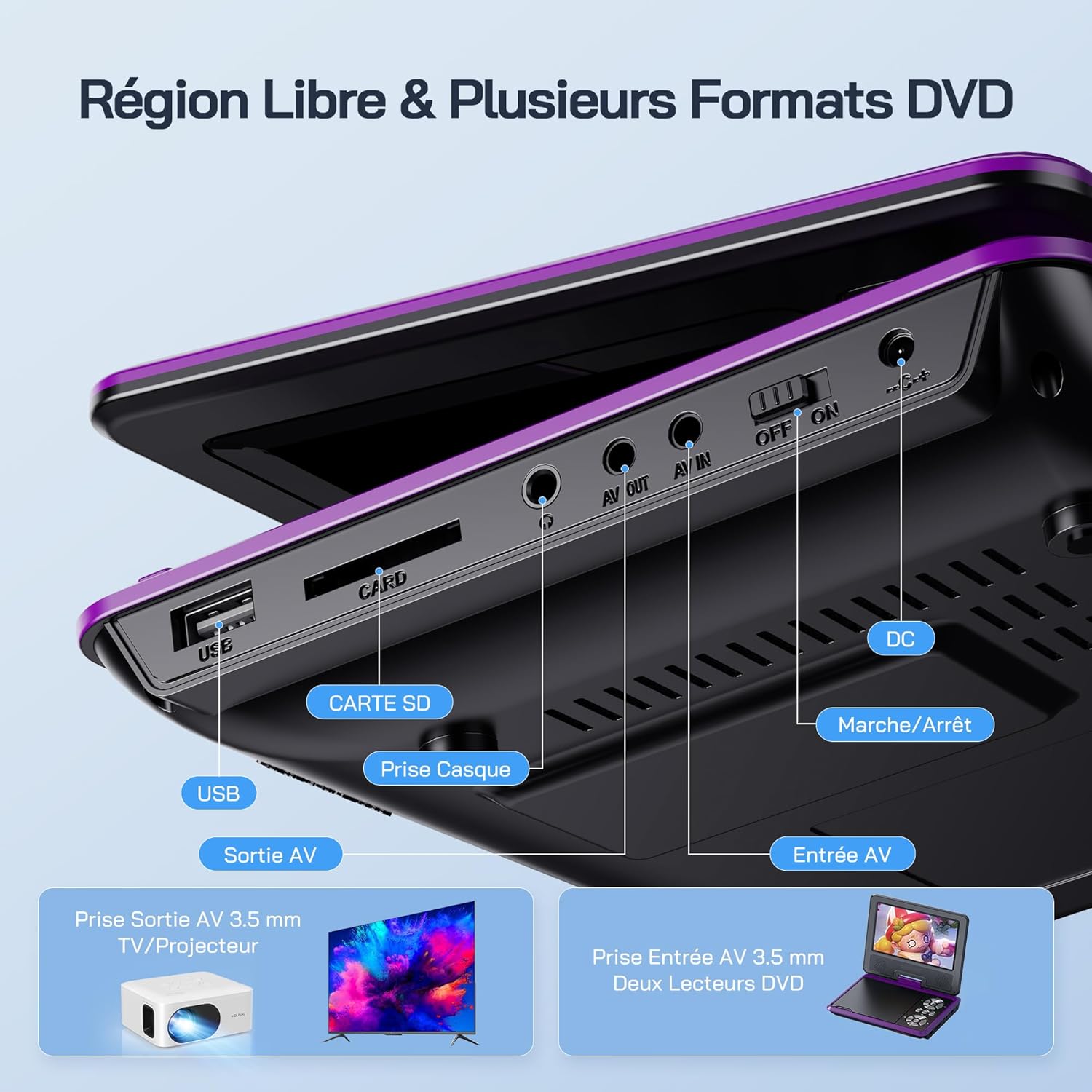
Зураг: Нарийвчилсан view of the side panel of the WOLFANG WDV01, highlighting the USB port, SD card slot, headphone jack, AV OUT, AV IN, DC power input, and ON/OFF switch.
- USB порт: USB флаш дискийг холбоход зориулагдсан.
- SD картны үүр: For inserting SD/MMC cards.
- Чихэвчний Жак: Чихэвчний 3.5 мм аудио гаралт.
- АВААРАЙ: Audio/Video output for connecting to a TV or projector.
- Оруулсан: Audio/Video input for connecting external devices or another DVD player.
- DC IN: Power input for AC adapter or car charger.
- ON/OFF унтраалга: Төхөөрөмжийн тэжээлийн хяналт.
4. Тохиргоо
4.1 Анхны цэнэглэлт
Before first use, fully charge the device. Connect the AC charger to the DC IN port on the player and plug it into a wall outlet. The charging indicator light will illuminate. Once fully charged, the light may change color or turn off, depending on the model.
4.2 Асаах/унтраах
To power on the device, slide the ON/OFF switch to the "ON" position. To power off, slide it to the "OFF" position.
4.3 Дэлгэцийн тохируулга
The screen can be rotated 270 degrees horizontally and flipped 180 degrees vertically. Adjust the screen to your preferred viewing angle. This feature is particularly useful for mounting in a car or for shared viewing.

Image: Illustration demonstrating the 270-degree rotation and 180-degree flip capabilities of the WOLFANG WDV01 screen.
5. Ашиглалтын заавар
5.1 DVD/CD тоглуулах
- Open the disc cover gently.
- Place a compatible DVD or CD onto the spindle, label side up.
- Дискний тагийг хаа.
- The player will automatically detect and begin playback. If not, select "Disc" from the main menu.
Жич: This device supports DVD, SVCD, VCD, CD-R/RW discs. It is not compatible with 1080p, 4K, or Blu-ray discs.
5.2 Playing from USB/SD Card
- USB флаш дискийг USB порт руу эсвэл SD картыг SD картны үүрэнд оруулна уу.
- From the main menu, select "USB" or "SD" depending on your media source.
- Фолдерууд болон files using the control buttons or remote control.
- Хүссэнээ сонго file (JPEG, WMA, MPG, MP3, DIVX, VOB, AVI) to begin playback.
Жич: Maximum supported Micro SD card capacity is 32GB. Video files should have a resolution up to 720x480. Image files should have a resolution up to 2650x1440.
5.3 Breakpoint Memory Function
The player automatically remembers the last playback position. When you power on the device again or re-insert the same disc/media, it will prompt you to resume playback from where you left off. This function may need to be activated in the system settings.

Image: Visual representation of the breakpoint memory feature, illustrating how the player can pause and resume video playback from the exact point of interruption.
5.4 Connecting to an External Display (TV/Projector)
Use the provided 3-in-1 AV cable to connect the player to a TV or projector.
- Connect one end of the AV cable to the AV OUT port on the DVD player.
- Connect the other end of the AV cable to the corresponding AV input ports (Yellow for Video, Red for Right Audio, White for Left Audio) on your TV or projector.
- Select the correct AV input source on your TV or projector.
- The player's screen content will now be displayed on the external screen.

Image: A WOLFANG WDV01 Portable DVD Player connected to a large television screen, displaying content for a family watching together, demonstrating the TV sync feature.
5.5 Connecting to Another DVD Player (AV IN)
The AV IN port allows you to connect another compatible device, such as a second DVD player, to display its content on the WOLFANG WDV01 screen.
- Connect one end of an AV cable to the AV OUT port of the external device.
- Connect the other end of the AV cable to the AV IN port on the WOLFANG WDV01.
- Switch the WOLFANG WDV01 to AV input mode (refer to the on-screen menu or remote control for this option).
6. Засвар үйлчилгээ
6.1 Төхөөрөмжийг цэвэрлэх
- Цэвэрлэхийн өмнө төхөөрөмжийг унтрааж, залгуураас салгасан эсэхийг шалгаарай.
- Тоглогчийн гадна талыг зөөлөн, хуурай даавуугаар арчина.
- Дэлгэцийг цэвэрлэхийн тулд электроникийн дэлгэцэнд тусгайлан зориулсан зөөлөн, хөвөнгүй даавуу ашиглаарай. Зүлгүүрийн цэвэрлэгч эсвэл уусгагч хэрэглэж болохгүй.
- Дискний линзийг цэвэрлэхийн тулд DVD линз цэвэрлэх тусгай диск ашиглаарай. Линзийг гараар цэвэрлэх гэж бүү оролдоорой.
6.2 Батерейны арчилгаа
- Төхөөрөмжийг хэт өндөр температурт (халуун эсвэл хүйтэн) байлгахаас зайлсхий.
- If storing the device for an extended period, charge the battery to approximately 50% to prolong its lifespan.
- Дотор батерейг өөрөө солих гэж бүү оролдоорой. Батерейны асуудал гарвал хэрэглэгчийн дэмжлэгтэй холбогдоно уу.
6.3 Хадгалалт
Store the player in a cool, dry place away from direct sunlight and moisture. Keep it in its original packaging or a protective case when not in use to prevent damage.
7. Алдаа засах
| Асуудал | Боломжит шалтгаан | Шийдэл |
|---|---|---|
| Хүч чадалгүй | Battery drained, power adapter not connected, power switch off. | Charge the battery, ensure power adapter is securely connected, slide power switch to ON. |
| Диск тоглохгүй байна | Incompatible disc format, disc dirty/scratched, disc inserted incorrectly. | Check disc compatibility (no Blu-ray/4K), clean disc, insert disc label side up. |
| Дуу алга | Volume too low, headphones connected, audio settings incorrect. | Increase volume, disconnect headphones, check audio output settings. |
| Зурагтаар зураг байхгүй | AV cable loose, incorrect TV input selected. | Ensure AV cable is securely connected, select correct AV input on TV. |
| USB/SD карт танигдаагүй байна | Incompatible format, card/drive damaged, incorrect file систем. | Ensure media is formatted to FAT32, check for damage, try another USB/SD card. Max 32GB SD card. |
If the problem persists after trying these solutions, please contact WOLFANG customer support.
8. Техникийн үзүүлэлтүүд
| Онцлог | Дэлгэрэнгүй |
|---|---|
| Брэнд | ВОЛФАНГ |
| Загвар | WDV01 |
| Дэлгэцийн хэмжээ | 7.5 инч |
| Нэгжийн хэмжээ | 9.5 инч (диагональ) |
| Дэлгэцийн нягтрал | 800 x 480 пиксел хүртэл |
| Дискний нийцтэй байдал | DVD, SVCD, VCD, CD-R/RW |
| File Форматын дэмжлэг | Video: AVI, MPG, MP3, DIVX, VOB; Audio: WMA, MP3; Image: JPEG |
| USB/SD картын дэмжлэг | Max 32GB (Micro SD) |
| Video Resolution (USB/SD) | 720 x 480 пиксел хүртэл |
| Image Resolution (USB/SD) | 2650 x 1440 пиксел хүртэл |
| Зайны ашиглалт | 4-6 цаг |
| Зүйлийн жин | 1100 грамм |
| UPC | 850067892205 |
9. Баталгаат хугацаа ба дэмжлэг
9.1 Үйлдвэрлэгчийн баталгаа
The WOLFANG WDV01 Portable DVD Player comes with a 24 сарын үйлдвэрлэгчийн баталгаа худалдан авсан өдрөөс. Энэхүү баталгаа нь ердийн ашиглалтын үед хийгдсэн материал, хийцийн согогийг хамарна. Энэ нь буруу ашиглалт, осол, зөвшөөрөлгүй өөрчлөлт, хэвийн элэгдлээс үүдэлтэй хохирлыг хамрахгүй.
Баталгаат заргад зориулж худалдан авалтаа нотлох баримтаа үлдээнэ үү.
9.2 Хэрэглэгчийн дэмжлэг
For any questions, technical assistance, or warranty claims, please contact WOLFANG customer support. Our team is available to assist you and aims to respond within 24 hours.
Contact information can typically be found on the official WOLFANG webсайт эсвэл таны худалдан авах платформоор дамжуулан.


