1. Танилцуулга
Thank you for choosing the RebotAi A11 Android 15 Tablet. This manual provides essential information for setting up, operating, maintaining, and troubleshooting your device. The RebotAi A11 features an 11-inch 2.5K IPS display, a powerful MediaTek Helio G100 Octa-Core processor, 24GB RAM, 128GB ROM, and an 8200 mAh battery, designed for a smooth and immersive user experience.
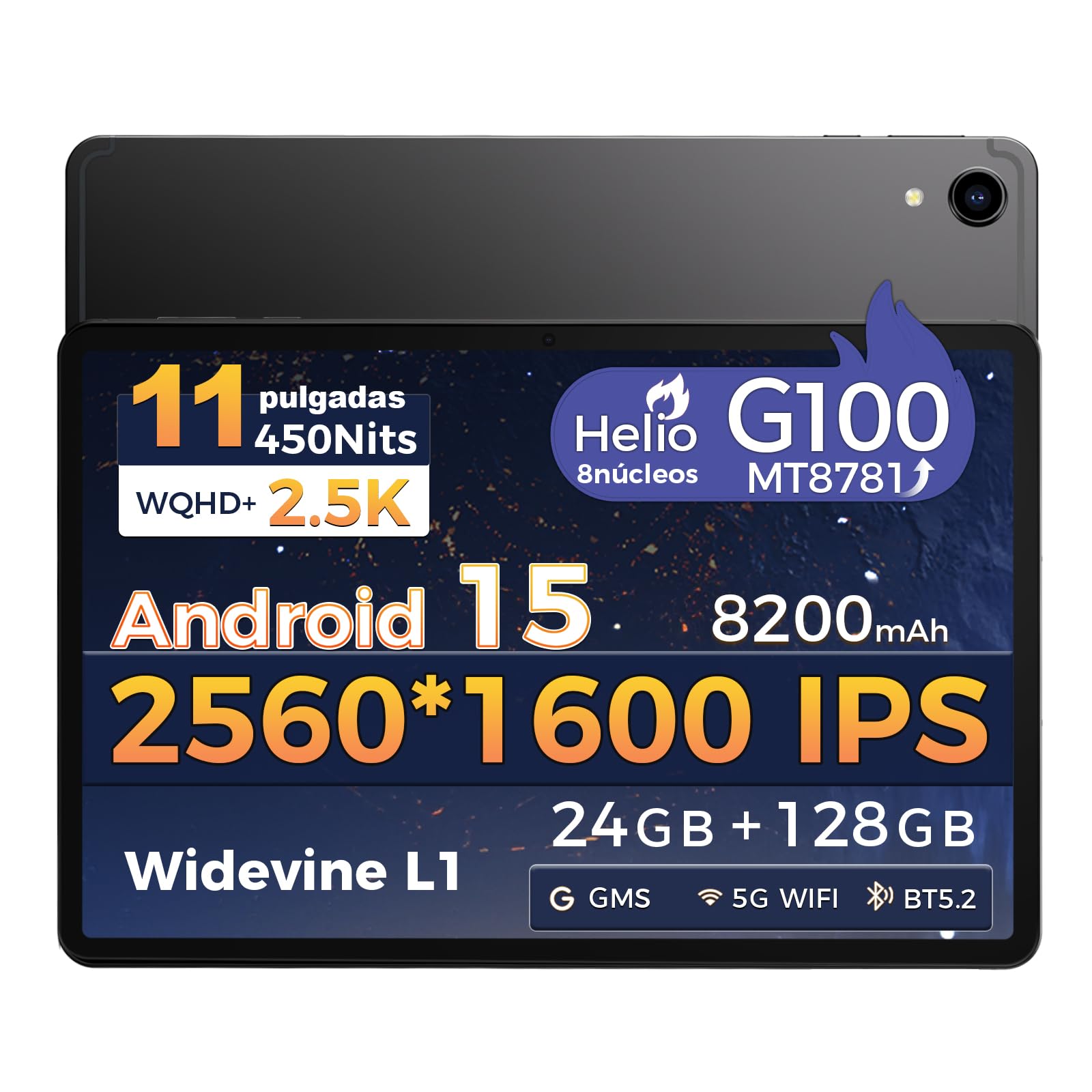
Зураг: Урд view of the RebotAi A11 Tablet.
2. Хайрцагт юу байна
Upon opening your RebotAi A11 package, please ensure all the following items are present:
- RebotAi A11 Tablet (x1)
- Leather Case (x1)
- USB-C to USB-C Charging Cable (x1)
- Зүүг (x1)
- SIM Ejector Pin (x1)
- Хэрэглэгчийн гарын авлага (x1)
Note: In accordance with global environmental guidelines, the RebotAi A11 tablet does not include a wall charger. Only a USB-C charging cable is provided.
Image: Contents of the RebotAi A11 Tablet package.
3. Тохиргоо
3.1 Зайг цэнэглэх
Before first use, fully charge your tablet. Connect the provided USB-C cable to the tablet's USB-C port and the other end to a compatible USB wall charger (not included) or a computer. The tablet supports 20W PD fast charging.
3.2 Асаах/унтраах
- Асаахын тулд: Press and hold the Power button located on the side of the tablet until the RebotAi logo appears.
- Унтраахын тулд: Press and hold the Power button until the power options appear on the screen, then select "Power Off."
- Дахин эхлүүлэхийн тулд: Цахилгааны сонголтууд гарч иртэл асаах товчийг удаан дараад "Дахин асаах" гэснийг сонгоно уу.
3.3 Анхны тохиргоо
When you power on the tablet for the first time, follow the on-screen instructions to:
- Хэлээ сонгоно уу.
- Wi-Fi сүлжээнд холбогдоно уу.
- Google бүртгэлээрээ нэвтэрч эсвэл шинээр үүсгэнэ үү.
- Дэлгэцийн түгжээг тохируулах (ПИН, хээ, нууц үг эсвэл царайгаар түгжээ тайлах).
3.4 MicroSD карт оруулах
The RebotAi A11 supports MicroSD cards up to 1TB for expanded storage. Use the provided SIM ejector pin to open the card tray, insert the MicroSD card into the designated slot, and then close the tray securely.
3.5 Үзэг ашиглах нь
The included stylus can be used for precise navigation, drawing, writing, and signing documents on the tablet's screen. No charging is required for the stylus.

Зураг: хажуу тал view of the RebotAi A11 Tablet, showing ports and buttons.
4. Ашиглалтын заавар
4.1 Дэлгэцийн онцлог
The RebotAi A11 features an 11-inch IPS Full HD 2.5K anti-glare display with a resolution of 2560 x 1600 pixels. It supports Widevine L1 certification for high-definition streaming and dynamic brightness adjustment. The anti-glare screen and immersive reading mode help prevent eye fatigue.

Image: The RebotAi A11's 2.5K high-definition display with eye protection and automatic brightness.

Image: Widevine L1 support for premium streaming services.
4.2 Гүйцэтгэл ба хадгалалт
The tablet is powered by the MediaTek Helio G100 Octa-Core processor (MT8781), featuring 2 high-performance Cortex-A76 cores and 6 power-efficient Cortex-A55 cores. This ensures smooth operation for daily tasks, social media, video playback, and light gaming. It comes with 8GB base RAM, expandable by 16GB virtual RAM for a total of 24GB, and 128GB of internal storage, expandable up to 1TB via a MicroSD card.

Image: The Helio G100 chip, demonstrating high performance and energy efficiency.

Image: Large capacity storage with 24GB RAM and 128GB ROM, expandable to 1TB.
4.3 Камер
The RebotAi A11 is equipped with a 5MP front-facing camera and a 16MP rear-facing camera. These cameras are suitable for video calls, online meetings, and capturing everyday moments with clear and natural images.

Image: The 5MP front and 16MP rear cameras for clear photos and video calls.
4.4 Батерейны удирдлага
The tablet features an 8200 mAh high-capacity battery, providing long-lasting power for reading, online courses, video playback, and office work. It supports 20W PD fast charging, allowing the device to be fully charged quickly.

Image: Powerful 8200 mAh battery with 20W fast charging for extended use.
4.5 Холболт
The RebotAi A11 supports dual-band Wi-Fi (2.4GHz and 5GHz) with 802.11ac for fast and stable internet access. It also includes Bluetooth 5.2 for energy-efficient wireless connections and GPS for precise navigation, compatible with Beidou, Galileo, and GLONASS.

Image: Fast connectivity and precise positioning with dual-band Wi-Fi, Bluetooth 5.2, and GPS.
4.6 Олон үйлдэл хийх
With the dual-screen function, you can run two applications simultaneously on a single screen. This allows for seamless navigation, watching videos while chatting, or consulting information while working.

Image: Dual-screen functionality for fluid multitasking.
4.7 Аудио
Equipped with dual BOX speakers, the tablet offers an immersive audio experience for both movies and music. The balanced reproduction of highs and lows creates a pleasant listening experience.

Image: Immersive and crystal-clear audio from dual BOX speakers.
4.8 Intelligent Sensors
The A11 is equipped with intelligent sensors and AI, offering a more intelligent user experience. The gyroscope improves immersion in games, while the magnetometer ensures precise navigation, even in tunnels. Other sensors include G-sensor (automatic rotation), proximity sensor (automatic screen off), and ambient light sensor (adjustable backlight).

Image: Intelligent detection with various sensors for enhanced user experience.
4.9 Физик шинж чанарууд
The tablet features a uniform metallic body crafted with advanced nano-coating technology, providing a smooth and delicate touch while being durable. Its surface is resistant to fingerprints and scratches, offering a high-quality texture and feel. It is surprisingly light at 510g and thin at 7.8mm.

Image: The tablet's lightweight and slim design, achieved through nano-molding technology.
5. Засвар үйлчилгээ
5.1 Таблетаа цэвэрлэх
Таблетаа цэвэрлэхийн тулд зөөлөн, хөвөнгүй даавуу хэрэглээрэй. Зөрүүд толбоны хувьд бага зэрэг dampen the cloth with water or a screen-safe cleaner. Avoid using harsh chemicals, abrasive materials, or excessive moisture.
5.2 Програм хангамжийн шинэчлэлтүүд
Regularly check for and install software updates to ensure optimal performance, security, and access to new features. You can usually find this option in Тохиргоо > Систем > Системийн шинэчлэл.
5.3 Батерейны арчилгаа
Батерейны ашиглалтын хугацааг уртасгахын тулд:
- Хэт их температураас зайлсхий.
- Зайг байнга бүрэн шавхаж болохгүй.
- Таблет бүрэн цэнэглэгдсэний дараа цэнэглэгчийг салга.
- Дэлгэцийн гэрлийг тав тухтай түвшинд тохируулна уу.
6. Алдаа засах
| Асуудал | Боломжит шийдэл |
|---|---|
| Таблет асахгүй байна | Ensure the battery is charged. Connect to a power source for at least 30 minutes. If it still doesn't turn on, try a forced restart by holding the power button for 10-15 seconds. |
| Дэлгэц хариу өгөхгүй байна | Restart the tablet. If the issue persists, perform a factory reset (data will be lost). |
| Wi-Fi холболтын асуудал | Wi-Fi чиглүүлэгч болон таблетаа дахин эхлүүлнэ үү. Таблетын тохиргоонд сүлжээгээ мартаад дахин холбогдоно уу. Та Wi-Fi дохионы хүрээнд байгаа эсэхээ шалгаарай. |
| Аппликейшнүүд гацаж эсвэл хөлддөг | Clear the cache and data for the problematic app in Тохиргоо > Програмууд. If the issue continues, uninstall and reinstall the app. Ensure sufficient storage space is available. |
| Батерей хурдан дуусдаг | Reduce screen brightness, close unused apps, disable Wi-Fi/Bluetooth when not in use. Check battery usage in Тохиргоо > Батерей эрчим хүч шаардсан програмуудыг тодорхойлох. |
7. Техникийн үзүүлэлтүүд
| Онцлог | Тодорхойлолт |
|---|---|
| Брэнд | RebotAi |
| Загвар цуврал | A11 |
| Бүтээгдэхүүний хэмжээс | 25 x 15 x 5 см |
| Жин | 900 гр |
| Өнгө | Саарал |
| Дэлгэцийн хэмжээ | 11 инч |
| Дэлгэцийн нягтрал | 2560 x 1600 пиксел (2.5К) |
| Процессор үйлдвэрлэгч | MediaTek |
| Процессорын загвар | Helio G100 (MT8781) |
| Процессорын хурд | 2.2 GHz |
| RAM хэмжээ | 8 GB (expandable to 24 GB with virtual RAM) |
| Хадгалах багтаамж | 128 GB (expandable up to 1 TB via MicroSD) |
| Арын Webкамерын нягтрал | 16 МП |
| Урд Webкамерын нягтрал | 5 МП |
| Үйлдлийн систем | Android 15 |
| Утасгүй холболт | Wi-Fi 6 (802.11ac, 802.11n), Bluetooth 5.2, GPS |
| Зайны багтаамж | 8200 мАч |
| Батерейны дундаж хугацаа | 24 цаг |
| Хурдан цэнэглэх | 20W PD |
8. Баталгаат хугацаа ба дэмжлэг
RebotAi offers a 2 жилийн баталгаат хугацаа for your tablet, ensuring peace of mind with your purchase. We are committed to providing excellent customer service.
8.1 Хэрэглэгчийн дэмжлэг
If you encounter any technical issues or have questions regarding the use of your RebotAi A11 tablet, our customer support team is available 24/7. You can contact us through the seller contact option on the Amazon product page.

Image: RebotAi customer service support information.


