Танилцуулга
The Lenovo Professional Wireless Rechargeable Combo Keyboard and Mouse is designed to enhance productivity and user experience. This full-size keyboard features scissor switches for a comfortable typing experience and includes a specialized Microsoft Copilot Key. The ergonomically designed mouse, crafted from bio-rubber, offers comfort for extended use and is equipped with a precise 4,000 DPI sensor. Both devices are constructed using 65% recycled materials, reflecting a commitment to environmental responsibility. This manual provides essential information for setting up, operating, maintaining, and troubleshooting your new wireless combo.
Багцын агуулга
Таны багцад бүх зүйл байгаа эсэхийг шалгана уу:
- Lenovo Professional Wireless Rechargeable Keyboard
- Lenovo Professional Wireless Rechargeable Mouse
- USB-A-аас USB-C хүртэлх цэнэглэгч кабель
- USB Wireless Receiver (typically stored in the mouse or keyboard)
- Хурдан эхлүүлэх гарын авлага (хэрэв байгаа бол)
Тохиргоо
1. Төхөөрөмжүүдийг цэнэглэх
Before initial use, ensure both the keyboard and mouse are fully charged. Use the provided USB-A to USB-C cable to connect each device to a powered USB port on your computer or a USB wall adapter. An indicator light on each device will show charging status and turn off or change color when fully charged.

Figure 1: Mouse charging port with USB-C cable connected.
2. Connecting via USB Wireless Receiver (RF)
This method provides a stable 2.4 GHz wireless connection.
- Locate the USB wireless receiver. It is often stored in a compartment within the mouse or keyboard for safekeeping.
- USB хүлээн авагчийг компьютер дээрх боломжтой USB-A порт руу залгаарай.
- Гар болон хулганыг тус тусын цахилгаан унтраалгаар нь асаана уу. Төхөөрөмжүүд хүлээн авагчтай автоматаар холбогдох ёстой.
- Your computer will typically install the necessary drivers automatically.
3. Bluetooth-ээр холбогдож байна
The combo supports Bluetooth connectivity for devices with built-in Bluetooth functionality.
- Таны компьютер эсвэл төхөөрөмж дээр Bluetooth идэвхжсэн эсэхийг шалгаарай.
- Put the keyboard or mouse into Bluetooth pairing mode (refer to the device for specific button combinations, often a dedicated Bluetooth button or holding a function key). An indicator light will usually flash to show pairing mode.
- Компьютер дээрээ Bluetooth тохиргоо руу очоод шинэ төхөөрөмжүүдийг хайгаарай.
- Select the Lenovo keyboard or mouse from the list of available devices to pair. Follow any on-screen prompts.

Зураг 2: Дээд тал view of the Lenovo Professional Wireless Keyboard and Mouse.
Ашиглалтын заавар
Гарны онцлог
- Хайчны унтраалга: Хариу үйлдэл үзүүлэхэд хялбар, тав тухтай бичих туршлагыг бий болгодог.
- Microsoft Copilot түлхүүр: Dedicated key for quick access to Microsoft Copilot features (requires compatible operating system and software).
- Функцийн товчлуурууд: Standard function keys (F1-F12) with integrated multimedia and system control functions, often accessed via the 'Fn' key.
- Програмчлагдах түлхүүрүүд: Certain keys may be programmable through Lenovo software for custom shortcuts (check Lenovo support webпрограм хангамжийн бэлэн байдлын талаархи сайт).
- 3-Zone Layout: Full-size keyboard with a dedicated numeric keypad for efficient data entry.
Хулганы онцлог шинж чанарууд
- 4,000 DPI Sensor: High-precision optical sensor for smooth and accurate cursor movement. DPI can often be adjusted via a button on the mouse or through system settings.
- Bio-Rubber Design: Ergonomic design with a comfortable bio-rubber grip for extended use.
- Tilt Wheel Scroller: The scroll wheel can be tilted left or right for horizontal scrolling, useful for navigating large spreadsheets or complex web хуудаснууд.
- Тусгай товчлуурууд: The mouse may include additional buttons that can be customized for specific functions through Lenovo software.
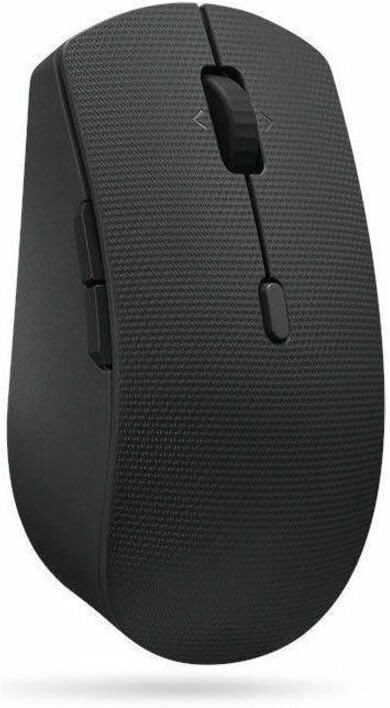
Зураг 3: Хажуу тал view of the Lenovo Professional Wireless Mouse, highlighting its ergonomic design.
Засвар үйлчилгээ
Цэвэрлэгээ
- Цэвэрлэхийн өмнө төхөөрөмжүүдийг компьютерээс салга.
- Зөөлөн, хөвөнгүй даавууг бага зэрэг хэрэглээрэй dampened with water or a mild cleaning solution (e.g., isopropyl alcohol) to wipe surfaces.
- Шингэнийг төхөөрөмж рүү шууд цацахаас зайлсхий.
- For keyboard keys, use compressed air to remove debris from underneath.
Батерейны арчилгаа
- The keyboard and mouse feature built-in rechargeable Lithium-Ion batteries.
- Charge the devices regularly to maintain optimal battery life.
- Avoid fully discharging the batteries frequently, as this can reduce their overall lifespan.
- Төхөөрөмжийг удаан хугацаагаар ашиглаагүй тохиолдолд сэрүүн, хуурай газар хадгална.
Байгаль орчны асуудал
Both the keyboard and mouse are made from eco-friendly 65% recycled materials. Please dispose of the devices and batteries responsibly according to local regulations at the end of their lifespan.
Алдааг олж засварлах
Төхөөрөмжүүд хариу өгөхгүй байна
- Эрчим хүчийг шалгах: Ensure both the keyboard and mouse are turned on and have sufficient battery charge. Recharge if necessary.
- Холболтыг шалгах:
- For RF (USB Receiver): USB хүлээн авагч ажиллаж байгаа USB порт руу найдвартай залгагдсан эсэхийг шалгаарай. Өөр USB порт ашиглаж үзнэ үү.
- Bluetooth-ийн хувьд: Verify Bluetooth is enabled on your computer and the devices are paired. Try unpairing and re-pairing the devices.
- хөндлөнгийн оролцоо: Move the devices closer to the receiver or computer. Avoid using them near other wireless devices that might cause interference.
- Дахин эхлүүлэх: Компьютерээ дахин эхлүүлнэ үү.
Оролтын саатал эсвэл тасалдал
- Батерейны түвшин: Low battery can affect wireless performance. Charge the devices.
- Зай: Ensure the devices are within the effective operating range (typically up to 10 meters/33 feet).
- хөндлөнгийн оролцоо: Reduce potential interference from other 2.4 GHz or Bluetooth devices.
- Жолооч нар: Үйлдлийн системийн драйверууд тань шинэчлэгдсэн эсэхийг шалгаарай.
Үзүүлэлтүүд
| Онцлог | Дэлгэрэнгүй |
|---|---|
| Брэнд | Lenovo |
| Цуврал | Мэргэжлийн |
| Загварын дугаар | 4X31R64316 |
| Техник хангамжийн платформ | PC |
| Үйлдлийн системийн нийцтэй байдал | Windows |
| Зүйлийн жин | 1.29 фунт |
| Бүтээгдэхүүний хэмжээ (LxWxH) | 17.2 x 17.2 x 0.5 инч |
| Өнгө | Саарал |
| Эрчим хүчний эх үүсвэр | Батерейгаар ажилладаг |
| Батерей | 1 литийн ион зай шаардлагатай (дагсан) |
| Холболтын технологи | USB, Wireless (Bluetooth/RF) |
| Онцлог шинж чанарууд | 3-zone Layout, 4000 dpi, Adjustable Tilt, Bluetooth/RF, Full-size Keyboard, Programmable Keys, Quiet Keys, Rechargeable Battery, Scissor Switches, Symmetrical Mouse |
| Тохиромжтой төхөөрөмжүүд | All-in-One PC, Laptop, Lenovo IdeaCentre AIO PCs, Lenovo IdeaCentre Desktop Towers, Lenovo IdeaCentre Mini PCs, Lenovo IdeaPad Notebooks, Personal Computer (Refer to psref.lenovo.com/accessory/4X31R64316 бүрэн жагсаалтын хувьд) |
Баталгаат болон дэмжлэг
For warranty information, technical support, or service inquiries regarding your Lenovo Professional Wireless Rechargeable Combo Keyboard and Mouse, please refer to the warranty card included with your product or visit the official Lenovo support website. You can typically find detailed support resources, FAQs, and contact information for your region at support.lenovo.com.


