1. Танилцуулга
This manual provides detailed instructions for the operation and maintenance of your HIFI WALKER H2 Touch 64GB Hi Res MP3 Player. Please read this manual thoroughly before using the device to ensure proper functionality and to maximize your audio experience.
2. Бүтээгдэхүүний онцлог
- Hi-Res Lossless Audio Performance: Equipped with an ESS9219Q DAC chip, supporting FLAC, APE, WAV, ALAC, AIFF, and native DSD64/128 up to 32-bit/384 kHz.
- Bluetooth 5.2: Bi-directional (TX/RX) with aptX-HD and LDAC support for high-fidelity wireless audio.
- Dual Control Interface: 2.4-inch full-touch 480x360 display combined with six physical buttons for intuitive navigation.
- Premium Build & Outputs: CNC-machined aluminum alloy body with 3.5 mm headphone out and line-out ports.
- Олон талт холболт: Functions as a USB DAC, offers SPDIF output via Type-C port.
- Өргөтгөх боломжтой хадгалах сан: Includes a pre-inserted 64 GB micro SD card, expandable up to 512 GB via micro SD or USB OTG.
- Өндөр нарийвчлалтай бичлэг: Digital stereo MIC for 48 kHz high-fidelity recording.
- Батерейны урт наслалт: 1500 mAh lithium battery provides up to 10 hours of playback.
- Нэмэлт функцууд: E-book reading, background music playback, multiple EQ presets.
3. Хайрцагт юу байна
- HIFI WALKER H2 Touch MP3 Player
- Цэнэглэх кабель
- 64GB Micro SD Card (pre-inserted)
- Хэрэглэгчийн гарын авлага
4. Бүтээгдэхүүн дууссанview
4.1 Төхөөрөмжийн зохион байгуулалт
The HIFI WALKER H2 Touch features a compact design with a 2.4-inch display and strategically placed physical controls.
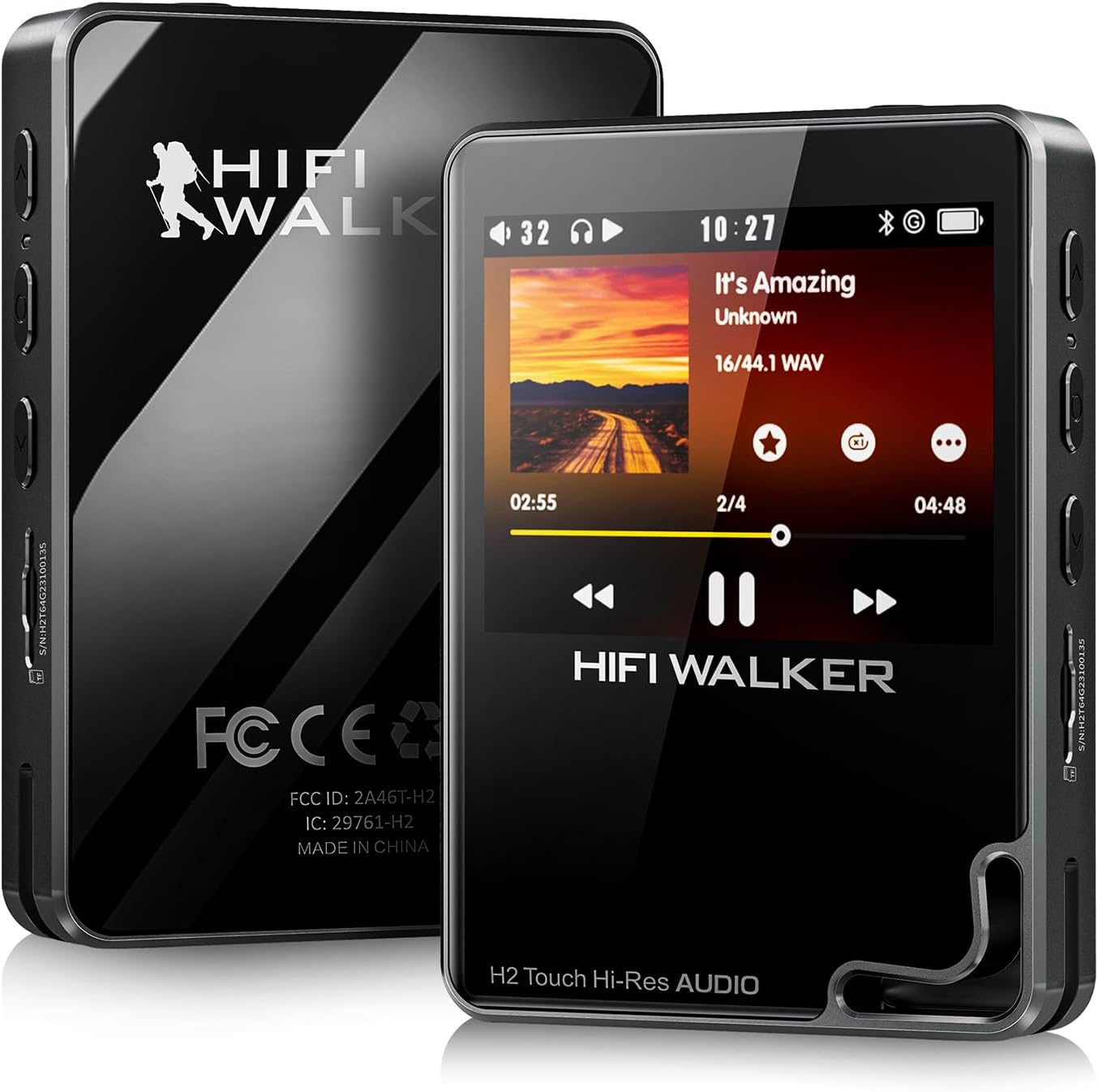
Зураг 1: Урд ба хойд view of the HIFI WALKER H2 Touch MP3 Player.
4.2 Физик товчлуурууд ба портууд
The device combines a touch screen with tactile buttons for ease of use.

Figure 2: Close-up of the H2 Touch screen and physical control buttons.
- Цахилгаан товч: Located on the top edge. Press and hold to power on/off.
- Дууны товчлуурууд: Located on the side, marked '+' and '-'.
- Бичил SD картны үүр: Located on the side, for memory expansion.
- 3.5 мм чихэвчний гаралт: Standard audio output port.
- Line-Out Port: Гадаад холболтын хувьд amplifiers or car audio systems.
- USB Type-C порт: For charging, data transfer, and USB DAC/SPDIF output.
- Навигацийн товчлуурууд: Play/Pause, Previous/Rewind, Next/Fast-forward, Back, and Menu buttons are located on the front panel.

Зураг 3: Нарийвчилсан view of the device's ports.
5. Тохиргоо
5.1 Анхны төлбөр
Before first use, fully charge the device using the provided USB Type-C cable connected to a computer or a compatible USB power adapter. A full charge typically takes about 3 hours.
5.2 Inserting/Expanding Storage
Your device comes with a 64GB micro SD card pre-inserted. To expand storage, power off the device, gently insert a micro SD card (up to 512GB) into the designated slot until it clicks. The device also supports USB OTG for additional storage.
5.3 Хөгжим дамжуулах
Connect the H2 Touch to your computer using the USB Type-C cable. The device will appear as a removable drive. Simply drag and drop your music files into the device's storage or the inserted micro SD card. The player supports various formats including FLAC, APE, WAV, ALAC, AIFF, DSD64/128, and MP3.
Video 1: Demonstrates connecting the H2 Touch to a computer and transferring music files.
6. Ашиглалтын заавар
6.1 Асаах/унтраах
Press and hold the Power button on the top edge for a few seconds to turn the device on or off.
6.2 Үндсэн навигаци
Navigate the menu using the 2.4-inch touch screen or the physical buttons on the front panel. The scroll wheel allows for quick browsing through lists, while the Play/Pause, Next/Fast-forward, Previous/Rewind, Back, and Menu buttons provide direct control.
6.3 Хөгжим тоглуулах
From the main menu, select 'Music' to browse your library by song, artist, album, or genre. Select a track to begin playback. Use the physical buttons or on-screen controls to play, pause, skip tracks, or adjust volume.
6.4 Bluetooth холболт
Bluetooth чихэвч эсвэл чанга яригчтай холбогдохын тулд:
- Go to 'System Settings' from the main menu.
- Select 'Bluetooth Settings'.
- Ensure Bluetooth is 'On'.
- Select 'Bluetooth Scan' to find available devices.
- Choose your desired device from the list to pair.
The H2 Touch supports bi-directional Bluetooth 5.2, allowing it to transmit audio to headphones/speakers or receive audio from another device (e.g., a smartphone) to act as a Bluetooth DAC.
Video 2: Demonstrates Bluetooth pairing and UI navigation on the H2 Touch.
6.5 USB DAC горим
Connect the H2 Touch to a computer or compatible smartphone via the USB Type-C cable. In the device's settings, select 'USB Mode' and choose 'DAC'. This allows the player to function as an external sound card, enhancing the audio quality of your connected device.
6.6 Тэнцвэржүүлэгчийн тохиргоо
Customize your sound experience by accessing the 'Equalizer' settings. Choose from various presets (Rock, Jazz, Classical, Pop, etc.) or create a custom EQ profile таны сонголтод нийцүүлэн.

Figure 4: Custom Equalizer modes for personalized audio.
6.7 Бичлэг хийх функц
The H2 Touch features a digital stereo MIC for high-fidelity recording. Access the 'Record' function from the main menu to start, pause, and save recordings.
7. Техникийн үзүүлэлтүүд
| Загварын нэр | H2 Touch |
| Брэнд | HIFI WALKER |
| Санах ойн хадгалах багтаамж | 64 ГБ (512 ГБ хүртэл өргөтгөх боломжтой) |
| Дэлгэцийн хэмжээ | 2.4 инч |
| Холболтын технологи | Bluetooth 5.2 (bi-directional) |
| Онцлог шинж чанар | Hi-Res Audio, USB DAC, SPDIF Output, Recording |
| DAC чип | ESS9219Q |
| Дэмжигдсэн аудио форматууд | FLAC, APE, WAV, ALAC, AIFF, native DSD64/128, MP3 |
| Батерей | 1500 mAh Lithium Polymer (up to 10 hours playback) |
| Зүйлийн жин | 10.5 унц |
| Хэмжээ | 5.91 x 3.78 x 2.24 инч |
8. Алдаа засах
- Төхөөрөмж асахгүй байна: Ensure the device is fully charged. If the battery is completely drained, it may take a few minutes of charging before it can power on.
- Дуу алга: Check headphone connection, volume level, and ensure the correct output mode (headphone out/line-out) is selected. Verify Bluetooth connection if using wireless audio.
- Хөгжим files not recognized: Баталгаажуулах files are in a supported format and correctly transferred to the device's internal storage or micro SD card. Try updating the music library from the settings.
- Bluetooth холболттой холбоотой асуудлууд: Ensure the H2 Touch and the target Bluetooth device are in pairing mode and within range. Try restarting both devices.
- Төхөөрөмж хариу өгөхгүй байна: Press and hold the power button for 10-15 seconds to force a restart. If issues persist, consider performing a factory reset (note: this will erase all user data).
9. Засвар үйлчилгээ
- Төхөөрөмжийг хуурай, хэт өндөр температураас хол байлга.
- Дэлгэц болон их биеийг зөөлөн, хуурай даавуугаар арчина. Хүчтэй химийн бодис хэрэглэхээс зайлсхий.
- Төхөөрөмжийг унагах эсвэл хүчтэй цохилтод оруулахаас зайлсхий.
- Хөгжмөө тогтмол нөөцлөөрэй files мэдээлэл алдагдахаас сэргийлнэ.
10. Баталгаат хугацаа ба дэмжлэг
For warranty information and technical support, please refer to the official HIFI WALKER webсайт эсвэл харилцагчийн үйлчилгээтэй шууд холбогдоно уу. Баталгаат нэхэмжлэл гаргахын тулд худалдан авалтаа нотлох баримтаа хадгалаарай.


