1. Танилцуулга
Thank you for choosing the Jesebang S75 Wireless Sport Earbuds. These earbuds are designed to provide a high-quality audio experience with features tailored for active lifestyles. This manual will guide you through the setup, operation, and maintenance of your new earbuds.
Хайрцагт юу байгаа вэ:
- S75 Wireless Earbuds (x2)
- Утасгүй цэнэглэх хайрцаг
- USB-C цэнэглэгч кабель
- Хэрэглэгчийн гарын авлага
- Eartips (3 sizes: S, M, L)

Image: Contents of the Jesebang S75 package.
2. Бүтээгдэхүүн дууссанview
The Jesebang S75 earbuds feature advanced technology for superior sound and user convenience.
Гол онцлогууд:
- Bluetooth 5.4: Ensures stable, fast, and low-latency wireless connection up to 15 meters.
- 14.2мм динамик драйверууд: Delivers powerful stereo sound with deep bass, clear mids, and bright highs.
- ENC Noise-Canceling Mic: Reduces up to 80% of background noise for clear calls.
- IPX7 Усны хамгаалалттай үнэлгээ: Protects against sweat and water splashes, ideal for workouts.
- Ergonomic Earhooks: Provides a secure and comfortable fit, preventing slippage during intense activities.
- Нийт 50 цаг тоглох хугацаа: 10 hours on a single charge, with an additional 40 hours from the charging case.
- Dual LED Digital Display: Shows battery levels for both the charging case and individual earbuds.
- Ухаалаг мэдрэгчтэй удирдлага: Хөгжим, дуудлага болон дуут туслахыг хялбархан удирдах боломжтой.
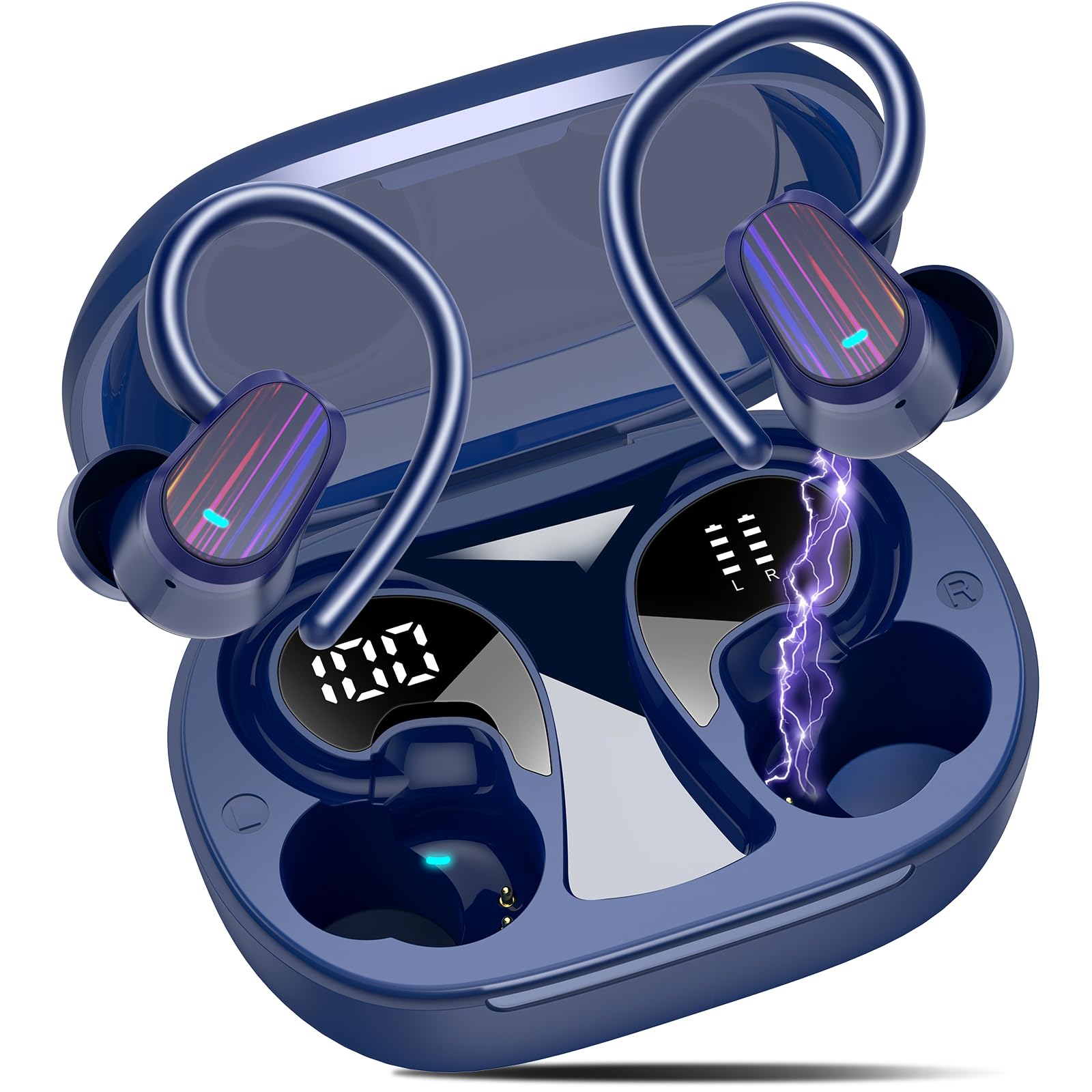
Image: Jesebang S75 Wireless Sport Earbuds and charging case.

Image: Internal structure highlighting the 14.2mm dynamic speaker for powerful stereo sound.

Image: ENC noise reduction technology for clear calls.
3. Тохиргоо
3.1 Чихэвч болон гэрийг цэнэглэх
Анх хэрэглэхийн өмнө чихэвч болон цэнэглэгчийг бүрэн цэнэглэ.
- Connect the provided USB-C charging cable to the charging port on the back of the case.
- Кабелийн нөгөө үзүүрийг USB тэжээлийн адаптер (дагаагүй) эсвэл компьютерийн USB порт руу холбоно уу.
- Цэнэглэгч хайрцаг дээрх LED дижитал дэлгэц нь батерейны хувийг харуулнаtage of the case and individual earbuds. Ensure both earbuds and the case are fully charged (100%) before initial use.

Image: Charging the earbuds and case with LED display.
3.2 Таны төхөөрөмжтэй хослуулах
The earbuds use Bluetooth 5.4 for a seamless connection.
- Анхны хосолсон: Цэнэглэх хайрцгийг нээнэ үү. Чихэвч автоматаар хослуулах горимд орно.
- Төхөөрөмж дээрээ (ухаалаг утас, таблет, компьютер) Bluetooth тохиргоо руу очоод Bluetooth-г асаана уу.
- Look for "S75" in the list of available devices and select it to connect.
- Once paired, the earbuds will automatically reconnect to the last paired device when you open the charging case.

Image: One-step auto pairing process.

Image: Bluetooth 5.4 Technology.
4. Үйл ажиллагаа
4.1 Чихэвч зүүх
The S75 earbuds are designed with soft and elastic earhooks for a secure and comfortable fit.
- Choose the correct size eartips (S, M, L) for the best fit and sound quality.
- Чихэвчийг чихний сувагт байрлуул.
- Gently adjust the earhook over your ear until it feels secure and comfortable.

Image: Comfortable design with IPX7 waterproof rating and flexible earhooks.

Image: Instructions for easy and stable wearing of the earbuds.
4.2 Ухаалаг мэдрэгчтэй удирдлага
The earbuds feature highly sensitive touch sensors for easy control.
- Тоглуулах/түр зогсоох: Чихэвчний аль нэг дээр (Зүүн/Баруун) нэг товшилт хийнэ үү.
- Дуудлагад хариулах: Short tap on either earbud (L/R).
- Дуудлага таслах: Long tap on either earbud (L/R).
- Дууг нэмэгдүүлэх: Single tap on the Right earbud.
- Дууг багасгах: Single tap on the Left earbud.
- Дараагийн дуу: Long tap (2s) on the Right earbud.
- Өмнөх бичлэг: Long tap (2s) on the Left earbud.
- Дуут туслахыг идэвхжүүлэх: Triple click on either earbud (L/R).

Image: Smart touch control functions.
5. Засвар үйлчилгээ
Зөв арчилгаа нь таны чихэвчний урт наслалт, оновчтой гүйцэтгэлийг баталгаажуулдаг.
5.1 Цэвэрлэгээ
- Regularly clean the eartips with a soft, dry cloth.
- Wipe the earbuds and charging case with a slightly damp даавуу, дараа нь сайтар хатаана.
- Химийн хатуу бодис, зүлгүүрийн материал ашиглахаас зайлсхий.
5.2 Хадгалалт
- Чихний чихэвчийг хамгаалж, цэнэгтэй байлгах үүднээс ашиглаагүй үед нь цэнэглэх хайрцагтаа хадгал.
- Чихэвч болон гэрийг сэрүүн, хуурай газар, хэт өндөр температур болон нарны шууд тусгалаас хол байлга.

Image: IPX7 Waterproof design for daily use.
6. Алдаа засах
If you encounter any issues, please refer to the following common solutions:
6.1 Чихэвчийг холбохгүй байна
- Чихэвч цэнэглэгдсэн эсэхийг шалгаарай.
- Таны төхөөрөмж дээр Bluetooth идэвхжсэн эсэхийг шалгана уу.
- Чихэвчийг хайрцагт нь хийж, тагийг нь хааж, хэдэн секунд хүлээсний дараа дахин нээгээд хослуулах горимд оруулна уу.
- Forget the device "S75" from your device's Bluetooth list and try pairing again.
6.2 Дуугүй эсвэл дуу багатай
- Төхөөрөмж болон чихэвчний дууны түвшнийг шалгана уу.
- Чихэвчээ чихэндээ зөв суулгасан, чихний үзүүр нь сайн битүүмжлэгдсэн эсэхийг шалгаарай.
- Чихэвчийг төхөөрөмждөө дахин холбоно уу.
6.3 Цэнэглэхтэй холбоотой асуудлууд
- Цэнэглэх кабель нь хайрцаг болон тэжээлийн эх үүсвэрт найдвартай холбогдсон эсэхийг шалгана уу.
- Өөр USB-C кабель эсвэл тэжээлийн адаптер ашиглаж үзнэ үү.
- Чихэвч болон хайрцагны цэнэглэх контактууд нь цэвэр, хог хаягдалгүй эсэхийг шалгаарай.
7. Техникийн үзүүлэлтүүд
| Онцлог | Дэлгэрэнгүй |
|---|---|
| Загварын нэр | S75 |
| Bluetooth хувилбар | 5.4 |
| Bluetooth хүрээ | 15 метр |
| Аудио драйверын хэмжээ | 14.2 миллиметр |
| Дуу чимээний хяналт | ENC Noise Canceling Mic |
| Усны эсэргүүцлийн түвшин | IPX7 Усны хамгаалалттай |
| Батерейны хугацаа (чихэвч) | 10 цаг хүртэл |
| Нийт тоглох хугацаа (Тоглоомтой хамт) | 50 цаг хүртэл |
| Цэнэглэх интерфейс | USB-C |
| Чихний байрлал | Чихний дээгүүр |
| Материал | Резин, Силикон |
| Зүйлийн жин | 3.84 унц |
8. Аюулгүй байдлын мэдээлэл
Please read and follow these safety guidelines to prevent damage to your device or injury to yourself.
- Чихэвч эсвэл цэнэглэгч гэрийг задалж эсвэл өөрчилж болохгүй.
- Төхөөрөмжийг хэт өндөр температур, нарны шууд тусгал, ил галаас хол байлга.
- Avoid exposing the device to excessive moisture, although it is IPX7 waterproof, prolonged submersion is not recommended.
- Цэнэглэхийн тулд зөвхөн өгсөн цэнэглэгч кабель эсвэл баталгаажуулсан USB-C кабелийг ашиглана уу.
- Do not use the earbuds at excessively high volumes for extended periods to prevent hearing damage.
- Хүүхэд, тэжээвэр амьтдын гар хүрэхгүй газар хадгална уу.
9. Баталгаат хугацаа ба дэмжлэг
Specific warranty details are not provided in this manual. For warranty information, technical support, or customer service, please refer to the product packaging or contact Jesebang customer support directly through their official webтухайн бүтээгдэхүүнийг худалдаж авсан сайт эсвэл жижиглэнгийн худалдаачин.
10. Бүтээгдэхүүний видео
Видео: Дууслааview of the Jesebang Wireless Earbuds, highlighting their sports features and Bluetooth connectivity.


