Танилцуулга
This manual provides detailed instructions for the ORICO AP42F Magnetic Card Reader and M.2 SSD Enclosure. Please read this manual thoroughly before using the product to ensure proper operation and to maximize its features. This device combines a TF/SD 3.0 card reader with an M.2 NVMe SSD enclosure, offering high-speed data transfer and PD 100W charging capabilities, designed for compatibility with various Type-C devices including iPhone 15/16/17 Pro series, iPads, MacBooks, and Android devices.
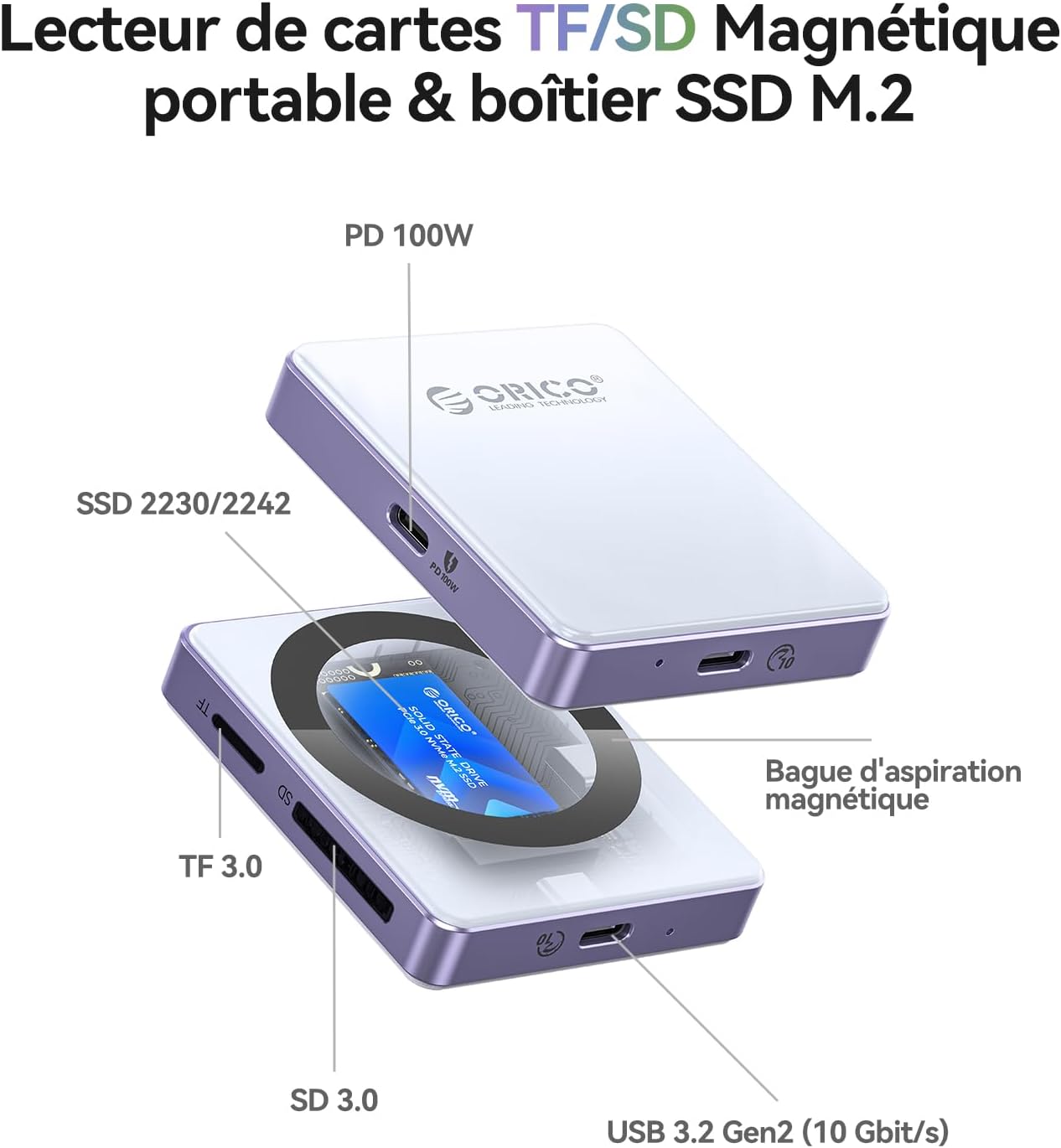
Бүтээгдэхүүн дууссанview
Гол онцлогууд
- 5-ын-1 функциональ байдал: Combines TF/SD 3.0 card reader and M.2 NVMe SSD enclosure.
- Өндөр хурдны өгөгдөл дамжуулах: USB 3.2 Gen2 interface supporting up to 10Gbps for SSDs and 104MB/s for SD/TF cards.
- 100 Вт цахилгаан дамжуулах (PD): Supports up to 100W power input and 85W output for simultaneous charging and data transfer.
- Соронзон хавсралт: Features 17 built-in magnets for secure and stable attachment to compatible devices, especially iPhone Pro models.
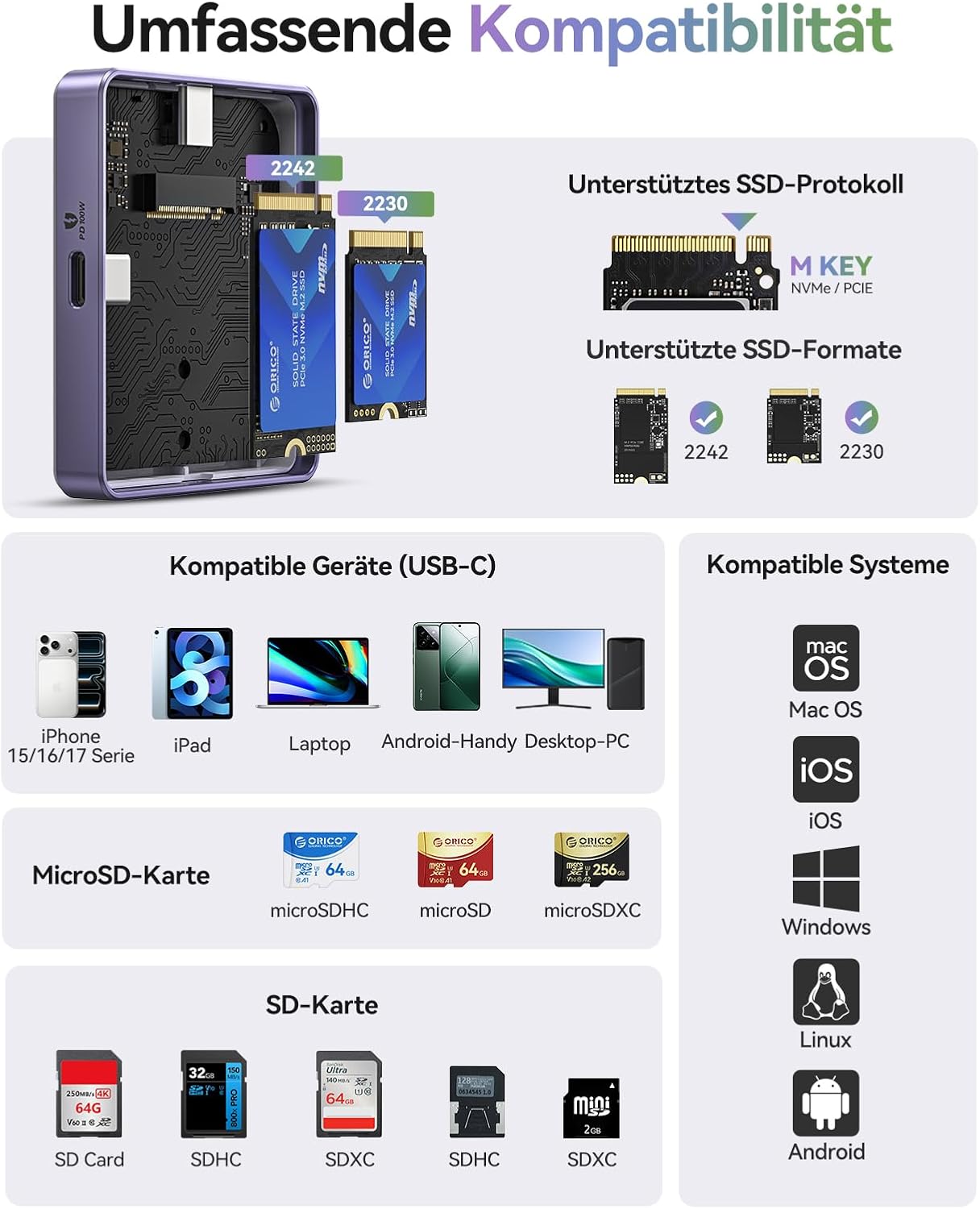
- SSD Compatibility: Supports M.2 NVMe (M-key) SSDs in 2230 and 2242 form factors.
- Төхөөрөмжийн өргөн нийцтэй байдал: Compatible with iPhone 15/16/17 Pro/Pro Max, iPad Pro, MacBook, Android phones, laptops, and tablets with Type-C ports.
Багцын агуулга
- ORICO Magnetic M.2 NVMe SSD Enclosure
- 0.3м USB-C-аас USB-C кабель
- Magnetic Ring (for non-magnetic devices)
- Дулааны дэвсгэр
- Шураг
- Халив
- Хэрэглэгчийн гарын авлага
Бүтээгдэхүүний диаграм
Тохиргоо
Installing an M.2 NVMe SSD
- Carefully open the SSD enclosure.
- Insert your M.2 NVMe (M-key) SSD (2230 or 2242 form factor) into the slot. Ensure it is fully seated.
- SSD-г өгөгдсөн боолтоор бэхлээрэй.
- Apply the thermal pad to the SSD for optimal heat dissipation.
- Хаалтыг найдвартай хаа.
Жич: The SSD is not included and must be purchased separately. For optimal performance and to prevent disconnections, especially with phone USB ports, use SSDs with power consumption of 4.5W or less. For higher power SSDs, external power via the PD port is required.
Төхөөрөмжид холбох
- For iPhones 15/16/17 Pro/Pro Max, the enclosure can magnetically attach directly to the back of the phone.
- For other devices or non-magnetic phone cases, use the included magnetic ring. Peel off the adhesive backing and attach the ring to the back of your device or case where you intend to mount the enclosure.

Ашиглалтын заавар
Таны төхөөрөмжтэй холбогдож байна
- Connect the ORICO AP42F to your host device (iPhone, iPad, MacBook, PC, etc.) using the provided USB-C cable.
- Ensure the connection is secure. The device should be recognized automatically by your operating system.
Using the M.2 SSD Enclosure
- Once connected, the installed M.2 SSD will appear as an external storage device.
- Та одоо шилжүүлж болно files to and from the SSD at speeds up to 10Gbps.
- For iPhone 15 Pro series and later, the enclosure supports direct ProRes 4K 60/120fps video recording to the SSD.


Using the TF/SD Card Reader
- Insert your TF (MicroSD) or SD card into the corresponding slot on the enclosure.
- The card will appear as a separate external drive.
- Дамжуулах files нь 104MB/s хүртэл хурдтай.

Using the PD 100W Charging Port
- Connect a USB-C power adapter (up to 100W) to the PD port on the enclosure.
- This will provide power to both the enclosure and the connected host device (up to 85W output), allowing for simultaneous data transfer and charging.

Засвар үйлчилгээ
- Хайрцгийг цэвэр, тоос шороогүй байлга. Цэвэрлэхэд зөөлөн, хуурай даавуу ашиглаарай.
- Төхөөрөмжийг хэт өндөр температур, чийгшил, нарны шууд тусгалд оруулахаас зайлсхий.
- Ensure proper ventilation, especially during extended use, to prevent overheating of the SSD. The thermal pad helps with this.
- Бие махбодид гэмтэл учруулахгүйн тулд болгоомжтой харьц.
Алдааг олж засварлах
| Асуудал | Боломжит шалтгаан | Шийдэл |
|---|---|---|
| Төхөөрөмжийг танихгүй байна | Loose connection, incompatible SSD, driver issue, SSD not properly installed. |
|
| Frequent disconnections during use (especially with phones) | SSD power consumption exceeds phone's USB port limit. |
|
| Өгөгдөл дамжуулах хурд удаан | USB port limitation, cable quality, SSD performance, host device limitations. |
|
| Соронзон холболт сул байна | Device not magnetic, thick case, incorrect placement of magnetic ring. |
|
Үзүүлэлтүүд
| Онцлог | Дэлгэрэнгүй |
|---|---|
| Брэнд | ORICO |
| Загвар | AP42F |
| Материал | Хөнгөн цагаан |
| SSD нийцтэй байдал | M.2 NVMe (M-key) 2230/2242 |
| Карт уншигч | TF 3.0, SD 3.0 |
| Data Transfer Rate (SSD) | 10 Gbps хүртэл (USB 3.2 Gen2) |
| Data Transfer Rate (Card Reader) | 104 MB/s хүртэл |
| Эрчим хүчний хангамж (PD) | Input: 100W, Output: 85W |
| Тохиромжтой төхөөрөмжүүд | iPhone 15/16/17 Pro/Pro Max, iPad Pro, MacBook, Android phones, Laptops, Tablets (Type-C) |
| Дэмжигдсэн үйлдлийн системүүд | macOS, iOS, Windows, Linux, Android |
| Онцлог шинж чанар | Compact, Magnetic Attachment (17 magnets) |
Баталгаат болон дэмжлэг
ORICO products typically come with a standard manufacturer's warranty. Please refer to the warranty card included in your package or visit the official ORICO webтусгай баталгаат нөхцөл, болзлын сайт.
For technical support, troubleshooting assistance, or inquiries about your product, please contact ORICO customer service through their official website or the retailer where you purchased the product. Keep your purchase receipt and product model number (AP42F) handy when contacting support.
Онлайн нөөцүүд:
- ORICO Official Store on Amazon
- (Refer to official ORICO website for direct support contact information)


