1. Танилцуулга
Thank you for choosing the JOMAA VM604 Wireless Ergonomic Vertical Mouse. This advanced mouse is designed to provide superior comfort and efficiency, reducing wrist strain during prolonged use. Featuring multi-device connectivity, adjustable DPI, and a unique multi-function dial, the VM604 is an ideal tool for various computing environments.
Бүтээгдэхүүнийг зөв ажиллуулахын тулд ашиглалтын хугацааг уртасгахын тулд хэрэглэхийн өмнө энэ гарын авлагыг сайтар уншина уу.
2. Бүтээгдэхүүн дууссанview
2.1 Багцын агуулга
- JOMAA VM604 Ergonomic Vertical Mouse
- USB хүлээн авагч (2.4G)
- USB-C цэнэглэгч кабель
- Хэрэглэгчийн гарын авлага
2.2 Mouse Components
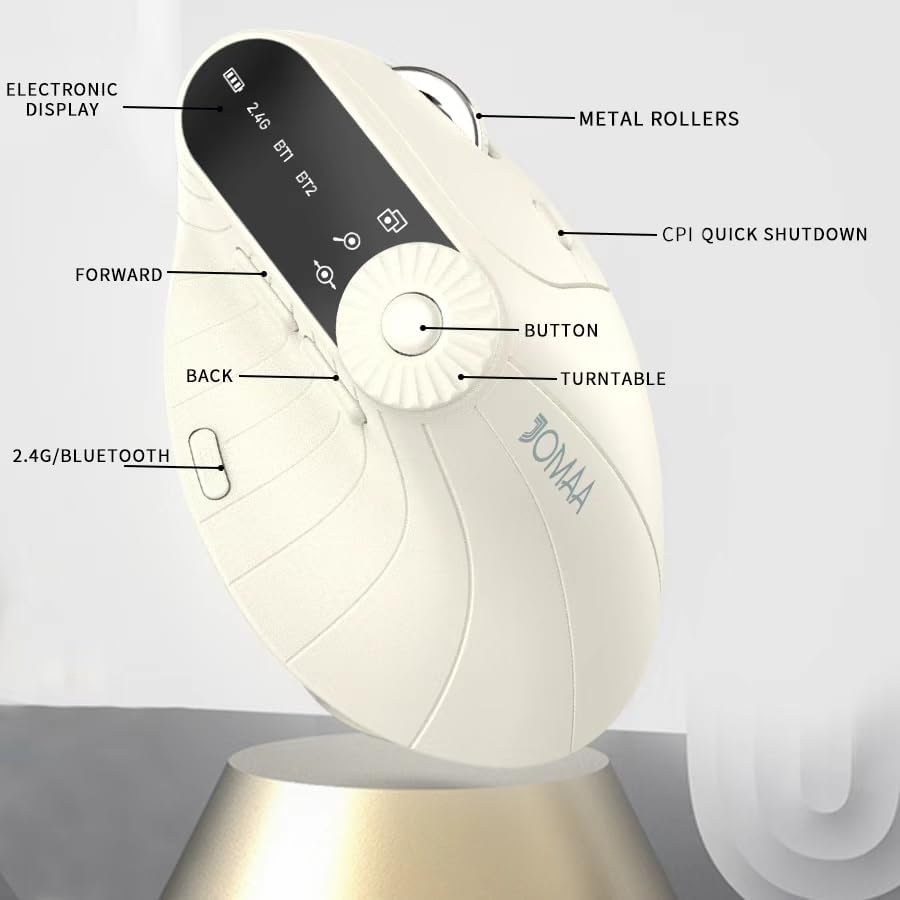
Зураг 1: Labeled components of the JOMAA VM604 mouse, highlighting the electronic display, metal rollers, CPI quick shutdown, forward/back buttons, turntable, and 2.4G/Bluetooth switch.
- Зүүн товшилтын товчлуур: Standard left mouse function.
- Баруун товчлуур дээр дарна уу: Standard right mouse function.
- Гүйлгэх дугуй: Босоо гүйлгэх зориулалттай.
- Урагшаа товч: Урагшаа дотогш чиглүүлнэ web хөтөч эсвэл file судлаачид.
- Буцах товчлуур: Буцаж дотогш шилжинэ web хөтөч эсвэл file судлаачид.
- Multi-function Turntable/Dial: Offers three functions: 1. Window switching, 2. Zoom in/out (for pages and images), 3. Page moves left/right (for Excel).
- DPI/CPI Adjustment Button: DPI тохиргоонуудаар (1000/1200/1600/2400) ээлжлэн солигдоно.
- Цахим дэлгэц: Shows battery level, connection mode (2.4G, BT1, BT2), and DPI setting.
- Холболтын горимын унтраалга (доод): Toggles between 2.4G, Bluetooth 1 (BT1), and Bluetooth 2 (BT2) modes.
- Power ON/OFF Switch (Bottom): Хулганыг асаах эсвэл унтраана.
- USB-C цэнэглэх порт: Located at the front of the mouse.
- USB хүлээн авагчийн хадгалах үүр: Located at the bottom of the mouse.
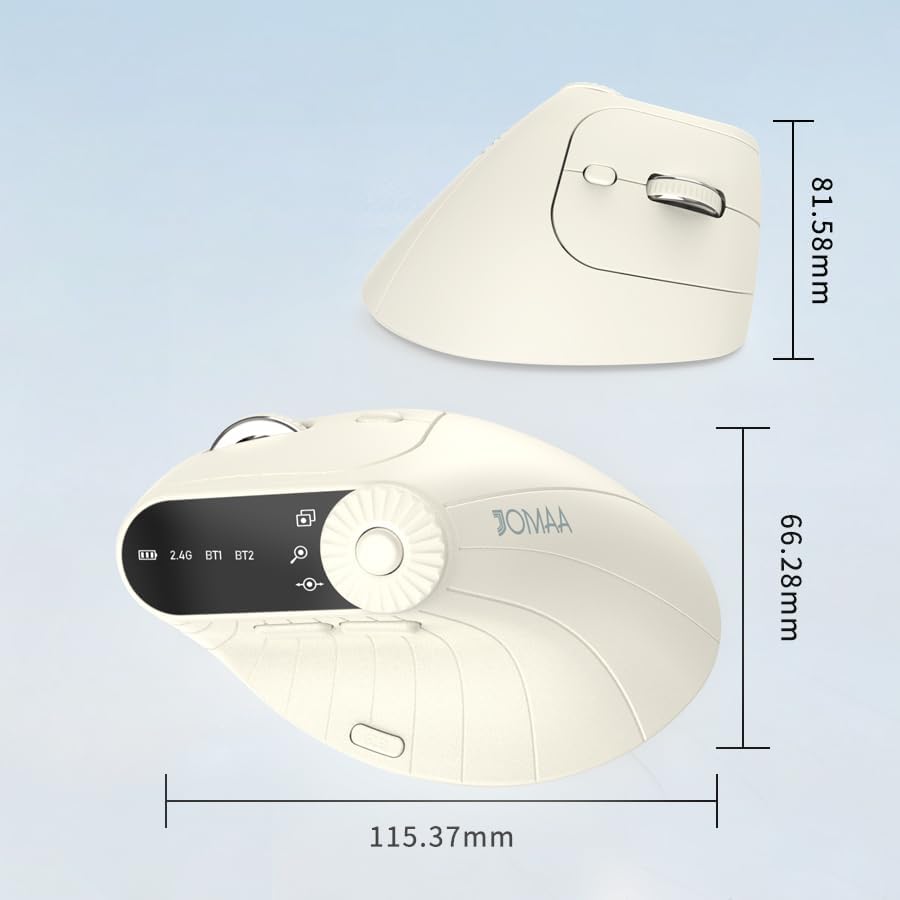
Зураг 2: Dimensions of the JOMAA VM604 mouse, showing its ergonomic vertical design.

Зураг 3: Illustration of the JOMAA VM604's 57-degree ergonomic design, promoting a natural handshake posture to reduce wrist pressure.
3. Тохиргоо
3.1 Хулгана цэнэглэх
The JOMAA VM604 mouse features a built-in rechargeable battery. To charge:
- Connect the provided USB-C charging cable to the charging port at the front of the mouse.
- USB кабелийн нөгөө үзүүрийг USB тэжээлийн эх үүсвэрт холбоно уу (жишээлбэл, компьютерийн USB порт, USB ханын адаптер).
- The electronic display will indicate charging status.

Зураг 4: The JOMAA VM604 mouse connected via USB-C for charging, with a visible charging indicator on the electronic display.
3.2 2.4G утасгүй холболт
Тогтвортой, хурдан утасгүй холболтын хувьд:
- Locate the USB receiver stored in the slot at the bottom of the mouse.
- USB хүлээн авагчийг компьютер дээрээ байгаа USB порт руу холбоно уу.
- Turn on the mouse using the ON/OFF switch at the bottom.
- Slide the connection mode switch to the '2.4G' position. The mouse should automatically connect to your computer.
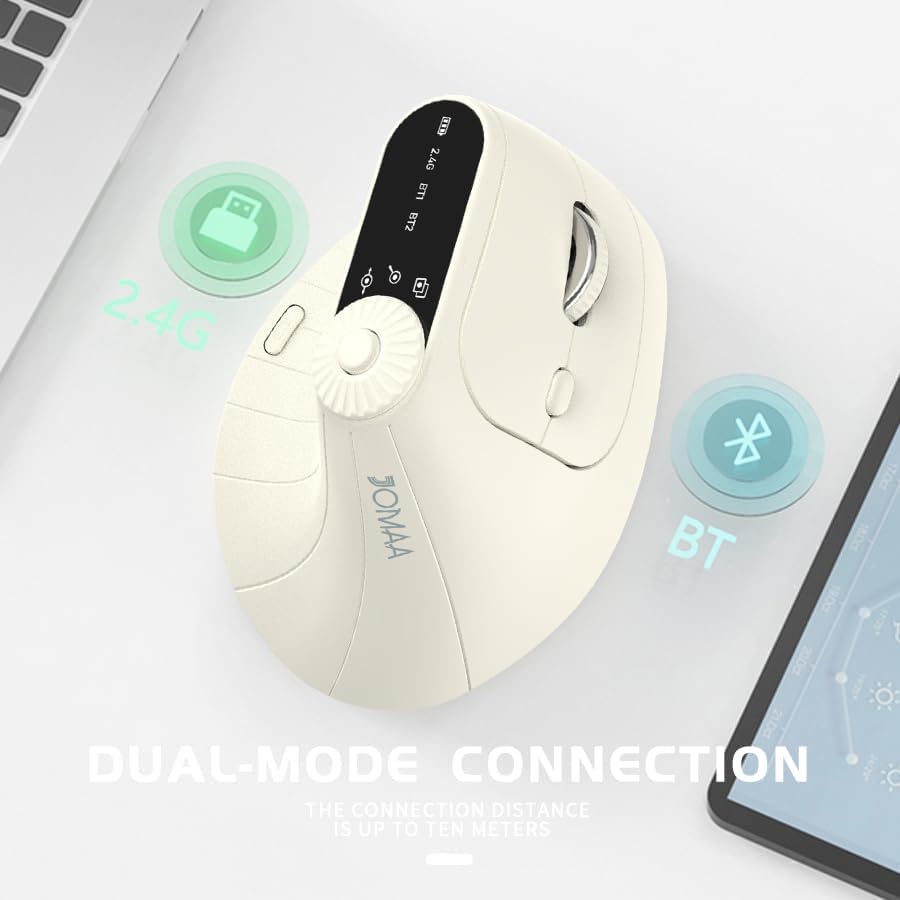
Зураг 5: The JOMAA VM604 mouse illustrating its dual-mode connection capabilities, including the 2.4G USB receiver and Bluetooth options.
3.3 Bluetooth холболт (BT1/BT2)
The mouse can connect to two different Bluetooth devices:
- Turn on the mouse using the ON/OFF switch at the bottom.
- Slide the connection mode switch to either 'BT1' or 'BT2' position.
- For the first Bluetooth connection or to reset a connection, press and hold the connection mode switch for 3-5 seconds until the Bluetooth indicator on the electronic display starts blinking.
- On your device (PC, Laptop, MacBook), go to Bluetooth settings and search for 'JOMAA VM604' (or similar name).
- Select the mouse to pair. The indicator light will stop blinking once connected.
- To switch between connected devices, simply double-click the connection mode switch to cycle through 2.4G, BT1, and BT2.
4. Ашиглалтын заавар
4.1 DPI тохируулга
Adjust the mouse sensitivity (DPI/CPI) to suit your preference:
- Press the DPI Adjustment Button (Component 7) located near the multi-function dial.
- Each press will cycle through the available DPI settings: 1000, 1200, 1600, and 2400.
- The electronic display will show the current DPI setting.
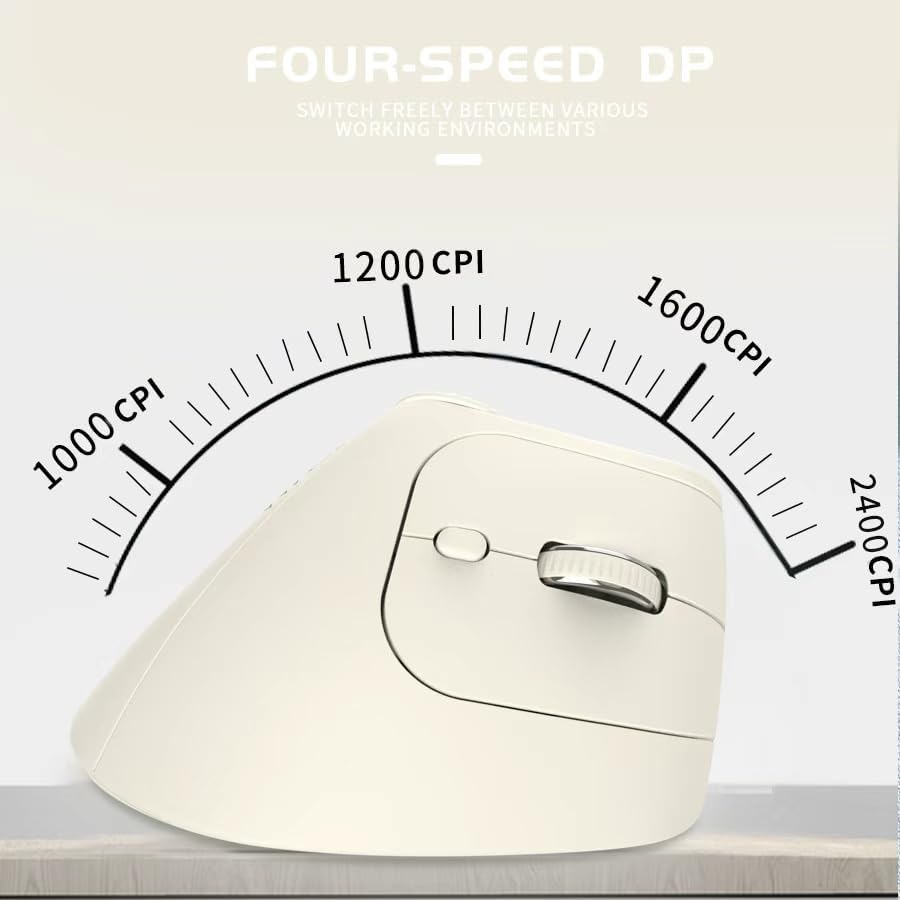
Зураг 6: The JOMAA VM604 mouse highlighting its four-speed CPI settings (1000, 1200, 1600, 2400) for precise optical tracking.
4.2 Multi-Function Turntable
The unique turntable (Component 6) provides enhanced control:
- Window Switching: Rotate the dial to quickly switch between open application windows.
- Томруулах/багасгах: Rotate the dial to zoom in or out on pages and images.
- Page Left/Right: Useful for navigating large spreadsheets in applications like Excel.

Зураг 7: The multi-function knob on the JOMAA VM604 mouse, demonstrating its uses for window switching, zooming in/out on pages and images, and moving pages left/right in applications like Excel.
4.3 Forward/Back Buttons
Use the Forward (Component 4) and Back (Component 5) buttons for quick navigation in web хөтөч болон file судлаачид.
5. Засвар үйлчилгээ
5.1 Цэвэрлэгээ
Хамгийн оновчтой гүйцэтгэл, эрүүл ахуйг хадгалахын тулд:
- Цэвэрлэхийн өмнө хулганаа унтраа.
- Зөөлөн ашиглах, damp хулганы гадаргууг арчих даавуу.
- Химийн хатуу бодис, зүлгүүрийн материал ашиглахаас зайлсхий.
- Periodically clean the optical sensor at the bottom with a cotton swab.
5.2 Батерейны арчилгаа
Батерейны ашиглалтын хугацааг уртасгахын тулд:
- Байнга зайгаа бүрэн цэнэглэхээс зайлсхий.
- Бүрэн цэнэггүй болоогүй байсан ч хулганаа тогтмол цэнэглээрэй.
- If the mouse will not be used for an extended period, turn it off.

Зураг 8: The JOMAA VM604 mouse demonstrating its intelligent hibernate mode, which activates after 60 seconds of inactivity to save power.
6. Алдаа засах
- Хулгана хариу өгөхгүй байна: Ensure the mouse is turned on and fully charged. Check the connection mode (2.4G or Bluetooth) and ensure it's correctly paired/connected to your device. For 2.4G, try plugging the USB receiver into a different port. For Bluetooth, try re-pairing the device.
- Курсорын хөдөлгөөн тогтворгүй байна: Clean the optical sensor at the bottom of the mouse. Ensure the surface you are using is clean and suitable for mouse operation. Adjust the DPI setting to a lower value if the cursor is too fast.
- Bluetooth холболттой холбоотой асуудлууд: Ensure your device's Bluetooth is enabled. Try forgetting the device in your Bluetooth settings and re-pairing. Ensure the mouse is in the correct BT1 or BT2 mode and in pairing mode (blinking indicator).
- Multi-function dial not working: Ensure the mouse is properly connected. Some functions may require specific application support.
7. Техникийн үзүүлэлтүүд
| Онцлог | Дэлгэрэнгүй |
|---|---|
| Бүтээгдэхүүний хэмжээс | 6 x 4 x 0.04 инч |
| Зүйлийн жин | 7.4 унц |
| Загварын дугаар | VM604 |
| Батерей | 1 9V batteries required (included) - Note: Product features built-in rechargeable battery, 9V battery information may be a listing error. |
| Холболтын технологи | Bluetooth, USB (2.4G Wireless) |
| Онцлог шинж чанар | Ergonomic Design, Multi-function Turntable, Adjustable DPI, Rechargeable |
| Хөдөлгөөнийг илрүүлэх технологи | Оптик |
| DPI тохиргоо | 1000/1200/1600/2400 |
| Өнгө | Beiga |
8. Баталгаат хугацаа ба дэмжлэг
JOMAA products are designed and manufactured to the highest quality standards. This product is covered by a limited warranty from the date of purchase. For detailed warranty information, technical support, or customer service inquiries, please refer to the contact information provided on the product packaging or visit the official JOMAA webсайт.
Баталгаат заргад зориулж худалдан авалтаа нотлох баримтаа үлдээнэ үү.
9. Бүтээгдэхүүний албан ёсны видео
Видео 1: Нэг гаруйview of the JOMAA VM604 Ergonomic Mouse, showcasing its unique vertical design and comfortable grip. This video highlights the physical appearance and ergonomic benefits of the mouse.


