1. Танилцуулга
This manual provides detailed instructions for the installation, operation, and maintenance of your Anweller MD168 Keyless Entry Door Lock and Handle Set. Please read this manual thoroughly before installation and use to ensure proper functionality and safety. The Anweller MD168 offers multiple convenient unlocking methods and advanced security features for your home.
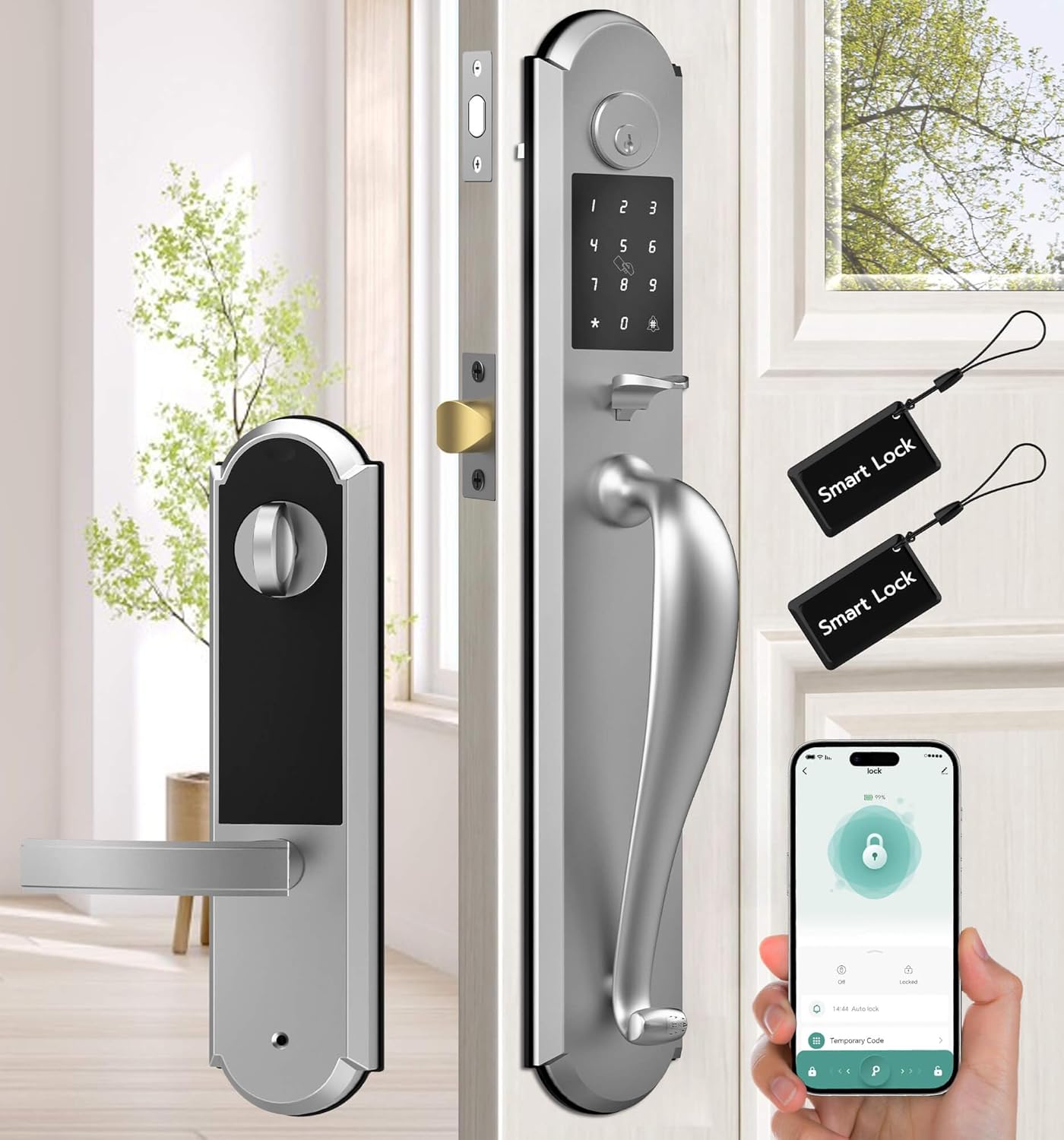
Figure 1: Anweller MD168 Keyless Entry Door Lock and Handle Set with mobile app interface.
2. Бүтээгдэхүүн дууссанview болон бүрэлдэхүүн хэсгүүд
The Anweller MD168 is an integrated smart deadbolt and knob set designed for front doors. It features a robust construction and multiple access options. Below are the components included in your package:
- 1 x Deadbolt Lock and Knob Handle Set (All Parts)
- 1 х хэрэглэгчийн гарын авлага
- 2 х механик түлхүүр
- 2 х RFID карт

Figure 2: Integrated design of the Anweller MD168, showcasing its zinc alloy material and oil-rubbed finish.
3. Суулгах заавар
Before beginning installation, ensure your door meets the compatibility requirements. The distance between the two door holes must be 5-1/2 inches (140mm). Door thickness should be between 1-3/8 inches to 2-1/8 inches (35mm to 55mm). The hole diameter should be greater than 1-17/20 inches (47mm).
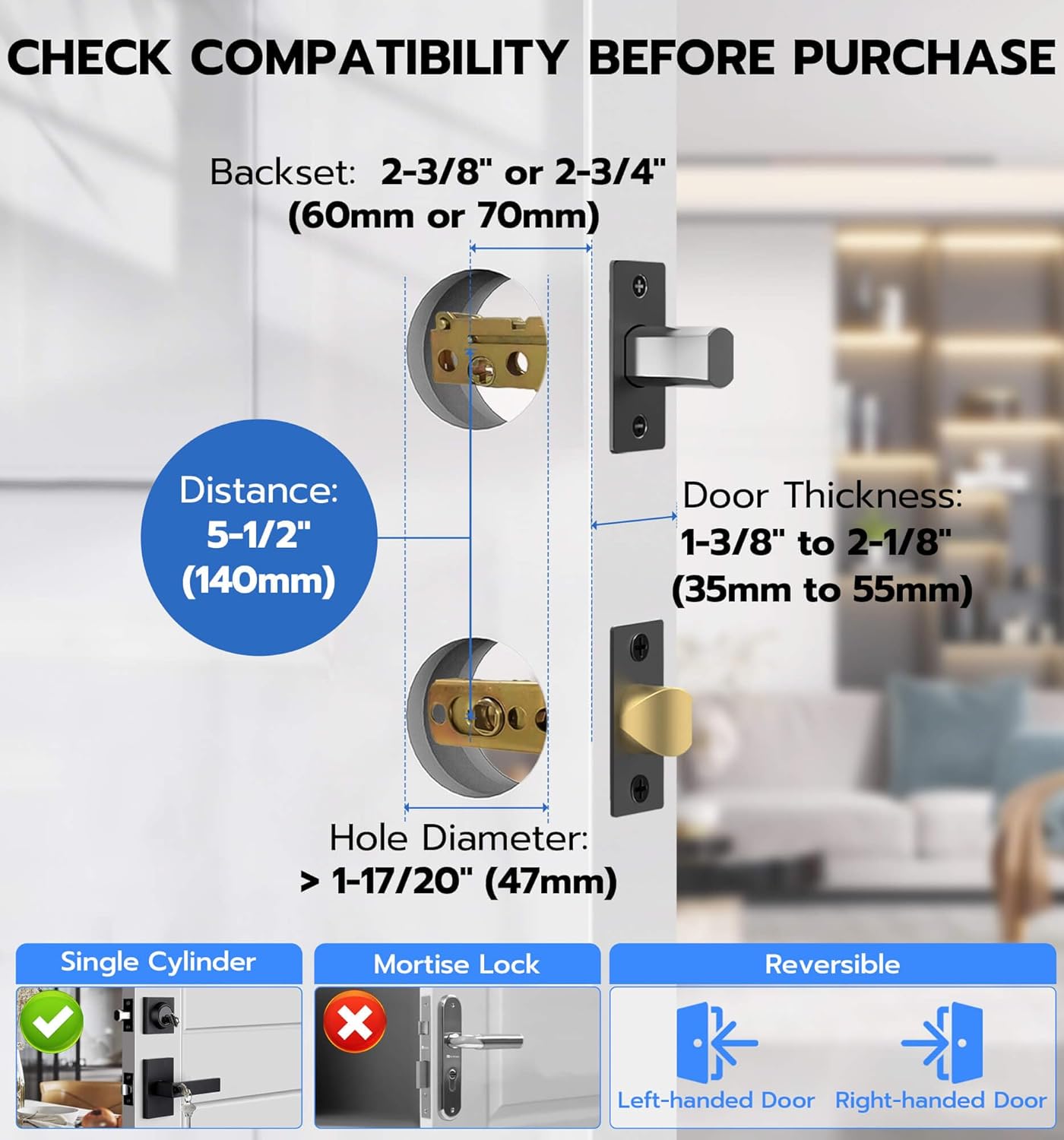
Figure 3: Door compatibility measurements for Anweller MD168 installation.
Step-by-Step Installation Video
Дүрслэлийн гарын авлагыг доорх албан ёсны суулгалтын видеоноос үзнэ үү.
Video 1: Official Anweller MD168 Installation Guide. This video provides a comprehensive walkthrough of the installation process, from unpacking to final testing.
Key Installation Steps (Refer to Video 1 for details):
- Бүрэлдэхүүн хэсгүүдийг задалж, тодорхойлох: (Video 0:07-0:20) Verify all parts listed in Section 2 are present.
- Install Closed Bolt and Latch Bolt: (Video 0:21-1:13) Insert the closed bolt and latch bolt into the door edge, ensuring correct orientation and securing with screws.
- Install Front Panel Studs: (Video 1:14-1:27) Attach the studs to the front panel of the lock.
- Урд самбарыг суулгах: (Video 1:28-1:45) Pass the power cord through the door hole and align the front panel with the lock ruler and square rod, then buckle them up.
- Install Rear Base Plate: (Video 1:46-2:15) Secure the rubber gasket and rear base plate, passing the power cord through the chassis.
- Adjust Front and Rear Panels: (Video 2:16-2:28) Ensure proper alignment of the front and rear panels and tighten all screws.
- Install Square Pole: (Video 2:29-2:40) Insert the spring into the square rod and then place the square rod into the latch bolt core hole.
- Remove Rear Lock Battery Box Cover: (Video 2:41-2:49) Press the groove on the top of the rear panel to remove the battery cover.
- Test Lock Sensitivity: (Video 2:50-2:58) Use pliers to test the lock ruler's rotation for smooth operation (right to lock, left to unlock).
- Арын самбарыг суулгах: (Video 2:59-3:16) Connect the front lock power cord (ensure correct orientation) and align the lock ruler and square rod before installing the rear panel. Tighten the fixing screws.
- Батерейг суулгах: (Video 3:17-3:26) Insert 4 AA batteries into the battery compartment and close the cover.
- Install Meson: (Video 3:27-3:36) Install the meson and tighten its screws.
4. Үйл ажиллагаа
Түгжээг тайлах аргууд
The Anweller MD168 offers four distinct ways to unlock your door:
- Нууц код: Enter a personalized code on the keypad.
- Гар утасны програм: Use the dedicated smartphone application for remote unlocking.
- RFID карт: Tap a programmed RFID card to the lock.
- Spare Key: Utilize traditional mechanical keys as a backup.

Figure 4: The four convenient unlocking methods available for the Anweller MD168.
Мобайл програмын хяналт
The mobile application provides extensive control over your smart lock:
- Нууц кодын удирдлага: Set up, modify, or delete passcodes.
- RFID Card Programming: Program or delete RFID cards.
- Үйл ажиллагааны бүртгэл: View real-time unlocking reminders and historical records.
- Auto-Lock & Passage Mode: Configure automatic locking times and enable passage mode for temporary unrestricted access.
- Дууны хяналт: Adjust the alarm volume (mute, low, medium, high).
- Статус шалгах: Monitor the lock's status and battery level.

Зураг 5: Илүүview of the convenient mobile app control features.
Аюулгүй байдлын онцлог
- Харагдахаас хамгаалах нууц код: Enter random digits before or after your actual passcode to obscure it from onlookers.
- Буруу нэвтрэх хязгаар: The lock will temporarily disable for 3 minutes after 5 consecutive invalid passcode or RFID entries, and an alarm will be triggered.
- TampСэрүүлэг: A built-in alarm system activates if tampering is detected, providing an additional layer of security.

Figure 6: The anti-peeping passcode feature for enhanced security.

Figure 7: Visual representation of the lock's pick-resistant and alarm capabilities.
Горимууд
- Автомат түгжигч: The lock can be configured to automatically secure the door after a set period of time.
- Дамжуулах горим: This mode allows the door to remain unlocked for continuous access, suitable for gatherings or when frequent entry/exit is required.

Figure 8: The Auto Lock feature for automatic door security.

Figure 9: The Passage Mode for temporary unrestricted access.
5. Засвар үйлчилгээ
- Зай солих: The lock requires 4 AA batteries. Replace them when the low battery reminder is activated.
- Яаралтай тусламж: In case of complete battery depletion, the lock can be temporarily powered via a USB-C power bank for emergency unlocking.
- Цэвэрлэгээ: Цоожны гадна талыг зөөлөн, damp cloth. Avoid using abrasive cleaners or harsh chemicals, as these can damage the finish and electronic components.

Figure 10: Battery compartment for 4 AA batteries, providing up to 180 days of power.
6. Алдаа засах
If you encounter issues with your Anweller MD168 smart lock, consider the following:
- Түгжээ хариу өгөхгүй байна: Батерейг зөв суурилуулсан, хангалттай цэнэгтэй эсэхийг шалгана уу. Шаардлагатай бол зайгаа солино.
- Incorrect Passcode Entry: Ensure you are entering the correct passcode. Remember the anti-peeping feature allows extra digits before or after the actual code. If 5 incorrect attempts are made, the lock will temporarily disable.
- Апп холболтын асуудал: Ensure Bluetooth is enabled on your smartphone and you are within range of the lock. Restart the app or your phone if problems persist.
- Emergency Unlocking: If the battery is completely dead, use the mechanical key or connect a USB-C power bank to the emergency power port.
Нэмэлт тусламж авахыг хүсвэл хэрэглэгчийн дэмжлэгтэй холбогдоно уу.
7. Техникийн үзүүлэлтүүд
| Онцлог | Дэлгэрэнгүй |
|---|---|
| Загварын дугаар | MD168 |
| Материал | Цайр |
| Өнгө | Мөнгө |
| Гаднах өнгөлгөө | Газрын тосоор үрсэн |
| Түгжээний төрөл | Deadbolt Lock, Keypad Lock, Pin Code, RFID |
| Зүйлийн жин | 8.8 фунт |
| Бүтээгдэхүүний хэмжээс | 19.3 x 3.1 x 3.3 инч |
| Батерей шаардлагатай | 4 АА батерей (оруулаагүй) |
| Зайны ашиглалт | 180 хоног хүртэл зогсолт хийх боломжтой |
| Онцлог шинж чанарууд | Deadbolt and Knob Integrated Design, 4 Unlocking Ways, USB-C Emergency Power Unlock, Anti-Peeping Passcode, Auto Lock & Passage Mode, IP54 Waterproof |
8. Баталгаат хугацаа ба дэмжлэг
Anweller is committed to providing high-quality products and excellent customer service.
- Баталгаат хугацаа: Энэхүү бүтээгдэхүүн нь худалдан авсан өдрөөс хойш 12 сарын баталгаат хугацаатай.
- Техникийн дэмжлэг: Free lifetime technical support is available for all Anweller MD168 users.
- Холбоо барих: For any queries, technical assistance, or warranty claims, please contact us via email at hongjdzwj@outlook.com.
