1. Танилцуулга
This manual provides essential information for setting up, operating, and maintaining your Machenike Mini Desktop. Please read this manual thoroughly before using the device to ensure proper functionality and longevity.
The Machenike Mini Desktop, model GTR HP8745H00, is a compact and powerful computing solution featuring an AMD Ryzen 7 8745HS processor, AMD Radeon Graphics, 32GB DDR5 RAM, and a 1TB SSD, running on Windows 11 Home.
2. Багцын агуулга
Бүх зүйл багцад байгаа эсэхийг шалгана уу:
- Machenike Mini Desktop (GTR HP8745H00)
- Эрчим хүчний адаптер
- Хэрэглэгчийн гарын авлага (энэ баримт бичиг)
- (Нэмэлт хэрэгслүүд нь бүс нутаг эсвэл багцаас хамаарч өөр өөр байж болно)
3. Бүтээгдэхүүн дууссанview
The Machenike Mini Desktop is designed for efficiency and performance in a small form factor. Below is an illustration of the device and its various ports.

Зураг: Урд view of the Machenike Mini Desktop, showcasinавсаархан дизайнтай бөгөөд урд талдаа харсан портуудтай.
3.1. Портын зохион байгуулалт
Familiarize yourself with the available ports for connecting peripherals and displays.
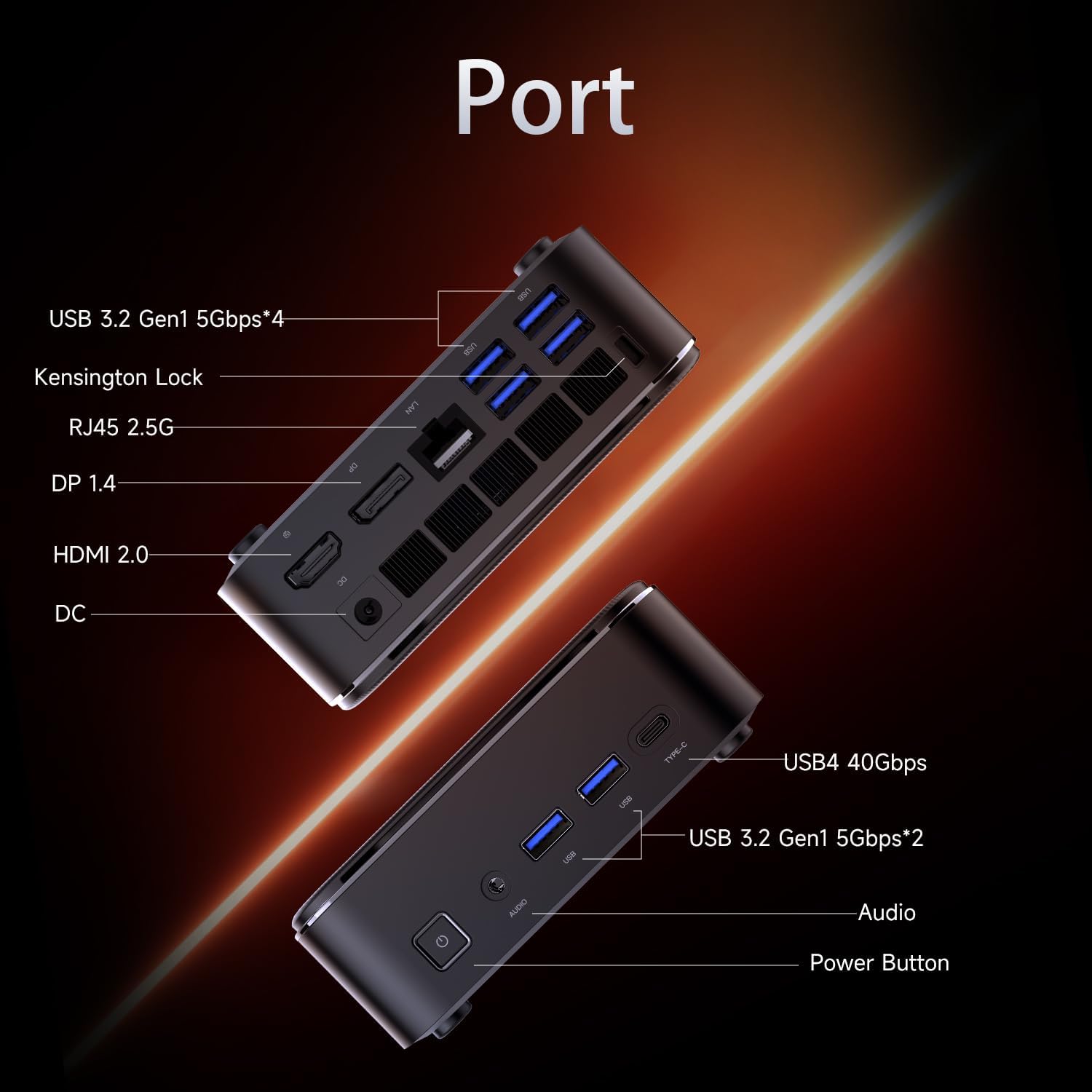
Image: Diagram illustrating the various ports on the Machenike Mini Desktop, including USB, Type-C, HDMI, DisplayPort, RJ45, and audio connections.
- Урд портууд: Power Button, 3.5mm Audio Jack, 2 x USB 3.2 Gen1 (5Gbps), 1 x Type-C (USB4 40Gbps)
- Арын портууд: 2 x USB 3.2 Gen1 (5Gbps), 1 x USB 3.2 Gen2 (10Gbps), 1 x Type-C, 1 x HDMI 2.1, 1 x RJ45, 1 x Display Port, DC Power Input, Kensington Lock Slot, Restart Button
4. Анхны тохиргоо
Follow these steps to set up your Machenike Mini Desktop:
- Дэлгэцийг холбох: Connect your monitor or display to the Mini Desktop using an HDMI or DisplayPort cable. The device supports 4K resolution.
- Дагалдах төхөөрөмжүүдийг холбох: Гар, хулгана болон бусад USB төхөөрөмжүүдээ боломжтой USB портуудад холбоно уу.
- Эрчим хүчийг холбох: Connect the power adapter to the DC power input port on the Mini Desktop, then plug the adapter into a power outlet.
- Асаах: Төхөөрөмжийн урд талд байрлах асаах товчийг дарна уу. Систем ачаалах болно.
- Windows тохиргоо: Follow the on-screen instructions to complete the initial Windows 11 Home setup, including language, region, network connection, and user account creation.
5. Ашиглалтын заавар
5.1. Асаах/унтраах
- Асаах: Төхөөрөмжийн урд талд байрлах цахилгаан товчийг дарна уу.
- Унтраах: Windows дээр Start товчийг дараад Power > Shut down-ыг сонгоно уу.
- Дахин эхлүүлэх: Windows дээрх Start товчийг дараад Power > Restart-ыг сонгоно уу.
5.2. Сүлжээний холболт
- Wi-Fi: The device supports Wi-Fi 6. During Windows setup or via Windows Settings, select your Wi-Fi network and enter the password.
- Утастай (Ethernet): Connect an Ethernet cable from your router or modem to the RJ45 port on the back of the Mini Desktop.
5.3. Гадаад төхөөрөмжүүдийг холбох
- USB төхөөрөмжүүд: Connect USB flash drives, external hard drives, printers, or other USB peripherals to any available USB 3.2 Gen1 or Gen2 ports.
- Type-C Devices: Use the Type-C ports for compatible devices, including high-speed data transfer (up to 40Gbps on the front Type-C port) or display output.
- Аудио: Connect headphones or speakers to the 3.5mm audio jack on the front.
- Bluetooth: The device supports Bluetooth for wireless peripherals like keyboards, mice, and speakers. Pair devices through Windows Settings > Bluetooth & devices.
6. Засвар үйлчилгээ
Regular maintenance helps ensure optimal performance and extends the lifespan of your Mini Desktop.
- Цэвэрлэгээ: Use a soft, dry cloth to clean the exterior. For dust accumulation in vents, use compressed air. Ensure the device is powered off and unplugged before cleaning.
- Програм хангамжийн шинэчлэлтүүд: Системийн тогтвортой байдал, аюулгүй байдлыг хангахын тулд Windows шинэчлэлтүүд болон драйверын шинэчлэлтүүдийг тогтмол шалгаж, суулгаарай.
- Агааржуулалт: Ensure the Mini Desktop is placed in a well-ventilated area. Avoid blocking the air vents to prevent overheating.
- Өгөгдлийн нөөцлөлт: Чухал өгөгдлөө үе үе гадаад диск эсвэл үүлэн хадгалалт руу нөөцөлж байгаарай.
7. Алдаа засах
Энэ хэсэгт танд тулгарч болох нийтлэг асуудлуудыг авч үзэх болно.
- Эрчим хүчгүй:
- Ensure the power adapter is securely connected to both the Mini Desktop and a working power outlet.
- Цахилгааны залгуурыг өөр төхөөрөмжөөр шалгана уу.
- Дэлгэц байхгүй:
- Verify that the HDMI or DisplayPort cable is securely connected to both the Mini Desktop and the monitor.
- Дэлгэц асаалттай, зөв оролтын эх үүсвэрт тохируулагдсан эсэхийг шалгаарай.
- Хэрэв боломжтой бол өөр кабель эсвэл монитор ашиглаж үзээрэй.
- Интернет холболт байхгүй:
- For Wi-Fi, check if the Wi-Fi adapter is enabled in Windows Settings and if you are connected to the correct network with the right password.
- For wired connection, ensure the Ethernet cable is properly connected and your router/modem is working.
- Bluetooth холболтын асуудал:
- Ensure Bluetooth is enabled in Windows Settings.
- Remove and re-pair the problematic Bluetooth device.
- Update Bluetooth drivers through Device Manager.
- Ensure the device is within range and fully charged.
- Системийн удаашрал:
- Check Task Manager for resource-intensive applications.
- SSD дээр хангалттай сул зай байгаа эсэхийг шалгаарай.
- Run a disk cleanup and defragmentation (for HDD, though SSDs don't need defragging).
- Perform a malware scan.
8. Техникийн үзүүлэлтүүд
Detailed technical specifications for the Machenike Mini Desktop (GTR HP8745H00):
| Онцлог | Тодорхойлолт |
|---|---|
| Загвар | GTR HP8745H00 |
| Процессор | AMD Ryzen 7 8745HS (8 Cores, 16 Threads, 16MB L3 Cache, up to 5.1 GHz) |
| График | AMD Radeon график (нэгдсэн) |
| RAM | 32 ГБ DDR5 (4800 МГц) |
| Хадгалах | 1TB PCIe M.2 SSD |
| Үйлдлийн систем | Windows 11 Нүүр хуудас |
| Утасгүй холболт | Wi-Fi 6 (802.11ax), Bluetooth |
| Урд портууд | 1 x Power Button, 1 x 3.5mm Audio, 2 x USB 3.2 Gen1 (5Gbps), 1 x Type-C (USB4 40Gbps) |
| Арын портууд | 2 x USB 3.2 Gen1 (5Gbps), 1 x USB 3.2 Gen2 (10Gbps), 1 x Type-C, 1 x HDMI 2.1, 1 x RJ45, 1 x Display Port, DC Power Input, Kensington Lock, Restart Button |
| Хамгийн их дэлгэцийн нягтрал | 3840 x 2160 (4К) |
| Хэмжээ (LxWxH) | 5.05 x 1.96 x 5.05 инч |
| Жин | 3.4 фунт |
| Өнгө | Хар |
9. Баталгаат хугацаа ба дэмжлэг
Machenike products are covered by a limited warranty. For specific warranty terms and conditions, please refer to the warranty card included with your product or visit the official Machenike webсайт.
For technical support, troubleshooting assistance, or to inquire about service, please contact Machenike customer support or visit the official brand store:


