1. Танилцуулга
Welcome to your new Baseus BC1 Open Ear Earbuds. This manual provides detailed instructions for setup, operation, and maintenance to ensure you get the best experience from your device. The Baseus BC1 earbuds feature a comfortable open-ear design, secure tri-curve clip, rich sound with powerful bass, clear calls with 4-mic AI noise reduction, IP55 water resistance, and precise button control.
2. Багцын агуулга
Бүх зүйл байгаа эсэхийг шалгахын тулд багцын агуулгыг шалгана уу:
- Baseus BC1 Open Ear Earbuds (Left & Right)
- Цэнэглэх хайрцаг
- Хэрэглэгчийн гарын авлага
- C төрлийн цэнэглэгч кабель

3. Бүтээгдэхүүн дууссанview
The Baseus BC1 Open Ear Earbuds are designed for comfort and high-quality audio, allowing you to stay aware of your surroundings. The compact charging case provides extended battery life and convenient storage.

4. Тохиргоо
4.1. Цэнэглэх
Анх хэрэглэхийн өмнө чихэвч болон цэнэглэгчийг бүрэн цэнэглэ.
- Өгөгдсөн Type-C цэнэглэгч кабелийг гэр дээрх цэнэглэх порт болон тэжээлийн эх үүсвэрт холбоно уу.
- Хэргийг бүрэн цэнэглэхэд ойролцоогоор 1.5 цаг зарцуулагдана.
- The earbuds offer up to 7.5 hours of listening on a single charge, and up to 38 hours total with the fully charged case.

4.2. Асаах/унтраах
- Асаах: Цэнэглэх хайрцгийг нээвэл чихэвч автоматаар асна.
- Унтраах: Place the earbuds back into the charging case and close the lid; they will power off automatically.
4.3. Bluetooth хослол
- Цэнэглэгчийн хайрцгийг нээнэ үү. Чихэвч автоматаар хослуулах горимд шилжих бөгөөд үүнийг LED гэрэл анивчсаар заана.
- Төхөөрөмж дээрээ (ухаалаг утас, таблет гэх мэт) Bluetooth тохиргоо руу очоод Bluetooth-г идэвхжүүлнэ үү.
- хайх "Baseus BC1" in the list of available devices and select it to connect.
- Once connected, you will hear a confirmation tone, and the LED indicator on the earbuds will turn off.
4.4. Чихэвч зүүх
Тайтгарал, дууны чанарыг оновчтой болгохын тулд чихэвчээ зүүхийн тулд дараах алхмуудыг дагана уу:
- Gently clip each earbud onto your ear, ensuring the main body rests comfortably behind your earlobe.
- Adjust the earbud to find the most comfortable and secure position. The tri-curve ergonomic clip is designed to adapt to various ear shapes.
- Ensure the sound outlet is aligned with your ear canal to experience the best sound quality.


5. Ашиглалтын заавар
5.1. Товчлуурын удирдлага
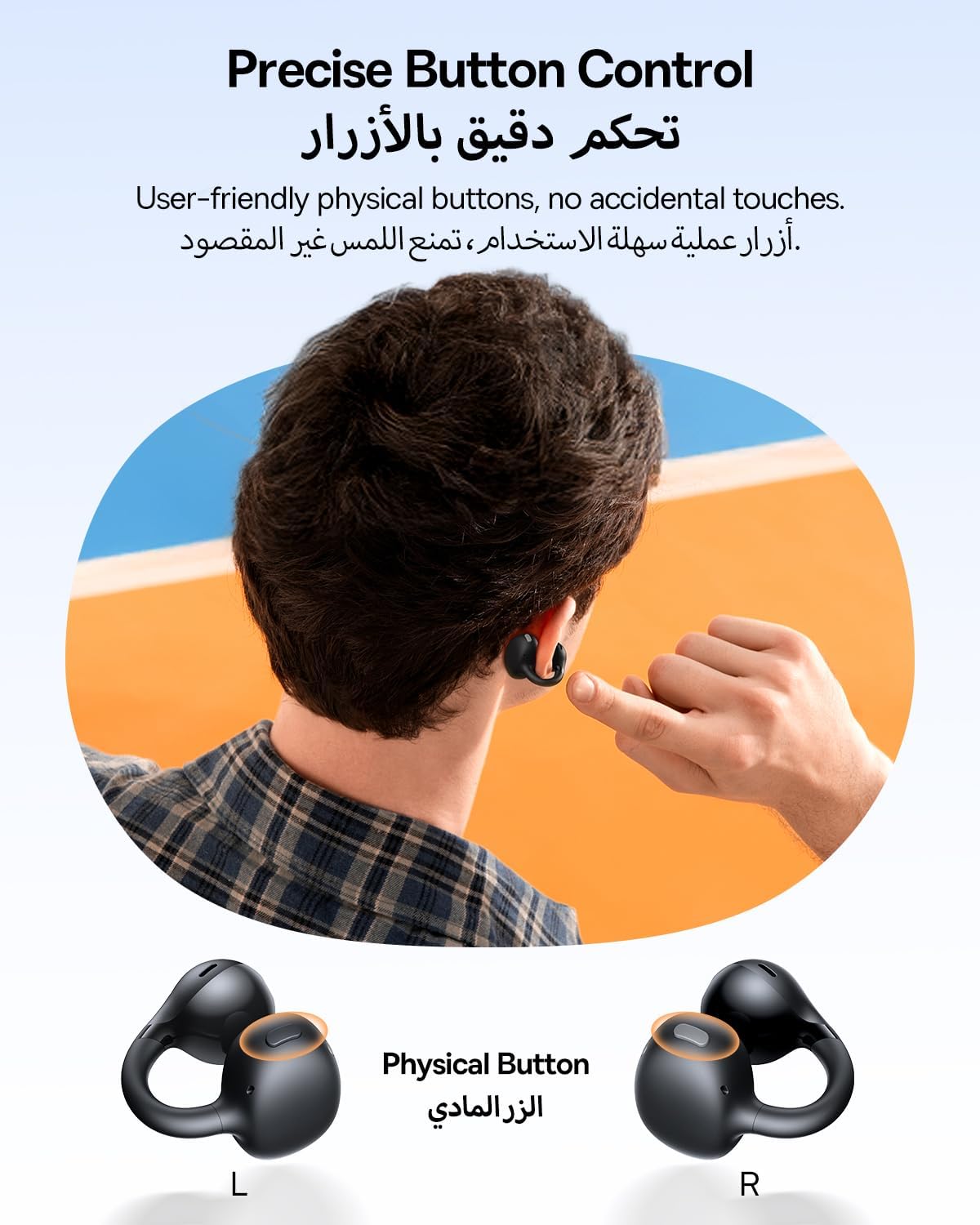
The Baseus BC1 earbuds feature physical buttons for precise control, minimizing accidental touches. The functions are as follows:
- Тоглуулах/түр зогсоох: Чихэвч дээрх товчлуурыг нэг удаа дарна уу.
- Дууг нэмэгдүүлэх: Single press the button on the right earbud.
- Дууг багасгах: Single press the button on the left earbud.
- Дараагийн дуу: Long press the button on the right earbud for 1.5 seconds.
- Өмнөх бичлэг: Long press the button on the left earbud for 1.5 seconds.
- Дуудлагад хариулах/дуусах: Double press the button on either earbud.
- Дуудлагаас татгалзах: Long press the button on either earbud for 1.5 seconds during an incoming call.
- Дуут туслах: Баруун чихэвч дээрх товчлуурыг гурав дахин дарна уу.
- Cycle Modes (Game/Movie/Normal): Зүүн чихэвч дээрх товчлуурыг гурав дахин дарна уу.
5.2. App Customization
Download the official Baseus app from your device's app store to unlock advanced features and personalize your listening experience:
- Тохируулах боломжтой EQ: Adjust the equalizer settings to fine-tune the audio to your preference.
- Sound Profiles: Төрөл бүрийн урьдчилан тохируулсан дууны мэргэжлийн сонголтуудаас сонгоно ууfiles for different music genres or listening scenarios.
- Touch Control Personalization: Reassign touch control functions to suit your needs.

5.3. Олон цэгийн холболт
The Baseus BC1 earbuds support simultaneous connection to two devices, allowing seamless switching between them:
- Pair the earbuds with your first device (e.g., smartphone).
- Чихэвчийг эхний төхөөрөмжийн Bluetooth тохиргооноос салга. Чихэвч дахин хослуулах горимд орно.
- Pair the earbuds with your second device (e.g., tablet or laptop).
- Manually reconnect the earbuds to the first device from its Bluetooth settings.
- The earbuds will now be connected to both devices simultaneously, allowing you to switch audio sources without re-pairing.

6. Засвар үйлчилгээ
6.1. Цэвэрлэгээ
To ensure optimal performance and longevity of your earbuds:
- Regularly clean the earbuds and the charging contacts inside the case using a clean, dry cotton swab.
- Шаардлагатай бол хөнгөн гampen the cotton swab with alcohol for disinfection.
- Avoid issues such as the earbuds being unable to charge or power on due to prolonged lack of cleaning.
6.2. Хадгалах
- Ашиглаагүй үедээ тоос шороо, гэмтлээс хамгаалахын тулд чихэвчийг цэнэглэх хайрцагт нь үргэлж хадгалаарай.
- If the earbuds will not be used for an extended period, charge the case at least once every three months to maintain battery health.
7. Алдаа засах
If you encounter any issues with your Baseus BC1 earbuds, please refer to the following common problems and solutions:
- Чихэвчийг хослуулахгүй байна: Ensure Bluetooth is enabled on your device and the earbuds are in pairing mode. Try forgetting previous pairings on your device and re-pairing.
- Зөвхөн нэг чихэвч ажиллаж байна: Place both earbuds back in the charging case, close the lid for 10 seconds, then open it again. If the issue persists, perform a factory reset.
- Дууны чанар муу: Ensure the earbuds are worn correctly and the sound outlet is aligned with your ear canal. Check the EQ settings in the Baseus app.
- Чихэвч цэнэглэхгүй байна: Clean the charging contacts on both the earbuds and the case. Ensure the charging cable is properly connected to a working power source.
7.1. Үйлдвэрийн тохиргоонд дахин тохируулах
If the earbuds are not functioning correctly, a factory reset may resolve the issue:
- Remove the pairing information of the earbuds from your device's Bluetooth settings (e.g., "Forget This Device").
- Place both earbuds into the charging case, ensuring they are securely in place.
- Close the charging case for 3 seconds, then reopen it.
- With the charging case open, long press the button on the charging case for 10 seconds until the indicator light flashes white twice. This indicates that the reset is complete.
- After the factory reset, use the initial Bluetooth pairing method (Section 4.3) to reconnect and resume normal use.
8. Техникийн үзүүлэлтүүд
| Онцлог | Дэлгэрэнгүй |
|---|---|
| Загварын нэр | BC1 |
| Загварын дугаар | PM153 |
| Брэнд | Базеус |
| Өнгө | Хар |
| Чихний байрлал | Нээлттэй чих |
| Чихэвчний форм фактор | Нээлттэй чих |
| Холболтын технологи | Утасгүй |
| Утасгүй холбооны технологи | Bluetooth |
| Эсэргүүцэл | 16 Ом |
| Дуу чимээний хяналт | Байхгүй |
| Чихэвчний залгуур | Жак үгүй |
| Хяналтын арга | Товчлуур |
| Усны эсэргүүцлийн түвшин | Усны хамгаалалттай (IP55) |
| Цэнэглэх хугацаа | 1.5 цаг |
| Зүйлийн жин | 111 грамм |
| Багцын хэмжээ | 13.4 x 8.5 x 4.2 см |
| Оруулсан бүрэлдэхүүн хэсгүүд | Хэрэглэгчийн гарын авлага |
| Материал | Хуванцар |
| Тохиромжтой төхөөрөмжүүд | Phones, tablets, desktop computers, laptops, mobile phones, smart speakers, TVs, digital video game players |
9. Аюулгүй байдлын мэдээлэл
- Avoid prolonged listening at high volume levels to prevent potential hearing damage.
- Чихэвчийг орчны дуу чимээг сонсохгүй байх нь аюултай байж болзошгүй нөхцөлд (жишээ нь, жолоо барих, дугуй унах, замын хөдөлгөөнд оролцох гэх мэт) бүү ашиглаарай.
- Keep the earbuds and charging case away from extreme temperatures, direct sunlight, and moisture.
- Бүтээгдэхүүнийг задлах, засах эсвэл өөрчлөх гэж бүү оролдоорой. Энэ нь баталгааг хүчингүй болгож, эвдрэлд хүргэж болзошгүй.
- Keep out of reach of children and pets to prevent accidental ingestion or misuse.
- Бүтээгдэхүүн болон түүний батерейг орон нутгийн дүрэм журмын дагуу хариуцлагатайгаар устгана уу.
10. Баталгаат хугацаа ба дэмжлэг
Баталгаат хугацаа, техникийн дэмжлэг эсвэл бүтээгдэхүүнтэй холбоотой аливаа лавлагааны талаар албан ёсны Baseus-аас лавлана уу. webсайт эсвэл орон нутгийн дистрибьютертэй холбогдоно уу.
You can also visit the official Baseus Store for more information: Baseus дэлгүүр


