1. Танилцуулга
This manual provides detailed instructions for the Bikevee GPS Bike Computer. This device is designed to track various cycling data, including speed, distance, time, and altitude, with features like auto start/stop, auto backlight, and IPX7 waterproofing. Please read this manual thoroughly before using the product to ensure proper operation and maintenance.
2. Юу багтсан
Таны багцад бүх бүрэлдэхүүн хэсгүүд байгаа эсэхийг шалгана уу:
- Bike Computer (Main Unit)
- Цэнэглэх кабель (USB-C)
- Out Front Extended Mount
- Зургаан өнцөгт сокет шураг
- Зургаан өнцөгт эрэг чангалах түлхүүр
- Хөвөн
- Хэрэглэгчийн гарын авлага

Image: All components included in the Bikevee GPS Bike Computer package.
3. Тохиргоо ба суурилуулалт
3.1 Дугуйн компьютерийг суурилуулах
The Bikevee GPS Bike Computer uses a wireless design for easy installation. Follow these steps to mount the device:
- Attach the Out Front Extended Mount to your bicycle's handlebar. Use the provided Hexagon Socket Screw and Hexagon Wrench to secure it firmly.
- Slide the Bike Computer onto the mount until it clicks securely into place.

Image: Simple installation of the wireless GPS bike computer on the handlebar mount.
3.2 Анх асаах болон GPS-ийн мэдээлэл авах
After mounting, press the power button to turn on the device. The computer will automatically search for GPS signals. It utilizes a 5-satellite system (GPS, BDS, Glonass, Galileo, QZSS) for accurate and stable positioning. The initial connection time may be longer, but subsequent connections will be faster.

Image: The bike computer's 5-satellite positioning system for enhanced accuracy.
3.3 Хэлний тохиргоо
The device supports 9 languages. Refer to the user manual for specific instructions on how to navigate to the language settings and select your preferred language.

Image: The bike computer displaying data in multiple languages.
4. Ашиглалтын заавар
4.1 Display Pages and Data Types
The Bikevee GPS Bike Computer features a 2.4" LCD screen that displays various cycling data across 6 functional pages. You can cycle through these pages using the device's buttons. The data types include:
- GPS-ийн өндөр
- Цаг
- Speed (MPH and KM/H)
- Аялалын цаг
- Аялалын зай
- Нийт хугацаа
- Нийт зай
- Дундаж хурд
- Хамгийн их хурд
- Арын гэрлийн төлөв

Зураг: Жишээ ньamples of the 6 functional data display pages.
4.2 Auto Start/Stop Function
The device automatically starts recording data when you begin cycling and pauses when you stop, conserving battery life and ensuring accurate trip data.
4.3 Автомат арын гэрэлтүүлэг
To turn the backlight on or off, press both the left and right buttons simultaneously. Once activated, the backlight remains on throughout your ride. You can turn off the backlight during the day to save battery power, or keep it on for clear visibility at night.
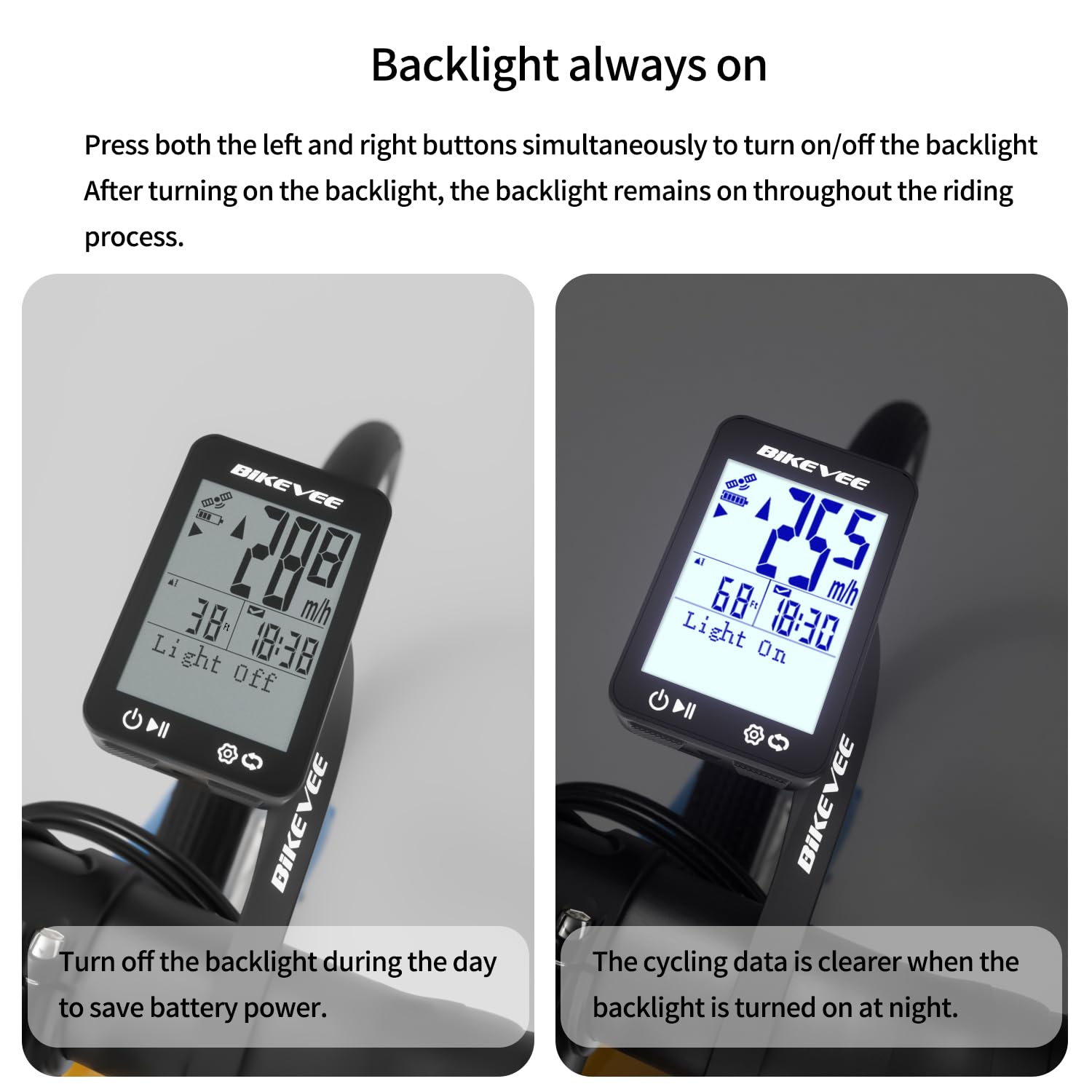
Image: Backlight functionality, showing display with backlight off and on.
5. Засвар үйлчилгээ, арчилгаа
5.1 Цэвэрлэгээ
Төхөөрөмжийг зөөлөн арчиж, damp cloth. Do not use abrasive cleaners or solvents, as they may damage the screen or casing.
5.2 Ус үл нэвтрэх
The Bikevee GPS Bike Computer has an IPX7 waterproof rating, meaning it can withstand immersion in water up to 1 meter for 30 minutes. This protects it from rain and splashes during your rides. However, avoid prolonged submersion or high-pressure water jets.
5.3 Батерейг цэнэглэх
The device is equipped with a 650mAh Lithium Ion battery, providing up to 28 hours of continuous use. Charge the device using the provided USB-C charging cable when the battery indicator is low.
6. Алдаа засах
If you encounter issues with your Bikevee GPS Bike Computer, consider the following:
- Төхөөрөмж асахгүй байна: Ensure the battery is charged. Connect the device to the charging cable and allow it to charge for at least 30 minutes before attempting to power it on again.
- GPS дохиог олж аваагүй байна: Ил тод газар байгаа эсэхээ шалгаарай view of the sky. Initial GPS acquisition can take longer. If indoors or under heavy tree cover, signal acquisition may be difficult.
- Буруу өгөгдөл: Ensure the device is securely mounted and has a clear GPS signal. Verify that the correct units (MPH/KM/H) are selected in the settings.
- Дэлгэц харагдахгүй байна: Check the backlight setting. If the backlight is off, press both left and right buttons simultaneously to activate it.
Нэмэлт тусламж авахыг хүсвэл Баталгаат болон дэмжлэгийн хэсэг дэх холбоо барих мэдээллийг үзнэ үү.
7. Техникийн үзүүлэлтүүд
| Онцлог | Тодорхойлолт |
|---|---|
| Брэнд | Bikevee |
| Загварын дугаар | SF20250929B0FN818NDK |
| Өнгө | Хар |
| Бүтээгдэхүүний хэмжээс | 45L x 16W x 70H Миллиметр |
| Зүйлийн жин | 50 грамм |
| Дэлгэцийн хэмжээ | 2.4 инч |
| Дэлгэцийн төрөл | LCD |
| Зайны ашиглалт | 28 цаг |
| Зайны эсийн найрлага | Лити ион |
| Олон улсын хамгаалалтын зэрэглэл | IPX7 |
| Суурилуулах төрөл | Бариулын бэхэлгээ |
| Хүний интерфейсийн оролт | Товчлуур |
| Гарал үүслийн улс | Хятад |

Image: Summary of key product features and specifications.
8. Баталгаат хугацаа ба дэмжлэг
8.1 Чанарын баталгаа
Bikevee is committed to providing dependable products. This GPS Bike Computer is designed for lasting satisfaction.
8.2 Хэрэглэгчийн дэмжлэг
For any questions, technical support, or warranty claims, please contact Bikevee customer service through the retailer where you purchased the product or visit the official Bikevee webхолбоо барих мэдээлэл авах сайт.


