Танилцуулга
Thank you for choosing the Rohs Touch Silicone Panda Light Lamp. This LED night light is designed to provide a soft, comforting glow with easy touch control. Please read this manual carefully before use to ensure proper operation and to maintain the product's longevity.
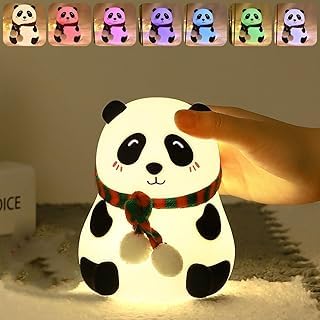
Image: The Rohs Touch Silicone Panda Light Lamp emitting a warm, soft light. The lamp is shaped like a panda wearing a red and green striped scarf.
Аюулгүй байдлын мэдээлэл
- l-г хадгалamp away from water and moisture. This product is not intended for use in wet environments.
- l-ийг задлах эсвэл засах гэж бүү оролдооройamp өөрөө. Үйлчилгээ авахын тулд мэргэшсэн ажилтантай холбогдоно уу.
- Use only the specified charging cable and power adapter (if included) to prevent damage.
- Keep out of reach of very young children to prevent choking hazards from small parts, although the silicone body is generally safe.
- Avoid extreme temperatures. Do not expose to direct sunlight for prolonged periods or place near heat sources.
- The silicone material is BPA-free and safe for contact.
Багцын агуулга
Багц нь дараахь зүйлийг агуулсан байх ёстой.
- 1 x Rohs Touch Silicone Panda Light Lamp
- 1 x USB Charging Cable (if applicable, check product packaging)
- 1 х хэрэглэгчийн гарын авлага (энэ баримт бичиг)
Тохиргоо
- L-ийг задлахamp: Carefully remove the panda light lamp and all accessories from its packaging.
- Анхны төлбөр: Эхний хэрэглээний өмнө l-г бүрэн цэнэглэamp. Locate the charging port (usually at the base) and connect the provided USB charging cable. Connect the other end to a compatible USB power source (e.g., computer, USB wall adapter). The charging indicator (if present) will show charging status.
- Байршил: l-г байрлуулamp on a stable, flat surface in your desired location, such as a bedside table or shelf.

Image: The Rohs Touch Silicone Panda Light Lamp in its unlit state, showing its white silicone body and black panda features.
Ашиглалтын заавар
The Rohs Panda Light Lamp features intuitive touch control for ease of use.
- Асаах/унтраах: Gently tap the silicone surface of the panda lamp to turn it on. Tap again to turn it off.
- Гэрлийн горимыг өөрчлөх: l-тэй хамтamp on, continue tapping the silicone surface to cycle through available light modes. This may include warm white, various colors, or a color-changing sequence.
- Цэнэглэдэг тав тухтай байдал: Лamp is rechargeable. When the light dims or stops responding, it indicates a low battery. Reconnect the USB charging cable to recharge.

Image: The Rohs Touch Silicone Panda Light Lamp illuminated with a blue light, demonstrating one of its color modes.
Засвар үйлчилгээ
- Цэвэрлэгээ: л цэвэрлэхийн тулдamp, gently wipe the silicone surface with a soft, damp даавуу. Хүчтэй химийн бодис эсвэл зүлгүүрийн цэвэрлэгч бүү хэрэглэ. Цэнэглэхийн өмнө цэнэглэх порт хуурай байгаа эсэхийг шалгаарай.
- Хадгалах: l-г хадгалж байгаа болamp for an extended period, ensure it is fully charged and then turn it off. Store in a cool, dry place.
- Батерейны арчилгаа: To prolong battery life, avoid completely draining the battery frequently. Recharge when the light starts to dim.
Алдааг олж засварлах
| Асуудал | Боломжит шалтгаан | Шийдэл |
|---|---|---|
| Lamp асахгүй байна. | Батерей дуусч байна. | l-г цэнэглэamp өгөгдсөн USB кабелийг ашиглан. |
| Lamp хүрэхэд хариу үйлдэл үзүүлэхгүй. | Батерей бага эсвэл дотоод эвдрэл. | l-г баталгаажуулна ууamp is fully charged. If the issue persists, contact customer support. |
| Гэрэл бүдэг эсвэл анивчдаг. | Батерей бага. | l-г цэнэглэamp. |
| Lamp төлбөр авдаггүй. | Кабель, адаптер эсвэл цэнэглэгч порт эвдэрсэн. | Try a different USB cable or power adapter. Ensure the charging port is clean and free of debris. |
Үзүүлэлтүүд
- Загвар: D-PANDA-LAMP-01
- Материал: Силикон (BPA агуулаагүй)
- Гэрлийн эх үүсвэр: LED
- Хяналтын арга: Хүрэх
- Эрчим хүчний эх үүсвэр: Цэнэглэдэг батерей (USB-ээр)
- Хэмжээ: Approximately 5D x 5W x 5H Centimeters
- Барааны жин: Approximately 0.32 Kilograms (320 g)
- Өнгө: White (lamp бие)
- Үйлдвэрлэгч: нийцтэй
Баталгаат болон дэмжлэг
For warranty information or technical support, please refer to the contact details provided on your product packaging or purchase receipt. Keep your proof of purchase for any warranty claims.
For further assistance, please contact your retailer or the manufacturer directly.


