Танилцуулга
Thank you for choosing the LogiLink BT0070 BT 6.0 Gaming Headset. This manual provides essential information for the proper setup, operation, and maintenance of your headset. Please read these instructions carefully before using the product to ensure optimal performance and longevity.
The LogiLink BT0070 is a versatile wireless gaming headset designed for clear communication and immersive audio experiences. It features a 360° microphone, comfortable ear pads, an adjustable headband, and a long-lasting battery.
Аюулгүй байдлын мэдээлэл
- Чихэвчийг хэт өндөр температур, чийгшил, идэмхий бодист бүү тавь.
- Чихэвчийг унагах эсвэл хүчтэй цохилтонд оруулахаас зайлсхий.
- Чихэвчийг задлах, өөрчлөхийг бүү оролд. Энэ нь баталгааг хүчингүй болгож, гэмтэл учруулж болзошгүй.
- Чихэвчийг ус болон бусад шингэнээс хол байлга.
- Зөвхөн заасан цэнэглэх хэмжээг ашиглана ууtage ба одоогийн.
- Дууны өндөр түвшинд удаан хугацаагаар сонсох нь сонсголд гэмтэл учруулж болзошгүй. Дууны түвшинг аюулгүй түвшинд тохируулна уу.
Багцын агуулга
Дараах зүйлсийн багцад байгаа эсэхийг шалгана уу.
- LogiLink BT0070 Gaming Headset
- USB цэнэглэгч кабель
- 3.5 мм AUX аудио кабель
- Хэрэглэгчийн гарын авлага (энэ баримт бичиг)
Бүтээгдэхүүн дууссанview
Familiarize yourself with the components of your LogiLink BT0070 Gaming Headset.

Зураг: Дууслааview of the LogiLink BT0070 headset highlighting its adjustable headband, adjustable microphone, soft memory earmuffs, and flexible design for various head shapes.
- Тохируулах боломжтой толгойн тууз: Allows for a customized and comfortable fit.
- Adjustable Microphone: A 360° noise-isolating microphone for clear voice communication.
- Soft Memory Ear Pads: Designed for extended comfort during long gaming sessions.
- Хяналтын товчлуурууд: (Specific button functions will be detailed in the Operating section).
- 3.5 мм-ийн AUX порт: For wired connection to devices.
- Цэнэглэх порт: Дотоод зайг цэнэглэхэд зориулагдсан.
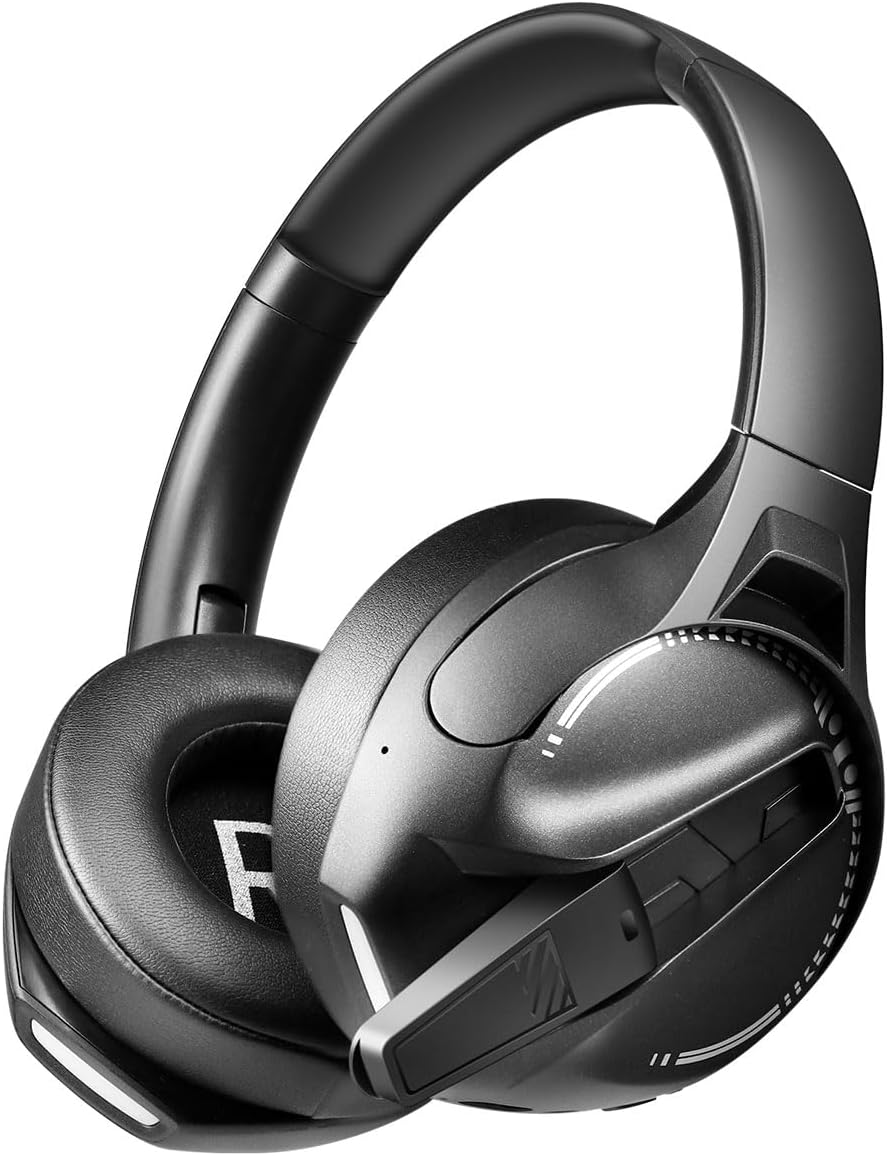
Зураг: Хажуу тал view of the LogiLink BT0070 headset, showing the extended microphone arm and ear cup design.

Зураг: Урд view of the LogiLink BT0070 headset, showcasing түүний ерөнхий загвар.
Тохиргоо
1. Чихэвчийг цэнэглэж байна
Before first use, fully charge the headset. Connect the USB charging cable to the headset's charging port and the other end to a compatible USB power source (e.g., computer USB port, USB wall adapter).

Зураг: Illustration of power adapter requirements. Use a 3.0-3.0W power adapter. Note that a power adapter is not included with the headset.
- A full charge typically takes approximately [X] hours (specific time not provided, refer to product packaging or LED indicator).
- The LED indicator on the headset will change color or turn off once charging is complete.
- Ensure the power source provides 3.0-3.0W for optimal charging.
2. Асаах/унтраах
- Асаахын тулд: LED заагч асах хүртэл Power товчийг ойролцоогоор 3 секундын турш дарна уу.
- Унтраахын тулд: LED заагч унтрах хүртэл Power товчийг ойролцоогоор 5 секундын турш барина уу.
3. Bluetooth хослол
Чихэвчээ төхөөрөмжид утасгүй холбохын тулд:
- Чихэвчийг унтраасан эсэхийг шалгаарай.
- Press and hold the Power button for approximately 5-7 seconds until the LED indicator flashes rapidly (usually blue and red), indicating pairing mode.
- On your device (smartphone, laptop, etc.), enable Bluetooth and search for new devices.
- Select "LogiLink BT0070" from the list of available devices.
- Once paired, the LED indicator on the headset will typically flash slowly or turn solid blue.
4. Wired Connection (3.5mm AUX)
Утастай холболтын хувьд дагалдаж ирсэн 3.5 мм-ийн AUX аудио кабелийг ашиглана уу:
- 3.5 мм аудио кабелийн нэг үзүүрийг чихэвч дээрх AUX порт руу холбоно уу.
- Нөгөө үзүүрийг нь төхөөрөмжийн 3.5 мм аудио залгуурт холбоно уу.
- The headset will operate in passive mode, drawing no power from its battery.
5. Fit тохируулга
For optimal comfort and sound quality, adjust the headset to fit your head:
- Extend or retract the adjustable headband until the ear cups comfortably cover your ears.
- Ensure the soft memory ear pads create a good seal around your ears.
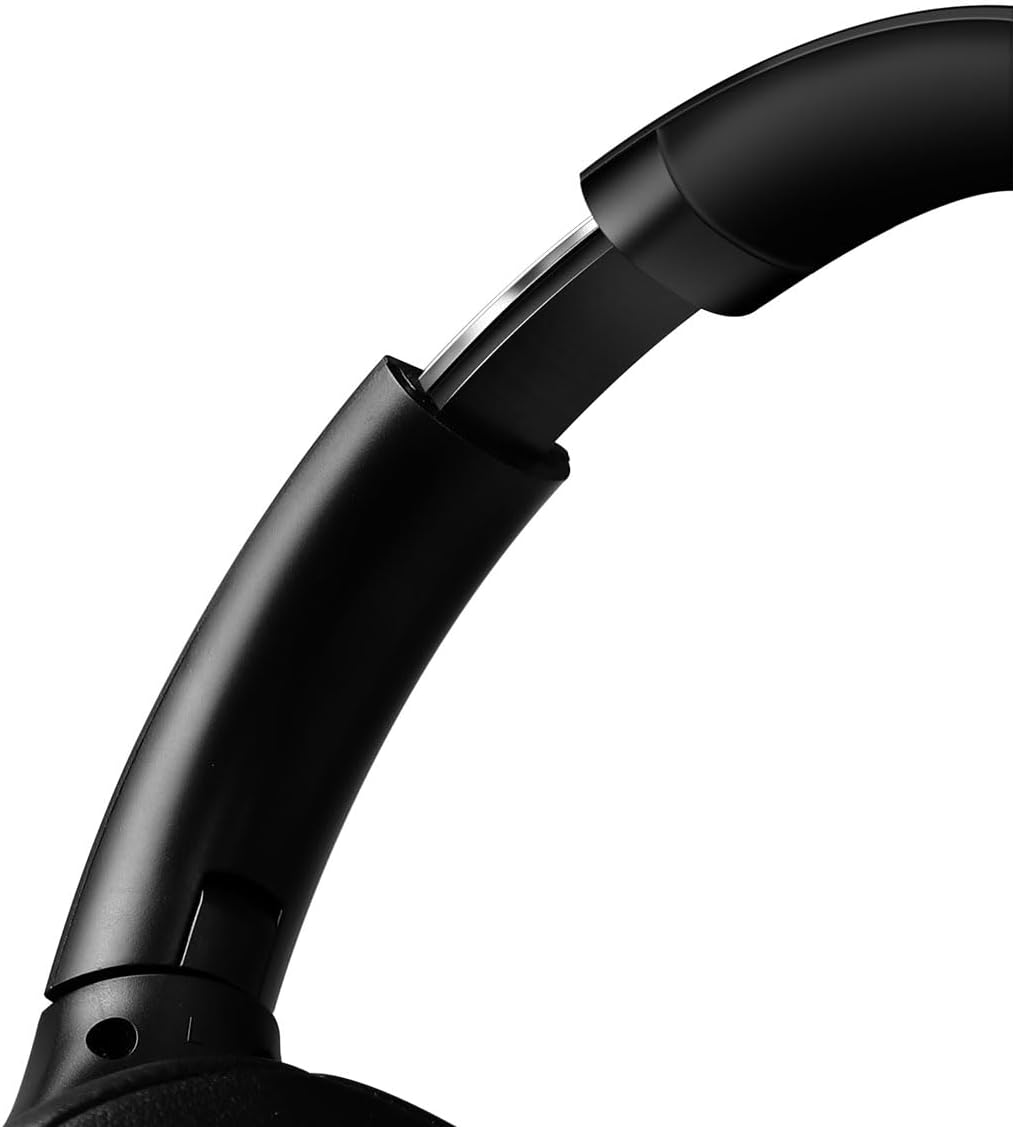
Зураг: Ойролцоогоор view of the adjustable headband mechanism, demonstrating how to customize the fit.
Чихэвчийг ажиллуулах
1. Үндсэн удирдлага
The headset features intuitive controls, typically located on the ear cups:
- Цахилгаан товч: Press and hold to power on/off. Short press for [X function, e.g., play/pause, answer call - specifics not provided, common functions listed].
- Дууг нэмэгдүүлэх/Дараагийн дуу: Дууг чангалахын тулд богино дарна уу. Дараагийн дуу руу орохын тулд удаан дарна уу.
- Дууг бууруулах/Өмнөх дуу: Дууг багасгахын тулд богино дарна уу. Өмнөх дууг харахын тулд удаан дарна уу.
- Олон үйлдэлт товчлуур (MFB): (Often combined with Power button) Single press to Play/Pause music or Answer/End calls. Double press to Redial last number.
2. Микрофоны хэрэглээ
The integrated 360° noise-isolating microphone is designed for clear communication.
- Микрофоныг тохируулах: Position the microphone close to your mouth for optimal voice pickup.
- Дууг хаах/Асаах: (Specific button for mute not provided, common methods listed) Look for a dedicated mute button on the headset or use your device's software controls.
3. Идэвхтэй дуу чимээг арилгах (ANC)
The headset features Active Noise Cancellation to reduce ambient noise.
- ANC-г идэвхжүүлж байна: (Specific button for ANC not provided, common methods listed) Look for a dedicated ANC button or a combination press on existing buttons.
- When ANC is active, you may notice a slight change in audio characteristics.

Зураг: Users experiencing immersive audio with the LogiLink BT0070 headset, emphasizing its 3D surround sound capabilities for gaming.
Засвар үйлчилгээ
1. Цэвэрлэгээ
- Чихэвчийг зөөлөн, хуурай, хөвөнгүй даавуугаар арчина.
- Зүлгүүрийн цэвэрлэгч, архи, химийн уусгагчийг бүү ашигла.
- Clean the ear pads gently to remove any buildup.
2. Хадгалах
- Чихэвчийг нарны шууд тусгал, хэт температураас хол, сэрүүн, хуурай газар хадгална.
- Хэрэв удаан хугацаагаар хадгалах бол батерейны эрүүл мэндийг хадгалахын тулд хэсэгчлэн цэнэглэгдсэн (ойролцоогоор 50%) эсэхийг шалгаарай.

Зураг: The LogiLink BT0070 headset shown in a folded configuration, suitable for compact storage or transport.
3. Зайны арчилгаа
- Байнга зайгаа бүрэн цэнэглэхээс зайлсхий.
- Charge the headset regularly, even if not in use, to maintain battery health.
Алдааг олж засварлах
Хэрэв та чихэвчтэй холбоотой асуудалтай тулгарвал дараах нийтлэг асуудал, шийдлүүдийг үзнэ үү.
| Асуудал | Боломжит шийдэл |
|---|---|
| Чихэвч асахгүй байна. | Ensure the headset is fully charged. Press and hold the Power button for the required duration. |
| Bluetooth-ээр холбох боломжгүй. | Ensure the headset is in pairing mode (rapidly flashing LED). Turn off and on your device's Bluetooth. Move closer to the device. Clear previous Bluetooth connections on your device. |
| Дуу байхгүй эсвэл дуу багатай. | Check headset and device volume levels. Ensure the headset is properly connected (Bluetooth or AUX). For Bluetooth, check audio output settings on your device. |
| Микрофон ажиллахгүй байна. | Ensure the microphone is not muted. Check microphone input settings on your device. Ensure the microphone is positioned correctly. |
| Дууны чанар муу байна. | Ensure the headset is within Bluetooth range. Check for interference from other wireless devices. For wired connection, ensure the 3.5mm cable is fully inserted. |
Үзүүлэлтүүд
Key technical specifications for the LogiLink BT0070 Gaming Headset:
| Онцлог | Дэлгэрэнгүй |
|---|---|
| Загвар | BT0070 |
| Холболтын технологи | Bluetooth 6.0, 3.5 мм AUX |
| Утасгүй холбоо | Bluetooth |
| Чихэвчний төрөл | Чихний дээгүүр |
| Жолоочийн диаметр | 40 мм |
| Эсэргүүцэл | 32 Ом |
| Микрофон | 360° Noise-isolating, Omnidirectional |
| Дуу чимээний хяналт | Идэвхтэй дуу чимээг арилгах |
| Зайны ашиглалт | 50 цаг хүртэл |
| Өнгө | Хар |
| Зүйлийн жин | 500 грамм |
| Бүтээгдэхүүний хэмжээс | 16.8 x 17.8 x 7.5 см |
| -тай нийцдэг | Smartphone & Laptop |
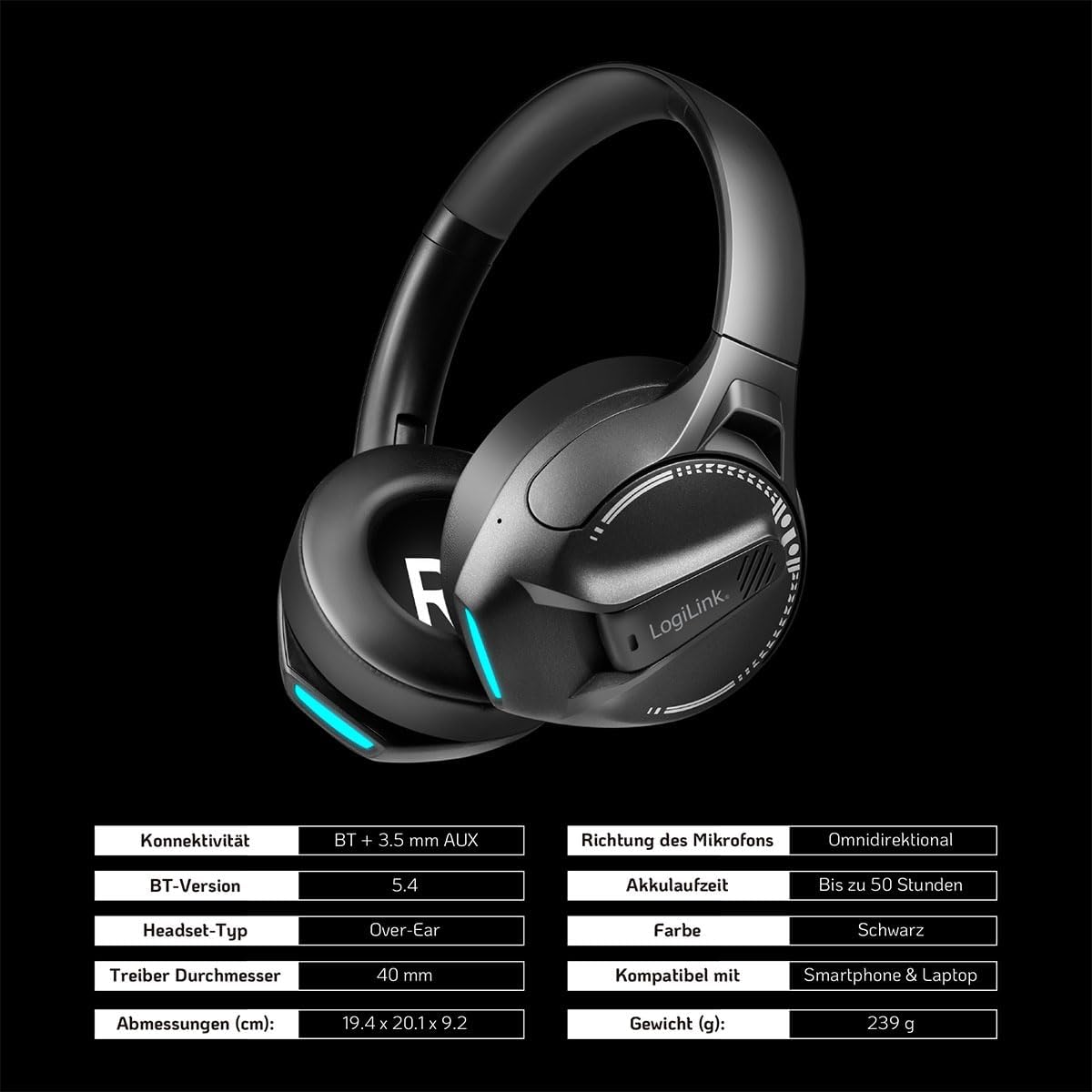
Зураг: Visual representation of key specifications for the LogiLink BT0070 headset, including connectivity, battery life, and dimensions. Note: The image lists Bluetooth version 5.4, while the product title specifies 6.0.
Баталгаат болон дэмжлэг
LogiLink products are designed and manufactured to the highest quality standards. For warranty information and technical support, please refer to the warranty card included with your product or visit the official LogiLink webсайт.
Баталгаат заргад зориулж худалдан авалтаа нотлох баримтаа үлдээнэ үү.


