1. Танилцуулга
The Havit H2002BG Wireless Gaming Headphones are designed to provide a versatile audio experience for gaming and entertainment. Featuring tri-mode connectivity, these headphones offer seamless switching between 2.4GHz wireless, Bluetooth, and wired connections (3.5mm and Type-C). Enjoy immersive sound with 53mm dynamic drivers and virtual 7.1 surround sound support, all while benefiting from a comfortable design with an adjustable head beam and memory foam earcups. The detachable omnidirectional microphone ensures clear communication.
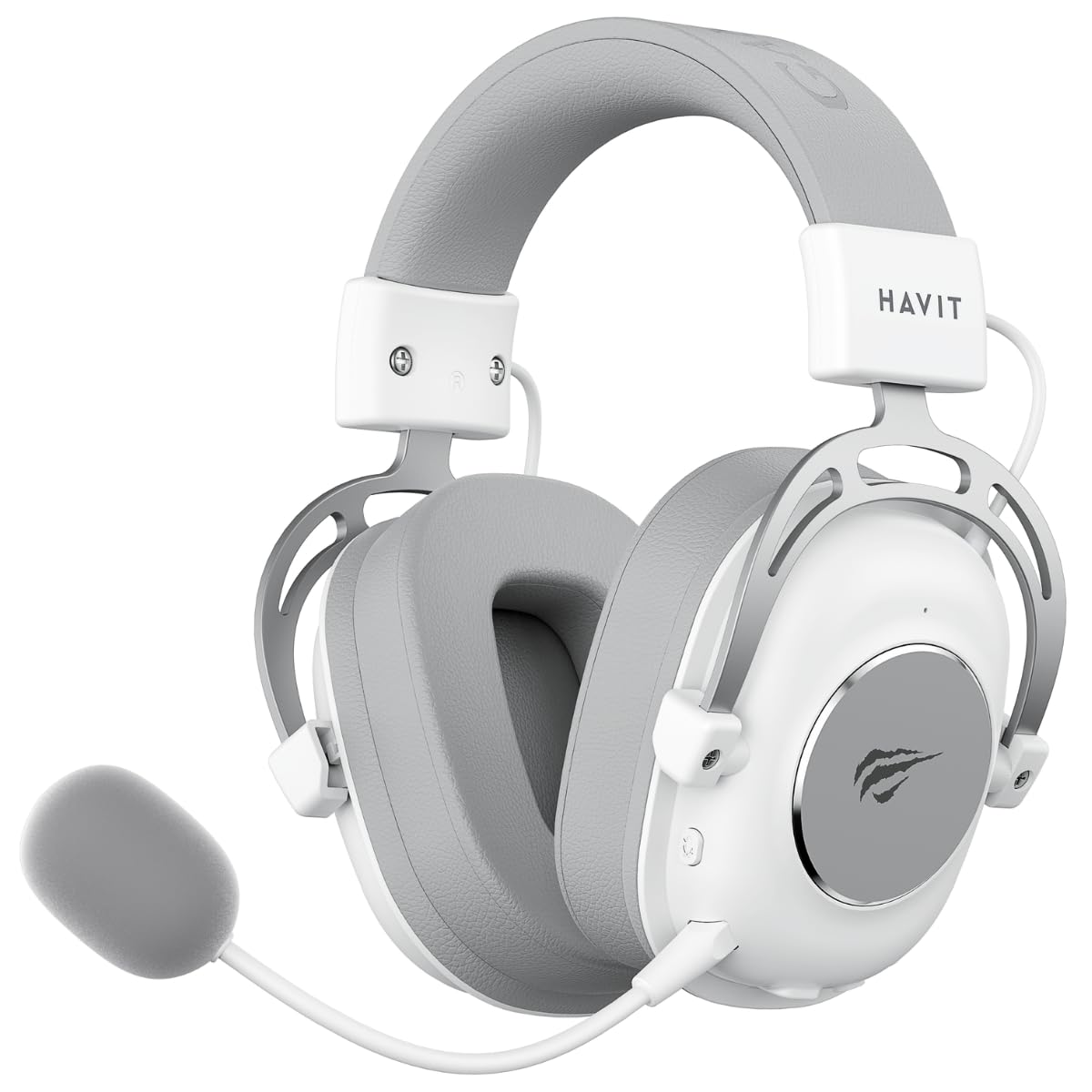
Figure 1: Havit H2002BG Wireless Gaming Headphones
2. Бүтээгдэхүүний онцлог
- Гурван горимын холболт: Supports 2.4GHz wireless, Bluetooth, 3.5mm audio jack, and Type-C wired connections for broad compatibility.
- 53мм динамик драйверууд: Delivers powerful and clear audio for an immersive experience.
- Виртуал 7.1 Хүрээлэн буй орчны дуу чимээ: Enhances spatial audio awareness for gaming.
- Тав тухтай дизайн: Features an adjustable head beam and memory foam earcups for extended wear comfort.
- Салгаж болдог бүх чиглэлтэй микрофон: Provides clear voice communication and can be removed when not needed.
- Батерейны урт наслалт: Up to 26 hours of playtime on a single charge with a 1200mAh battery.

Figure 2: Tri-Mode Connection Capabilities

Figure 3: Virtual 7.1 Surround Sound Feature
3. Багцын агуулга
Дараах зүйлсийн багцад байгаа эсэхийг шалгана уу.
- 1 x Havit H2002BG Wireless Gaming Headphones
- 1 x Detachable Omnidirectional Microphone
- 1 x 2.4GHz USB Dongle
- 1 x 3.5 мм аудио кабель
- 1 x Type-C цэнэглэгч кабель
- 1 х хэрэглэгчийн гарын авлага (энэ баримт бичиг)
4. Тохиргоо
4.1 Анхны цэнэглэлт
- Type-C цэнэглэгч кабелийг чихэвчний цэнэглэх порт руу холбоно уу.
- Plug the other end of the Type-C cable into a USB power source (e.g., computer USB port, USB wall adapter).
- Allow the headphones to fully charge before first use. The LED indicator will show charging status.
4.2 Микрофон бэхэлгээ
- Locate the microphone port on the left earcup of the headphones.
- Insert the detachable microphone firmly into the port until it clicks into place.
4.3 Чихэвчийг холбох
The Havit H2002BG offers multiple connection options:

Зураг 4: Чихэвчний удирдлага ба портууд
4.3.1 2.4GHz Wireless Connection (PC/Console with USB-A)
- Plug the 2.4GHz USB dongle into an available USB-A port on your PC or compatible gaming console.
- Power on the headphones by pressing and holding the power button.
- The headphones should automatically connect to the dongle. The LED indicator will confirm connection.
- On your device, ensure the Havit H2002BG is selected as the audio output and input device.
4.3.2 Bluetooth Connection (Mobile Devices/PC with Bluetooth)
- Power on the headphones and switch to Bluetooth mode (refer to Operating Instructions for mode switching). The LED indicator will flash, indicating pairing mode.
- On your mobile device or PC, enable Bluetooth and search for new devices.
- Select "Havit H2002BG" from the list of available devices to pair.
- Once paired, the LED indicator will show a steady light.
4.3.3 Утастай холболт (3.5 мм аудио залгуур)
- Connect one end of the 3.5mm audio cable to the 3.5mm port on the headphones.
- Plug the other end of the 3.5mm audio cable into the audio output jack of your device (e.g., gaming console controller, PC, smartphone).
- The headphones will operate in passive wired mode.
4.3.4 Wired Connection (Type-C Cable)
- Connect the Type-C cable to the Type-C port on the headphones.
- Plug the other end of the Type-C cable into a compatible Type-C port on your device. This connection can provide both audio and charging simultaneously.
5. Ашиглалтын заавар
5.1 Асаах/унтраах
- Асаах: LED индикатор асах хүртэл асаах товчийг ойролцоогоор 3 секундын турш дарна уу.
- Унтраах: LED индикатор унтрах хүртэл асаах товчийг ойролцоогоор 3 секундын турш дарна уу.
5.2 Дууны хяналт
- Use the volume wheel or dedicated volume buttons on the earcup to adjust the audio output level.
5.3 Микрофоныг дуугүй болгох/дууг нь нээх
- Press the microphone mute button to toggle the microphone on or off. An indicator light on the microphone or headphones may show its status.
5.4 Горим солих
- Use the mode button to cycle between 2.4GHz wireless, Bluetooth, and wired (3.5mm/Type-C) connection modes. The LED indicator will change to reflect the active mode.
5.5 Виртуал 7.1 Хүрээлэн буй орчны дуу чимээ
- Activate or deactivate the virtual 7.1 surround sound feature using the dedicated button on the headphones or through compatible software on your PC.
5.6 RGB гэрэлтүүлгийн удирдлага
- If applicable, use the designated button to cycle through different RGB lighting effects or turn them off.
6. Засвар үйлчилгээ
6.1 Цэвэрлэгээ
- Чихэвчийг зөөлөн, хуурай, хөвөнгүй даавуугаар арчина.
- Химийн хатуу бодис, цэвэрлэгээний уусгагч, хүчтэй угаалгын нунтаг хэрэглэж болохгүй.
- Аливаа нүхэнд чийг орохоос зайлсхий.
6.2 Хадгалалт
- Чихэвчийг нарны шууд тусгал, хэт температураас хол, сэрүүн, хуурай газар хадгална.
- If storing for an extended period, ensure the battery is partially charged (around 50%) to maintain battery health.
6.3 Батерейны арчилгаа
- Байнга зайгаа бүрэн цэнэглэхээс зайлсхий.
- Charge the headphones regularly, even if not in frequent use, to prevent deep discharge.
7. Алдаа засах
7.1 Дуугүй
- Чихэвч асаалттай, цэнэглэгдсэн эсэхийг шалгаарай.
- Чихэвч болон холбогдсон төхөөрөмж дээрх дууны түвшинг шалгана уу.
- Verify that the headphones are correctly connected (2.4GHz dongle, Bluetooth paired, or wired cable securely inserted).
- Confirm that the Havit H2002BG is selected as the primary audio output device in your PC or console settings.
7.2 Микрофон ажиллахгүй байна
- Ensure the detachable microphone is securely attached to the headphones.
- Check if the microphone mute function is active.
- Verify microphone input settings on your connected device and ensure Havit H2002BG is selected.
- Test the microphone in different applications or communication software.
7.3 Холболтын асуудал
- 2.4 ГГц: Ensure the USB dongle is fully inserted and there are no significant obstructions or interference sources nearby. Try re-pairing by restarting both headphones and the device.
- Bluetooth: Ensure the headphones are in Bluetooth pairing mode and within the effective range (typically 10 meters). Try unpairing and re-pairing the device.
- Утастай: Ensure all cables (3.5mm or Type-C) are fully inserted into their respective ports and are not damaged.
7.4 Цэнэглэхтэй холбоотой асуудлууд
- Ensure the Type-C charging cable is properly connected to both the headphones and the power source.
- Try using a different Type-C charging cable or a different USB power adapter/port.
- Чихэвчний цэнэглэх порт цэвэр, хог хаягдалгүй эсэхийг шалгаарай.
8. Техникийн үзүүлэлтүүд
| Онцлог | Тодорхойлолт |
|---|---|
| Загвар | H2002BG |
| Жолоочийн диаметр | 53 мм |
| Эсэргүүцэл | 64 ± 15% Ω |
| Мэдрэмж | 111 ± 3дБ |
| Давтамжийн хариу үйлдэл | 20Гц - 20кГц |
| Зайны багтаамж | 1200 мАч |
| Тоглоомын цаг | 26 цаг хүртэл |
| Холболт | 2.4GHz Wireless, Bluetooth, 3.5mm, Type-C |
| Микрофон | Бүх чиглэлтэй, салгаж болдог |
| Form Factor | Чихний дээгүүр |
| Материал | Металл, хуванцар |
| Өнгө | Цагаан/Саарал |
9. Баталгаат хугацаа ба дэмжлэг
9.1 Баталгаат хугацааны мэдээлэл
The Havit H2002BG Wireless Gaming Headphones are covered by a 1 жилийн хязгаарлагдмал баталгаат хугацаа from the date of purchase. This warranty covers manufacturing defects and workmanship under normal use. It does not cover damage caused by misuse, accidents, unauthorized modifications, or normal wear and tear. Please retain your proof of purchase (receipt or invoice) for any warranty claims.
9.2 Хэрэглэгчийн дэмжлэг
For further assistance, technical support, or warranty inquiries, please contact Havit customer service or visit the official Havit website. You may find FAQs, additional troubleshooting guides, and contact information there.
Official Havit Webсайт: www.havit.com


