1. Танилцуулга
This manual provides essential instructions for the safe and efficient operation of your Minuteman EN450G 450VA Standby Uninterruptible Power Supply (UPS). The EN450G is designed to provide reliable backup power and surge protection for various electronic devices, including gaming consoles, desktop PCs, home office equipment, and network devices. Please read this manual thoroughly before installation and use, and retain it for future reference.
2. Аюулгүй ажиллагааны чухал заавар
WARNING: To reduce the risk of electric shock, fire, or injury to persons, read all instructions before using this product.
- Энэхүү UPS нь аюултай хэмжээ агуулсанtages. Do not attempt to disassemble the unit. Servicing should be performed by qualified service personnel only.
- Эмнэлгийн тоног төхөөрөмж, амьдралыг дэмжих төхөөрөмж, богино долгионы зуух, тоос сорогч зэрэг компьютертэй холбоогүй зүйлсийг UPS-д холбож болохгүй.
- Агааржуулалтын нүхийг хааж болохгүй. Төхөөрөмжийн эргэн тойронд хангалттай агаарын урсгалыг хангах.
- Do not install the UPS in direct sunlight, near heat sources, or in areas with excessive dust, moisture, or flammable liquids.
- Connect the UPS to a properly grounded AC power outlet.
- The battery is hot-swappable. Exercise caution when replacing the battery. Refer to the Maintenance section for instructions.
- In case of emergency, press the power button to turn off the UPS and disconnect the power cord from the AC power outlet.
3. Бүтээгдэхүүн дууссанview
The Minuteman EN450G UPS provides comprehensive power protection. Familiarize yourself with its components:
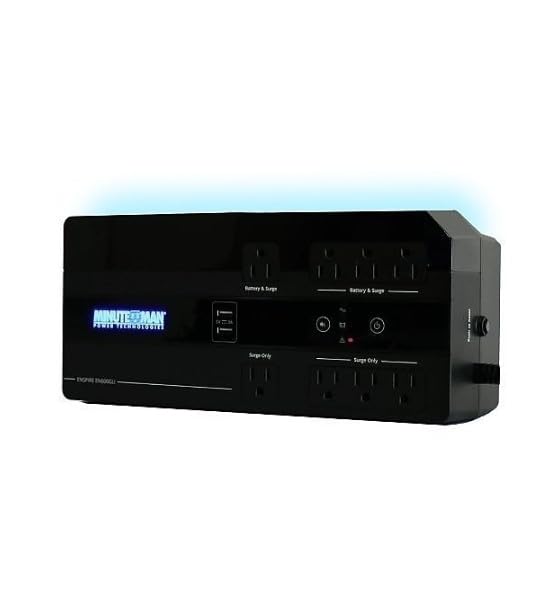
Зураг 1: Minuteman EN450G UPS Unit. This image displays the Minuteman EN450G UPS unit. The front panel features the 'Minuteman Power Technologies' logo, two USB charging ports, and control buttons. The top surface shows four 'Battery & Surge' protected outlets and four 'Surge Only' outlets, clearly labeled. The unit is black and designed for compact placement.
3.1 Урд самбарын онцлогууд
- Цахилгаан товч: UPS-г асаах эсвэл унтраах.
- USB цэнэглэх портууд: Two ports for charging mobile devices.
- Статусын үзүүлэлтүүд: LEDs indicating power status, battery status, and fault conditions.
3.2 Арын самбарын онцлогууд
- Battery & Surge Outlets (x4): Provide battery backup power and surge protection for critical devices.
- Surge Only Outlets (x4): Provide surge protection only for non-critical devices.
- Хувьсах гүйдлийн оролт: UPS-ийг ханын цахилгаан залгуурт холбодог.
- Хэлхээ таслагч: Дахин тохируулах боломжтой хэт ачааллын хамгаалалт.
4. Тохиргоо ба суурилуулалт
4.1 Савлах
Carefully unpack the UPS and inspect it for any shipping damage. If damage is found, do not operate the unit and contact your dealer.
4.2 Байршил
The EN450G is designed for versatile placement:
- Ширээний: Төхөөрөмжийг тогтвортой, тэгш гадаргуу дээр байрлуул.
- Шал: Position on the floor, ensuring ventilation is not obstructed.
- Ханын бэхэлгээ: The unit can be mounted on a wall using appropriate hardware (not included). Ensure the mounting surface can support the weight of the UPS.
Ensure the installation area is clean, dry, and has adequate ventilation. Avoid placing the UPS near heat-emitting appliances or in direct sunlight.
4.3 Цахилгаан тэжээлд холбогдох
- UPS унтраалттай байгаа эсэхийг шалгаарай.
- Plug the UPS power cord into a grounded 120V AC wall outlet.
- Батерейг оновчтой ажиллуулахын тулд UPS-ийг анх ашиглахаасаа өмнө дор хаяж 8 цагийн турш цэнэглэхийг зөвшөөрнө үү.
4.4 Төхөөрөмжүүдийг холбох
- Battery & Surge Protected Outlets: Connect critical devices such as your computer, monitor, router, or other essential electronics that require continuous power during outages.
- Зөвхөн хүчдэлийн гаралтын цэгүүд: Connect non-critical devices like printers, scanners, or desk lamps that only require surge protection.
CAUTION: Do not connect laser printers or shredders to the battery backup outlets, as their high power draw can overload the UPS.
5. Үйл ажиллагаа
5.1 UPS-ийг асаах/унтраах
- Асаахын тулд: Press and hold the power button for approximately 2 seconds until you hear a beep and the power indicator illuminates.
- Унтраахын тулд: Press and hold the power button for approximately 2 seconds until you hear a beep and the power indicator turns off.
5.2 Статусын үзүүлэлтүүд
The front panel LEDs provide information about the UPS status:
- Ногоон LED (Хатуу): UPS is operating normally, providing AC power.
- Ногоон LED (анивчсан) ба дуут дохиолол: UPS is operating on battery power during an outage.
- Red LED (Solid) & Audible Alarm: Battery low or fault condition. Refer to Troubleshooting.
5.3 Батерейны ажиллах хугацаа
The EN450G provides approximately 3 minutes of runtime at full load (450VA/255W) and 11 minutes at half load. Actual runtime may vary based on connected equipment and battery age.
6. Засвар үйлчилгээ
6.1 Батерейг солих
The EN450G features a hot-swappable Sealed Lead Acid (SLA) battery, allowing replacement without interrupting power to connected devices. Batteries typically last 3-5 years depending on usage and environmental conditions. A flashing red LED or continuous alarm may indicate a need for battery replacement.
- Ensure the UPS is connected to AC power and operating normally.
- Locate the battery access panel (refer to product diagram if available).
- Carefully slide out the old battery pack.
- Insert the new, fully charged replacement battery pack, ensuring correct orientation.
- Батерейны нэвтрэх самбарыг бэхлээрэй.
- Allow the new battery to charge for 8-12 hours to reach full capacity.
WARNING: Use only approved replacement batteries. Improper battery replacement can result in fire or explosion. Dispose of old batteries properly at a recycling facility.
6.2 Цэвэрлэгээ
Periodically clean the exterior of the UPS with a soft, dry cloth. Do not use liquid or aerosol cleaners. Ensure ventilation openings remain clear of dust and debris.
7. Алдаа засах
This section addresses common issues you may encounter with the EN450G UPS. If a problem persists after attempting the solutions below, contact technical support.
| Асуудал | Боломжит шалтгаан | Шийдэл |
|---|---|---|
| UPS асахгүй байна. | Батерей холбогдоогүй эсвэл цэнэггүй болсон. Цахилгааны утас холбогдоогүй байна. | Ensure battery is properly connected and charged. Verify power cord is securely plugged into wall outlet and UPS. |
| UPS beeps continuously or red LED is solid. | Battery low or fault condition. Overload on battery outlets. | Allow battery to charge. If problem persists, battery may need replacement. Disconnect non-essential devices from battery outlets. Check circuit breaker. |
| UPS нь батарейгаар байнга ажилладаг. | Unstable incoming AC power. UPS sensitivity setting (if applicable, though not specified for this model). | Check the quality of your incoming AC power. Consider connecting to a different outlet. |
| No power from surge-only outlets. | Хэлхээ таслагч тасарсан. | Press the circuit breaker reset button on the rear panel. Reduce load if necessary. |
8. Техникийн үзүүлэлтүүд
| Онцлог | Дэлгэрэнгүй |
|---|---|
| Загвар | EN450G |
| Хүчин чадал | 450ВА / 255Вт |
| Оролт/гаралтын ботьtage | 120V хувьсах гүйдэл |
| Гаралтын долгионы хэлбэр | Зохиомол синус долгион |
| Гаралтын цэгүүд | 4 x Battery & Surge Protected, 4 x Surge Only |
| Зайны төрөл | Sealed Lead Acid (SLA), Hot-Swappable |
| Typical Runtime (Full Load) | 3 минут хүртэл |
| Typical Runtime (Half Load) | 11 минут хүртэл |
| Хэмжээ (D x W x H) | 12.8 x 5.7 x 4.1 инч (32.5 x 14.5 x 10.4 см) |
| Жин | 4.4 фунт (2 кг) |
| Суурилуулах сонголтууд | Desktop, Floor, Wall Mount |
9. Баталгаат хугацааны мэдээлэл
Please refer to the warranty card included with your product or visit the manufacturer's webнарийвчилсан баталгаат нөхцөлийг сайтаас авна уу. Баталгаат нэхэмжлэл гаргахын тулд худалдан авалтаа нотлох баримтаа хадгалаарай.
10. Техникийн дэмжлэг
If you require technical assistance or have questions regarding your Minuteman EN450G UPS, please contact your dealer or the manufacturer's customer support. Have your model number (EN450G) and serial number ready when contacting support.
For more information, you may visit the official Minuteman webсайт.