Танилцуулга
This manual provides essential information for the safe and efficient use of your Philips Smart TV Ambilight THE ONE 55 inch 4K 144 Hz, model 55PUG8929/78. Please read these instructions carefully before operating the device and retain them for future reference.
Your Philips TV features Ambilight technology, a P5 processor for enhanced image quality, Dolby Vision and Dolby Atmos for immersive audiovisual experiences, a 144Hz refresh rate with VRR and AMD FreeSync Premium for gaming, and the Titan OS smart TV platform.
Тохиргоо
1. Хайрцагнаас задлах болон багцын агуулга
Carefully remove all components from the packaging. Ensure all items are present before discarding packaging materials.
- 1 Smart TV Philips 55"
- 1 Алсын удирдлага
- 2 AAA батерей
- 1 Цахилгааны кабель
- 1 Шуурхай эхлүүлэх гарын авлага
- 1 Legal and safety leaflet
- 1 Ширээний тавиур
Note: The product does not include installation services. For apartment delivery, lifting, or wall mounting, the customer is responsible. Philips is not responsible for installation or assembly.
2. Суурилуулалт эсвэл хананд бэхэлгээг угсрах
If using the included table stand, follow the instructions in the quick start guide to securely attach it to the TV. Ensure all screws are tightened properly. If wall mounting, use a VESA-compatible wall mount (sold separately) and consult a professional for installation to ensure safety and proper alignment. The TV supports VESA 30cm mounting.

Зураг: Урд view of the Philips 55 inch Smart TV with its table stand assembled.
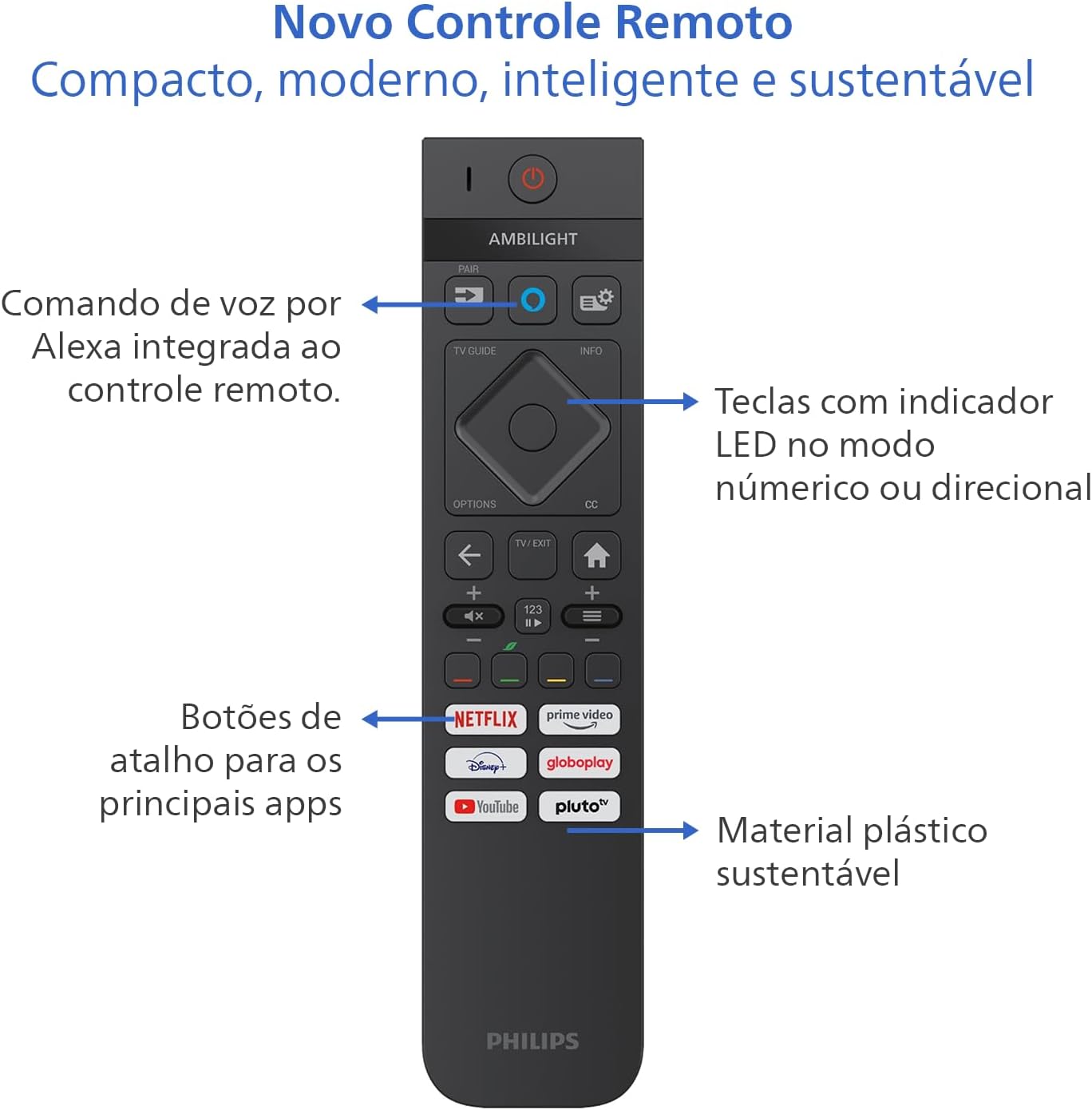
Image: Diagram showing the dimensions of the Philips 55 inch Smart TV with and without the stand, including VESA wall mount specifications (30cm).
3. Захын төхөөрөмжүүдийг холбох
Connect your devices to the TV's ports. Refer to the back and side views for port locations.
- Эрчим хүч: Connect the power cable to the TV and a suitable electrical outlet (110V/220V compatible).
- HDMI: Use HDMI 2.1 ports for high-definition devices like gaming consoles, Blu-ray players, or set-top boxes. There are 4 HDMI ports available.
- USB: Connect USB drives for media playback or external devices. There are 2 USB ports.
- Antenna/RF: Connect your antenna cable for terrestrial TV reception.
- Ethernet (RJ-45): Утастай интернет холболтын хувьд.
- Audio L-R: Аналог аудио оролт.
- SPDIF (Optical Audio): Дижитал аудио гаралтыг дууны самбар эсвэл гэрийн театрын системд зориулав.
- Чихэвчний гаралт: Чихэвч холбох.

Зураг: Side profile of the Philips 55 inch Smart TV, highlighting the accessible USB ports and other side connections.

Зураг: Ар талд view of the Philips 55 inch Smart TV, displaying the full array of input and output ports for various connections.
4. Анхдагч асаалт ба сүлжээний тохиргоо
After connecting the power cable, press the power button on the remote control. Follow the on-screen instructions to complete the initial setup, including language selection, country, and network connection (Wi-Fi or Ethernet). The TV supports Wi-Fi Dual Band and Bluetooth 5.2 for wireless connectivity.
Ашиглалтын заавар
1. Алсын удирдлагатай функцууд
The included remote control is designed for intuitive navigation and features voice command with integrated Alexa. Insert the two AAA batteries into the remote control before use.

Зураг: Нарийвчилсан view of the Philips Smart TV remote control, highlighting the voice command button (Alexa), LED indicator keys, and dedicated shortcut buttons for popular streaming applications.
- Цахилгаан товч: ТВ-г асаах эсвэл унтраана.
- Voice Command (Alexa): Press and hold to use voice commands for searching content, controlling smart home devices, and more.
- Навигацийн самбар: Цэсүүдээр гүйлгэж, сонголтуудыг сонгохын тулд чиглүүлэгч товчлууруудыг ашиглана уу.
- Товчлолын товчлуурууд: Direct access to popular streaming apps like Netflix, Prime Video, YouTube, and Pluto TV.
- Эзлэхүүн/Суваг: Дууны хэмжээг тохируулж, сувгаа солино.
- LED Indicator Keys: Keys with LED indicators for numeric or directional mode.
2. Smart TV Features (Titan OS)
Your TV runs on Titan OS, offering a user-friendly interface and quick access to various applications. The home screen is customizable, allowing you to prioritize your favorite apps and content.

Image: The Philips Smart TV's home screen, showing a selection of streaming applications and a personalized content layout.
- Хувийн болгосон нүүр дэлгэц: Access your favorite content and applications with recommendations tailored to your preferences.
- Зөн совинтой интерфэйс: Organize your home screen by prioritizing frequently used applications for easy daily access.
- Агуулгын нээлт: Easily find new content with agile navigation and smart search functions.
3. Ambilight технологи
Ambilight projects colors from the screen onto the surrounding wall, enhancing immersion. Your TV features three-sided Ambilight with 8 illumination modes.

Image: A Philips Ambilight TV displaying dynamic backlighting that extends the on-screen colors onto the wall, creating an immersive viewтуршлага.
- Байгалийн: Softer colors and brightness for visual comfort.
- Тод: Stronger, more vibrant Ambilight colors to create a sense of expanded imagery.
- Lounge: Can be active even when the TV is off, creating a cozy ambient atmosphere.
- Тоглоом: Adapts lights to dark and dynamic scenes, enhancing gaming immersion.
- Хөгжим: Ambilight follows the rhythm of music, ideal for creating a festive home environment.
- AmbiWake Up: Simulates sunrise with soft Ambilight, gentle music, and weather forecast.
- Ambi-sleep: With the screen off, Ambilight emits an orange light and nature sounds to promote sleep.
- Аврора: Transforms the TV into a decorative piece, displaying continuous animations for a pleasant ambiance.

Image: Comparison of Ambilight's Natural mode (soft, comfortable lighting) and Vivid mode (strong, vibrant lighting for expanded imagery).

Image: Comparison of Ambilight's Lounge mode (ambient lighting when TV is off) and Game mode (dynamic lighting for gaming immersion).

Image: Comparison of Ambilight's Music mode (lights synchronize with music) and AmbiWake Up mode (simulates sunrise).

Image: Comparison of Ambilight's Ambi-sleep mode (orange light and nature sounds for sleep) and Aurora mode (decorative animations).
4. Picture and Sound Quality
The TV features a P5 processor, 4K resolution, Dolby Vision, and HDR10+ for exceptional image quality. The audio system includes 40W RMS, Dolby Atmos, and DTS Play-Fi for immersive sound.

Image: Explanation of the Philips P5 Perfect Picture Engine, illustrating how it optimizes colors, contrasts, and movements for realistic images.

Image: Visual comparison demonstrating the enhanced detail and richness of images with Dolby Vision and HDR compared to standard display.
- P5 Processor: Optimizes colors, contrasts, and movements in real-time for vivid and realistic images.
- Dolby Vision болон HDR10+: Provides cinematic visual experience with impressive brightness, contrast, and color detail in 4K resolution.
- 40W RMS Audio: Powerful sound output that fills the environment with clarity and intensity.
- Dolby Atmos & DTS:X: Advanced audio technologies creating a three-dimensional sound effect for an immersive experience.
- Intellisound with AI: Automatic audio adjustment based on content, ensuring clear and balanced sound from subtle dialogues to intense soundtracks.
5. Тоглоомын онцлог
Designed for gamers, this TV offers a fluid and responsive gaming experience.

Image: The Philips Smart TV's Game Bar interface, showing various settings for optimizing the gaming experience, including VRR, ALLM, and FreeSync Premium.
- 144Гц VRR: Variable Refresh Rate ensures ultra-fast, tear-free, and stutter-free motion.
- AMD FreeSync Premium: Provides stable, fluid, and lag-free gaming.
- Тоглоомын талбар: Тоглоомын тусгай тохиргоонд хурдан нэвтрэх.
- ALLM (Автоматаар бага хоцролттой горим): Automatically switches to low-latency mode for responsive gaming.
- Cloud Gaming: Compatible with cloud gaming services like Blacknut.
Засвар үйлчилгээ
1. ТВ цэвэрлэх
- Дэлгэц: Зөөлөн, хөвөнгүй даавуугаар дэлгэцийг зөөлөн арчина. Зөрүүд тэмдгийн хувьд бага зэрэг dampдаавууг усаар эсвэл тусгай дэлгэц цэвэрлэгчээр угаана. Хэзээ ч шингэнийг дэлгэц рүү шууд цацаж болохгүй.
- Засгийн газрын танхим Зурагтын шүүгээг цэвэрлэхдээ зөөлөн, хуурай даавуу ашиглаарай. Зүлгүүрийн цэвэрлэгч эсвэл уусгагч бодис хэрэглэхээс зайлсхий.
- Алсын удирдлага: Зөөлөн, хуурай даавуугаар арчина.
2. Програм хангамжийн шинэчлэлтүүд
Periodically check for software updates to ensure optimal performance and access to the latest features. You can usually find this option in the TV's settings menu under "System" or "About TV". Ensure your TV is connected to the internet for updates.
Алдааг олж засварлах
Хэрэв та ТВ-тэй холбоотой асуудалтай тулгарвал дэмжлэгтэй холбогдохын өмнө дараах нийтлэг алдааг олж засварлах алхмуудыг уншина уу.
Хүч чадалгүй
- Цахилгааны кабелийг телевизор болон цахилгааны залгуурт найдвартай холбосон эсэхийг шалгаарай.
- Цахилгаан залгуур ажиллаж байгаа эсэхийг өөр төхөөрөмжид залгаж шалгана уу.
- Зөвхөн алсын удирдлага биш, зурагт дээрх асаах товчийг дарж үзээрэй.
Зураг байхгүй эсвэл зургийн чанар муу
- Зөв оролтын эх үүсвэр сонгогдсон эсэхийг шалгана уу (жишээлбэл, HDMI 1, ТВ).
- Бүх кабелийн холболтууд (HDMI, антенн) сул эсвэл гэмтсэн эсэхийг шалгана уу.
- ТВ цэсэнд зургийн тохиргоог (тод байдал, тодосгогч, өнгө) тохируулна уу.
- If using an external device, try connecting it to a different HDMI port or another TV to rule out device issues.
Дуу байхгүй эсвэл дууны чанар муу
- Дууг хаагаагүй, асаасан эсэхийг шалгаарай.
- Check audio settings in the TV menu, ensuring the correct audio output is selected (e.g., TV speakers, external audio system).
- If using external speakers or a soundbar, check their power and connections.
Алсын удирдлага ажиллахгүй байна
- Батерейг шинэ AAA батерейгаар солино уу.
- Алсын удирдлага болон ТВ-ийн IR мэдрэгчийн хооронд ямар ч саад бэрхшээл байхгүй эсэхийг шалгаарай.
- If the remote uses Bluetooth, try re-pairing it with the TV (refer to the TV's settings for pairing instructions).
Network/Internet Connection Issues
- Check your router and modem to ensure they are powered on and functioning correctly.
- Чиглүүлэгч болон модемоо дахин эхлүүлнэ үү.
- If using Wi-Fi, ensure the TV is within range of your router. Try connecting via Ethernet cable if possible.
- Verify Wi-Fi password if prompted.
Үзүүлэлтүүд
| Онцлог | Дэлгэрэнгүй |
|---|---|
| Брэнд | Philips |
| Загвар | 55PUG8929/78 |
| Дэлгэцийн хэмжээ | 55 инч |
| Дэлгэцийн технологи | 4K UHD, LED, IPS |
| Шийдвэр | 3840 x 2160 пиксел (4К) |
| Сэргээх хурд | 144 Гц |
| Хариу өгөх хугацаа | 8 миллисекунд |
| Viewing өнцөг | 178 градус |
| Харьцаа | 16:9 |
| Ялгаатай харьцаа | 1:200,000 |
| Үйлдлийн систем | Титан үйлдлийн систем |
| Санах ойн хадгалах багтаамж | 8 ГБ |
| Онцлог шинж чанарууд | Dolby Atmos / DTS-X, HDR10+/HLG/HDR10, Titan OS, Ambilight |
| Аудио гаралтын хүч | 40 ватт (RMS) |
| Хүрээлэн буй орчны дууны сувгууд | 2.0 |
| Холболтын технологи | HDMI, USB, Wi-Fi, Bluetooth |
| HDMI портууд | 4 (HDMI 2.1 нийцтэй) |
| USB портууд | 2 |
| Бусад холболтууд | 1 Audio L-R, 1 RF (Antenna), 1 SPDIF (Optical Audio), 1 Headphone Output, 1 Ethernet RJ-45 |
| Утасгүй холболт | Bluetooth 5.2, Wi-Fi Dual Band |
| Ботьtage | 110 вольт, 220 вольт |
| Эрчим хүчний хэмнэлтийн шошго | A (ENCE) |
| Бүтээгдэхүүний хэмжээсүүд (суурьгүй) | 123 x 8.1 x 72 см (Ө x Ө x Ө) |
| Бүтээгдэхүүний жин (суурьгүй) | 14.2 кг |
| Бүтээгдэхүүний жин (индэртэй) | 14.6 кг |
| Өнгө | Хар |
| Баталгаажуулалт | INMETRO |
| Жил | 2025 |
Баталгаат хугацааны мэдээлэл
Your Philips Smart TV model 55PUG8929/78 comes with a Үйлдвэрлэгчийн 1 жилийн баталгаат хугацаа. This warranty covers defects in materials and workmanship under normal use. Please retain your proof of purchase for warranty claims. For detailed terms and conditions, refer to the legal and safety leaflet included in your package.
Хэрэглэгчийн дэмжлэг
For further assistance, technical support, or warranty claims, please contact Philips customer service. You can find contact information on the Philips official webсайт эсвэл таны ТВ-д өгсөн баримт бичигт.
Philips албан ёсны Webсайт: www.philips.com