Танилцуулга
Thank you for choosing the MLOVE E90 Bluetooth Speaker. This manual provides detailed instructions for setting up, operating, and maintaining your speaker to ensure optimal performance and longevity. Please read this manual thoroughly before using the product and retain it for future reference.
Бүтээгдэхүүн дууссанview
Хайрцагт юу байна
- MLOVE E90 Bluetooth Speaker
- USB-C цэнэглэгч кабель
- Мөрний оосор
- Түргэн эхлүүлэх гарын авлага
Гол онцлогууд
- 80W Powerful Stereo Sound: Delivers robust audio output for an immersive listening experience.
- Динамик RGB гэрэлтүүлэг: Features customizable RGB lights that sync with music, enhancing the ambiance.
- IP65 тоос, ус нэвтэрдэггүй: Гадаа ашиглахад зориулагдсан, тоос шороо, ус цацагдахаас хамгаалагдсан.
- Жинхэнэ утасгүй стерео (TWS) функц: Allows pairing two E90 speakers for enhanced stereo sound.
- Олон тоглуулах горим: Supports Bluetooth, AUX-in, USB drive, and MicroSD card playback.
- Батерейны урт наслалт: Equipped with a large capacity battery for extended playtime.
- Зөөврийн дизайн: Includes a shoulder strap for easy transport.
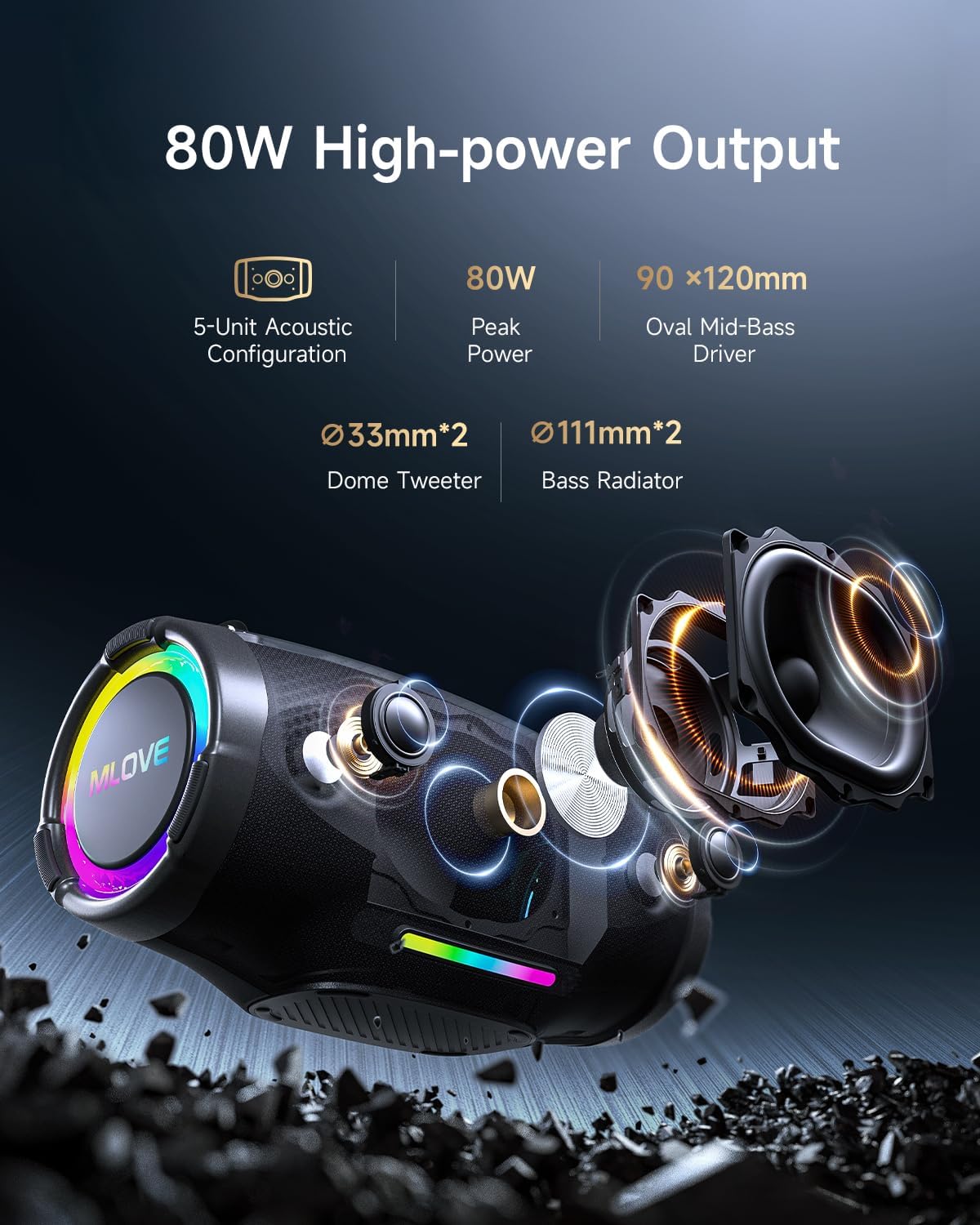
Image: Internal components of the MLOVE E90 speaker, highlighting its 80W peak power output, 5-unit acoustic configuration, including two 33mm dome tweeters, two 111mm bass radiators, and a 90x120mm oval mid-bass driver.

Image: The MLOVE E90 speaker illustrating its powerful battery life, emphasizing its large capacity and Type-C quick charge capability for uninterrupted listening.
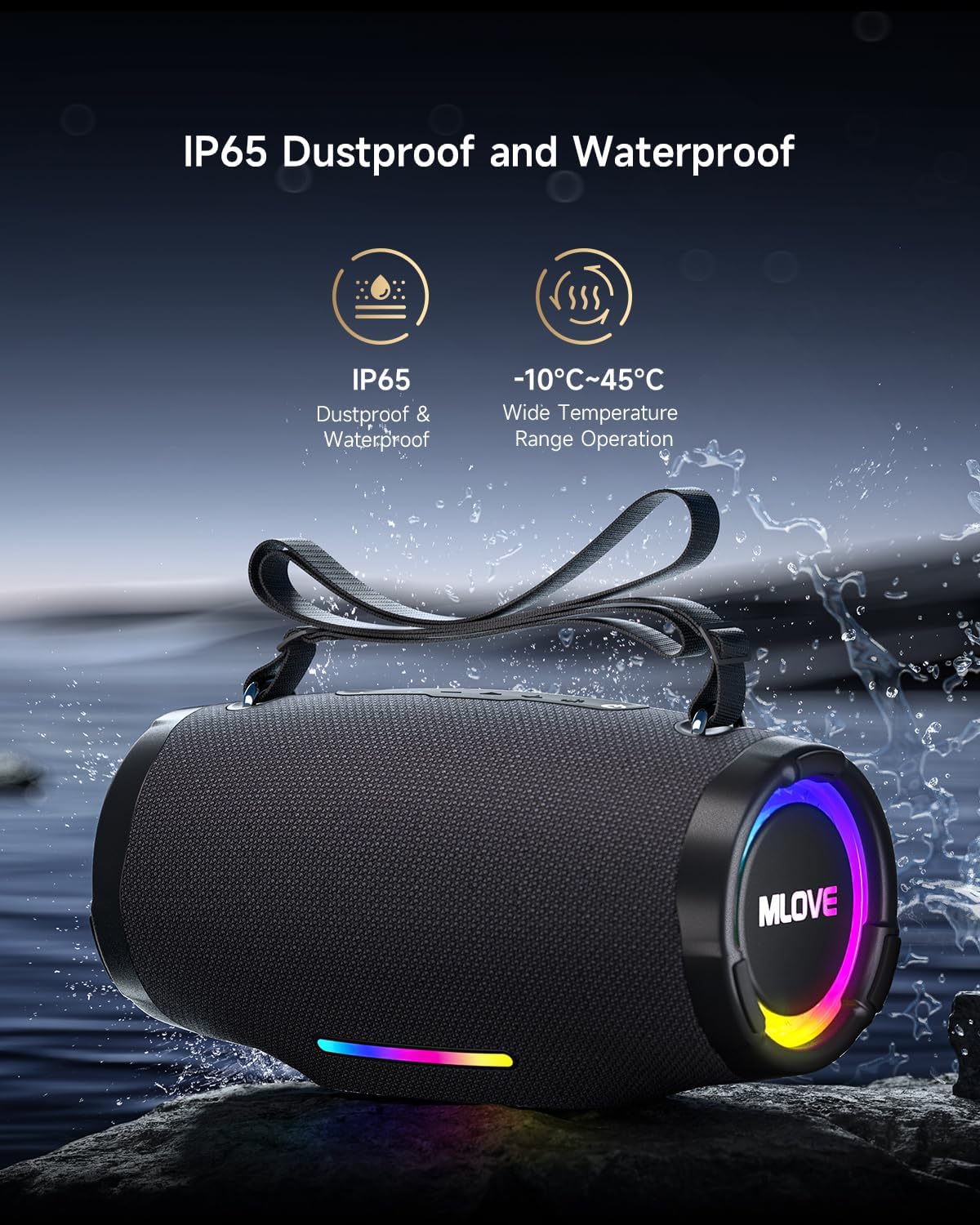
Image: The MLOVE E90 speaker shown with water splashing around it, highlighting its IP65 dustproof and waterproof rating, making it suitable for various outdoor environments and temperatures from -10°C to 45°C.
Тохируулах гарын авлага
1. Илтгэгчийг цэнэглэх
- Locate the USB-C charging port, usually protected by a rubber flap on the back or side of the speaker.
- Өгөгдсөн USB-C кабелийг чанга яригчийн цэнэглэх порттой холбоно уу.
- USB-C кабелийн нөгөө үзүүрийг тохирох USB тэжээлийн адаптер (дагаагүй) эсвэл компьютерийн USB порт руу холбоно уу.
- The charging indicator lights will illuminate, typically showing charging progress. A full charge may take approximately 4.5 hours with a 3A charger.
- Once fully charged, disconnect the charging cable and ensure the rubber flap is securely closed to maintain water resistance.
2. Асаах/унтраах
- Асаахын тулд: Press and hold the Power button for a few seconds until you hear an audible prompt or see the indicator lights activate.
- Унтраахын тулд: Press and hold the Power button again for a few seconds until you hear an audible prompt or the indicator lights turn off.
3. Bluetooth хослол
- Ensure the speaker is powered on and in Bluetooth pairing mode. The Bluetooth indicator light will typically flash.
- Төхөөрөмж дээрээ (ухаалаг утас, таблет, компьютер) Bluetooth-г идэвхжүүлж, боломжтой төхөөрөмжүүдийг хайж олоорой.
- Select "MLOVE E90" from the list of found devices.
- Хослуулсны дараа чанга яригч нь дуут баталгаажуулалт өгөх бөгөөд Bluetooth заагч гэрэл тогтворжино.
- The speaker supports Bluetooth 5.4 for stable and efficient connection.

Image: The MLOVE E90 speaker demonstrating its ability to connect to two devices simultaneously (e.g., a smartphone and a tablet) with seamless switching, utilizing Bluetooth 5.4 for stable playback.
4. Жинхэнэ утасгүй стерео (TWS) хослуулах
To achieve a true stereo sound experience, you can pair two MLOVE E90 speakers together.
- Ensure both MLOVE E90 speakers are powered on and not connected to any Bluetooth device.
- On one speaker (this will be the primary speaker), press the TWS button (refer to your Quick Start Guide for button location). The TWS indicator light will flash.
- Үндсэн чанга яригч нь хоёрдогч чанга яригчийг автоматаар хайх болно.
- Once connected, both speakers will emit an audible confirmation, and the TWS indicator lights will become solid.
- Одоо 3-р алхамд тайлбарласны дагуу төхөөрөмжөө Bluetooth-ээр дамжуулан үндсэн чанга яригчтай холбоно уу. Аудио нь хоёр чанга яригчаар дамжуулан стерео хэлбэрээр тоглогдоно.

Image: Two MLOVE E90 speakers shown wirelessly connected, demonstrating the True Wireless Stereo (TWS) function which allows them to play audio in synchronized stereo for an enhanced listening experience.
Ашиглалтын заавар
Үндсэн удирдлага
- Цахилгаан товч: Асаах/унтраахын тулд удаан дарна уу.
- Тоглуулах/түр зогсоох товчлуур: Хөгжим тоглуулах эсвэл түр зогсоохын тулд нэг удаа дарна уу.
- Дууны хэмжээг нэмэгдүүлэх (+): Press once to increase volume. Press and hold to skip to the next track.
- Дууг багасгах (-): Press once to decrease volume. Press and hold to skip to the previous track.
- Горимын товчлуур (M): Press to switch between playback modes (Bluetooth, AUX, USB, MicroSD).
- Гэрэл товчлуур: Press to cycle through RGB light modes. Press and hold to turn lights off/on.
- Bass Boost товчлуур: Press to activate/deactivate enhanced bass.
RGB гэрлийн горимууд
The MLOVE E90 features dynamic RGB lighting with 16.8 million colors. Use the Light button to cycle through various modes, including beat-sync and dynamic flowing light effects. Press and hold the Light button to turn the lights off or on.
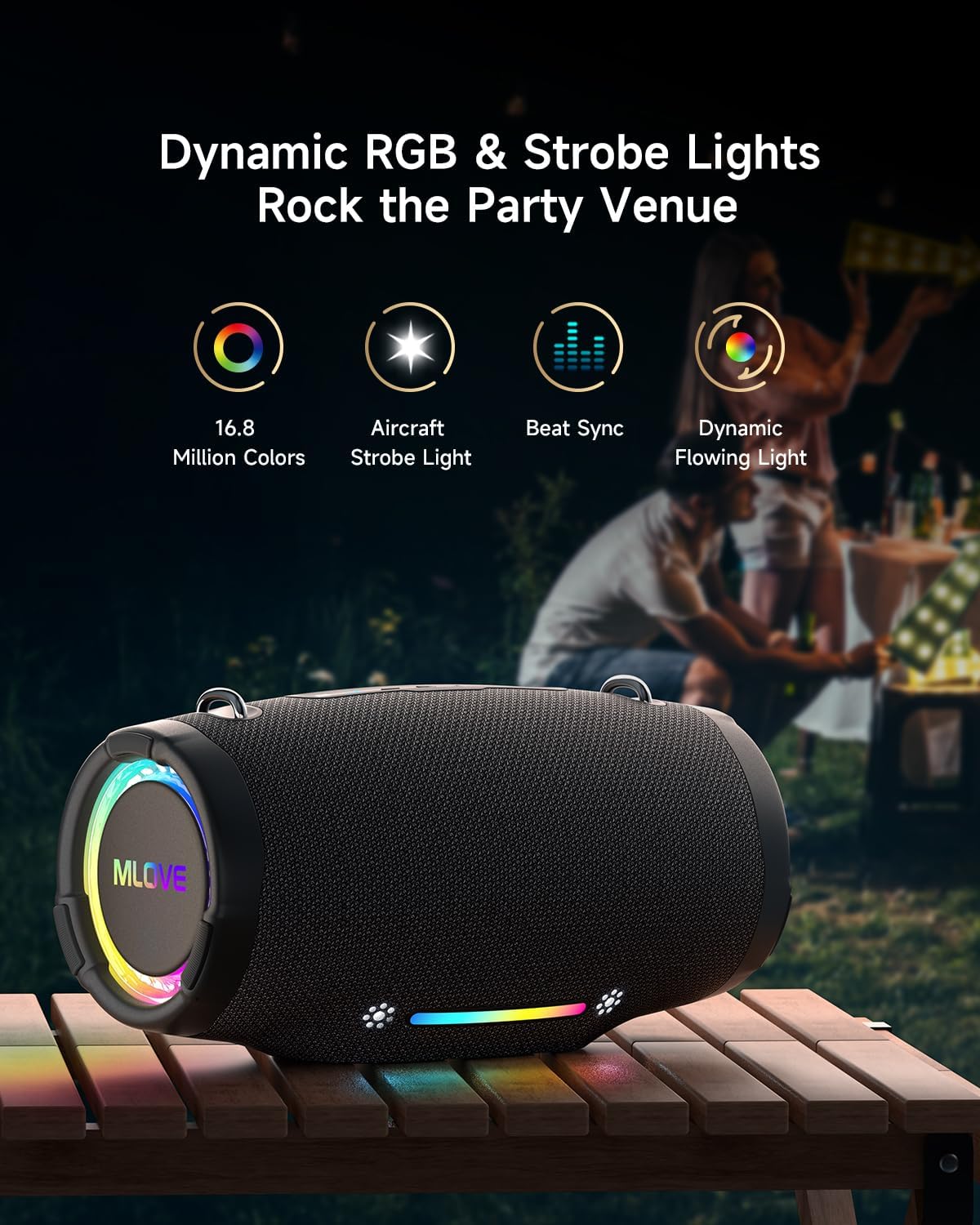
Image: The MLOVE E90 speaker displaying its dynamic RGB and strobe lights in an outdoor party setting, illustrating features like 16.8 million colors, aircraft strobe light effects, beat synchronization, and dynamic flowing light patterns.
Олон тоглуулах горим
Чанга яригч нь янз бүрийн аудио оролтын аргуудыг дэмждэг:
- Bluetooth 5.4: Тохиромжтой төхөөрөмжүүдэд утасгүй холболт.
- AUX оролт: 3.5 мм-ийн аудио кабель (дагалдахгүй) ашиглан гадаад аудио төхөөрөмжүүдийг холбоно уу.
- USB Playing: Аудио бүхий USB флаш дискийг оруулна уу files (WAV, WMA, MP3 formats supported).
- MicroSD Card Playing: Insert a MicroSD card with audio files (WAV, WMA, MP3 formats supported).
Use the Mode button to switch between these input sources. The speaker will automatically detect and switch to an inserted USB drive or MicroSD card.
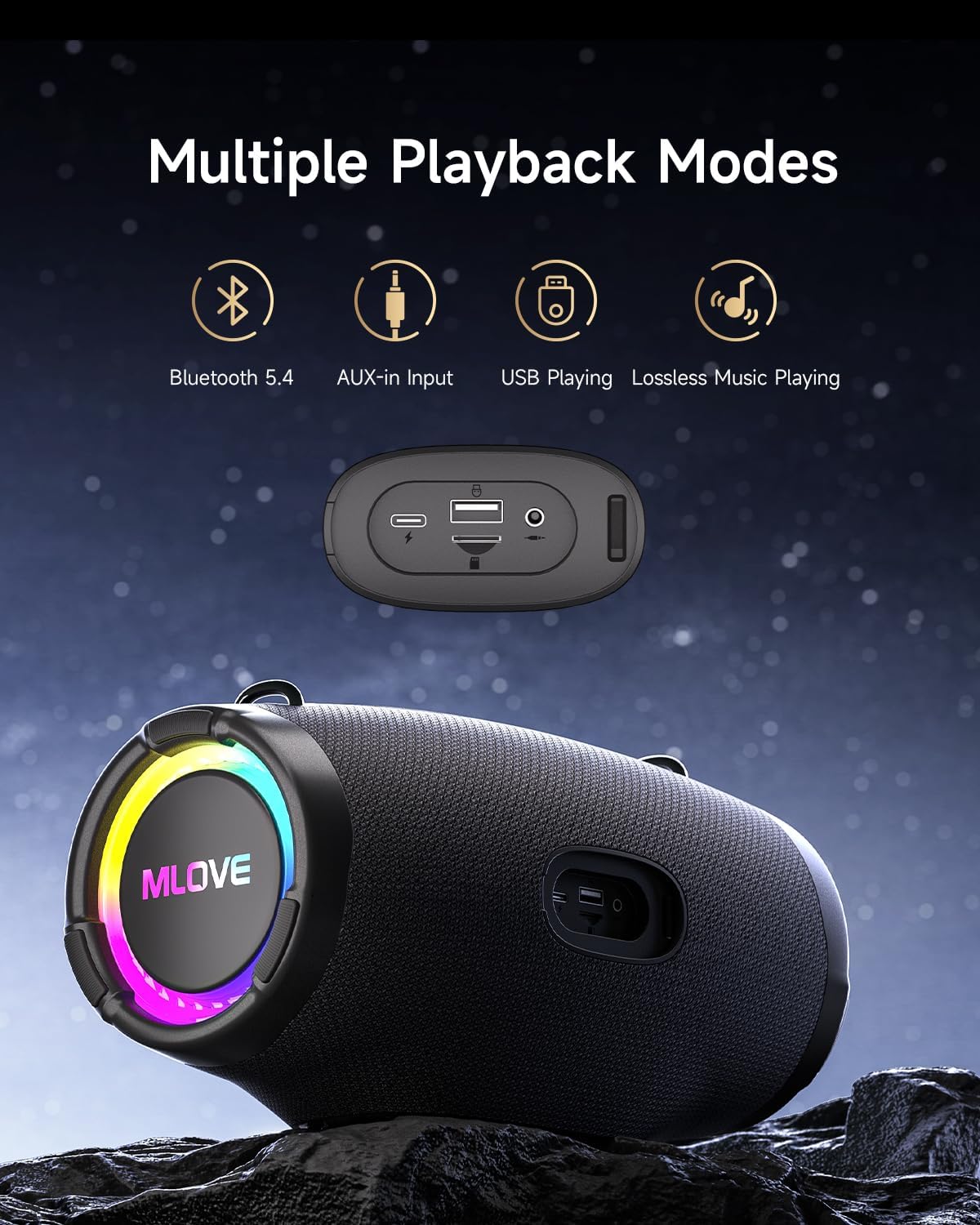
Image: The MLOVE E90 speaker displaying its connectivity panel with ports for USB-C charging, USB-A for playing music from a USB drive and power bank functionality, and a 3.5mm AUX-in port, alongside icons for Bluetooth 5.4, AUX-in, USB Playing, and Lossless Music Playing.
Засвар үйлчилгээ
Цэвэрлэгээ
- Чанга яригчийг зөөлөн арчих, damp даавуу.
- Зүлгүүрийн цэвэрлэгч, спирт, химийн уусгагч хэрэглэж болохгүй, учир нь эдгээр нь гадаргууг гэмтээж болзошгүй.
- Ensure all port covers are securely closed before cleaning with a damp даавуу.
Усны эсэргүүцэл (IP65)
- The MLOVE E90 is rated IP65, meaning it is protected against dust ingress and low-pressure water jets from any direction.
- This speaker is suitable for use in light rain or near water, but it should not be submerged in water.
- Always ensure the rubber flap covering the charging and input ports is securely closed to maintain water resistance.
- Do not expose the speaker to saltwater or other corrosive liquids. If exposed, rinse with fresh water and dry thoroughly.
Хадгалах
- Чанга яригчийг нарны шууд тусгал, хэт температураас хол, сэрүүн, хуурай газар хадгална уу.
- Хэрэв удаан хугацаагаар хадгалах бол батерейны эрүүл мэндийг хадгалахын тулд хэдэн сар тутамд ойролцоогоор 50% хүртэл цэнэглээрэй.
Алдааг олж засварлах
| Асуудал | Боломжит шалтгаан | Шийдэл |
|---|---|---|
| Чанга яригч асахгүй байна. | Батерей бага. | Өгөгдсөн USB-C кабелийг ашиглан чанга яригчийг цэнэглэ. |
| Bluetooth-ээр холбох боломжгүй. | Чанга яригчийг холбох горимд оруулаагүй; төхөөрөмжийн Bluetooth унтраалттай; чанга яригчаас хэтэрхий хол байна. | Ensure speaker is in pairing mode (flashing Bluetooth light). Turn Bluetooth on your device. Move device closer to speaker (within 10 meters). Forget "MLOVE E90" on your device and try pairing again. |
| Дуу байхгүй эсвэл дуу багатай. | Чанга яригч эсвэл төхөөрөмж дээрх дууны түвшин хэт бага байна; оролтын горим буруу байна. | Increase volume on both the speaker and your connected device. Press the Mode button to ensure the correct input source is selected. |
| TWS холболт амжилтгүй боллоо. | Чанга яригч аль хэдийн өөр төхөөрөмжтэй холбогдсон байна; чанга яригчид хоорондоо хэт хол байна. | Ensure both speakers are disconnected from any Bluetooth devices. Place speakers close to each other. Follow TWS pairing instructions carefully. |
| RGB гэрэл ажиллахгүй байна. | Гэрэл унтарсан; чанга яригч эвдэрсэн. | Press the Light button to cycle through modes or press and hold to turn them on. If issue persists, contact support. |
| Өндөр түвшний дуу чимээг гажуудуулсан. | Хэмжээ хэт өндөр; аудио эх сурвалжийн чанар. | Reduce the volume. Ensure the audio source is of good quality. |
Үзүүлэлтүүд
| Брэнд | ХАЙВ |
| Загварын нэр | E90 |
| Чанга яригчийн төрөл | Зөөврийн Bluetooth чанга яригч |
| Чанга яригчийн хамгийн их гаралтын чадал | 80 ватт |
| Аудио гаралтын горим | Стерео |
| Утасгүй холбооны технологи | Bluetooth 5.4 |
| Давтамжийн хариу үйлдэл | 20000 Hz (Note: Typically a range, e.g., 20Hz-20kHz) |
| Эрчим хүчний эх үүсвэр | Батерейгаар ажилладаг |
| Усны хамгаалалттай үнэлгээ | IP65 |
| Бүтээгдэхүүний хэмжээ (D x W x H) | 15.4 x 30.5 x 15.8 см |
| Зүйлийн жин | 2000 грамм |
| Тохиромжтой төхөөрөмжүүд | Хувийн компьютер, ухаалаг утас, таблет, телевизор |
| Зөвлөмж болгож буй хэрэглээ | For smartphone or tablet, For ambient sound system |
| Хяналтын арга | Application (Physical buttons also available) |
| Оруулсан бүрэлдэхүүн хэсгүүд | Quick Start Guide, USB-C Charging Cable, Shoulder Strap |
Баталгаат болон дэмжлэг
The MLOVE E90 Bluetooth Speaker comes with a 2 жилийн үйлдвэрлэгчийн хязгаарлагдмал баталгаа худалдан авсан өдрөөс. Энэхүү баталгаа нь ердийн ашиглалтын үеийн үйлдвэрлэлийн согог, гүйцэтгэлийг хамарна.
Баталгаат хугацаа нь буруу ашиглалт, осол аваар, зөвшөөрөлгүй өөрчлөлт, хэвийн элэгдлээс үүдэлтэй гэмтэлд хамаарахгүй. Баталгаат заргад зориулж худалдан авалтаа нотлох баримтаа үлдээнэ үү.
Хэрэглэгчийн дэмжлэг
For technical assistance, warranty claims, or any questions regarding your MLOVE E90 speaker, please contact our customer support team. Refer to the contact information provided in your Quick Start Guide or on the official MLOVE webсайт.
Note: Specific contact details may vary by region.


