Танилцуулга
This manual provides comprehensive instructions for the safe and efficient operation of your NIIMBOT D110 Bluetooth Label Maker Machine. Please read this manual thoroughly before using the device to ensure proper setup, usage, and maintenance.
Багцын агуулга
Багцыг нээхдээ дараах бүх зүйлс багтсан эсэхийг шалгана уу.
- 1 x NIIMBOT D110 Label Maker Machine
- 1 x 12x40mm Thermal Label Roll (pre-installed in printer)
- 1 x Type-C USB кабель
- Хэрэглэгчийн гарын авлага (энэ баримт бичиг)
- Additional 3 rolls of clear labels (packaged separately)
Тохиргоо
1. Төхөөрөмжийг цэнэглэж байна
Before initial use, fully charge the NIIMBOT D110 label maker.
- Connect the provided Type-C USB cable to the charging port on the label maker.
- USB кабелийн нөгөө үзүүрийг стандарт USB тэжээлийн адаптер (дагаагүй) эсвэл компьютерийн USB порт руу холбоно уу.
- Заагч гэрэл нь цэнэглэх төлөвийг харуулах болно (жишээлбэл, цэнэглэж байгаа бол улаан, бүрэн цэнэглэгдсэн бол ногоон).
2. Installing Label Tape
The device comes with one roll of label tape pre-installed. To replace or install new tape:
- Open the label compartment cover by gently lifting it.
- Remove any empty label roll.
- Insert the new label roll with the printing surface facing upwards, ensuring the label edge extends slightly out of the slot.
- Close the compartment cover firmly until it clicks into place.

Image: NIIMBOT D110 Label Maker with a label roll being inserted and a smartphone displaying the NIIMBOT app interface for label creation.
3. App Download and Bluetooth Connection
The NIIMBOT D110 operates via a dedicated mobile application.
- Download the "NIIMBOT" app from the App Store (for iOS) or Google Play Store (for Android). You can search for "NIIMBOT" or scan the QR code provided in the quick start guide.
- Таны мобайл төхөөрөмж дээр Bluetooth идэвхжсэн эсэхийг шалгаарай.
- NIIMBOT аппликейшнийг нээнэ үү.
- Turn on the D110 label maker by pressing and holding the power button.
- Within the app, search for available devices and select "D110" to connect. The indicator light on the printer will confirm a successful connection.
Image: The NIIMBOT D110 Bluetooth Label Maker, highlighting its wireless connectivity and showing icons for downloading the companion app from the App Store and Google Play.
4. PC Connection (Optional)
For more versatile content editing, the D110 can also be connected to a computer.
- Download and install the necessary drivers from the official NIIMBOT webсайт.
- Connect the D110 to your computer using the provided Type-C USB cable.
- Follow the on-screen instructions in the NIIMBOT PC software to begin creating and printing labels.
Ашиглалтын заавар
1. Creating Labels with the NIIMBOT App
The NIIMBOT app offers various features for designing your labels.
- Текст оруулах: Enter your desired text.
- Symbols & Icons: Access over 1500 symbols to enhance your labels.
- Хэлнүүд: Supports over 10 languages for text input.
- Хүрээ: Choose from over 100 frames to customize label borders.
- QR Code & Barcode: Generate and print QR codes or barcodes directly from the app.
- Загварууд: Utilize various built-in templates for quick label creation.
- Багц хэвлэх: Print multiple identical or different labels efficiently.

Image: The NIIMBOT app interface showcasing its powerful functions, including a wide selection of symbols, support for multiple languages, various frames, and the ability to generate QR codes and barcodes.
2. Шошго хэвлэх
Аппликейшн дээр шошгоны дизайнаа хийсний дараа:
- Review your label design on the app screen.
- Ensure the D110 is connected via Bluetooth and has sufficient battery.
- Аппликейшн дээрх "Хэвлэх" товчийг дарна уу.
- The label maker will automatically feed and print the label.
- Хэвлэсэн шошгыг шүдтэй ирмэгийн дагуу урж ав.
3. Supported Label Sizes
The D110 supports various label widths from 0.47 inches (12mm) to 0.59 inches (15mm). Ensure you use genuine NIIMBOT thermal labels for optimal performance.

Image: The NIIMBOT D110 Label Maker demonstrating its compatibility with various label sizes, including 12x22mm, 12x40mm, 14x40mm, 14x60mm, 15x30mm, and 15x50mm, with exampхэвлэсэн шошгоны цөөн тоо.
4. Өргөдөл Examples
The NIIMBOT D110 is suitable for a wide range of labeling needs, including:
- School supplies (notebooks, binders, pencil cases)
- Food storage and organization
- Reminder labels for medication or tasks
- Gift labeling
- Travel item identification
- Cosmetic organization
- Office filing and organization
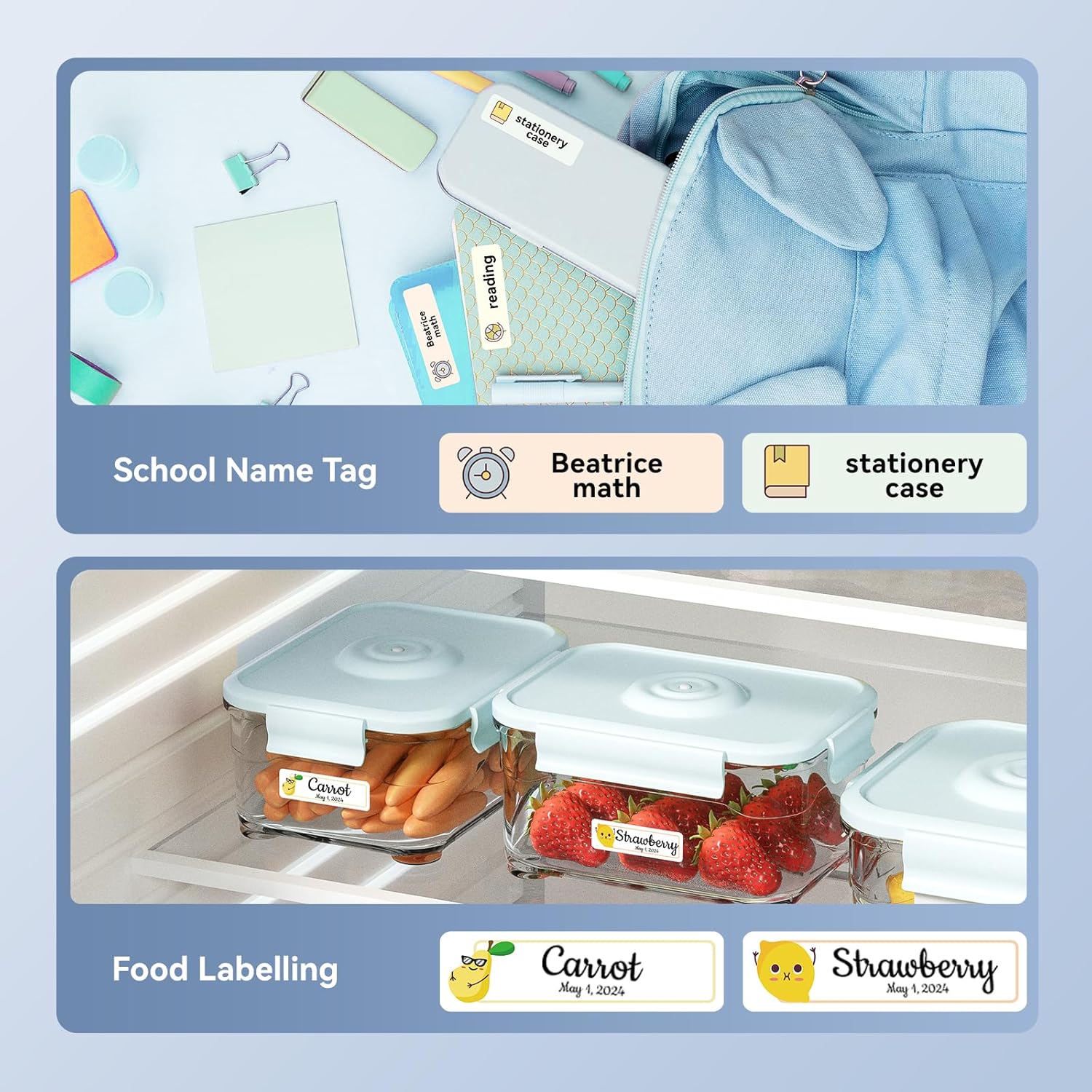
Зураг: Жишээ ньamples of labels created with the NIIMBOT D110, demonstrating use for school name tags on backpacks and stationery, as well as for food labeling on storage containers with contents and dates.

Зураг: Жишээ ньamples of labels created with the NIIMBOT D110, showing application for medication reminders in a pill organizer and decorative labels for gifts.

Зураг: Жишээ ньamples of labels created with the NIIMBOT D110, illustrating use for organizing travel toiletries like shampoo and conditioner, and for identifying makeup products such as eyeliner and eyeshadow.
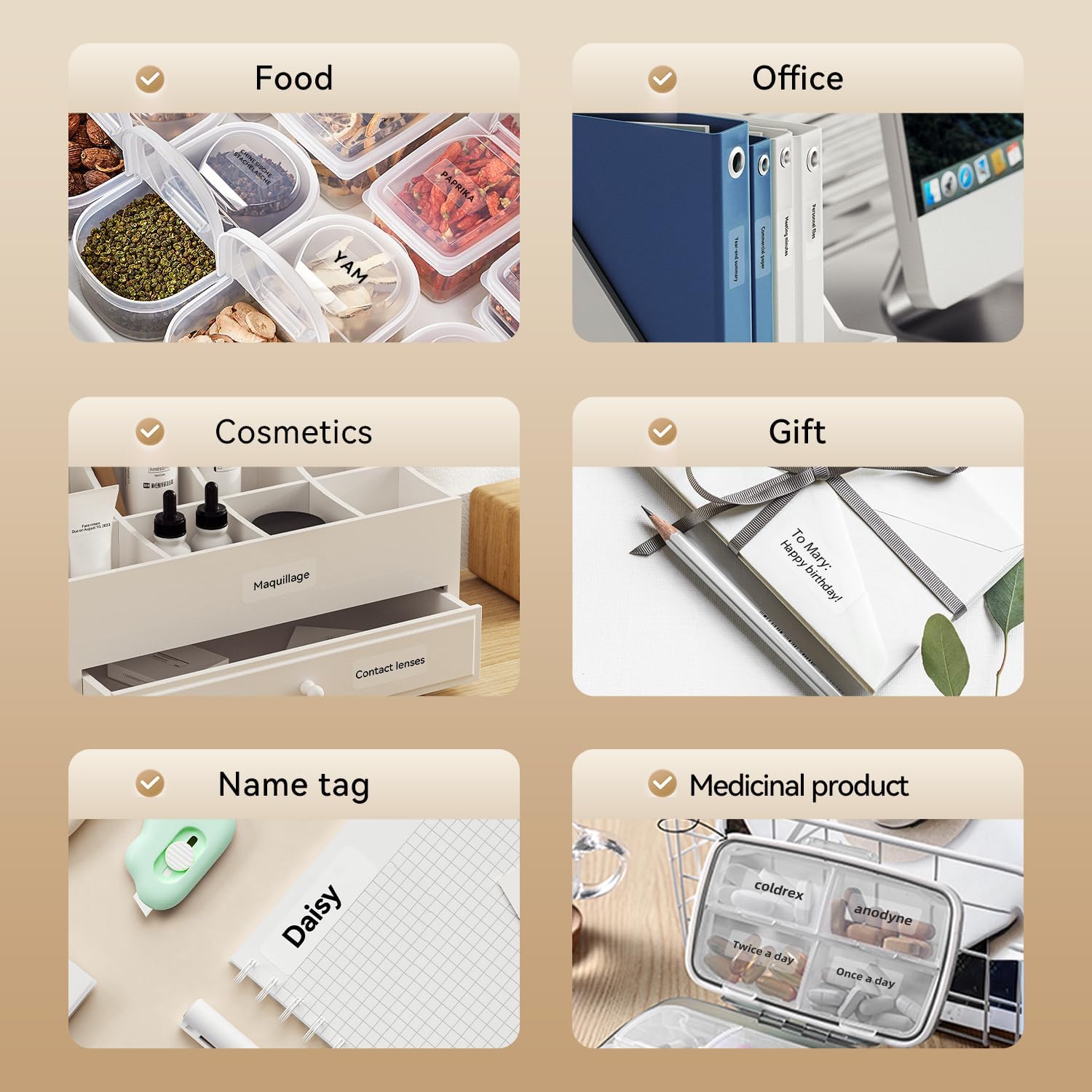
Image: A collage of various application examples for NIIMBOT D110 labels, including organizing food containers, office supplies, cosmetic items, gifts, creating name tags, and labeling medicinal products.
Засвар үйлчилгээ
1. Хэвлэх толгойг цэвэрлэх
To ensure optimal print quality, regularly clean the print head.
- Turn off the label maker and disconnect it from any power source.
- Шошгоны тасалгааны тагийг нээнэ үү.
- Хэвлэх толгойг хөвөн арчдасаар зөөлөн арчинаampизопропилийн спиртээр хангадаг.
- Allow the print head to dry completely before closing the cover and resuming use.
2. Зайны арчилгаа
Батерейны ашиглалтын хугацааг уртасгахын тулд:
- Байнга зайгаа бүрэн цэнэглэхээс зайлсхий.
- Төхөөрөмжийг байнга ашиглахгүй байсан ч тогтмол цэнэглээрэй.
- Төхөөрөмжийг удаан хугацаагаар ашиглаагүй бол сэрүүн, хуурай газар хадгална.
3. Хадгалах
Store the label maker and label rolls in a dry environment, away from direct sunlight and extreme temperatures.
Алдааг олж засварлах
| Асуудал | Боломжит шалтгаан | Шийдэл |
|---|---|---|
| Төхөөрөмж асахгүй байна | Батерей бага | Өгөгдсөн USB кабелийг ашиглан төхөөрөмжийг цэнэглэ. |
| Bluetooth-ээр холбогдож чадахгүй байна | Bluetooth is off; App not open; Device out of range | Ensure Bluetooth is enabled on your phone, open the NIIMBOT app, and keep the printer within close proximity. Restart both devices if necessary. |
| Хэвлэх чанар муу | Dirty print head; Incorrect label type; Low battery | Clean the print head (refer to Maintenance section). Ensure you are using genuine NIIMBOT thermal labels. Charge the device. |
| Шошго нь зөв хооллож чадахгүй байна | Label roll incorrectly installed; Label jammed | Open the cover and re-install the label roll, ensuring it is properly aligned. Remove any jammed labels carefully. |
| "No ink" message | Thermal printers do not use ink. This message is incorrect or a misunderstanding. | The D110 is a thermal printer and does not require ink. Ensure the label roll is correctly installed and is thermal paper. |
Үзүүлэлтүүд
| Онцлог | Дэлгэрэнгүй |
|---|---|
| Загвар | NIIMBOT D110 |
| Хэвлэх арга | Thermal Printing (No Ink Required) |
| Холболт | Bluetooth, USB (for PC) |
| Дэмждэг шошгоны өргөн | 0.47'' - 0.59'' (12мм - 15мм) |
| Жин | 0.2 lb (approximately 90g) |
| Хэмжээ | 3.8'' x 2.9'' x 1.1'' (approximately 9.65cm x 7.37cm x 2.79cm) |
| Эрчим хүчний оролт | C төрлийн USB |

Image: A visual comparison showing the NIIMBOT D110 as significantly smaller and lighter (0.2 lb, 3.8"x2.9"x1.1") compared to a traditional label printer (1.2 lb, 7"x6.3"x2.2").
Баталгаат болон дэмжлэг
For warranty information and technical support, please refer to the official NIIMBOT website or contact NIIMBOT customer service directly. Details can typically be found on the product packaging or the manufacturer's webсайт.
Онлайн дэмжлэг: зочилно уу www.niimbot.com for FAQs, driver downloads, and contact information.


