
Танилцуулга
This manual provides essential information for the setup, operation, and maintenance of your Hyperkin The Competitor Wired Controller. Designed for precision and performance, this controller is compatible with Xbox Series X|S, Xbox One, and Windows PC. Please read this manual thoroughly before use to ensure optimal performance and longevity of your device.
Багцын агуулга
Таны багцад бүх зүйл байгаа эсэхийг шалгана уу:
- Hyperkin The Competitor Wired Controller
- Салдаг USB-C кабель
- Түргэн эхлүүлэх гарын авлага
- Swappable Stick Caps (Domed & Concave)

Image: Contents of the Hyperkin The Competitor package, including the controller, cable, and documentation.
Тохиргоо
The Hyperkin The Competitor Wired Controller offers plug-and-play functionality for supported platforms.
Connecting to Xbox Series X|S or Xbox One:
- Xbox консолоо асаалттай байгаа эсэхийг шалгаарай.
- Connect the detachable USB-C cable to the USB-C port on the top of the controller.
- Plug the USB-A end of the cable into an available USB port on your Xbox console.
- Хянагч автоматаар холбогдож, ашиглахад бэлэн болно.
Connecting to PC (Windows):
- Таны компьютер асаалттай байгаа эсэхийг шалгаарай.
- Connect the detachable USB-C cable to the USB-C port on the top of the controller.
- Plug the USB-A end of the cable into an available USB port on your PC.
- Windows will automatically detect and install the necessary drivers. The controller will be ready for use once the installation is complete.
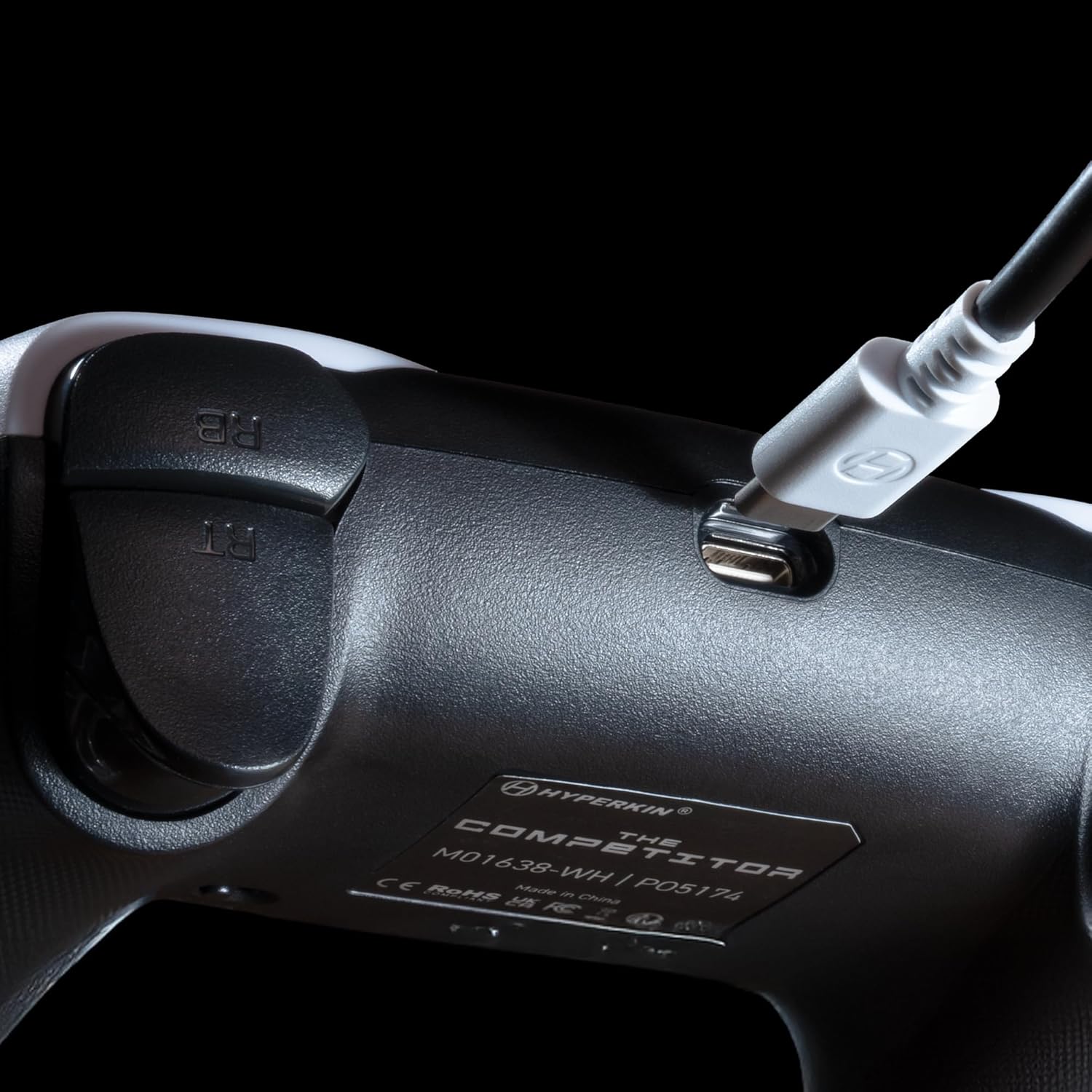
Зураг: Ойролцоогоор view of the USB-C port on the Hyperkin The Competitor controller, illustrating the connection point for the detachable cable.
Хянагчийг ажиллуулах
Familiarize yourself with the key features and controls of your Hyperkin The Competitor controller.
Гол онцлогууд:
- Hall Effect Joysticks: Experience drift-free accuracy and magnetic precision for ultra-smooth movement and long-lasting durability.
- Импульсийн триггерүүд: Provides immersive and reliable haptic feedback for enhanced gameplay.
- Symmetrical Analog Stick Layout: Offers a balanced and comfortable design, supporting precision play.
- Segmented Traditional D-pad: Delivers ultra-responsive control and satisfying feedback for pinpoint accuracy.
- Програмчлагдах боломжтой буцах товчлуурууд: Two customizable rear buttons for on-the-fly remapping to suit your playstyle.
- Зориулалтын дууг хаах товчлуур: Quickly mute your microphone during gameplay.
- Swappable Stick Caps: Customize your feel with included Domed and Concave stick caps.
- Anti-Friction Gates & Metal Glide Rings: Engineered for ultra-smooth control and reduced wear.

Image: Diagram highlighting the Hall Effect Sticks and the Symmetrical Twin Stick Layout of the controller.

Image: Diagram illustrating the Hall Effect Impulse Triggers and the location of the programmable Back Buttons.

Зураг: Нарийвчилсан views of the Traditional Segmented D-Pad, the interchangeable Dome and Concave stick caps, and the Metal Glide Rings.
Programming Back Buttons:
Specific instructions for programming the back buttons are typically found in the Quick Start Guide included with your product or on the Hyperkin official support website. Generally, this involves a combination of holding a program button and pressing the desired back button and the button you wish to map.
Засвар үйлчилгээ
Хянагчаа удаан эдэлгээтэй, оновчтой ажиллуулахын тулд дараах засвар үйлчилгээний зөвлөмжийг дагаж мөрдөнө үү.
- Цэвэрлэгээ: Удирдлагыг зөөлөн, хуурай даавуугаар арчина. Зөрүүд бохирдлыг бага зэрэг арчина.ampдаавуугаар усаар. Хүчтэй химийн бодис, зүлгүүрийн цэвэрлэгч хэрэглэхээс зайлсхий.
- Хадгалах: Удирдагчийг нарны шууд тусгал, хэт температураас хол, сэрүүн, хуурай газар хадгална.
- Кабель арчилгаа: Avoid sharply bending or twisting the USB-C cable. Always grasp the connector, not the cable, when plugging or unplugging.
- Дусалаас зайлсхийх: Удирдагчийг уналт, нөлөөллөөс хамгаалж, дотоод эд ангиудыг гэмтээж болно.
Алдааг олж засварлах
If you encounter issues with your Hyperkin The Competitor controller, try the following steps:
- Хянагч хариу өгөхгүй байна:
- USB-C кабелийг хянагч болон консол/компьютерт найдвартай холбосон эсэхийг шалгаарай.
- Хянагчийг өөр USB порт руу залгаж үзээрэй.
- Консол эсвэл компьютерээ дахин ачаална уу.
- Боломжтой бол хянагчийг өөр нийцтэй төхөөрөмж дээр туршина уу.
- Buttons/Joysticks Not Working Correctly:
- Товчлуур эсвэл удирдлагын товчлуурын эргэн тойронд ямар ч хог хаягдал хуримтлагдаагүй эсэхийг шалгаарай.
- Perform a system update on your console or PC to ensure the latest drivers are installed.
- If using on PC, check controller calibration settings in your operating system.
- Audio Issues (Mic Mute Button):
- Ensure the dedicated mute button is not activated.
- Check your in-game or system audio settings.
If problems persist after attempting these steps, please contact Hyperkin customer support for further assistance.
Үзүүлэлтүүд
| Загварын дугаар | M01638-WH |
| Тохиромжтой байдал | Xbox Series X|S, Xbox One, PC (Windows) |
| Холболт | Wired (Detachable USB-C to USB-A cable) |
| Жойстик | Холл эффект |
| Өдөөгч | Импульсийн триггерүүд |
| Зохион байгуулалт | Symmetrical Analog Sticks |
| D-Pad | Segmented Traditional D-pad |
| Товчлуур | ABXY, Menu, View, Share, Xbox Guide, 2 Programmable Back Buttons, Dedicated Mic Mute Button |
| Тохируулга | Swappable Stick Caps (Domed & Concave) |
| Хэмжээ | 6.25 x 2.5 x 5 инч |
| Жин | 15.6 унц |
Баталгаат болон дэмжлэг
Баталгаат мэдээлэл:
Warranty details for the Hyperkin The Competitor Wired Controller are typically provided with your product packaging or can be found on the official Hyperkin webсайт. Аливаа баталгаат нэхэмжлэлийн хувьд худалдан авалтаа нотлох баримтаа хадгална уу.
Хэрэглэгчийн дэмжлэг:
For technical assistance, troubleshooting, or further inquiries, please visit the official Hyperkin support page or contact their customer service directly. Refer to the contact information provided in your product's Quick Start Guide or on the Hyperkin webсайт.


