Тохиргоо
1. Хайрцагнаас задлах ба бүрэлдэхүүн хэсгүүд
The MiLESEEY TP2 package includes the TP2 Wireless Thermal Camera, a USB-C charging cable, and a protective carrying case. Ensure all components are present upon unboxing.

Figure 1: MiLESEEY TP2 Wireless Thermal Camera with dimensions and features.
2. Системийн нийцтэй байдал
- iOS 12 / Android 9.0 and above.
- Compatible with iPhone, iPad, and Android devices.

Figure 2: Seamless wireless pairing of the TP2 camera with a smartphone.
3. Програм суулгах
Download the "Thermal TP Series" app from the App Store (iOS) or Google Play Store (Android).

Figure 3: Locate and install the 'Thermal TP Series' application from your device's respective app store.
4. Анхны холболт
Ensure your smartphone's Bluetooth is enabled. Power on the TP2 camera. Open the "Thermal TP Series" app and follow the on-screen instructions to pair your device.
Video 1: This video demonstrates the initial setup and connection process of the TP2 thermal camera with a smartphone, including app pairing and basic functionality.
Ашиглалтын заавар
1. Үндсэн үйл ажиллагаа
Once connected, the app will display real-time thermal imagery. The camera automatically tracks maximum, minimum, and central temperatures.

Figure 4: The app interface provides real-time thermal feedback, automatically highlighting the maximum, minimum, and central temperature points within the frame.
2. Image Enhancement and Resolution
The TP2 features MATRIX IV technology, upscaling images to 512x384 resolution from 256x192 for enhanced detail.

Figure 5: The MATRIX IV technology enhances the thermal image resolution, providing clearer and more detailed visuals for improved analysis.
3. Temperature Measurement and Accuracy
- Accuracy: ±2% or ±3°F.
- NETD: < 40 mK.
- Temperature Range: -4°F to 752°F.
- Wide F1.1 aperture for capturing subtle temperature variations.

Figure 6: The camera offers high thermal sensitivity and accuracy, capable of detecting subtle temperature differences across a wide range.
4. Custom Area Analysis
Users can add points, lines, or rectangular boxes to monitor specific regions and obtain local temperature readings.

Figure 7: The app allows for advanced analysis by defining custom areas (points, lines, boxes) to precisely measure temperatures in specific regions of interest.
5. Өнгөт палитр
Seven selectable color palettes are available to enhance readability and adaptability across various inspection environments.
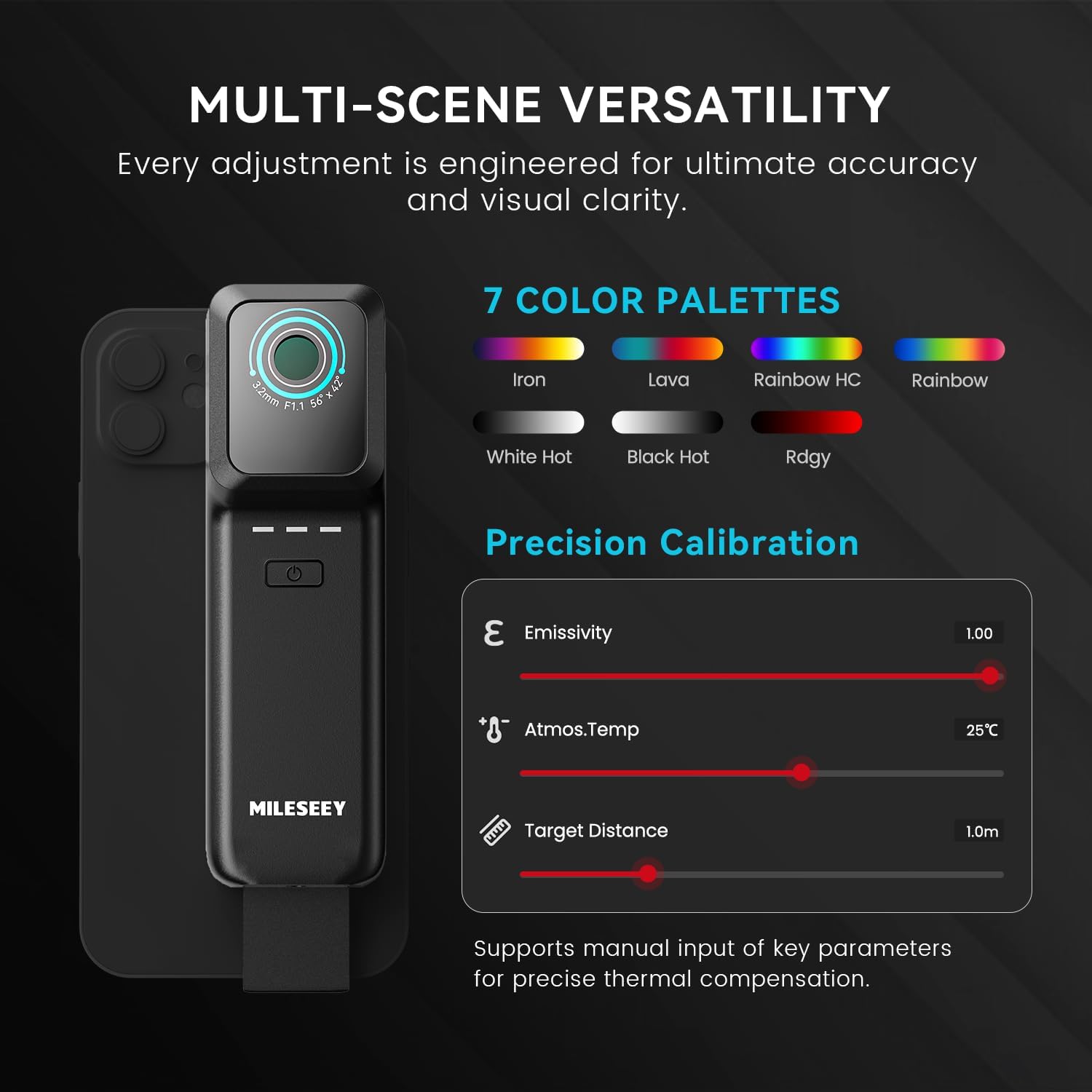
Figure 8: Choose from seven different color palettes to optimize the visual representation of thermal data based on your specific inspection needs.
6. Precision Calibration
Manually input ambient temperature, target emissivity, and target distance for algorithmic compensation and accurate readings.
Figure 9: Adjust parameters like emissivity, ambient temperature, and target distance within the app to ensure the most precise temperature measurements.
7. Фото болон видео бичлэг хийх
The camera supports photo and video recording, delivering real-time imagery at a 25 Hz frame rate.

Figure 10: Capture still images or record videos of thermal inspections directly through the app, with smooth 25 Hz frame rate.
8. Температурын дохиолол
Utilize the temperature alarm function to receive alerts when preset temperature thresholds are exceeded.
Засвар үйлчилгээ
1. Цэвэрлэгээ
Камерын линз болон их биеийг зөөлөн, хуурай даавуугаар зөөлөн арчина. Хүчтэй химийн бодис эсвэл зүлгүүрийн материал хэрэглэхээс зайлсхий.
Video 2: This video provides general usage instructions for similar thermal cameras, which may include basic cleaning and handling advice.
2. Хадгалах
Store the camera in its protective case when not in use to prevent damage. Keep the device in a cool, dry place away from direct sunlight and extreme temperatures.
Алдааг олж засварлах
1. Camera Not Connecting
- Ухаалаг утсан дээрээ Bluetooth идэвхжсэн эсэхийг шалгаарай.
- Verify the TP2 camera is powered on and fully charged.
- Апп-г дахин эхлүүлээд дахин хослуулахыг оролдоно уу.
- Check system compatibility (iOS 12 / Android 9.0 and above).
2. Blurry or Unclear Images
- Камерын линз нь цэвэр, тоос, толбо байхгүй эсэхийг шалгаарай.
- Adjust the focus if available (though this model is fixed focus, general advice).
- Ensure proper distance to the target for optimal image clarity.
3. App Functionality Issues
- Update the "Thermal TP Series" app to the latest version.
- Ухаалаг утсаа дахин эхлүүлнэ үү.
- If issues persist, reinstall the app.
Үзүүлэлтүүд
| Онцлог | Дэлгэрэнгүй |
|---|---|
| Үр дүнтэй шийдэл | 196608 Pixels (Upscaled 512x384 from 256x192) |
| Температурын хүрээ | -4°F-ээс 752°F хүртэл |
| NETD | < 40 мК |
| Нарийвчлал | ±2% or ±3°F |
| Frame Rate | 25 Гц |
| FOV | >56° |
| Хэмжээ | 5.3 × 1.6 × 1.1 инч |
| Жин | 4.4 унц (125 гр) |
| Батерей | 1 лити ион батерей (дагсан) |
| Усны эсэргүүцлийн түвшин | Усны хамгаалалттай |
| Тохиромжтой төхөөрөмжүүд | Smartphone, Tablet (iOS 12+ / Android 9.0+) |
| Оруулсан бүрэлдэхүүн хэсгүүд | TP2 Wireless Thermal Camera |
Figure 11: Detailed specifications and physical dimensions of the MiLESEEY TP2 Wireless Thermal Imaging Camera.
Баталгаат хугацаа
Бүтээгдэхүүний баталгаа
The MiLESEEY TP2 Wireless Thermal Imaging Camera comes with a 2-year warranty. For detailed warranty terms and conditions, please refer to the official MiLESEEY webсайт эсвэл хэрэглэгчийн дэмжлэгтэй холбоо барина уу.
Дэмжлэг
Харилцагчийн үйлчилгээ
For any questions, technical assistance, or feedback, please contact MiLESEEY customer service. You can often find support contact information within the "Thermal TP Series" app under the Customer Service or FAQ sections. Visit the official MiLESEEY webнэмэлт эх сурвалж, түгээмэл асуултуудын сайт.


