1. Танилцуулга
This manual provides essential information for setting up, operating, maintaining, and troubleshooting your HP EliteDesk 800 G9 Mini Desktop. Please read these instructions carefully before using your device to ensure optimal performance and longevity.
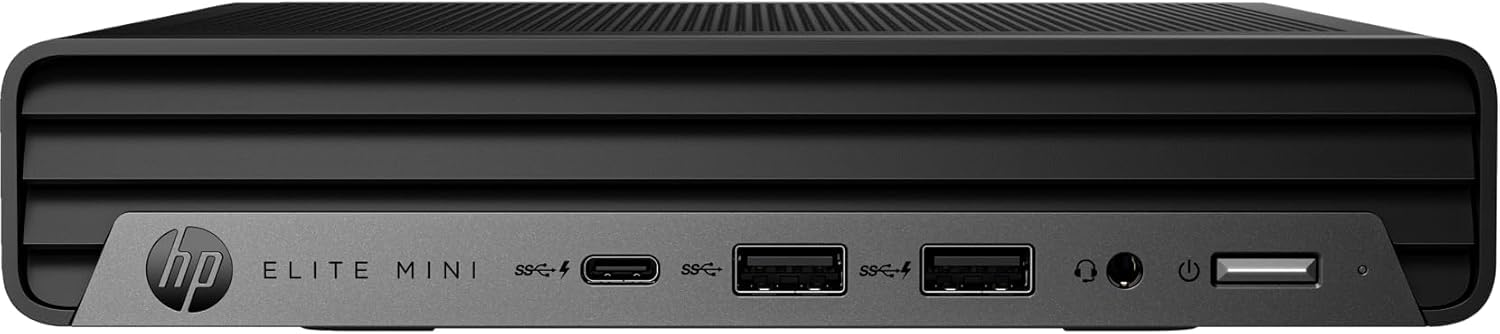
Figure 1: HP EliteDesk 800 G9 Mini Desktop
The HP EliteDesk 800 G9 Mini Desktop is a compact and powerful computing solution designed for efficiency. It features an Intel 12th Generation Core i5-12500T (6-Core) processor, 16GB of RAM, and a 256GB PCIe SSD, running on Windows 11 Pro. Integrated Intel WiFi 6 AX211 and Bluetooth provide robust wireless connectivity.
2. Хайрцагт юу байна
Upon unboxing your HP EliteDesk 800 G9 Mini Desktop, verify that all the following components are included:
- HP EliteDesk 800 G9 Mini Desktop PC
- HP OEM 90W Power Adapter
- Утастай гар
- Утастай хулгана
- Баримт бичиг (Шуурхай эхлүүлэх гарын авлага, аюулгүй байдлын мэдээлэл)
3. Бүтээгдэхүүн дууссанview
3.1 Урд самбар

Figure 2: Front Panel Ports and Features
- 1 Чихэвч холбогч
- 1 SuperSpeed USB Type-A 10Gbps дохионы хурд
- 1 SuperSpeed USB Type-A 10Gbps дохионы хурд (цэнэглэх)
- 1 Супер хурдтай USB Type-C 20Gbps дохиоллын хурд
3.2 Арын самбар
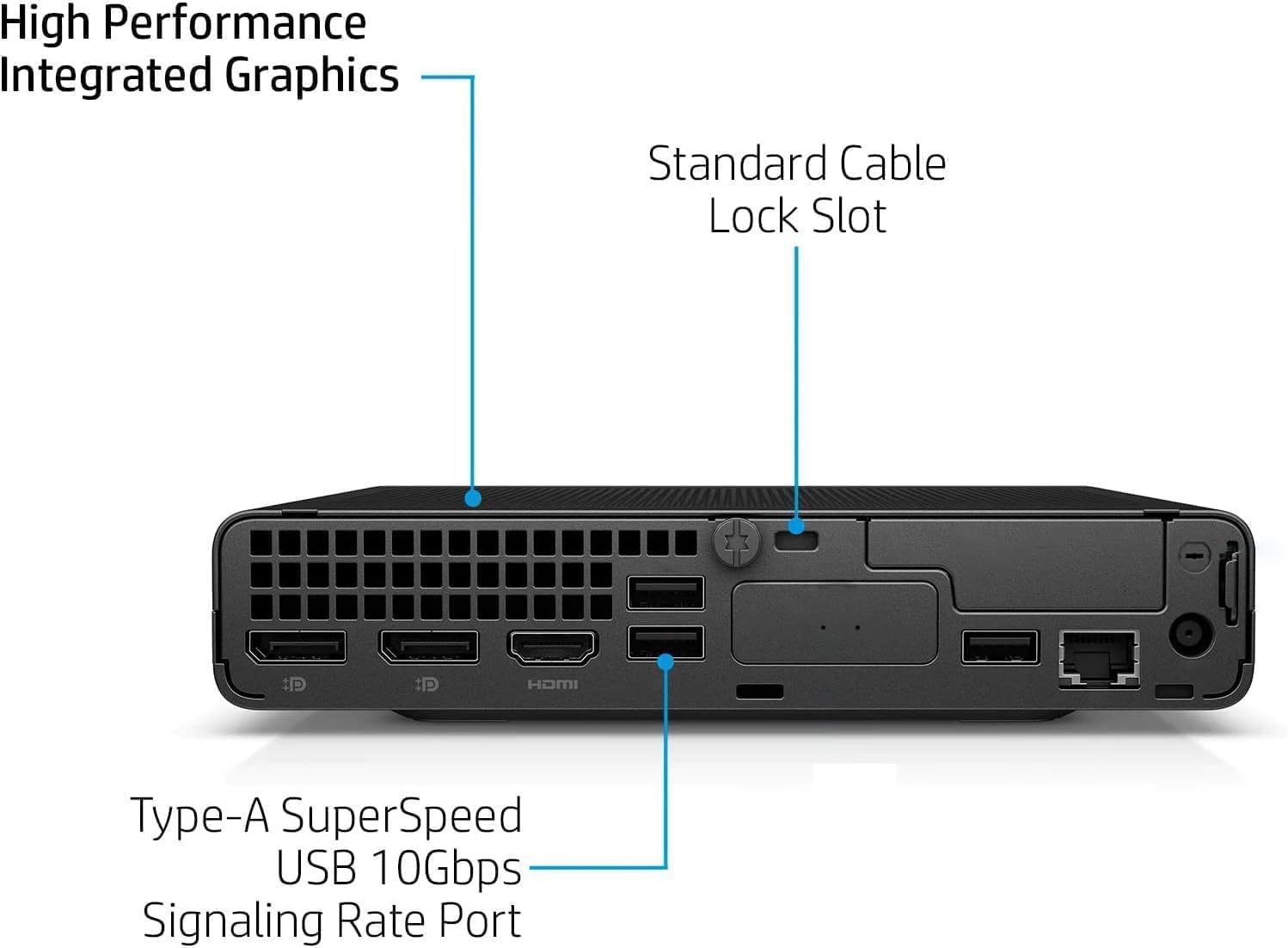
Figure 3: Rear Panel Ports and Features
- 1 External antenna connector
- 1 цахилгаан холбогч
- 1 RJ-45 (Ethernet)
- 3 SuperSpeed USB Type-A 10Gbps дохионы хурд
- 2 DisplayPort 1.4
- 1HDMI 2.1
4. Тохируулах заавар
HP EliteDesk 800 G9 Mini Desktop компьютерээ тохируулахын тулд дараах алхмуудыг дагана уу:
- Дагалдах төхөөрөмжүүдийг холбох: Connect your monitor(s) to the DisplayPort 1.4 or HDMI 2.1 ports. Connect the wired keyboard and mouse to the available USB Type-A ports.
- Эрчим хүчний холболт: Connect the HP OEM 90W Power Adapter to the power connector on the rear panel, then plug the power adapter into a wall outlet.
- Сүлжээний холболт (заавал биш): For a wired internet connection, connect an Ethernet cable to the RJ-45 port. For wireless, ensure the external antenna is connected (if applicable) and configure Wi-Fi during the initial Windows setup.
- Асаах: Press the power button on the front panel to turn on the Mini Desktop.
- Windows-ийн анхны тохиргоо: Хэл, бүс нутаг, сүлжээ болон хэрэглэгчийн бүртгэл үүсгэх зэрэг Windows 11 Pro тохиргоог дуусгахын тулд дэлгэц дээрх зааврыг дагана уу.
5. Үйлдлийн систем
Your HP EliteDesk 800 G9 Mini Desktop comes pre-installed with Windows 11 Pro. This operating system offers a modern interface, enhanced security features, and improved productivity tools. For detailed information on Windows 11 Pro features and usage, refer to the official Microsoft documentation or support webсайт.
6. Техникийн үзүүлэлтүүд
Below are the key technical specifications for your HP EliteDesk 800 G9 Mini Desktop:
| Онцлог | Тодорхойлолт |
|---|---|
| Процессор | Intel 12th Generation Core i5-12500T (6-Core, 18M Cache, Upto 4.0Ghz) |
| RAM | 16 ГБ DDR5 SDRAM |
| Хадгалах | 256 ГБ PCIe SSD |
| График процессор | Intel UHD график |
| Үйлдлийн систем | Windows 11 Pro |
| Утасгүй холболт | Integrated Intel WiFi 6 AX211 + Bluetooth |
| Эрчим хүчний адаптер | 90 W external power adapter, up to 89% efficiency, active PFC |
| Жин | 3.13 фунт (ойролцоогоор 1.42 кг) |
| Хамгийн их дэлгэцийн нягтрал | 3840х2160 |
| USB портууд (урд) | 1 Headset connector; 1 SuperSpeed USB Type-A 10Gbps (charging); 1 SuperSpeed USB Type-A 10Gbps; 1 SuperSpeed USB Type-C 20Gbps |
| USB портууд (арын) | 3 SuperSpeed USB Type-A 10Gbps |
| Video Ports (Rear) | 2 DisplayPort 1.4; 1 HDMI 2.1 |
| Сүлжээ | 1 RJ-45 |
7. Засвар үйлчилгээ
To ensure the longevity and optimal performance of your HP EliteDesk 800 G9 Mini Desktop, regular maintenance is recommended:
- Цэвэр байлгах: Regularly clean the exterior of the device with a soft, dry cloth. Ensure ventilation openings are free from dust and debris to prevent overheating.
- Програм хангамжийн шинэчлэлтүүд: Keep your Windows 11 Pro operating system and drivers updated to the latest versions. This ensures security patches and performance improvements.
- Өгөгдлийн нөөцлөлт: Өгөгдөл алдагдахаас сэргийлж чухал өгөгдлөө гадаад диск эсвэл үүлэн хадгалалт руу тогтмол нөөцөлж байгаарай.
- Онцгой нөхцөл байдлаас зайлсхийх: Төхөөрөмжийг хэт өндөр температур, чийгшил, нарны шууд тусгалд бүү тавь.
8. Алдаа засах
If you encounter issues with your Mini Desktop, try the following basic troubleshooting steps:
- Эрчим хүчгүй: Ensure the power adapter is securely connected to both the device and a working power outlet. Check if the power outlet is functional.
- Дэлгэц байхгүй: Verify that your monitor is properly connected to the Mini Desktop and powered on. Try connecting to a different video port or monitor if available.
- Захын асуудлууд: If the keyboard or mouse is not responding, ensure they are correctly plugged into the USB ports. Try different USB ports or restart the system.
- Удаан гүйцэтгэл: Close unnecessary applications, check for malware, and ensure your system has sufficient free storage space. Consider running a disk cleanup.
- Сүлжээний холболт: For Wi-Fi issues, restart your router and the Mini Desktop. For wired connections, check the Ethernet cable and router status.
For more advanced troubleshooting or persistent issues, refer to the HP support webсайт эсвэл харилцагчийн үйлчилгээтэй холбоо барина уу.
9. Баталгаат хугацаа ба дэмжлэг
This HP EliteDesk 800 G9 Mini Desktop is an Amazon Renewed - Certified Refurbished product. It is backed by the Amazon Renewed Guarantee, which provides a replacement or refund within 90 days of receipt if the product does not work as expected. For specific warranty details and support, please refer to the Amazon Renewed program terms and conditions or contact Amazon customer service.