1. Танилцуулга
Thank you for choosing the LOEWE Leo Wireless Headphones. These premium headphones are designed to deliver an exceptional audio experience with advanced features such as Hi-Res Audio, adaptive noise cancellation, and real-time voice translation. This manual provides essential information for setting up, operating, and maintaining your headphones to ensure optimal performance and longevity.
2. Багцын агуулга
Хэрэглэхийн өмнө бүх зүйл багцад байгаа эсэхийг шалгана уу:
- LOEWE Leo Wireless Headphones
- USB-C цэнэглэгч кабель
- AUX to USB-C Audio Cable
- Арьс зөөвөрлөгч
- Хатуу зөөвөрлөгч
- Cable Pouch
- Хэрэглэгчийн гарын авлага (энэ баримт бичиг)
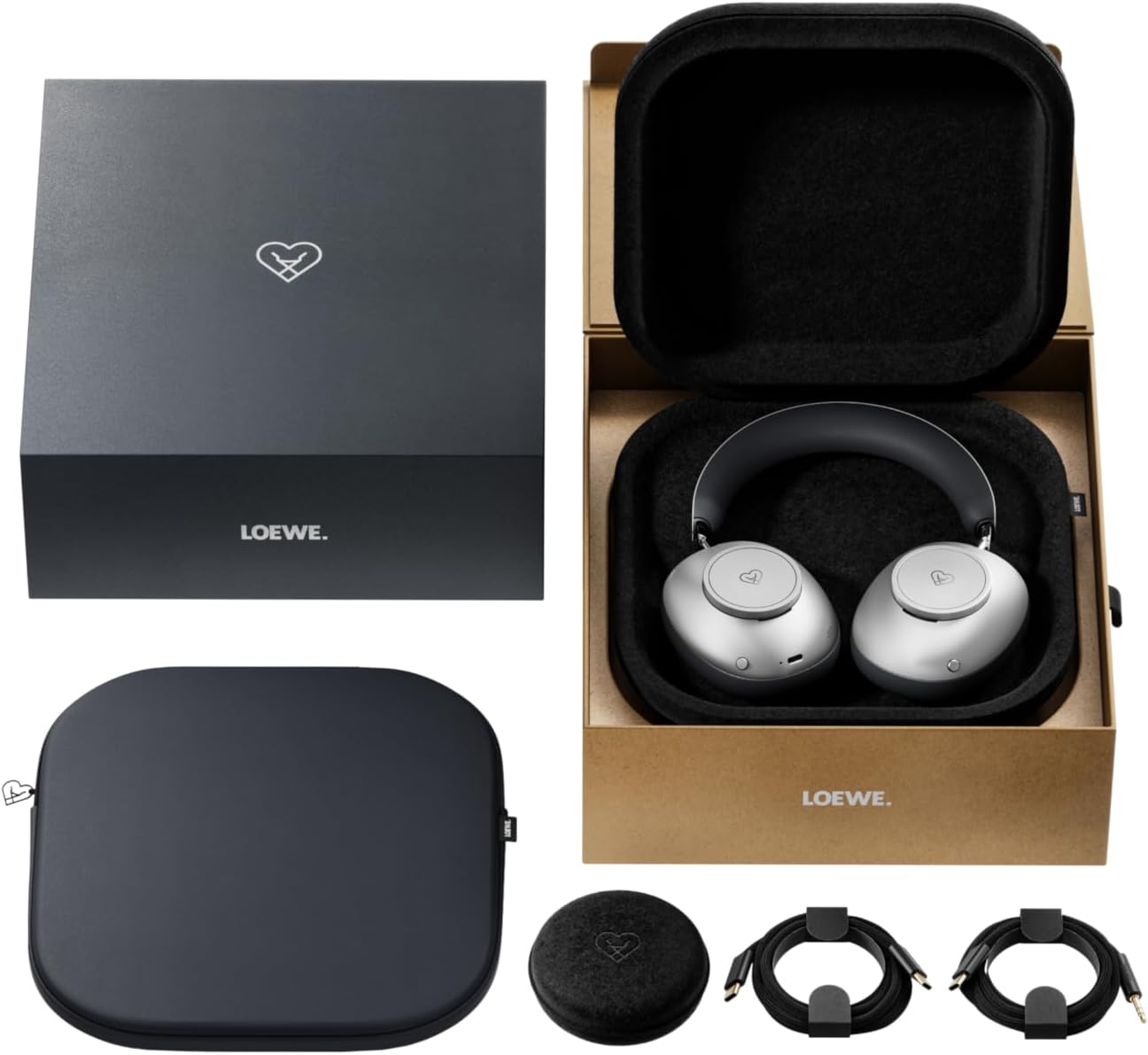
Image: The LOEWE Leo Wireless Headphones package contents, showing the headphones, USB-C cable, AUX cable, leather case, hard case, and cable pouch.
3. Бүтээгдэхүүн дууссанview
Familiarize yourself with the physical components and controls of your LOEWE Leo headphones.

Зураг: Урд view of the LOEWE Leo Wireless Headphones, showcasinчихний хаалт болон толгойн боолт.
3.1. Удирдлага ба портууд
Чихэвч нь ашиглахад хялбар болгохын тулд ойлгомжтой удирдлагатай:
- Хяналтын утаснууд: Two precision-crafted rotary wheels for volume adjustment and navigation.
- Үйлдлийн товчлуурууд: Dedicated buttons for playback control, ANC modes, and voice translation activation.
- USB-C порт: Цэнэглэх болон утастай аудио холболтын зориулалттай.
- 3.5 мм-ийн үүр: For traditional wired audio connection.

Зураг: Нарийвчилсан view of the earcup, highlighting the control dial, USB-C port, and 3.5mm audio jack.
4. Эхлэл
4.1. Чихэвчийг цэнэглэх
Before first use, fully charge your LOEWE Leo headphones. A full charge provides up to 65 hours of continuous playback.
- Дагалдах USB-C цэнэглэгч кабелийг чихэвчний USB-C порт руу холбоно уу.
- Кабелийн нөгөө үзүүрийг тохирох USB тэжээлийн адаптер (дагаагүй) эсвэл компьютерийн USB порт руу холбоно уу.
- The LED indicator on the headphones will show the charging status. It will typically turn off or change color once fully charged.
4.2. Асаах/унтраах
- Асаахын тулд: LED заагч асах хүртэл Power товчийг ойролцоогоор 3 секундын турш дарна уу.
- Унтраахын тулд: LED заагч унтрах хүртэл Power товчийг ойролцоогоор 3 секундын турш барина уу.
4.3. Bluetooth хослол
The LOEWE Leo headphones utilize Bluetooth Low Energy (BLE) for faster pairing and reduced power consumption.
- Чихэвч унтарсан эсэхийг шалгаарай.
- Press and hold the Power button for approximately 5 seconds until the LED indicator flashes rapidly, indicating pairing mode.
- Төхөөрөмж дээрээ (ухаалаг утас, таблет, компьютер) Bluetooth-г идэвхжүүлж, боломжтой төхөөрөмжүүдийг хайж олоорой.
- Select "LOEWE Leo" from the list of found devices.
- Холбогдсоны дараа LED индикатор анивчхаа больж, цэнхэр хэвээр үлдэнэ.
4.4. Утастай холболт
For a wired audio experience, use the supplied AUX to USB-C cable.
- Connect the USB-C end of the AUX cable to the headphones.
- Connect the 3.5mm end of the AUX cable to your audio source's 3.5mm jack.
- Чихэвч автоматаар утастай горимд шилжинэ.
5. Чихэвчээ ажиллуулах
5.1. Аудио тоглуулах болон дууны түвшинг хянах
Use the control dials and action buttons for managing your audio:
- Дууны хэмжээг нэмэгдүүлэх/доошруулах: Rotate the designated control dial.
- Тоглуулах/түр зогсоох: Press the central action button once.
- Дараагийн дуу: Double-press the central action button.
- Өмнөх бичлэг: Triple-press the central action button.

Image: Close-up of the earcup's control dial, used for volume and navigation.
5.2. Adaptive Noise Cancellation (ANC)
The LOEWE Leo features advanced adaptive noise cancellation that continuously analyzes your environment and adjusts in real-time.
- ANC-г идэвхжүүлэх/идэвхгүй болгох: Press the dedicated ANC button once.
- Ил тод байдлын горим: Press the ANC button twice to allow ambient sounds to pass through, enhancing situational awareness.

Image: Illustration of the adaptive noise cancellation feature, depicting sound wave management.
5.3. Real-time Voice Translation
Communicate across language barriers with the integrated real-time voice translation feature.
- Ensure your headphones are connected to a device with internet access and the LOEWE companion app installed.
- Activate the translation feature via the dedicated button or the companion app.
- Speak into the headphone's microphone. The translated audio will be played back in real-time.

Image: Earcup detail showing the microphone for voice input and the 'leo' icon, representing the real-time translation function.
5.4. Dolby Atmos and Spatial Audio
Experience immersive sound with Dolby Atmos and spatial audio support. This feature is automatically enabled when compatible content is played through a connected device that supports these audio technologies.
6. Засвар үйлчилгээ, арчилгаа
6.1. Цэвэрлэгээ
- Чихэвчийг зөөлөн, хуурай, хөвөнгүй даавуугаар арчина.
- Зүлгүүрийн цэвэрлэгч, архи, химийн уусгагчийг бүү ашигла.
- Keep moisture away from openings.
6.2. Зайны арчилгаа
- Байнга зайгаа бүрэн цэнэглэхээс зайлсхий.
- Store the headphones in a cool, dry place when not in use for extended periods.
- The battery is user-replaceable, contributing to the product's longevity.
6.3. Модульчлагдсан дизайн
The LOEWE Leo headphones feature a durable modular design with replaceable components, such as ear cushions and headbands. This design allows for easy replacement of worn parts, extending the product's lifespan.

Image: The modular construction of the LOEWE Leo headphones, showing detachable earcups and headband for maintenance or replacement.
7. Алдаа засах
If you encounter issues with your LOEWE Leo headphones, refer to the following common solutions:
- Эрчим хүчгүй: Чихэвч бүрэн цэнэглэгдсэн эсэхийг шалгаарай. Тэдгээрийг USB-C кабель ашиглан тэжээлийн эх үүсвэрт холбоно уу.
- Дуугүй:
- Чихэвч болон холбогдсон төхөөрөмжийнхөө дууны түвшинг шалгана уу.
- Ensure the headphones are properly paired via Bluetooth or the AUX cable is securely connected.
- Try restarting both the headphones and the audio source device.
- Bluetooth салгах:
- Ensure the headphones are within the Bluetooth range of your device (typically 10 meters).
- Disable and re-enable Bluetooth on your device, then attempt to re-pair.
- Clear the LOEWE Leo from your device's Bluetooth history and pair again.
- ANC үр дүнтэй ажиллахгүй байна:
- Чихэвч таны чихний эргэн тойронд сайн битүүмжлэлтэй байгаа эсэхийг шалгаарай. Шаардлагатай бол тохируулгыг тохируулна уу.
- Verify that ANC is activated.
- Voice Translation Issues:
- Check your device's internet connection.
- Ensure the LOEWE companion app is up-to-date and configured correctly.
- Тодорхой, дунд зэргийн хэмнэлтэй ярь.
If problems persist, please contact LOEWE customer support.
8. Техникийн үзүүлэлтүүд
| Онцлог | Тодорхойлолт |
|---|---|
| Загварын нэр | Лео |
| Загварын дугаар | 64641J10 |
| Холболтын технологи | Wireless (Bluetooth), Wired |
| Утасгүй холбоо | Bluetooth бага эрчим хүч (BLE) |
| Дууны онцлог | Hi-Res Audio, Dolby Atmos, Spatial Audio |
| Дуу чимээг арилгах | Adaptive Noise Reduction (ANC) |
| Онцлог шинж чанарууд | Real-time Voice Translation, Modular Design with Replaceable Components |
| Зайны ашиглалт | 65 хүртэл цаг (ойролцоогоор) |
| Хяналтын төрөл | Button Control, Rotary Dials |
| Тохиромжтой төхөөрөмжүүд | Cellular Phone, Tablet, Computer, Laptop |
| Жин | 3 Kilograms (product weight as listed, may include packaging) |
9. Баталгаат хугацаа ба дэмжлэг
9.1. Үйлдвэрлэгчийн баталгаа
The LOEWE Leo Wireless Headphones come with a Үйлдвэрлэгчийн 2 жилийн баталгаат хугацаа. Энэхүү баталгаа нь ердийн ашиглалтын үед хийгдсэн материал, хийцийн согогийг хамарна. Баталгаат заргад зориулж худалдан авалтаа нотлох баримтаа үлдээнэ үү.
For specific terms and conditions of the warranty, please refer to the warranty card included in your product packaging or visit the official LOEWE webсайт.
9.2. Хэрэглэгчийн дэмжлэг
For technical assistance, troubleshooting, or warranty inquiries, please contact LOEWE customer support through their official webсайт эсвэл таны бүтээгдэхүүний баримт бичигт заасан холбоо барих мэдээлэл.
Онлайн нөөцүүд: Visit the official LOEWE webТүгээмэл асуултууд, програм хангамжийн шинэчлэлтүүд болон нэмэлт дэмжлэгийн эх сурвалжуудын сайт.


