1. Танилцуулга
This manual provides detailed instructions for the installation, operation, and maintenance of your VSTARCAM CS995 Pan/Tilt Smart Security Camera. This indoor camera is designed to provide comprehensive surveillance with features such as 2K QHD resolution, full-color night vision, motion detection, and two-way audio. Please read this manual thoroughly before using the product to ensure proper setup and functionality.
2. Багцын агуулга
Доор жагсаасан бүх зүйл таны багцад байгаа эсэхийг шалгаарай. Хэрэв ямар нэгэн зүйл дутуу эсвэл эвдэрсэн бол хэрэглэгчийн дэмжлэгтэй холбоо барина уу.
- VSTARCAM CS995 Pan/Tilt Smart Security Camera
- Эрчим хүчний адаптер
- Цэнэглэх кабель
- Суулгах шураг хэрэгсэл
- Зогс
- Хэрэглэх заавар (энэ баримт бичиг)
3. Бүтээгдэхүүн дууссанview
The VSTARCAM CS995 camera offers advanced features for indoor monitoring.
3.1 Гол онцлогууд
- 360° PTZ хамрах хүрээ: Pan 310° horizontally and tilt 115° vertically for complete room coverage.
- 2K QHD нягтрал: Captures clear, detailed video footage.
- Бүрэн өнгөт шөнийн хараа: Provides clear, colored images up to 15ft in low-light conditions using dual light sources.
- Motion & Human Detection: AI-powered detection sends real-time alerts to your mobile phone upon detecting motion or human figures.
- Хоёр талын аудио: Built-in microphone and speaker allow for clear communication with family or pets.
- Уян хатан хадгалах: Supports local storage via Micro SD card (up to 256GB, not included) and cloud storage (7-day trial available).
- 2.4GHz Wi-Fi холболт: Connects to your home network for remote access and control.
3.2 Камерын бүрэлдэхүүн хэсгүүд
Камерынхаа физик бүрэлдэхүүн хэсгүүдтэй танилцаарай.

Image: VSTARCAM CS995 camera illustrating its 310° pan and 115° tilt capabilities. The image shows the camera in a living room setting, monitoring a child playing.
- Линз: Main camera lens for video capture.
- Infrared LEDs/Spotlights: For night vision and illumination.
- Микрофон: Хоёр талын харилцаа холбооны үед аудио оролтод зориулагдсан.
- Илтгэгч: For audio output during two-way communication and alerts.
- Бичил SD картны үүр: Орон нутгийн видео хадгалах зориулалттай.
- Эрчим хүчний порт: Цахилгаан адаптерийг холбоход зориулагдсан.
- Дахин тохируулах товч: Үйлдвэрийн тохиргоонд буцааж оруулахад ашигладаг (ихэвчлэн жижиг зүүний нүх).
4. Тохируулах гарын авлага
4.1 Камерыг асаах
- Connect the charging cable to the camera's power port.
- Цахилгаан адаптерийг ердийн цахилгаан залгуурт холбоно уу.
- The camera will power on and initiate its self-test, indicated by a rotating motion and status light.
4.2 Installing the O-KAM Pro App
- Download the "O-KAM Pro" app from your smartphone's app store (App Store for iOS, Google Play Store for Android).
- Шинэ акаунтаар бүртгүүлэх эсвэл хэрэв танд бүртгэл байгаа бол нэвтэрнэ үү.
4.3 Камерыг Wi-Fi руу холбох
Ухаалаг гар утсаа 2.4GHz Wi-Fi сүлжээнд холбосон эсэхээ шалгаарай. Камер нь 5GHz Wi-Fi-г дэмждэггүй.
- Open the O-KAM Pro app and tap the "+" icon to add a new device.
- Follow the on-screen instructions to select your camera model and begin the pairing process.
- You may be prompted to scan a QR code displayed on your phone with the camera, or to enter your Wi-Fi credentials.
- Wait for the camera to connect to your Wi-Fi network. A voice prompt or status light change will indicate a successful connection.
4.4 Installing a Micro SD Card (Optional)
For local storage, insert a Micro SD card (up to 256GB, not included) into the designated slot on the camera. Ensure the camera is powered off before inserting or removing the card.
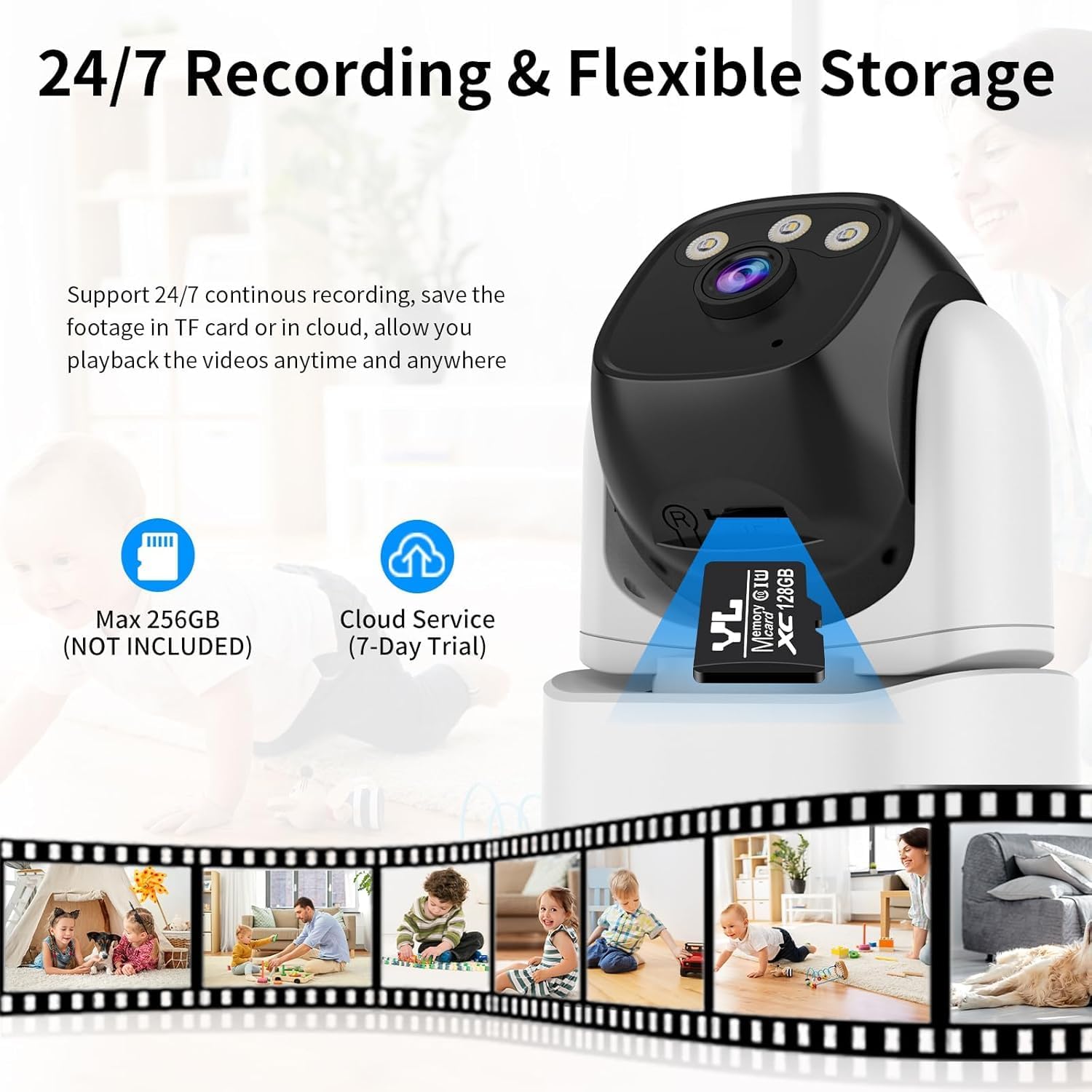
Image: VSTARCAM CS995 camera highlighting the Micro SD card slot and indicating support for both local (SD card) and cloud storage options.
5. Ашиглалтын заавар
5.1 Амьд View болон PTZ хяналт
Once connected, open the O-KAM Pro app to view таны камернаас шууд дамжуулалт.
- Товчлуур/Найлгах: Drag your finger across the live view screen to remotely adjust the camera's horizontal (pan) and vertical (tilt) angles.
- Томруулах: Шууд дамжуулалт дээр чимхэх томруулах дохиог ашиглаарай view to digitally zoom in or out.
Image: VSTARCAM CS995 camera illustrating its 310° pan and 115° tilt capabilities. The image shows the camera in a living room setting, monitoring a child playing.
5.2 Хоёр талын аудио
The camera supports two-way communication.

Image: VSTARCAM CS995 camera demonstrating its two-way audio function, showing a child communicating with an adult via the camera.
- Аппликешн дээрх микрофоны дүрсийг товшино уу view камерын чанга яригчаар ярих.
- Tap the speaker icon to listen to audio from the camera's environment.
5.3 Motion and Human Detection
The camera can detect motion and human figures, sending alerts to your phone.

Image: VSTARCAM CS995 camera demonstrating AI-powered motion and human detection, showing the camera tracking a person in a living room.
- Анхааруулга идэвхжүүлэх: In the app settings, navigate to "Detection Settings" to enable motion and human detection.
- Customize Zones: Камерын доторх тодорхой хэсгийг тодорхойл view хөдөлгөөн илрүүлэх зориулалттай.
- Мэдрэмж: Adjust the detection sensitivity to minimize false alarms.

Image: VSTARCAM CS995 camera illustrating real-time alert notifications, including spotlight activation, alarm alerts, and push notifications to a smartphone when motion is detected.
5.4 Шөнийн харааны горимууд
Камер нь шөнийн харааны хэд хэдэн сонголтыг санал болгодог:

Image: VSTARCAM CS995 camera demonstrating its three night vision modes: Infrared (black and white), Full Color (using ambient light or spotlights), and Smart Light (activates spotlights upon detection for color vision).
- Хэт улаан туяаны горим: Стандарт хар цагаан шөнийн хараа.
- Бүрэн өнгөт горим: Utilizes built-in spotlights to provide color images in the dark.
- Smart Light Mode: The camera remains in infrared mode and switches to full color with spotlights upon detecting motion.
You can switch between these modes in the O-KAM Pro app settings.
5.5 Бичлэг хийх, тоглуулах
The camera supports 24/7 continuous recording to a Micro SD card or cloud storage.
- SD картын бичлэг: Ensure a Micro SD card is inserted and formatted via the app. Recordings will be saved locally.
- Үүл хадгалах сан: Activate the cloud storage service (7-day trial available) through the app for remote backup.
- Тоглуулах: Бүртгэгдсэн foo руу нэвтрэхtage through the "Playback" section in the O-KAM Pro app.
5.6 Олон хэрэглэгчтэй хуваалцах
You can share live views of your camera with other users through the O-KAM Pro app.
- In the app, go to the camera settings and find the "Share Device" option.
- Invite other users by entering their O-KAM Pro account details.
- Shared users will receive an invitation and can view the live feed and access certain features based on permissions granted.
6. Засвар үйлчилгээ
- Цэвэрлэгээ: Камерын линз болон биеийг цэвэрлэхийн тулд зөөлөн, хуурай даавуу ашиглана уу. Зүлгүүрийн цэвэрлэгч эсвэл уусгагчаас зайлсхий.
- Програм хангамжийн шинэчлэлтүүд: Regularly check the O-KAM Pro app for available firmware updates to ensure optimal performance and security.
- Байршил: Ensure the camera is placed in a stable, dry indoor environment, away from direct sunlight or extreme temperatures.
7. Алдаа засах
7.1 Камер Wi-Fi-д холбогдоогүй байна
- Таны Wi-Fi сүлжээ 2.4GHz байгаа эсэхийг шалгаарай. Камер нь 5GHz сүлжээг дэмждэггүй.
- Аппликейшнд оруулсан Wi-Fi нууц үг зөв эсэхийг шалгана уу.
- Place the camera closer to your Wi-Fi router during setup.
- Restart your router and the camera, then attempt the connection process again.
- Perform a factory reset on the camera by pressing and holding the reset button for several seconds until a voice prompt confirms.
7.2 No Motion Detection Alerts
- Check if motion detection is enabled in the O-KAM Pro app settings.
- Adjust the detection sensitivity. Higher sensitivity may be needed for subtle movements.
- Ensure notification permissions are enabled for the O-KAM Pro app on your smartphone.
- Verify that the camera has a stable internet connection.
7.3 Issues with Two-Way Audio
- Ensure your phone's microphone and speaker are not muted or blocked.
- Check the volume settings within the O-KAM Pro app.
- Verify the camera's internet connection stability.
7.4 Unable to Share Camera with Family Members
- Ensure the family member has downloaded the O-KAM Pro app and created their own account.
- Double-check the account details (email/username) entered when sending the share invitation.
- The invited user must accept the sharing invitation within the app.
- Verify that both your device and the invited user's device have a stable internet connection.
8. Техникийн үзүүлэлтүүд
| Онцлог | Дэлгэрэнгүй |
|---|---|
| Загварын нэр | CS995 |
| Дотор/гадаа ашиглах | Дотор |
| Видео бичлэгийн нягтрал | 1440p (2K QHD) |
| Холболтын технологи | Утастай (Цахилгаан), Wi-Fi (Өгөгдөл) |
| Утасгүй холбооны технологи | Wi-Fi (зөвхөн 2.4 GHz) |
| Эрчим хүчний эх үүсвэр | Утастай цахилгаан |
| Шөнийн харааны хүрээ | 15 метр (ойролцоогоор 49 фут) |
| Frame Rate | Секундэд 20 кадр |
| Хадгалах сонголтууд | Micro SD Card (max 256GB), Cloud Storage |
| Хяналтын арга | Апп (O-KAM Pro) |
| Тойрог/Найлтын муж | Пан 310 °, 115 ° хазайна |
| Хэмжээ (L x W x H) | 5 x 3 x 3 инч |
| Зүйлийн жин | 11.2 унц |
| Материал | Хуванцар |
9. Баталгаат хугацаа ба дэмжлэг
VSTARCAM provides professional customer service. If you encounter any issues or have questions regarding your CS995 camera, please contact our support team.
- Холбоо барих мэдээлэл: Refer to the contact details provided on the product packaging or the official VSTARCAM webсайт.
- Баталгаат хугацаа: Information regarding product warranty can be found on the official VSTARCAM webсайт эсвэл харилцагчийн үйлчилгээтэй холбоо барина уу.


